

AWS just made a move your finance team will actually high-five. If you're decrypting and inspecting HTTPS at scale, the new AWS Network Firewall pricing can cut 15–40% off your security bill—without ripping anything out.
The big unlock: no extra data processing fees for Advanced Inspection (TLS). Translation: you can finally do deep packet inspection on encrypted traffic without a tax for doing security right.
Pair that with discounts for NAT Gateway traffic service-chained to Network Firewall secondary endpoints, and hybrid inspection stops feeling like a money pit. The kicker? It stacks cleanly with a Transit Gateway hub, so you centralize policy across every VPC and your on‑prem estate.
You get stronger inspection, predictable spend, and a cleaner design. Net‑net: your CFO smiles; your CISO sleeps fine; and you don’t spend Q3 fighting shadow VPCs.
If you’ve been stuck choosing between security and spend, this removes the handbrake. Most real traffic is HTTPS, and the old “TLS tax” forced compromises. Now you can inspect what matters—auth, payments, admin tools—without lighting money on fire. The rest of this guide shows how to roll it out fast, prove results, and keep builders moving.
TLDR
- Price cuts + no extra Advanced Inspection data fees = 15–40% lower costs
- Ideal for e-commerce, SaaS, and hybrid networks with high TLS volumes
- Service-chained NAT Gateway traffic to secondary firewall endpoints now cheaper
- Centralize policies with Transit Gateway; keep VPC teams moving fast
- Deep packet inspection on encrypted traffic without the cost penalty
- Practical blueprint + aws network firewall example and case study included
If you only skim one section, read the blueprint and the 10‑step checklist. You’ll leave with a concrete path that fits what you already run.
Price drop changes math
What changed
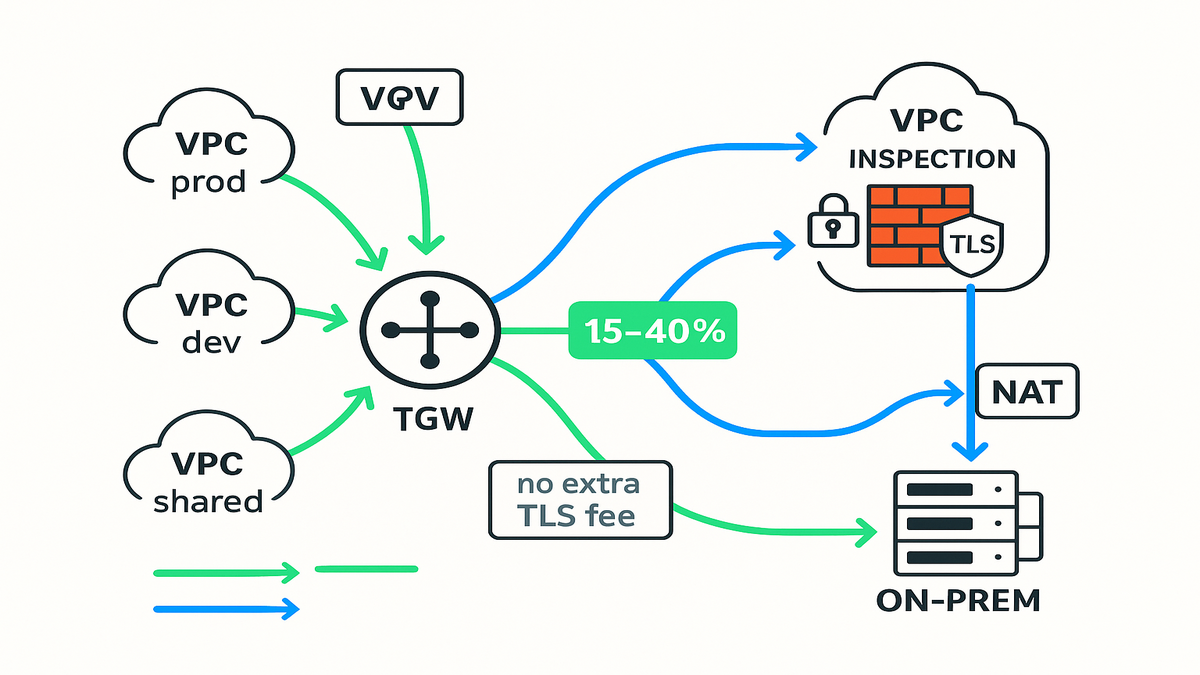
Two things moved the needle. First, AWS removed extra data processing charges for Advanced Inspection—TLS decryption and deep packet inspection on encrypted flows. Second, there are hourly and data processing discounts when NAT Gateway is service‑chained with AWS Network Firewall secondary endpoints. For you, that means the priciest part of “doing security right” (decryption at scale) no longer nukes your budget.
In plain English: you used to pay a premium anytime you turned on TLS decryption in Network Firewall. That premium is gone. Your bill is now anchored on usual endpoint hours and general data processing, plus whatever NAT Gateway charges apply—but without the extra per‑GB hit for decrypt and inspect.
Why this matters
Most of your east‑west and north‑south traffic is HTTPS. Historically, teams either skipped TLS inspection (risky) or paid a premium for it (painful). With the fee removal, deep packet inspection isn’t a luxury line item anymore. And because the NAT Gateway path is cheaper when chained through secondary endpoints, hybrid egress and centralized inspection stop being a tax on growth.
This also changes the cultural math. Security can raise the bar without being “the team that makes things cost more.” Platform teams can standardize egress through an inspection VPC and still hit budget. And app teams stop building one‑off exceptions just to keep speed.
Who wins
- High‑throughput apps (e‑commerce checkouts, multi‑tenant SaaS)
- Hybrid shops routing via Transit Gateway to the cloud
- Regulated orgs that must decrypt TLS for threat detection
“As AWS describes it, ‘AWS Network Firewall is a managed service that makes it easy to deploy essential network protections’ across your VPCs.” That “easy” just got cheaper—and that shifts your architecture tradeoffs.
To put a point on it: if you avoided TLS inspection due to cost, you now get coverage where it matters—without a procurement fight. If you were already decrypting, you claw back spend and can expand scope safely.
Cost planning model
- Before: baseline firewall costs + extra TLS inspection data fees + NAT charges on egress.
- After: baseline firewall costs + NAT charges, with the TLS premium removed.
- What to measure: total data processed, fraction of flows under Advanced Inspection, NAT volume through service‑chained secondary endpoints.
- How to show impact: compare monthly pre/post costs normalized to GB processed and flows inspected. Expect 15–40% savings if you previously had broad TLS inspection.
Blueprint central inspection
Transit Gateway hub
Put AWS Transit Gateway (TGW) in the middle and attach your VPCs (prod, dev, shared services) and on‑prem (VPN/Direct Connect). Create inspection VPCs with AWS Network Firewall endpoints in dedicated subnets. Update TGW route tables so inter‑VPC and egress traffic detours through the inspection VPC. This enforces consistent policies without micromanaging every team’s routes.
Add some guardrails as you wire it up:
- Use separate TGW route tables for spoke VPCs vs. inspection VPC to keep steering simple.
- Keep firewall subnets zonal and symmetrical—one per AZ—to avoid asymmetric routing and surprise drops.
- Log everything (flow logs, firewall alerts) to a central account via CloudWatch and S3 for audit.
Service chaining with NAT Gateway
For outbound internet, send egress from app VPCs through the firewall endpoints, then to NAT Gateway in the inspection VPC. With the new pricing, service‑chained NAT Gateway traffic hitting secondary firewall endpoints is discounted—so your egress inspection path is cleaner and cheaper. Bonus: central NAT keeps public exposure out of app subnets.
Add best practices:
- Place one NAT Gateway per AZ in the inspection VPC to keep paths AZ‑local and reduce cross‑AZ charges.
- Prefer interface endpoints (PrivateLink) for AWS APIs to shrink what must traverse NAT at all.
- Tag NAT and firewall resources for cost allocation so finance sees impact by environment or team.
aws network firewall for nlb
There’s no “attach firewall to NLB” knob. Instead, inspect traffic to and from your Network Load Balancer by routing subnet traffic through the firewall subnets. Example: for inbound, terminate to an NLB in a dedicated ingress VPC, route via firewall endpoints for policy checks, then forward to application VPCs. This gives visibility and control for L4/L7 flows without piping the NLB itself through the firewall.
A simple inbound flow that works:
- Internet -> NLB in Ingress VPC (public)
- Ingress VPC route -> Firewall endpoints (inspection VPC) for policy
- Firewall -> TGW -> Application VPC targets
For outbound (app‑initiated) flows:
- App VPC subnets -> TGW -> Firewall endpoints (inspection VPC)
- Firewall -> NAT Gateway -> Internet
Two gotchas to avoid:
- Don’t hairpin to a different AZ for firewall or NAT; keep traffic zonal where possible.
- Make sure return paths traverse the same inspection VPC to preserve stateful context.
Performance scaling and cost
aws network firewall performance basics
AWS Network Firewall scales horizontally—add capacity by increasing endpoint utilization or adding endpoints across Availability Zones. The engine uses Suricata‑compatible rules for stateless and stateful inspection, and you track throughput, packet drops, and rule matches via CloudWatch. Throughput depends on rule complexity and TLS usage, so keep rule sets tight and test under real loads.
Practical tips:
- Split noisy rules (e.g., high‑churn domains) into their own group so you can tune safely.
- Prefer stateless rules for obvious allows and denies; reserve stateful for nuance.
- Benchmark with traffic that mirrors your ciphers, record sizes, and connection counts. Synthetic tests that don’t mimic production will lie.
TLS Advanced Inspection
Advanced Inspection performs TLS decryption and deep packet inspection, then re‑encrypts. With extra data processing fees removed, your cost anchors shift to: endpoint hours, data processing that remains outside the waived piece, and NAT Gateway transfer and processing. Practically, this clears the “we can’t afford to decrypt” objection and lets you target TLS inspection where it matters—payments, auth, admin panels, and high‑risk egress.
How to scope wisely:
- Start with high‑risk destinations (code repos, admin portals, third‑party APIs with sensitive data).
- Target source principals (CI/CD subnets, bastion hosts) rather than blanket VPC‑wide rules.
- Use allow‑by‑default with explicit denylists plus threat intel feeds for destinations you never want.
Observability and tuning
- Narrow scope: apply Advanced Inspection selectively (CIDRs, ports, tags)
- Optimize rule sets: remove redundant signatures; prefer fast‑path stateless where possible
- Right‑size subnets: spread load across AZs to avoid burst drops
- Watch metrics: alert on PerEndpointBytes, TLS handshake failures, and FlowDropped
- Cost checks: compare pre and post total egress and firewall data processed; expect 15–40% cuts if you paid the old TLS tax
“As the AWS docs put it, TLS inspection decrypts and inspects traffic before re‑encrypting to enforce policy.” Now you can turn that on without a budget asterisk.
Layer in visibility fast:
- Ship firewall logs to CloudWatch Logs and S3, maybe through Kinesis Data Firehose to your SIEM.
- Enable VPC Flow Logs for app, ingress, and inspection VPCs with consistent fields and retention.
- Instrument latency SLOs (P50 and P95) for key flows; track before and after to prove minimal impact.
Playbook fast rollout example
Baseline your environment
Inventory traffic. Where does TLS terminate? Which VPCs talk to the internet or to each other? What subnets host NLBs or ALBs, and where does NAT live? Tag flows by risk (payments, PII, admin, CI/CD egress) and map paths through TGW if you use one. This gives you a surgical plan for where to apply Advanced Inspection and where stateless rules are fine.
Make it measurable:
- Pull 30 days of NAT Gateway bytes by tag; stack‑rank top talkers.
- Review TLS versions and ciphers seen by your apps and endpoints.
- Capture a sample of DNS queries to find risky destinations and domains to allow by policy.
Migrate in controlled hops
- Build an inspection VPC with firewall subnets in at least two AZs
- Deploy AWS Network Firewall with baseline stateless (allowlist) and stateful (blocklist) rules
- Service‑chain NAT Gateway after the firewall for egress
- Update TGW route tables to steer traffic through inspection
- Gradually enable Advanced Inspection on scoped segments (like payments)
- Load test with production‑like TLS ciphers and record CloudWatch metrics
Turn the crank safely:
- Pilot with one app VPC and one ingress VPC; validate logs and latency.
- Expand to more VPCs after a week of clean metrics.
- Automate via Terraform, CloudFormation, or CDK so future VPCs inherit the pattern.
aws network firewall case study
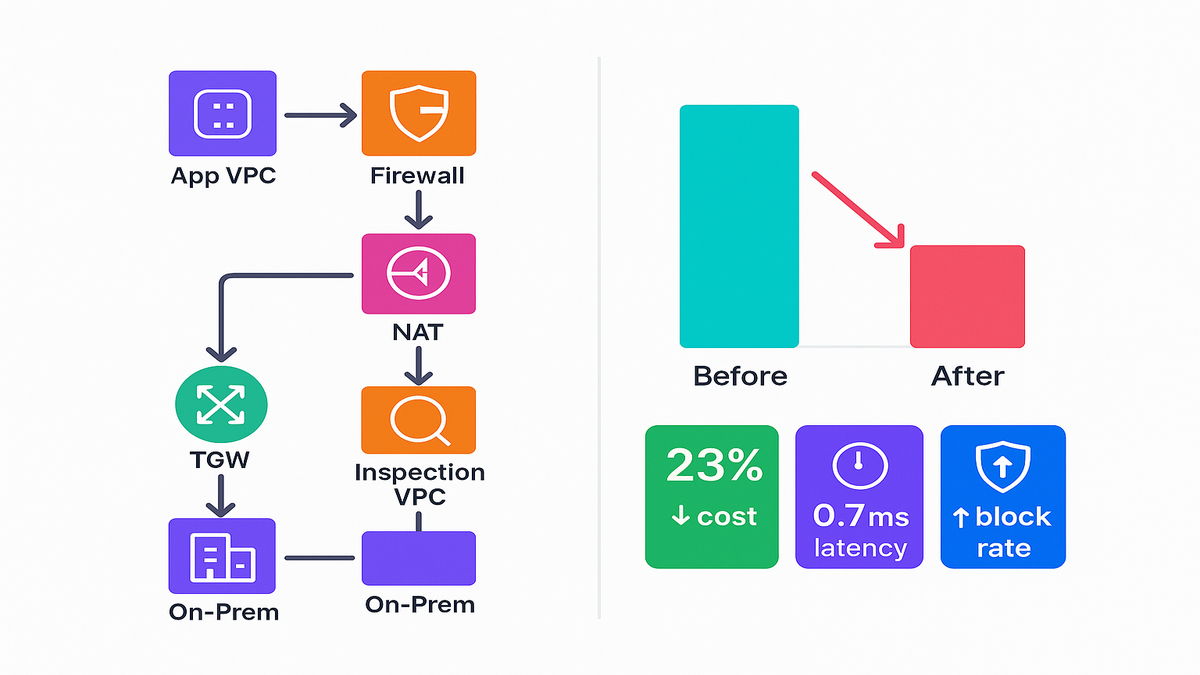
A SaaS company pushing 5 Gbps average egress and ~60% east‑west TLS moved to this model. Before: spotty TLS inspection (too expensive), per‑VPC NAT, and inconsistent rules. After: centralized TGW and inspection VPC, NAT chained post‑firewall, Advanced Inspection on auth and payment flows. Result: 23% cost reduction overall (closer to 35% on egress‑heavy apps), 0.7 ms median added latency, and higher block rates for C2 beacons. It’s an aws network firewall example that hits the sweet spot—cheaper, safer, faster to operate.
Extra context from that rollout:
- They trimmed rule groups by 28% by removing dupes and saw latency drop.
- Cost allocation tags let finance credit savings to the platform team—instant win.
- Weekly reviews of top blocked destinations uncovered bad build scripts phoning random mirrors.
Quick pulse check
- New pricing slashes the TLS “decryption tax,” enabling deep packet inspection by default
- NAT Gateway + secondary firewall endpoint chaining now carries discounts
- TGW‑centric design centralizes enforcement without freezing team velocity
- No direct “aws network firewall for nlb” attachment—route subnets through firewall instead
- Expect 15–40% savings if you previously paid for broad TLS inspection
- Start with high‑risk flows; expand once baselines look clean
One more nudge: almost all modern web traffic is encrypted, so the only way to see real risk is to decrypt and inspect. Now you can do that without finance sirens blaring.
FAQs
What is AWS Network Firewall
AWS Network Firewall is a managed network security service that provides stateless and stateful inspection, intrusion prevention, and filtering at the VPC boundary. Security groups and NACLs are basic L3 and L4 controls per ENI or subnet; Network Firewall enforces centralized, rule‑driven policies across flows and integrates with Transit Gateway for org‑wide control.
Advanced Inspection pricing
The extra data processing charges that previously applied to Advanced Inspection have been eliminated. You still pay for the usual parts (endpoints and general data processing where it applies), but the “TLS decryption premium” is gone—removing a major cost barrier to decrypt and scan HTTPS traffic at scale.
aws network firewall for nlb
Not as a direct attachment. You don’t “put” the firewall in front of an NLB. Instead, you inspect traffic by routing packets through firewall subnets using VPC or TGW route tables. For inbound, place the NLB in an ingress VPC and steer traffic through Network Firewall before reaching app VPCs. For outbound, route app subnet egress to firewall endpoints, then NAT.
What about performance
Expect minimal overhead if you scale properly. Network Firewall endpoints scale horizontally, and TLS inspection adds CPU work but can stay sub‑millisecond at P50 under reasonable loads. Keep rule sets lean, scope Advanced Inspection to high‑risk flows, spread across AZs, and watch CloudWatch metrics to right‑size capacity.
Hybrid on prem cloud
Yes. Attach on‑prem networks via VPN or Direct Connect to Transit Gateway, then apply centralized policies by steering that traffic through the inspection VPC. The NAT Gateway service‑chaining discounts further improve egress economics for hybrid paths that require inspection before hitting the internet.
aws network firewall case study
Use the example above as a template: TGW hub, dedicated inspection VPC, service‑chained NAT Gateway, selective Advanced Inspection for sensitive flows, and phased routing updates with load testing. Measure egress spend, firewall data processed, latency, and block rate gains.
Prove savings to finance
- Turn on cost allocation tags for Network Firewall and NAT resources.
- Export the AWS Cost and Usage Report and chart month‑over‑month totals.
- Normalize by GB processed and by count of TLS‑inspected flows to show true unit costs.
What about TLS
Network Firewall’s TLS inspection supports modern TLS versions. You’ll decrypt where policy allows, inspect, then re‑encrypt. Keep cipher suites current and test with your real client and server profiles to avoid handshake surprises.
AWS Firewall Manager
Not required, but helpful at scale. Firewall Manager can push Network Firewall policies across accounts and VPCs, keep drift in check, and simplify org‑wide governance. If you’re multi‑account and growing fast, consider it for consistency.
Pitfalls and quick wins
- Don’t inspect everything day one. Start scoped to avoid noise.
- Avoid asymmetric routing. Zonal symmetry is your friend.
- Keep rule groups small and focused; big monoliths are hard to tune.
- Use PrivateLink for AWS APIs and partner services to reduce NAT spend.
- Rotate TLS keys and certs on a schedule—stale crypto is avoidable risk.
- Set explicit SLOs (like P95 < 3 ms added) and alert when you breach.
Cost math
- Step 1: Pull last 30–60 days of NAT and Network Firewall usage (bytes and endpoint hours).
- Step 2: Identify what share of traffic is under Advanced Inspection versus basic stateless or stateful.
- Step 3: After enabling the new model, track the same metrics for two bill cycles.
- Step 4: Compare total security and egress spend per GB and per flow. You’re aiming for a 15–40% drop if TLS inspection was broad before.
- Step 5: Share a one‑pager with finance: charts, scope, and the plan to expand coverage.
Governance and compliance
- Central policy: define org‑wide allow and deny plus intel feeds once; inherit to all VPCs.
- Evidence: store firewall logs in immutable buckets with retention and lifecycle policies.
- Separation of duties: platform runs the fabric; security owns rules; app teams own SGs.
- Reviews: monthly rule review; quarterly tabletop for egress abuse and incident response.
10 step rollout checklist
1) Map flows (ingress, egress, east‑west) and tag by risk 2) Create an inspection VPC with firewall subnets in 2+ AZs 3) Deploy Network Firewall with baseline stateless and stateful rules 4) Integrate with Transit Gateway; attach app and ingress VPCs 5) Service‑chain NAT Gateway after the firewall for egress 6) Update route tables to steer traffic via firewall endpoints 7) Enable Advanced Inspection for scoped TLS flows 8) Load test with production ciphers; tune rules and capacity 9) Enable logging and metrics; set SLOs for latency and drops 10) Expand coverage; review costs monthly to target 15–40% savings
Flip the script: security that’s cheaper, better, and easier to run. These pricing changes aren’t just “nice”—they turn TLS inspection into a default call.
“When the cost of doing the right thing drops, adoption explodes. TLS inspection just crossed that chasm.”
References
- AWS Network Firewall – Product page
- AWS Network Firewall – Pricing
- AWS Network Firewall – What is AWS Network Firewall?
- AWS Network Firewall – TLS (Advanced) Inspection
- AWS Transit Gateway – Product page
- AWS NAT Gateway – Pricing
- AWS Network Firewall – Monitoring with CloudWatch
- Google Transparency Report – HTTPS encryption on the web
- AWS Firewall Manager – Product page
- AWS Cost and Usage Report (CUR) – What is CUR?