

You want more performance without lighting money on fire. Good news: AWS just dropped C8id, M8id, and R8id powered by custom Intel Xeon 6. They’re built for exactly this moment.
Here’s the punchline: up to 50 Gbps networking, EFA for low-latency clusters, and Nitro Enclaves for confidential compute. Plus arch gains that shave 20–30% off some workloads. Translation: you get the speed you wanted and a bill you don’t dread.
Stuck on older C/M/R generations? This is the jump you’ve waited on. C8id for compute-heavy crunching. M8id for balanced, everywhere apps. R8id for memory beasts. All tuned for modern pipelines—HPC, batch, microservices, caches, in-memory databases.
And no, you don’t need a six-month migration marathon. With AWS’s pricing calculator, migration guides, and a bit of test discipline, you can scope gains fast. Then roll upgrades safely, region by region.
One more thing before we dive in: you’re not betting the farm. Start with one service, compare cost-per-request and p95 latency. Move on only if the numbers sing. In minutes, you’ll see where each family fits, how to wire up EFA and Enclaves without drama, and a simple two-day test plan to prove results to your CFO.
TLDR
- Intel Xeon 6–powered C8id, M8id, R8id: faster and more efficient.
- Up to 50 Gbps networking + EFA for low-latency HPC/AI clusters.
- Nitro Enclaves for isolated, confidential compute on sensitive data.
- Real-world savings: 20–30% on certain workloads from arch improvements.
- C8id = compute-heavy, M8id = general-purpose, R8id = memory-intensive.
- Use AWS Pricing Calculator + Compute Optimizer to right-size and save.
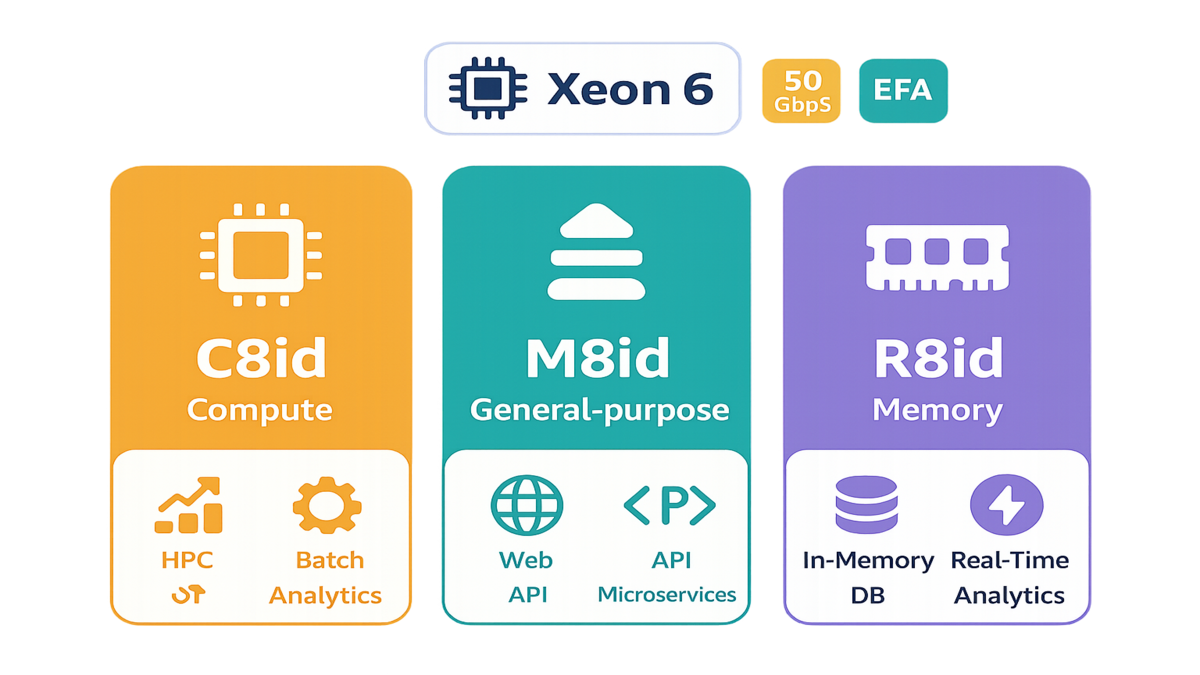
Meet Intel Xeon 6 trio
The lineup at a glance
- C8id: Your go-to for compute-intensive jobs—HPC, batch processing, distributed analytics. Expect higher clock speeds and better efficiency over last-gen compute families.
- M8id: The balanced hitter for web apps, microservices, enterprise backends, and mixed traffic. If your fleet runs “a bit of everything,” start here.
- R8id: Memory specialist for in-memory databases, large caches, and real-time analytics. When cache misses hurt feelings, R8id is the balm.
A quick naming decoder so you don’t have six tabs open: the “i” usually means Intel-based families. The “d” often means local instance storage (NVMe) is included for scratch space or fast temp data. That local storage is huge for build artifacts, shuffle-heavy jobs, or hot caches you can afford to lose. Always verify per Region and size, since local disks vary by instance type.
Also remember: these run on the Nitro System. That’s AWS’s dedicated hardware for virtualization and I/O offload, so more of the CPU is yours. Less is spent pretending to be a hypervisor. The result is predictable performance, lower jitter, and strong isolation by design.
Whats under the hood
These families ride custom Intel Xeon 6. That means better performance-per-watt design and tighter tuning for cloud-scale throughput. You also get enhanced networking—up to 50 Gbps—and optional Elastic Fabric Adapter to chop tail latency. That helps tightly coupled jobs like CFD, risk modeling, or distributed training. Security-wise, you can isolate sensitive workloads with Nitro Enclaves and keep the main instance minimal and auditable.
Under the covers, enhanced networking uses the Elastic Network Adapter. ENA gives higher packets-per-second and lower CPU overhead than legacy drivers. For cluster-style traffic, EFA adds user-space networking with the Scalable Reliable Datagram transport. That reduces latency variance that kills MPI and all-reduce performance. If you’ve seen p99s blow up because one node lags, this is your antidote.
A quick concrete example
Think about your CI/CD pipeline. On C8id, you pin builds to CPU-optimized nodes and cut noisy neighbor risk with right-sized vCPUs. You also use instance storage (where available) for faster local I/O during image builds. For microservices on M8id, you balance CPU and memory headroom while using enhanced networking. That keeps p99 latencies stable through traffic spikes. For R8id, you park Redis, Memcached, or in-memory analytics. Keep hot data in RAM and kill round trips. This isn’t theory; this is how modern stacks squeeze throughput today.
If you’re on Kubernetes, label nodes by family (c8id, m8id, r8id). Add simple nodeSelectors or Affinity rules and treat each pool like a performance persona. Use Pod Disruption Budgets and topology spread to keep replicas healthy during rollouts. For build-heavy teams, point your runners at C8id with local NVMe for Docker layer caching. Watch your build times just collapse.
Choose by workload
Compute heavy pick C8id
If your jobs look like HPC kernels, Monte Carlo sims, media transcode, or Spark stages that are CPU-bound, C8id lands first. Pair EFA with tightly coupled jobs to cut MPI jitter and time-to-solution. For embarrassingly parallel tasks like batch or map-only stages, scale out with autoscaling. Bin-pack to keep cores hot and idle time low.
Extra juice:
- Place your cluster in a placement group (cluster strategy) to shrink network hops and reduce latency between nodes.
- For Spark, favor fewer, fatter executors when your workload is cache-friendly; go wider when you’re I/O bound. Validate executor cores and memoryOverhead against GC behavior.
- Pin processes to cores for consistent timings and use OS profiles that reduce irqbalance surprises during bursts.
General purpose pick M8id
Running web platforms, API gateways, microservices, Kafka consumers, or Java/Go backends? M8id’s balanced CPU/RAM is your default. You’ll get steady throughput for mixed traffic patterns. You also can use enhanced networking to protect tail latency at the service mesh. Put bursty or queuing layers here; save the RAM behemoths for R8id.
Quick wins:
- Target 60–70% average CPU on steady-state services; let autoscaling handle spikes. If you’re idling at 20–30%, downshift one size and re-test p95/p99.
- For JVM apps, tune heap vs. container memory limits with headroom for native libs. Track GC pause time, not just throughput.
- Move TLS termination or tokenization into Nitro Enclaves to shrink your blast radius and simplify audits.
Memory hungry pick R8id
When your data is the bottleneck—like in-memory DBs, feature stores, or real-time analytics—R8id keeps it resident. That kills round trips and warmup delays. If you split between managed services and self-managed caches, R8id gives raw control and steady performance under load. Always profile dataset size-to-RAM ratio with headroom for growth and failover.
Hard-earned tips:
- Keep swap off and watch page faults like a hawk. Any swapping under load is a red flag—fix sizing first.
- For Redis/Memcached, chart hit ratio vs. object size distributions. If your hit ratio dips at peak, add memory or shard.
- If you rely on instance store for speed, remember it’s ephemeral—rebuild on boot and persist snapshots to EBS/S3 where needed.
First hand style playbook
- HPC team: migrate a single job class (e.g., CFD) to C8id + EFA, validate wall-clock speedups and cost-per-simulation, then expand.
- Platform team: shift a microservice tier to M8id behind a traffic shadow; measure p95/p99 and cost-per-request before/after.
- Data team: trial R8id for Redis with mixed read/write patterns; monitor eviction rates and hit ratios at peak.
Add a mini checkpoint after week one: if p95 improved and cost-per-request fell, keep rolling. If not, re-check rightsizing and the network path. Nine times out of ten, the fix is size tweaks or confirming ENA/EFA drivers are actually live.
Throughput and trust
EFA for low latency scaling
For tight cluster comms, EFA is the line between “scales on paper” and “scales in prod.” As AWS explains, “EFA provides lower and more consistent latency and higher throughput than the TCP transport traditionally used in cloud-based HPC systems.” That consistency is gold for MPI and collective ops that hate jitter. Pair with up to 50 Gbps networking to reduce sync stalls.
- Use cases: distributed training (parameter servers, all-reduce), weather sims, FEA/CFD, genome pipelines.
- Tuning tips: pin processes to cores, align network interrupts, and test with representative message sizes—not just microbenchmarks.
Practical checklist:
- Use a cluster placement group when your nodes chat a lot.
- Install the EFA software (libfabric provider) on supported AMIs and confirm with efa_cfg.
- Keep security groups open for the required ports inside the cluster; don’t let packet filtering add invisible latency.
Nitro Enclaves for confidential computing
Sensitive workloads shouldn’t live in the blast radius of your main instance. Nitro Enclaves creates isolated compute environments to process highly sensitive data. In AWS’s words, “Nitro Enclaves help customers create isolated compute environments to process highly sensitive data.” That’s the model you want for secrets handling, PII enrichment, or secure key operations. All that without inflating your threat model.
- Practical pattern: run your main service on M8id/R8id, move decryption or tokenization into an enclave, and pass only minimal attested outputs back.
- Compliance lift: enclaves simplify audits by shrinking trusted code and access paths.
Setup notes:
- Use the Nitro Enclaves CLI and SDK to build the enclave image (EIM), attest it, and wire it to KMS for key operations.
- Enforce IMDSv2 on the parent instance and keep the parent’s role minimal—let the enclave handle sensitive bits.
Region and fleet aware rollout
C8id, M8id, and R8id are rolling out across multiple AWS Regions. Roll upgrades zone-by-zone, keep a rollback AMI, and use launch templates with versioning. Validate EFA availability in your target Region and subnets. Finally, watch network quotas—50 Gbps per instance doesn’t excuse a congested VPC core.
Extra safety gear:
- Use On-Demand Capacity Reservations when you need guaranteed capacity in a specific AZ.
- Version your Auto Scaling Groups with new Launch Template revisions; canary with a small percentage before flipping the rest.
- Track Service Quotas for ENIs/EFA/throughput to avoid silent throttling during scale events.
The savings plan
Where savings come from
Architectural improvements in Intel Xeon 6 let you do more work per core and per watt. Combine that with better networking and right-sizing to cut overprovisioning. In many fleets, you’ll see savings by consolidating instance counts or stepping down a size while keeping SLAs. On-demand pricing stays competitive, and the new families give headroom to pick the right tier.
You don’t have to refactor to collect wins. Start with a lift-and-shift move for a single service, then right-size. If CPU sits under 40% and memory under 50% at peak, you’re likely oversized. Drop a size, re-run your load test, and note p95. If SLAs hold, lock it in.
Your cost workflow
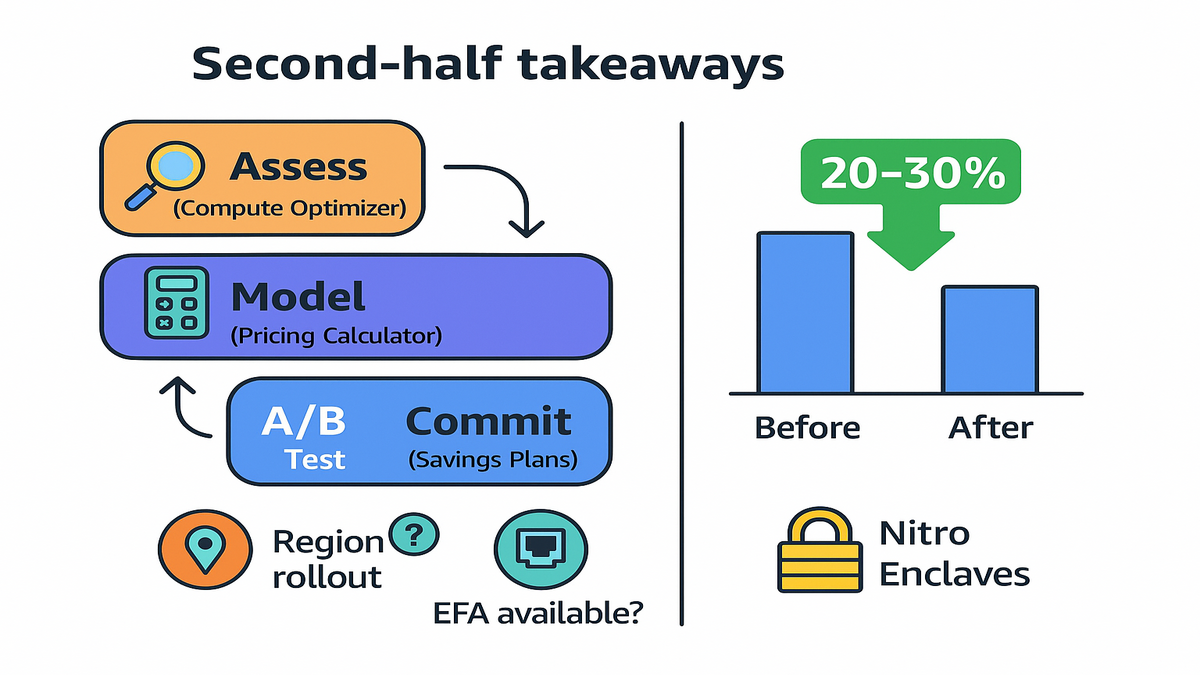
1) Use AWS Compute Optimizer to identify under/over-provisioned instances and rightsizing opportunities. 2) Model scenarios in the AWS Pricing Calculator: baseline today’s footprint vs. a trial footprint on C8id/M8id/R8id. 3) Run an A/B test on a single service or job class; compare cost-per-request or cost-per-completion. 4) If steady, layer commitment (e.g., Savings Plans) on top for more discount—after you’re confident in the new baseline.
Dial up the discipline:
- Track both performance (p95, p99, throughput) and money (cost-per-request, cost-per-GB processed). If only one improves, keep iterating.
- Prefer Compute Savings Plans for flexibility across instance families, Regions, and OS. Start with a smaller 1-year commitment, then top up.
- Tag your test stacks and keep a short-lived budget alarm so experiments don’t wander into surprise bills.
Naming notes you keep Googling
- r8i instances vs R8id: historically, “i” indicates Intel-based families; “d” variants in AWS often include local instance storage (NVMe). Check the exact specs for your Region and size before assuming storage is present.
- aws x8i / x8i instances: if you landed here searching this, you’re likely thinking of X2idn/X2iedn (ultra high-memory, different line). If you truly need extreme memory, compare R8id to X2iedn tradeoffs.
- aws flex instances: look at M7i-flex and C7i-flex for price/perf-optimized general compute. They’re separate from the new 8id families but relevant if you’re squeezing cost on mixed workloads.
- aws r8a: AWS’s “a” families denote AMD-based variants. If you’re evaluating Intel vs. AMD for memory-optimized tiers, benchmark your real workload across both.
Halfway checkpoint
- C8id = compute-heavy; M8id = balanced; R8id = memory-first.
- Up to 50 Gbps + EFA cuts tail latency in clustered jobs.
- Nitro Enclaves isolates sensitive compute for cleaner compliance.
- Expect 20–30% savings in certain workloads from arch gains.
- Use Compute Optimizer + Pricing Calculator before committing fleet-wide.
- Roll out by Region with launch template versioning and clear rollback.
Ship your migration
Scoping and prep
- Inventory candidates: pick 1–2 services per tier (compute, general, memory) for initial trials.
- Capture baselines: cost-per-request, p95/p99 latency, CPU/RAM/net utilization, error budgets.
- Verify Region support: confirm C8id/M8id/R8id, EFA, and Nitro Enclaves availability where you operate.
Pro move: prepare golden AMIs with the latest ENA/EFA/NVMe drivers and agent stack (CloudWatch, SSM). Bake once, reuse everywhere. Keep IMDSv2 required and restrict instance roles to the bare minimum.
Test and validate
- Create new AMIs with latest drivers/agents; bake EFA/NVMe drivers where needed.
- Spin up parallel environments behind a shadow/traffic mirror; ramp 5% → 25% → 50%.
- Validate p95/p99, throughput, and saturation. For clustered jobs, measure wall-clock completion and synchronization stalls.
Observability pack:
- Track CPUUtilization, NetworkPacketsIn/Out, and DiskQueueLength for EBS-backed workloads. For caches, watch eviction count and keyspace hits.
- Use a synthetic load job per rollout wave to catch regressions even during “quiet” periods.
- Set CloudWatch alarms on error budgets and tail latency so you can auto-rollback if things wobble.
Lock in the gains
- Right-size: downshift sizes if headroom is excessive; scale-out where parallelism wins.
- Update launch templates/ASGs; tag versions for fast rollback.
- Re-run Compute Optimizer; layer Savings Plans once steady.
Expert cue you can trust: “AWS Compute Optimizer recommends optimal AWS resources for your workloads to reduce costs and improve performance.” Use it as your second opinion before scaling the change fleet-wide.
Common pitfalls
- Forgot EFA drivers or placement group: you’ll “have EFA enabled” but won’t see the latency win. Validate with efa_info and cluster placement.
- Local NVMe overconfidence: instance store is ephemeral. If a host retires, data goes with it. Persist what matters.
- Quotas and limits: ENIs, EFA adapters, and PPS limits can throttle your big test. Pre-check Service Quotas and request bumps early.
FAQs
R8id vs r8i
R8id is the new Intel Xeon 6–powered, memory-optimized family described here. In AWS naming, “i” generally denotes Intel-based, and “d” variants often include local instance storage (NVMe). Always confirm the exact specs for your chosen Region/size—assume nothing and check the instance detail page and instance store docs.
EFA and 50 Gbps support
Yes. The new C8id/M8id/R8id families feature enhanced networking up to 50 Gbps and support Elastic Fabric Adapter for low-latency, high-throughput communication in HPC and distributed AI training clusters. Verify EFA availability per Region and instance size before deployment.
C8id R8id vs x8i
If you searched “aws x8i” or “x8i instances,” you’re likely mixing naming lines. For ultra high-memory, check X2idn/X2iedn, which is a separate family. If your primary bottleneck is memory but not at “extreme” levels, R8id is the balanced, general memory-optimized path to start with.
Are flex instances same
No. “Flex” options like M7i-flex or C7i-flex target price/performance for general-purpose compute with simplified choices. They’re complementary, not replacements. If you need HPC/EFA or memory-first behavior, the 8id families are a more direct fit.
Consider aws r8a vs R8id
“A” families in AWS denote AMD-based variants. If you’re evaluating AMD vs. Intel for memory-optimized tiers, benchmark your real workload on both. Then compare cost-per-throughput, latency, and ecosystem tooling. The winner depends on your code paths and data patterns.
Estimate savings before migrating
Use AWS Compute Optimizer to surface rightsizing opportunities and the AWS Pricing Calculator to model side-by-side costs for your current fleet versus a trial footprint on C8id/M8id/R8id. Then run a controlled A/B test to validate cost-per-request or cost-per-completion.
EKS and ECS support
Yes. Create separate node groups or capacity providers per family (c8id, m8id, r8id), label them, and schedule workloads with node selectors or task placement constraints. Keep AMIs updated with ENA/EFA drivers and validate with a small canary deployment before moving production traffic.
Instance store vs EBS
Use instance store (the “d” in 8id) for temporary, high-IO data like build caches, shuffle space, or ephemeral queues. Use EBS for anything that must persist across reboots or host replacements. A common pattern is logs and checkpoints on EBS, temp artifacts on instance store.
You don’t need a moonshot to justify this upgrade. Start small, benchmark honestly, and let the numbers choose your instance family. Do that, and you’ll ship faster, pay less, and sleep better.
“New hardware only matters if it changes your bill or your p99s.” These do both.
The fastest infra upgrade is the one you actually ship. Aim for two services this week; the rest will follow.
Want to see how teams shipped similar upgrades and quantified savings? Explore our Case Studies. If you’re evaluating tooling to accelerate performance testing and rollout hygiene, check out our Features.
References
- AWS Elastic Fabric Adapter (overview)
- EFA user guide (latency/throughput details)
- EFA software installation and libfabric provider
- Amazon EC2 Placement Groups
- Enhanced Networking with ENA
- AWS Nitro Enclaves
- Nitro Enclaves + AWS KMS (attestation)
- Amazon EC2 On-Demand Pricing
- AWS Savings Plans
- AWS Pricing Calculator
- AWS Compute Optimizer
- AWS Global Infrastructure (Regions/AZs)
- Amazon EC2 Instance Storage (instance store)
- AWS Service Quotas
- Amazon EC2 Launch Templates
- EC2 Auto Scaling
- Intel Xeon 6 overview
- Amazon EC2 X2iedn instances (ultra high-memory reference)
- Amazon EC2 M7i-flex instances
- Amazon EC2 C7i-flex instances