


You push a fix to a broken listing. Amazon fires back a cryptic error. It reads like a fortune cookie, not a log. Cool. Now try doing that at scale across marketplaces with deadlines. You’ve got teams waiting, inventory inbound, and a PM asking, “Is it live yet?” Meanwhile, your logs look like alphabet soup.
Here’s the good news: VALIDATIONPREVIEW for Listings Items API just got smarter. You now get grouped, granular error codes: DQxxx, BRxxx, CCxxx. There’s a richer issues array with more context and pointers. And finally, a fatal flag to split show-stoppers from nice-to-haves. That’s the difference between blocked publish and a small cleanup task. It’s your ticket to ship faster without gambling in production.
Translation: you can triage fast and fix what actually matters. Ship clean listings on the first try with confidence. Fewer rollbacks, less Slack chaos, and quiet on-call.
If you’ve been Googling “validation preview error code listings items api amazon,” this is it. You don’t need to crawl GitHub at 2 a.m. anymore. We’ll break down what changed and how to migrate your parsers. We’ll show a preview-to-live flow that doesn’t brick SKUs. We’ll also survive rate limits (hello, QuotaExceeded) without waking PagerDuty. We’ll keep it practical with patterns real teams use. Goal is make this feel routine, not risky.
TLDR
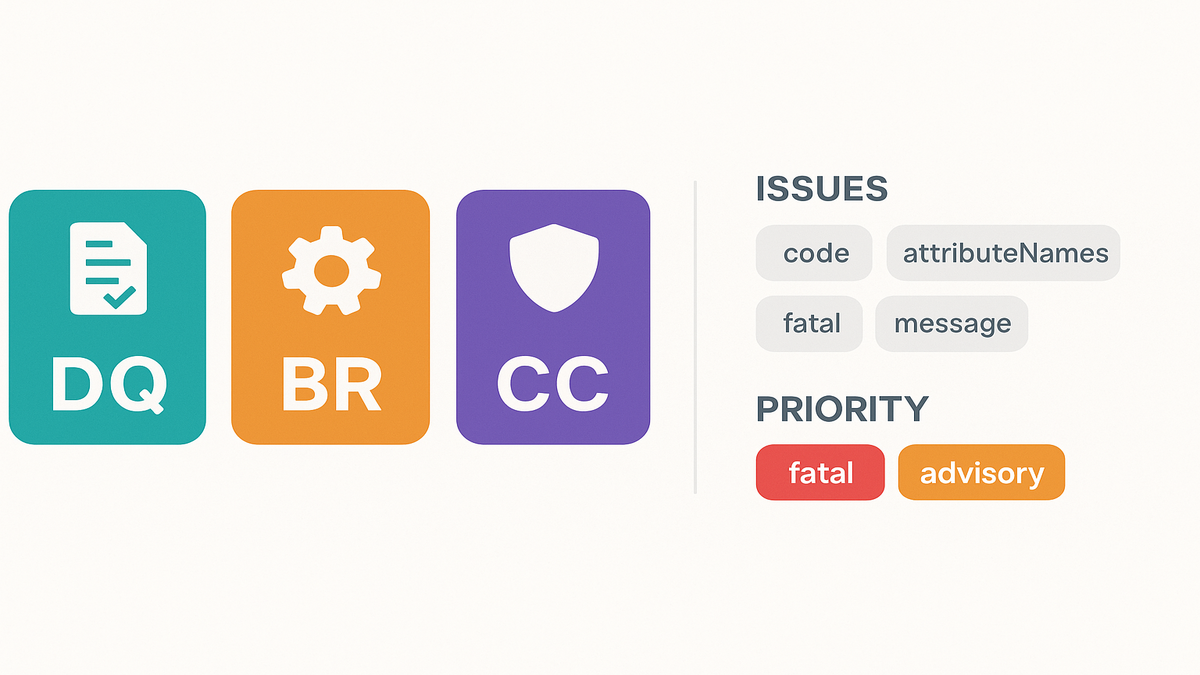
- VALIDATION_PREVIEW now returns clear categories: Data Quality (DQ), Business Rules (BR), and Catalog Compliance (CC).
- Each issue includes code, message, attributeNames, and a fatal flag. Triage in seconds.
- Run putListingsItem or patchListingsItem in VALIDATION_PREVIEW first, always.
- Fix fatal items, then push live once the preview is clean.
- Update parsing and mapping. Legacy generic errors are replaced by DQ/BR/CC_xxx.
- Conform to current product type schemas. Watch marketplace-specific rules, like Brazil extended fields.
Granular errors changed
New categories decoded
- Data Quality (DQ_xxx): Missing or invalid attributes, wrong formats, schema mismatches. Example: color name where a hex code was required.
- Business Rule (BR_xxx): Marketplace or category logic that you must follow. Example: condition rules that differ by region or category.
- Catalog Compliance (CC_xxx): Policy and compliance checks that keep you safe. Think restricted attributes, unsafe claims, or missing certifications.
These categories replace the old catch-all errors that told you nothing. Your benefit is instant signal on what to fix where. You’ll know if it’s data, rules, or compliance duties.
Under the hood, keep this simple mental model in mind:
- DQ means “fix your payload.” Your data is missing, wrong, or off-schema.
- BR means “follow the rules.” The marketplace or category has logic you must honor.
- CC means “stay compliant.” You might hit policy flags or need paperwork.
This split stops the blame game across teams. Data teams take DQ and ship better payloads. Rules engines and listing logic handle BR issues properly. Policy and compliance teams own CC without confusion. One glance, three lanes, fewer arguments.
The issues array upgraded
VALIDATION_PREVIEW responses now include an issues array with:
- code (e.g., DQ_1234)
- message (clear action in human words)
- attributeNames (exact fields to fix)
- fatal (true or false)
Fatal means it blocks publication outright. Non-fatal is advisory and won’t block. That split alone saves hours of log spelunking later.
In practice, surface attributeNames in your UI or logs for clarity. Contributors will know exactly what field to fix next. Route fatal items to a “stop the line” queue immediately. Advisories become backlog items for copy, content, or enrichment tasks.
First hand example
You submit a SKU missing “brand” and using unsupported “material” for Brazil. You’ll see two issues in preview, not twenty confusing ones. DQ for missing brand with fatal: true, blocking publish. BR for marketplace-specific material with fatal: false, advisory only. Fix brand first to unblock the listing, then iterate the material. No more blind whack-a-mole guessing.
References: see Listings Items API reference and Handling Errors docs for structures and best practices.
Pro move: treat the issues array like a mini changelog. Persist each preview’s issues with payload version, marketplaceId, and productType. If an advisory later flips to fatal after a schema change, you’ll spot it fast.
Migrate error handling
Legacy errors DQ BR CC
If you keyed off generic error strings before, it’s time to upgrade. Migrate to deterministic code families and act with confidence:
- Legacy “Invalid attribute value” → DQ_xxx in the new world.
- Legacy “Attribute not applicable” → BRxxx, or CCxxx if it’s policy related.
- Legacy “Restricted content” → CC_xxx with clear compliance ownership.
Build a mapping layer that buckets errors by family first. Then route by specific code to the right playbook. That gives you per-bucket workflows instantly. DQ goes to data fixes, BR to rules logic, CC to compliance review.
To roll this out safely without breaking stuff:
- Run both systems in parallel for at least a week. Use a sample of SKUs.
- Gate live pushes using the new fatal logic only, keep old logs for visibility.
- After parity is confirmed, retire legacy free-text parsing for good.
Parsing tips that survive upgrades
- Treat code as the primary key. Message is for humans and may change.
- Use attributeNames to highlight precise fields in UI or logs.
- Respect fatal first, always. Non-fatal can be queued as follow-ups.
- Track unknown codes. Log them, add soft fallbacks, and update regularly.
Also consider these practical touches:
- Add a “confidence” tag to your resolver. Known vs unknown codes matter.
- Standardize error fingerprints: code + marketplaceId + productType together.
- Build a runtime switch to downgrade non-critical advisories during peak launches.
First hand example
We’ve seen teams wire a triage board that’s dead simple. Column one is fatal DQ, then fatal BR/CC, then advisory. Items move left to right as they resolve in order. Outcome is faster MTTR and fewer silent failures in production.
Why it works is ownership becomes super clear. Data ops clears DQ, no questions asked. Catalog ops handles BR without delay or confusion. Compliance or legal clears CC with proper guidance. No more “who owns this?” ping-pong across Slack.
Helpful docs: Amazon Seller API documentation for Listings Items and Product Type Definitions. Read them to understand attributes and schema shape.
Preview to live flow
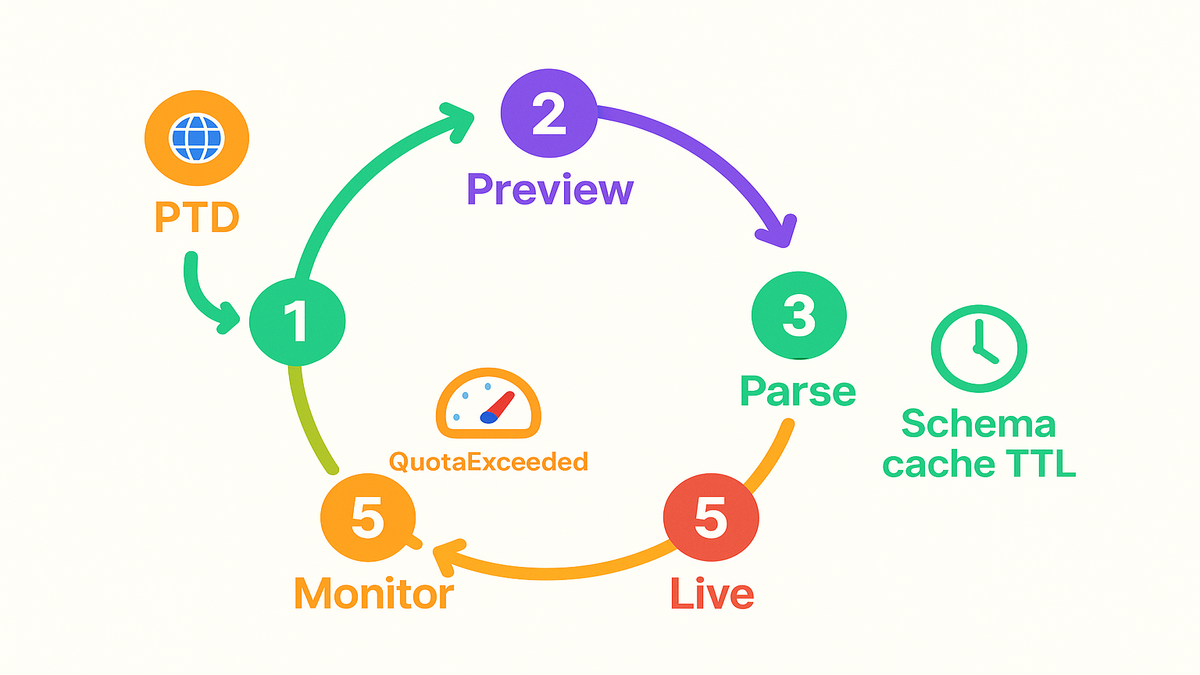
The step by step loop
1) Build payloads to the latest productType schema via the PTD API. 2) Call putListingsItem or patchListingsItem in VALIDATION_PREVIEW mode first. 3) Parse issues in order, fix all fatal first, and log advisories. 4) Re‑preview until fatal equals zero and you feel good. 5) Submit in live mode once the preview stays clean. 6) Monitor post‑publish advisories and iterate asynchronously with your team.
This simple loop makes validation a pre-flight check, not a surprise. You’ll feel calmer when deploying changes at scale.
To make it bulletproof in real life:
- Tag every preview with a correlation ID for clean tracing.
- Use idempotent updates so retries don’t cause duplicate changes.
- Save the successful preview snapshot next to the live payload.
Fatal vs advisory triage
- Fatal DQ: Missing required attributes or invalid formats. Send back to data pipeline or UI with precise fields.
- Fatal BR/CC: Rule or policy blockers. Route to rules engine or compliance flow with marketplace logic.
- Advisory: Capture and improve later without holding launch. Examples include copy or optional images.
Give advisories an SLA that fits your tempo and bandwidth. Example: fix advisories within seven days post-launch unless they turn fatal. That keeps quality rising without blocking revenue.
First hand example
A clothing SKU fails with DQmissingmainimage marked fatal. It also has DQlength_bullets as advisory only. You upload the main image and pass validation quickly. Then you schedule bullet copy edits for your content team. The listing goes live while content improves in the background.
Pro tip: store preview artifacts and keep timestamps tight. Keeping issues arrays helps pinpoint regressions after a schema or rule change lands.
Second pro tip: choose PATCH vs PUT with care and intention. Partial updates can remove required fields if you’re not careful. When unsure, preview the full intended state to confirm nothing goes missing.
Quick pulse check
- VALIDATION_PREVIEW now returns categorized codes with fatal and attributeNames.
- Fix fatal items first and then ship live. Log advisories for later.
- Update your mappers from legacy strings to the new code families.
- Always validate against the latest product type schema and rules.
- Rate-limit gracefully. Expect QuotaExceeded and implement smart retries.
If you wire these five steps, validation becomes predictable and automated. You’ll avoid late-stage fire drills that cost sleep and money.
Schemas product types marketplace
Use PTD prepare for drift
Product type schemas evolve fast and sometimes without warning. The only safe play is fetch the latest definitions via PTD. Then render your payloads accordingly and avoid landmines. If templates are hard-coded, you’ll drift and DQ_xxx will spike badly. This is extra true for apparel, health, or electronics.
Practical flow that teams actually ship:
- On app startup and on schedule, fetch PTD for all productTypes by marketplace.
- Cache with a TTL so you don’t hammer the API during peaks.
- Diff versions and notify when attributes flip optional to required.
Marketplace specific rules Brazil EU
What passes in the US may advisory-fail elsewhere, or even fatal. Brazil often needs extended attributes for compliance and localization. Europe may require VAT or specific safety fields you didn’t expect. That’s BRxxx and CCxxx land. Your validation must be marketplace-aware with correct parameters.
Examples of differences you’ll commonly encounter:
- Labeling or certification fields required in one region, optional elsewhere.
- Allowed values for materials or claims that differ by locale.
- Language and character set expectations for titles and bullets.
Practical guardrails
- Keep a schema cache with TTL, maybe 24 hours to stay fresh.
- Version payload builders per productType and per marketplace clearly.
- Write tests against sample payloads per region: BR, US, EU, and JP. Include at least one negative fatal DQ_xxx test to validate parsing.
Bonus guardrails worth adding now:
- Add a “marketplace readiness” score to each SKU pre-launch.
- Keep a small library of known-good payloads per category. Use snapshots to detect regressions.
First hand example
A shoe listing passes in the US without any issues at all. In Brazil, the same payload returns BRmaterialineligible advisory and CClabelingrequired fatal. You add the labeling attribute per PTD and re‑preview quickly. Fatal clears and advisory gets logged. Result is a live listing without guessing anymore.
Rate limits and observability
QuotaExceeded not a surprise
If you trigger QuotaExceeded, don’t panic or single-thread forever. Back off with jittered exponential retries, and respect rate limits per operation. Single-threading until it works will cause bigger throttling and angry on-call rotations.
Smart retry playbook teams rely on:
- Exponential backoff with jitter so fleets don’t retry in sync.
- Cap retries with a maximum wait to avoid infinite limbo.
- Respect operation-level quotas and vary concurrency by endpoint.
Operational patterns that work
- Idempotency: ensure PUT and PATCH requests are safely repeatable.
- Batching: validate in small, controlled waves to avoid burst limits.
- Circuit breakers: pause previews when fatal rates spike unexpectedly. Likely a schema change to fetch.
- Telemetry: log code, attributeNames, fatal, marketplace, productType, and time-to-fix. Then build dashboards by code family.
Need out‑of‑the‑box triage dashboards and alerts for SP‑API validations? Explore Requery for quick wins.
Good observability smells like this in dashboards:
- A daily trend of fatal versus advisory by marketplace.
- Top ten codes blocking listings this week with counts.
- Mean time to clear fatal DQ versus fatal CC issues.
- Alerts when a new code appears or an advisory turns fatal.
First hand example
A team saw a morning spike of DQrequiredattribute_missing across marketplaces. They paused live pushes and refreshed schemas right away. They found a new required attribute for a subset of SKUs quickly. After adding the field and re‑previewing, the fatal rate dropped to near zero.
Bonus: use amazon sp-api reports to cross-check catalog health weekly. Identify systemic data gaps your upstream PIM or DAM must fix.
FAQ
Difference between preview live
VALIDATION_PREVIEW runs validations and returns issues without touching live listings. Live mode performs the actual create or update on the marketplace. Best practice is validate until fatal equals zero, then submit live confidently.
Think of PREVIEW as your pre-flight checklist that saves you. Live is takeoff where mistakes cost more. If the red lights are still on, don’t take off.
DQ BR CC mean
- DQ: Data Quality for schema, format, and required fields.
- BR: Business Rule for category or marketplace logic.
- CC: Catalog Compliance for policy and regulatory constraints. They replace generic errors and make triage faster and more accurate daily.
If you route these to different owners, blocks resolve faster. You reduce handoffs and get fewer dead ends.
Are advisories safe to ignore?
Advisories won’t block publishing, but ignoring them hurts quality. You’ll degrade discoverability, conversion, and risk future policy checks. Log and prioritize them right after launch and you’ll be fine.
Treat advisories like quality debt and stop them from piling up. Keep a queue and burn them down.
Handle QuotaExceeded in SP API
Implement exponential backoff with jitter and respect per-operation limits. Batch validations when possible and watch HTTP headers for guidance. Never retry hot loops without delays or you’ll make it worse.
Also keep a retry budget per request so you don’t waste cycles. Know when the system is truly throttled and wait calmly.
Find SP API release notes
Docs: check the Amazon Seller API docs for Listings Items and PTD. Release notes: follow the official GitHub SP‑API release notes for changes.
Put a recurring calendar reminder to review release notes weekly. It will pay off the first time a schema flips.
SP API Reports change
Not directly, but pairing PREVIEW findings with reports is powerful. Use catalog or listing quality reports to locate upstream data gaps quickly. That helps prevent repeat DQ_xxx errors down the line.
Run a weekly compare across teams. Match top DQ codes versus fields most often missing in reports.
Ship clean listings checklist
- Fetch latest product type schemas per marketplace via the PTD API.
- Run VALIDATION_PREVIEW for every PUT or PATCH request always.
- Block deploys when fatal is greater than zero in preview results.
- Parse by code family DQ/BR/CC and surface attributeNames clearly.
- Map legacy errors to new codes and add a fallback for unknowns.
- Implement retries for QuotaExceeded with backoff plus jitter enabled.
- Cache schemas with TTL and add dashboards for fatal and advisory trends.
You now have what you need to move fast without breaking listings. This VALIDATION_PREVIEW upgrade isn’t just nicer error text, it’s an operating system. Treat DQ, BR, and CC like triage tags in your pipeline. Make PTD your single source of truth for attributes and rules. Wire a preview-to-live loop that’s boringly reliable and easy to trust.
The payoff is fewer rollbacks and calmer launches across markets. Your catalog scales without surprise fires or last-minute scrambles.
Want to see how teams operationalize this at scale? Browse these Case Studies and steal what works.
Final thought: speed is great, but repeatability actually wins. If your system shows what broke, who owns it, and how to fix it in under a minute, you’re good. Listing updates go from late-night firefight to a normal Tuesday.
References
- Listings Items API Reference: https://developer-docs.amazon.com/sp-api/docs/listings-items-api-v2021-08-01-reference
- Handling Errors in SP‑API: https://developer-docs.amazon.com/sp-api/docs/handling-errors
- Rate Limits in SP‑API: https://developer-docs.amazon.com/sp-api/docs/rate-limits
- Product Type Definitions API Reference: https://developer-docs.amazon.com/sp-api/docs/product-type-definitions-api-v2020-09-01-reference
- Product Type Definitions Use Case Guide: https://developer-docs.amazon.com/sp-api/docs/product-type-definitions-api-use-case-guide
- SP‑API Release Notes (GitHub): https://github.com/amzn/selling-partner-api-docs/tree/main/references/release-notes
- Reports API Reference: https://developer-docs.amazon.com/sp-api/docs/reports-api-v2021-06-30-reference
- Marketplace IDs: https://developer-docs.amazon.com/sp-api/docs/marketplace-ids