
You don’t lose cloud environments in big movie hacks; you lose them through tiny trust leaks. Think a token without the right guardrails, a role anyone can assume, or an unchecked IdP group.
Here’s the fix: AWS STS now validates IdP claims before issuing temporary credentials. If the token’s claims, like groups, roles, audience, or subject, miss policy, the door stays shut.
No more assume first and then sort it out later. This tightens zero trust and blocks lateral movement before it starts. It’s like checking guests at the door against the real list first.
If you use Okta, Azure AD (Entra ID), Amazon Cognito, or GitHub OIDC, make this your default. You verify who’s asking, what they claim, and if those claims match expectations. Do it in the role trust policy and with session tags. It’s clean, fast, and ruthlessly consistent every single time.
TLDR
- STS validates IdP claims for OIDC and SAML before issuing temporary creds.
- Enforce zero trust by matching aud, sub, groups, and roles in the trust policy.
- Use session tags and ABAC to enforce fine-grained controls on resources.
- Configure the OIDC provider correctly, like issuer, JWKS, and client IDs, to avoid breaks.
- Log and test with CloudTrail, sts:DecodeAuthorizationMessage, and token introspection to save hours.
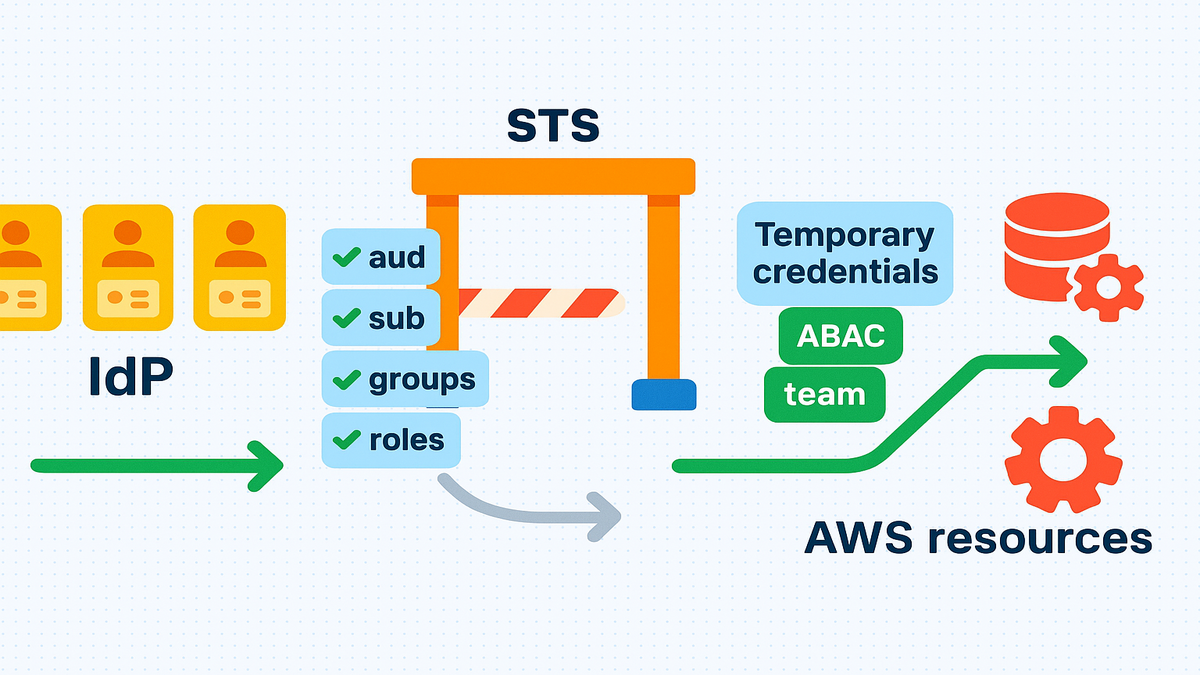
If you only read this, you can finally make identity checks deterministic. Your IdP states who the caller is, with proof inside the token. Your trust policy checks exactly what you care about, like audience, subject, groups, and app. STS either issues creds or it doesn’t, with no gray zone or later band-aids.
And because this happens before a session exists, cleanup time drops hard. A bad token dies at the door and never gets a session. A misconfigured app can’t accidentally slide in and cause trouble. That’s a huge win for least privilege and incident response sanity.
Claims First Security
What claims validation actually means
When STS evaluates AssumeRoleWithWebIdentity or AssumeRoleWithSAML, it can demand claim matches first. Practically, you put the checks in the role’s trust policy for OIDC or SAML. You can also pass session tags from IdP attributes, then gate access with ABAC using aws:PrincipalTag. If the token’s aud, sub, or mapped attributes don’t align, the AssumeRole call fails.
First-hand example: You map your Okta group cloud-admins into the token’s groups claim. Then you write a trust policy that only allows AssumeRole when groups includes cloud-admins. Folks outside that group never even get a session, which is perfect.
This is identity-first authorization, simple and direct. For OIDC, your trust policy references claim keys namespaced by the OIDC provider you registered. For example, idp.example.com:aud or idp.example.com:sub in the policy conditions. For SAML, AWS exposes attributes so you can apply the same claims-must-match pattern. No session, no access, no problem, and logs explain why.
Two quick realities to internalize
- Claims are not nice-to-have metadata; they’re the contract you must honor.
- Mapping attributes from the IdP matters a lot, and you control what crosses.
Big for zero trust
Zero trust says never trust, always verify, even inside your walls. With STS claims validation, the verification happens right at the blast door. This isn’t post-hoc authorization or logs you’ll read tomorrow or later. It’s a hard deny at call time that shrinks attack paths fast.
Real-world vibe: same dev machine and same VPN, but different Okta group. One button works, the other doesn’t, because the claim didn’t match. That’s zero trust doing reps, every hour, every day.
Another way to see it: an attacker steals a web token, but cannot satisfy aud or sub. Your trust policy requires those exact values to match or the call dies. They can’t even start a session, so a whole class of incidents vanishes. Bonus: CloudTrail shows who tried what, which claims, and the deny reason.
OIDC Provider Setup
Issuer and discovery
Before claims can be validated, your AWS OIDC provider configuration must be exact. Point AWS to the IdP’s issuer and keys using the discovery document at:
- https://
/.well-known/openid-configuration - Its jwks_uri for signing keys, usually at /.well-known/jwks.json
Pro move: Confirm the iss in real tokens exactly matches the issuer you register.
The ARN format for an IAM OIDC provider is: arn:aws:iam::
Avoid common misconfig
A frequent mix-up is pasting the discovery URL as the provider URL in IAM.
Do not include protocol paths or the well-known path in the provider URL.
The provider URL must equal the token’s iss claim, including any fixed path.
If you see the identity provider url cannot be same as openid connect oidc issuer url, check issuer alignment.
CLI setup via OIDC
aws iam create-open-id-connect-provider --url https://idp.example.com --client-id-list sts.amazonaws.com --thumbprint-list <SHA1_THUMBPRINT>
First-hand example: With Azure AD (Entra ID), the issuer often includes a tenant path.
If your iss is https://login.microsoftonline.com/
Where teams trip most often
- Thumbprints: The IAM OIDC provider needs a thumbprint for the IdP’s TLS chain. If it’s wrong or the IdP rotates to an unknown cert, calls fail closed. Capture the right thumbprint, and list multiple thumbprints to hedge rotation.
- Audience: For OIDC with STS, the audience must be sts.amazonaws.com unless customized. Don’t guess; check a real token and match the trust policy conditions.
- Multiple tenants or environments: Each unique issuer value is a distinct provider. Prod and staging issuers must be separate IAM OIDC entries to work right.
IdP specific breadcrumbs
- Okta: Create a custom Authorization Server if needed and add custom claims. Put groups into the ID token for your AWS app and scope tightly. Verify the Include in token settings and filters so only right groups flow.
- Azure AD (Entra ID): Stick to v2.0 endpoints if your apps use them today. Azure groups may not flow by default; configure claims mapping or switch to session tags.
- GitHub OIDC: The issuer is https://token.actions.githubusercontent.com for all workflows. Set audience to sts.amazonaws.com and pin sub to repos or branches in trust policy. This prevents any repo from deploying by mistake, which is the goal.
- Amazon Cognito: The user pool is your issuer, confirm it in a real token. Add custom attributes in Cognito if you need teams or environments as claims.
Trust policies check claims
Match aud and sub
In the role trust policy, key off claims like aud and sub. For OIDC, use the provider namespace keys you registered in IAM for checks. For example: idp.example.com:aud == sts.amazonaws.com and idp.example.com:sub == app:backend:ci-runner. For Kubernetes IRSA, sub often looks like system:serviceaccount:namespace:serviceaccount value.
Bring groups or roles into the decision
Need group-based gates from Okta or Cognito for access controls? You can map groups into a custom OIDC claim and check it in the policy. Or pass groups as session tags and enforce aws:PrincipalTag/Group in resource policies.
First-hand example: Require claim idp.example.com:groups to contain billing-ops for finance roles. Anyone outside that group gets a hard deny on AssumeRoleWithWebIdentity requests immediately.
Patterns that save you pain
- Lock down sub to an immutable identity your users cannot spoof. For workloads, use a stable subject like a service account or a GitHub ref.
- Prefer StringEquals over StringLike unless a pattern is truly needed here. If you do need patterns, pin fixed prefixes and avoid vague wildcards.
- Combine claims like aud and sub with environment or team for precision. The more precise your claim cocktail, the smaller your blast radius gets.
GitHub Actions baseline
Use aud=sts.amazonaws.com and iss=https://token.actions.githubusercontent.com for the provider. Then restrict sub to repo:ORG/REPO:ref:refs/heads/main or your release tag pattern. That only lets your intended workflow on your intended branch assume the role.
Session Tags ABAC
Turn IdP attributes into tags
When federating with AssumeRoleWithWebIdentity or AssumeRoleWithSAML, pass chosen IdP attributes as tags. Then write resource policies that only allow actions when aws:PrincipalTag values match. This is ABAC, and you avoid provisioning lots of similar IAM roles.
Example flow
- IdP assertion contains department=finance and data_sensitivity=restricted attributes.
- STS session is tagged with those exact pairs on session creation time.
- The S3 bucket policy allows s3:GetObject when those PrincipalTag values match restricted and finance.
Why ABAC pairs perfectly
Claims validation filters who even gets a session in the first place. ABAC then decides what that session can do across resources later. It’s two gates: first the front door, then the hallway, nicely layered.
First-hand example: One analytics-engineer role covers many teams across regions. ABAC policies limit Glue, Athena, and S3 prefixes by team=analytics-east or analytics-west. You scale access with tags instead of a huge sprawl of roles.
ABAC best practices
- Treat tag keys like APIs and standardize names and allowed values. Use names like Team, Env, and DataClass and then document them. If two apps use different tags for the same thing, ABAC loses power.
- Push tags from the source of truth, like HR for department. Have the IdP include department, not ad hoc tags from random scripts.
- Keep policies readable by using clear allow rules with focused conditions. Avoid sprawling deny lists, your future self will actually thank you.
Troubleshooting
Log test repeat
- CloudTrail records AssumeRoleWithWebIdentity and AssumeRoleWithSAML attempts, even failures. Failed entries are gold for debugging claims that don’t match or align.
- sts:DecodeAuthorizationMessage helps untangle complex denies when policies stack.
- With the AWS CLI or SDK, log the raw OIDC ID token securely for review. Inspect iss, aud, sub, exp, and any custom claims for drift.
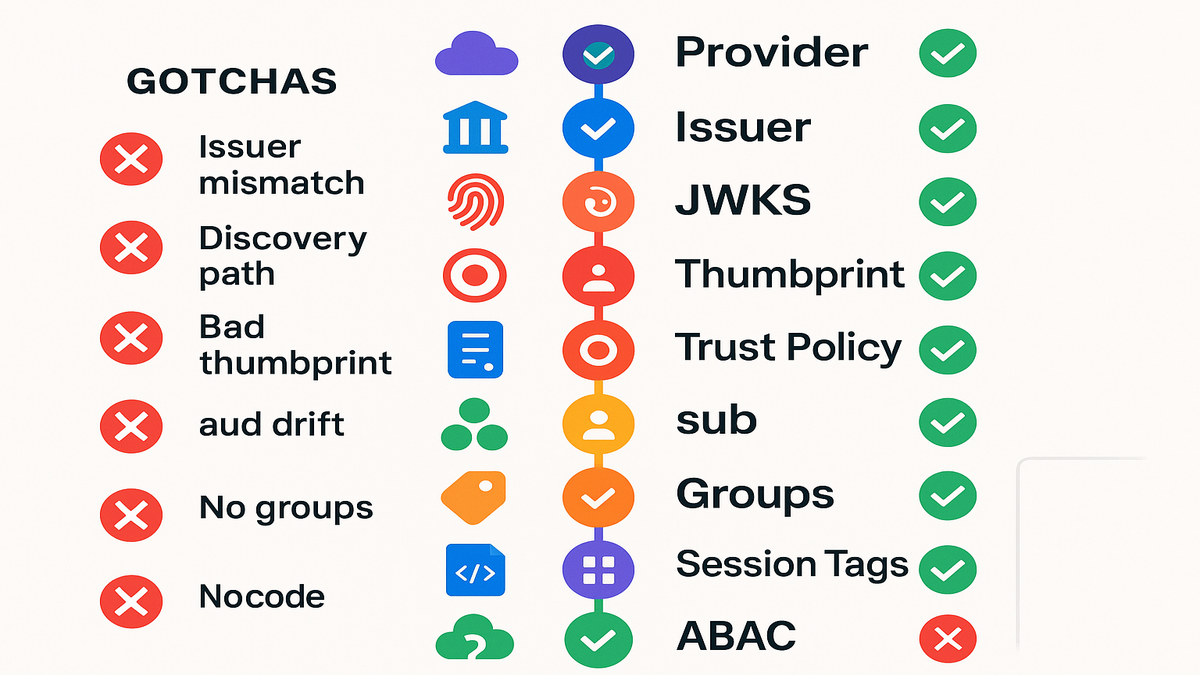
The usual suspects
- Issuer mismatch: iss in the token doesn’t equal the OIDC provider URL.
- Using the discovery path: don’t set /.well-known/openid-configuration as the provider URL.
- Bad thumbprint: wrong CA thumbprint means AWS can’t validate the IdP TLS chain.
- aud drift: the IdP isn’t minting aud=sts.amazonaws.com, so fix the app settings.
- Group claim not present: the IdP app may not include groups by default, configure it.
First-hand example: A team assumed the role locally, but the CI pipeline failed. Reason was the CI IdP app used a different audience than the local setup. Matching idp.example.com:aud to sts.amazonaws.com surfaced the misconfig right away.
More quick wins
- Check time first; if exp is past or nbf is future, STS denies. Sync clocks on CI runners and IdPs since drift bites hard sometimes.
- Session duration: the role’s maxSessionDuration must match the workflow’s request. Asking for longer than allowed will just not work, it’s blocked.
- JWKS freshness: if your IdP rotated signing keys, AWS needs to fetch them. Retry after a minute and confirm the JWKS endpoint responds correctly.
- Simulate: use IAM Policy Simulator for resource policies after tagging design. It won’t mint tokens, but it checks ABAC logic and expected effects.
Quick Pulse
- STS validates IdP claims like aud, sub, and groups or roles before creds.
- OIDC provider must match the token’s issuer, not the well-known config path.
- Trust policies enforce who can assume; ABAC policies enforce allowed actions.
- Session tags carry IdP attributes for scalable, fine-grained resource controls.
- CloudTrail and decode-authorization-message make debugging misaligned claims doable.
You’ve basically moved identity checks to the exact right layer here. They run at the moment of assumption, before anything dangerous can happen. That shrinks attack paths, makes access predictable, and pleases your auditors. They get neat, timestamped receipts for every accept and deny event.
FAQ
- How does this differ from traditional role trust policies?
Traditional trust policies could rely on broad principals and simple conditions that were vague. With claims validation for OIDC or SAML, you match token attributes directly. If claims don’t match, STS denies the session up front, every single time.
- Do I need multiple roles for every group?
Not necessarily, and that’s the good news for your team. Use ABAC, pass groups or team attributes as session tags from the IdP. Then enforce access in resource policies with aws:PrincipalTag for least privilege.
- What’s the correct value for the OIDC provider URL in AWS?
It must exactly match the token’s iss claim without the well-known path. For example, if iss is https://idp.example.com, register that as the URL. For Azure AD, the issuer can include a tenant path, so match it precisely.
- Why does my AssumeRoleWithWebIdentity call fail with aud errors?
Your IdP likely isn’t minting aud=sts.amazonaws.com or the expected audience claim. In OIDC, aud identifies the intended recipient for tokens without confusion. Update the IdP app configuration so the audience matches your trust policy.
- Should I validate groups in the trust policy or via ABAC?
If the group appears as an OIDC claim, enforce it in the trust policy. That gives a hard front-door check that denies early and clearly. If easier, pass groups as session tags and enforce them with ABAC. Many teams do both for defense in depth across the stack.
- Can I use Cognito as the IdP?
Yes, Amazon Cognito can issue OIDC tokens that AWS will accept. Ensure the issuer, JWKS, and audiences are correct and consistent values. Then reference claims in your trust policy and pass custom attributes as tags.
- How do I test this locally without guessing?
Capture a real token from your IdP app securely, then decode it. Review iss, aud, sub, and custom claims to see the real values. Call sts:AssumeRoleWithWebIdentity using that token with the AWS CLI. Use CloudTrail to confirm the deny reason and tune the trust policy.
- What about token expiration and max session duration?
Tokens must be valid at call time or else STS will deny fast. If tokens expire too quickly, refresh them or shorten the job length. Your role’s maxSessionDuration is an upper bound for STS credentials. Don’t request longer than allowed because it will not be granted.
- Does this help with supply-chain risk in CI/CD?
Yes, you can bind roles to specific repos, branches, or environments now. Use sub and aud to lock roles to exact workflows that you approve. A rogue fork won’t match your subject pattern, so it cannot assume.
Ship It
- Register the OIDC provider with the exact issuer and confirm JWKS and thumbprint.
- In the role trust policy, require aud=sts.amazonaws.com and a strict sub match.
- Map groups or roles in the IdP, or pass them as session tags for ABAC.
- Test with a real token and verify iss, aud, sub, exp, and custom claims.
- Observe denials in CloudTrail and use sts:DecodeAuthorizationMessage for clarity.
- Iterate by tightening conditions, removing wildcards, and documenting expected claims.
One more pragmatic tip: roll this out in slices to reduce risk. Start with CI roles since they are most predictable and easier to reason. Then service workloads like Kubernetes service accounts with clear subjects. Finally, move to human access and document expected claims next to code. You’re building muscle memory so future changes feel smooth and safe.
Here’s the kicker: STS claims validation makes zero trust actually practical. When trust policies and ABAC align with real IdP claims, access turns deterministic. No surprise entitlements, no mystery escalations, and no worked in staging ghosts. Make identity a crisp contract that’s codified, enforced, and fully logged. Start by locking down aud and sub in every trust policy you own. Then add groups or roles and session tags, and watch blast radius shrink.
References
- AWS STS AssumeRoleWithWebIdentity
- IAM OIDC Providers (Creating and Managing)
- Session Tags with SAML/OIDC (ABAC)
- EKS IRSA (Trust policy with aud/sub conditions)
- OpenID Connect Discovery 1.0
Zero trust isn’t no trust. It’s prove it, every time.
References
- AWS STS AssumeRoleWithWebIdentity
- AWS STS AssumeRoleWithSAML
- IAM OIDC Providers (Creating and Managing)
- Logging IAM and STS API calls with CloudTrail
- sts:DecodeAuthorizationMessage API
- Attribute-based access control (ABAC) for AWS
- Using session tags
- EKS IRSA (IAM roles for service accounts)
- GitHub Actions OIDC (GitHub Docs)
- AWS Security Blog – Use OIDC to allow GitHub Actions to access AWS
- Azure AD (Entra ID) ID tokens
- Okta – Customize tokens and add claims
- Amazon Cognito user pools – OIDC tokens
- IAM quotas and limits (for awareness)
- NIST SP 800-207 (Zero Trust Architecture)
- OpenID Connect Core 1.0