

“APIs don’t break your app. Ignoring release notes does.”
If you sell or build on Amazon, November 2025 SP-API notes just dropped. Blink and you’ll miss the one line that sparks a sprint, hotfix, or rollback.
Good news: you don’t need to read every byte. You need a system. In 60 minutes, scan the notes, check the Deprecation Schedule, diff schemas on GitHub, and ship confident.
This guide is the playbook. You’ll learn what to scan first, how to triage deprecations, where fees and finances quietly drift, and how SP-API fits with Ads and AMC. No fluff—just what to do and when to do it.
You handle the roadmap; this handles the risk.
And one more thing before we dive in: this is for product leaders, data engineers, and devs who balance speed with safety. Use it like a checklist. Share it with the person who’ll get paged if a report shape shifts on Friday. The goal isn’t to read more docs; it’s to make fewer mistakes and protect revenue while you move fast.
TLDR
- Start with breaking vs. non-breaking updates in November 2025 SP-API notes; confirm timelines in the Deprecation Schedule.
- Diff OpenAPI models on GitHub before deploy; regenerate clients only after contract tests pass.
- Watch fees, finances, and report schemas—tiny field shifts can break reconciliation downstream.
- SP-API ≠ Amazon Ads API ≠ AMC. Keep identities, permissions, and data joins separated and documented.
- Automate a six-step loop: monitor, diff, test, stage, roll out, then audit.
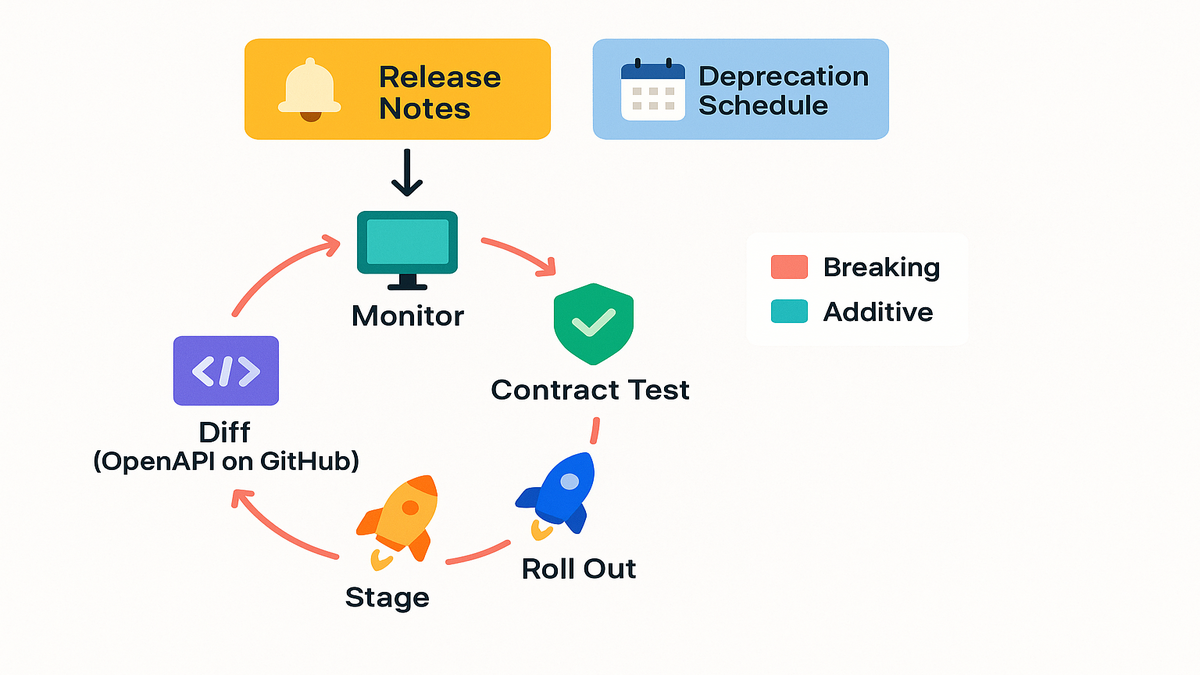
Read This First
Breaking vs additive changes
Start with the release notes highlights. Additive changes rarely break clients, but they can break strict ETL. Breaking changes like removals, new required fields, auth changes, or throttle shifts need tickets now.
First-hand example: If your Orders pipeline uses strict JSON validation, a new optional property can fail loads. Even if app logic is fine, your loaders still choke. Loosen validation, then map new fields on purpose.
A quick triage flow that works:
- Flag any mentions of ‘deprecation’, ‘replaced by’, or ‘required’. Those are must-do items.
- Scan for pagination language changes like tokens vs. nextToken, or maxResults tweaks.
- Note enum expansions. New values break strict switch statements and rigid BI filters.
- Check default values. An implicit default becoming explicit, or gone, can drift business logic.
Reality check: additive doesn’t mean harmless. Strict serializers can still break parsers, copy jobs, or dbt models.
Versioning patterns you should recognize
Amazon often ships new minor or date-stamped versions instead of mutating old endpoints. If you see a new date version in November 2025, treat it like a parallel track. Test, migrate, then cutover when results hold steady.
Pro move: pin code generators to OpenAPI model commit SHAs on GitHub. Regenerate only after contract tests pass in sandbox and a few production accounts.
How to operationalize date-stamped versions:
- Dual-wire your client: support vOld and vNew behind a feature flag.
- Mirror traffic for a tiny cohort, like two percent of accounts, for 48–72 hours.
- Compare item counts, totals, and null rates daily. Flip global when drift is within tolerance.
If the version adds fields or changes nullability, update warehouse schemas first. That way upstream services don’t hard-fail when shapes change under them.
Cross check the Deprecation Schedule
Release notes tell you what changed; the Deprecation Schedule tells you when it ends. Put those end-dates into your backlog and your calendar. Don’t wing it late Friday.
Quote to remember: “If it isn’t on your calendar, it isn’t real.” Treat deprecations the same way.
Make it stick:
- Create calendar holds 90, 60, 30, and 14 days out from each deprecation.
- Add an owner on each item. If there’s no owner, there’s no outcome.
- Share the list with support and accounts so comms are ready if behavior changes.
Deprecations And Deadlines
Map dates to work
Deprecations aren’t suggestions. Grab November 2025 items and map into two-week chunks. Do discovery, prototype, dual-run, and cutover. Keep a rollback plan ready, every single time.
First-hand example: Teams migrating reports often run legacy and new report types in parallel. They compare counts and aggregates daily for a week. They switch when metrics match within variance.
Define ‘done’ before you start:
- Acceptance: set numeric tolerances like net sales within 0.5 percent; counts within 0.2 percent.
- Data scope: test marketplaces, fulfillment types like FBA and FBM, and peak vs. off-peak hours.
- Rollback trigger: decide the error rate or variance that forces a revert.
Set automated reminders and monitors
Build a small service that scrapes the Deprecation Schedule and posts to Slack. Have it ping harder as dates creep closer. Tie that into health checks automatically.
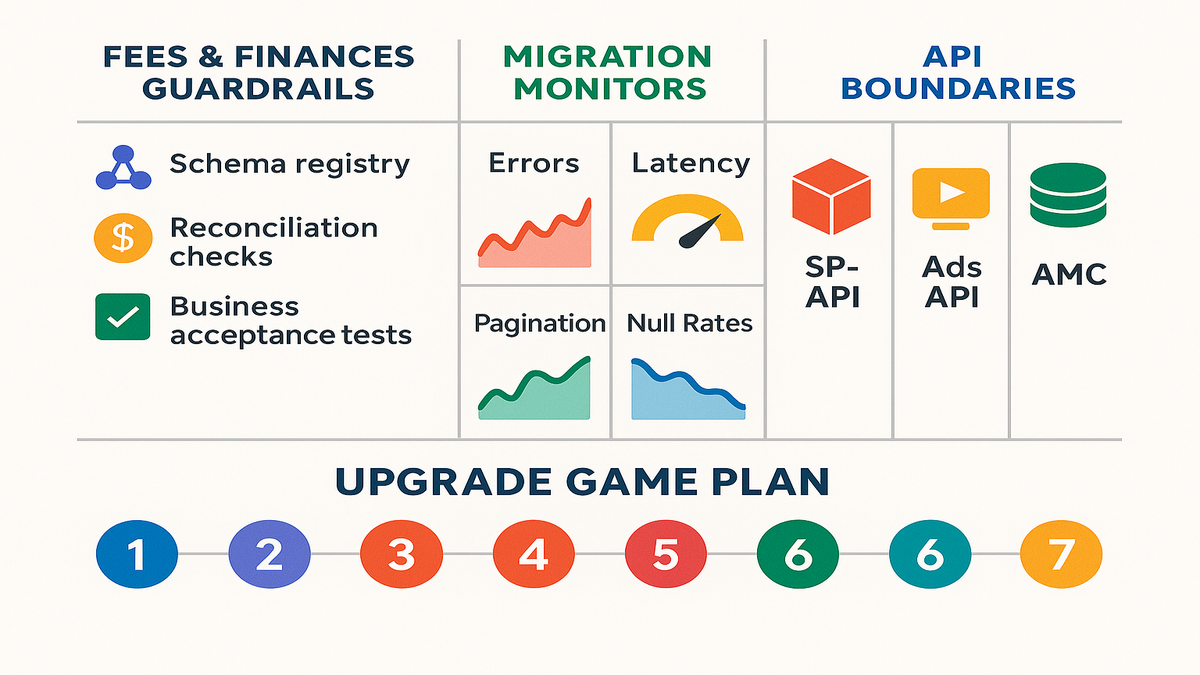
Also monitor four signals during migrations: error rates, latency, pagination completeness, and field null rates. If nulls climb after the switch, your mapping likely missed a new or renamed field.
Helpful guardrails:
- Add a canary job running both versions and comparing record keys daily.
- Track “expected vs. received” pages per report; alert if off by more than one page.
- Track HTTP 429s by operation to catch per-endpoint throttle changes, not just global.
Validate auth scopes and limits
Some changes alter scopes or throttling. If limits shift, rethink batching and backoffs. Keep a throttle-aware queue with jitter. Validate scopes for any new resources before go-live.
Quote from an engineering lead I trust: “Rate limits aren’t bugs; they’re budgets. Spend them intentionally.”
Playbook for smooth auth and usage plans:
- Before cutover, re-run the SP-API authorization scope check for each operation you use.
- Implement token refresh retries with exponential backoff and jitter. Log refresh latency, always.
- Batch requests to stay under per-operation quotas. Split heavy workloads across time windows.
- Use idempotency keys where supported, so retries don’t do double work.
Fees And Finances
Fees and finance changes
Fees changes rarely scream ‘breaking’, but penny-level shifts mess with reconciliations, payouts, and invoices. Even optional fields can change how you derive net margin per SKU.
First-hand example: A merchant’s daily P&L drifted because ETL ignored a newly available fees field. The fix wasn’t code. It was governance: every schema change triggers a mapping review and reconciliation test.
Typical drift points to watch:
- New fee components in Finances events missing from your rollups and totals.
- Sign changes, like refunds vs. charges, that invert a metric in one report.
- Marketplace quirks where a field is set in EU but null across NA.
What to test every time
- Fees and Finances fields: confirm presence, data type, and semantics across SKUs and orders.
- Report schemas: rebuild your schema registry from SP-API docs and validate loaders in staging.
- Derived metrics: compare gross sales, refunds, and fees before and after. Respect your tolerances.
Add a simple reconciliation harness:
- Pick a seven-day window crossing a weekend and a promotion.
- Compute per-SKU net margin with old and new field mappings.
- Diff totals by marketplace and channel. Export variance for finance to sign off.
Build guardrails into your pipeline
- Schema registry: version expected shapes for reports and finances. Reject unknown shapes in staging.
- Reconciliation jobs: schedule small-delta hourly checks and one full-delta daily check.
- Business acceptance tests: automate a financial sanity suite across margins, fee buckets, and payouts.
Useful docs to keep handy: Fees and Finances API references, plus Reports API references for structure updates.
Pro tip: keep a field lineage doc. For each metric, list source fields, transforms, and caveats. When a field appears, changes, or disappears, you’ll know which metrics to check.
Docs Schemas And GitHub
Where the truth lives
Three sources matter most:
- Release Notes: the story of what changed and why it changed.
- Deprecation Schedule: the deadlines you must respect.
- GitHub models: the exact OpenAPI contracts your code relies on.
Bookmark the SP-API docs and the Selling Partner API Models repo. When November 2025 hits, pull the latest models and run your diffs.
Reality: docs explain intent, but OpenAPI files define the contract. Trust the contract when unsure.
How to diff safely
- Script a diff: parse OpenAPI JSON or YAML and compare paths, parameters, enums, and schemas.
- Highlight severity: additive fields are info; breaking changes are critical, fix-now items.
- Gate codegen: only regenerate clients when all critical diffs are resolved or mitigated.
First-hand example: One team killed release-day fire drills by failing CI on critical diffs. They fix mappings first, regenerate clients second, then re-run contract tests without panic.
Practical diff checklist:
- Look for required=true added on any property across schemas.
- Scan for enum deletions or renamed values that break logic.
- Note format changes like string to date-time or number to integer.
- Compare pagination parameter names and default page sizes carefully.
Regenerate then verify contract tests
After codegen, run sandbox calls and a small production canary. Verify pagination behavior, empty responses, enum expansions, and nullable fields. If you consume webhooks via Notifications, validate signatures and payload shapes before full flow.
Pro tip: keep a golden set of anonymized real payloads for regressions. When the schema expands, those tests tell you exactly what changed.
Also validate:
- Sorting and order consistency across pages. Are results stable between fetches?
- Time zone handling for date filters. UTC vs. local market time can bite.
- Idempotent retries for long-running report generation. Don’t double count jobs.
- Notification message signature verification using current public keys.
SP API Ads AMC
Clear lines between ecosystems
- SP-API serves retail ops: orders, listings, reports, finances, fees, and more.
- Amazon Ads API powers Sponsored Ads, DSP, and campaign and reporting endpoints.
- Amazon Marketing Cloud is a clean-room with its own query model and API.
These aren’t interchangeable. Auth, rate limits, models, and privacy rules all differ. If you want a managed way to run AMC queries, explore AMC Cloud.
Keep the seams clean:
- Separate credentials and secrets per ecosystem, no exceptions.
- Maintain independent change logs and runbooks to keep context straight.
- Define distinct data contracts for each warehouse layer to prevent bleed.
When you need all three
If your business spans retail and ads, draw the boundary at the lake. Use SP-API for retail truth, Ads API for spend and performance, AMC for lift and audiences. Join on stable IDs in your warehouse, not inside your apps.
First-hand example: A brand tied SP-API order cohorts to AMC campaign exposures. They cut CAC variance by spotting regions with strong lift but weak fill rates. Ops fixed the bottleneck. Ads performance improved without touching bids at all.
Join tips that save headaches:
- Standardize marketplaces and currency before joining retail with ads data.
- Maintain a lookup from ASIN or SKU to ad targets used in campaigns.
- Keep time windows explicit. Impressions, clicks, and conversions rarely align by default.
Where to read docs
- SP-API documentation: references, guides, and the Deprecation Schedule.
- Amazon Ads API: campaign and reporting endpoints for Sponsored and DSP.
- AMC API documentation: how to query and export aggregated signals.
Keep one internal page linking each source, November 2025 notes, and all migration tickets.
Quick Pulse Check
- Confirm what’s additive vs. breaking in November 2025. Calendar the deprecation dates now.
- Diff OpenAPI models from your pinned GitHub commit. Gate codegen behind passing contract tests.
- Revalidate fees, finances, and report schemas. Monitor derived metrics closely for drift.
- Treat SP-API, Ads API, and AMC as separate stacks. Join data downstream with care.
- Automate reminders, CI diffs, and canary rollouts. Then document everything that changed.
FAQs
Where do I find notes
Check the official SP-API Release Notes page in Amazon’s developer docs. That page lists monthly updates and links to the right API references.
How do I know breaking
Breaking signs include removed fields, new required fields, scope changes, pagination changes, or deprecations. Cross-check the Deprecation Schedule for deadlines and any required version migrations.
Is there a GitHub place
Yes. The Selling Partner API Models repo hosts OpenAPI definitions. Pin builds to a commit and diff against latest before regenerating clients.
What about fees
Maybe. Even additive fields in fees or finances can shift calculations. Run before and after reconciliations, verify data types, and update your schema registry.
Are Ads API and AMC
Not directly. SP-API updates don’t govern Ads API or AMC. Review their docs separately. Keep auth, limits, and logs split cleanly.
How should I test
Canary it. Regenerate clients, run sandbox contract tests, then canary production on a slice. Watch errors, pagination completeness, and metric drift for 24–72 hours.
Fastest way to tell team
Post a one-pager in Slack with three bullets: what changed, by when, and who owns it. Link the release notes, the Deprecation Schedule, and your diff report.
Update scopes re authorize sellers
If new operations need new scopes, yes. Plan a re-consent flow. Validate in sandbox, then prompt sellers with clear messaging and support ready.
How do I prevent surprises
Pin OpenAPI SHAs, run nightly diffs against upstream, and fail CI on critical changes. Keep golden payloads and run them on every pull request for safety.
November Upgrade Game Plan
1) Read the November 2025 release notes. Tag items by impact: info, action, or critical. 2) Cross-check each action item with the Deprecation Schedule. Add calendar holds early. 3) Pull the latest OpenAPI models from GitHub. Run automated diffs versus your pinned commit. 4) Regenerate clients only after critical diffs are fixed or mitigated in code. 5) Validate in staging: sandbox calls, schema registry updates, and reconciliation tests. 6) Run a production canary with enhanced logs and alerts. Monitor drift carefully. 7) Document the change, update runbooks, and archive payload samples for regressions.
Close the loop by opening migration tickets for anything still on the deprecation path.
Shipping software is risk management. Treat these notes like a sprint backlog, not a memo.
If you take one thing from the November 2025 SP-API release, take this: speed comes from preparation. Build your diff-and-deploy muscle now, before the deprecation clock runs out. Use the docs for truth, GitHub for precision, and your tests for confidence. Do the boring things consistently and you’ll move faster than teams who wait and see. Your future self, and your weekend, will thank you.
Want to see how teams operationalize this across retail and ads stacks? Browse our Case Studies.
References
- Selling Partner API Release Notes
- SP-API Deprecation Schedule
- SP-API Documentation Hub
- SP-API Development Guide
- Connecting to the Selling Partner API (Auth)
- Usage Plans and Rate Limits
- Verifying Notifications Message Signatures
- Selling Partner API Models (GitHub)
- Reports API Reference (2021-06-30)
- Orders API v0 Reference
- Catalog Items API (2022-04-01) Reference
- Notifications API v1 Reference
- Amazon Ads API Docs Overview
- Ads API Rate Limits
- Amazon Marketing Cloud (AMC) Docs Overview