

Miss February 16, 2026 and your app goes dark. Not “degraded.” Not “read-only.” Dark. Your SP‑API access gets cut. Authorizations stall. Your customers get a scary notice your app is no longer available.
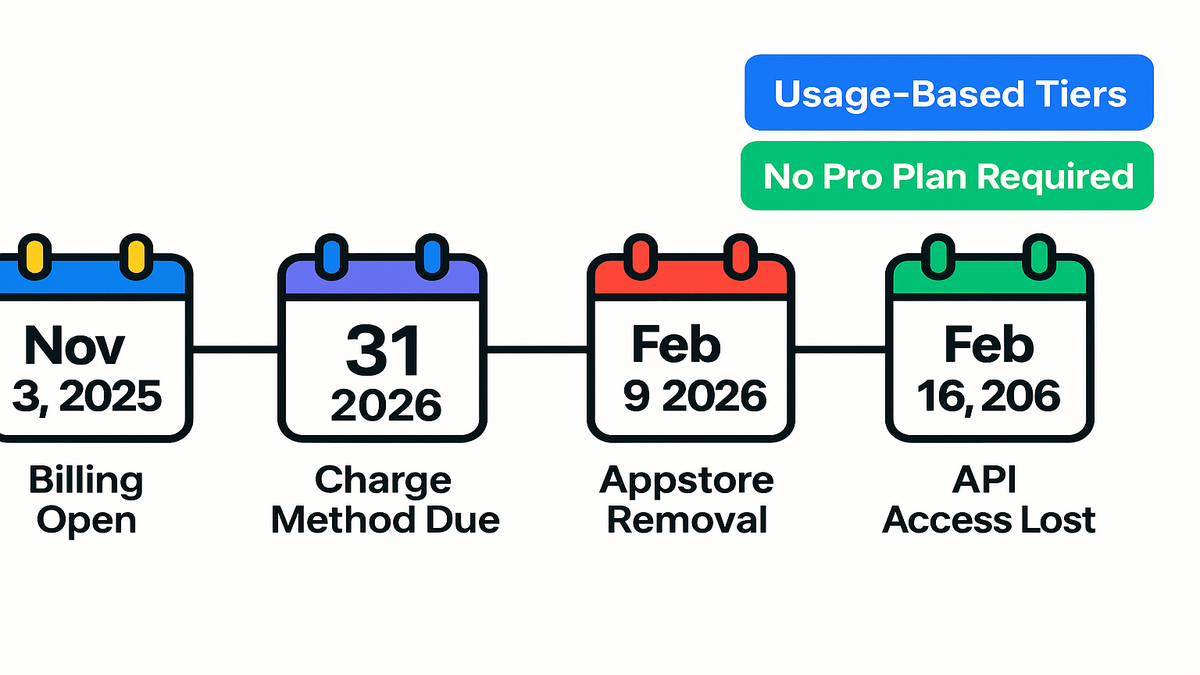
That’s the new reality with Amazon’s SP‑API fee rollout. Billing setup opened November 3, 2025. Charge methods are due January 31, 2026. Miss that, and you start losing visibility February 9. One week later, you lose access. This isn’t a “deal with it later” thing.
Here’s the good news. Amazon aligned fees to usage and dropped a big old cost. Third‑party devs no longer need a Professional selling plan to use SP‑API. Translation: that old subscription you ate to build is gone. Play this right and you can offset new API costs. You can streamline pricing with a retainer fee structure and sharpen margins.
You don’t need panic; you need a plan. Let’s build yours.
Here’s exactly what to do. Understand the changes and hit the deadlines. Clean up billing and tax details. Price like a consultant, not a utility meter. Over‑communicate with sellers before Amazon’s notices land. Nail these basics this month. Then Feb 9 and Feb 16 become non‑events. Your competitors’ bad day becomes your quiet win.
TL;DR
New SP‑API fee model with critical deadlines: Nov 3 (billing open), Jan 31 (charge method due), Feb 9 (appstore removal + auth blocks), Feb 16 (API access lost).
Third‑party devs no longer need a Professional selling plan; budget shifts to SP‑API tiers.
Treat SP‑API usage like a consulting cost structure: map tiers to retainers and pass‑through costs cleanly.
Price like a pro: build in “expert consulting fee” positioning, not just cost‑plus.
Communicate early to sellers to avoid churn on Feb 9/16 notifications.
What’s Changing
The new SP‑API monetization model
Amazon is aligning SP‑API fees with service usage. They’re introducing flexible tiers sized for different developers. Practically, that means predictable billing tied to how you actually use SP‑API. Not a one‑size gate. Billing setup opened November 3, 2025 in the Solution Provider Portal. Charges begin after you submit valid payment info by January 31, 2026.
Relevant docs to keep handy: Amazon’s Selling Partner API docs and release notes. They’re your source of truth for changes and timelines.
Think of this shift like moving from a cover charge to metered power. With usage‑aligned pricing, smart teams plan calls, cache sensibly, and batch workflows. Those teams will control spend. Teams that spray API calls everywhere? They’ll feel it in COGS. The upside: you finally get clear line‑of‑sight from features to unit economics. That makes roadmap choices easier and internal chargebacks fair.
Prepare without guessing. Instrument code to tag each call by feature and customer plan. Roll those tags into a weekly usage report. Don’t just watch totals. Watch the shape of demand across endpoints. That lets you map usage to pricing tiers without surprises.
No more Pro selling plan
Big shift: third‑party developers no longer need a Professional selling plan to use SP‑API. If you paid a monthly fee just to keep your app humming, that cost goes away. Your budgeting moves from “pay to enter” to “pay based on usage.” That’s cleaner for forecasts and smoother for unit economics.
In the U.S., the Professional selling plan has cost $39.99 per month. Many indie devs carried it to maintain authorizations while building or supporting tools. Removing that line item lets you reallocate spend into real usage. That usage drives outcomes customers care about. Way easier to defend in a CFO review.
Example indie dev margin flip
You kept a Professional plan just to maintain app authorizations. With the new model, you drop that subscription and reallocate to API tiers. Net impact: cleaner COGS and better CAC payback math. You can package API usage into a retainer fee structure. More on that below. If you’re unsure, model both scenarios for 12 months. Odds are you get higher clarity and fewer mystery costs.
Run a quick sanity check. List your top three features and estimate call volume per customer per month. Multiply by your current install base. Add 25–50% buffer for peak periods. That’s your planning number. If the eliminated selling plan cost covers a big chunk, great. You’ve got headroom to preserve or even expand margin.
Forecast usage without guesswork
- Tag calls by endpoint, customer, and plan. Export weekly.
- Separate “baseline” calls from “value” calls. Keep auth checks and pings apart from inventory, orders, and pricing.
- Model 1x, 1.5x, and 2x scenarios for seasonality and launches.
- Identify calls you can cache, like catalog lookups. Identify calls you must fetch fresh, like pricing or order updates.
- Set alert thresholds at 70/90/100% of plan. Give yourself time to adjust.
Deadlines You Cannot Miss
Key dates with consequences
- November 3, 2025: Billing setup opens in the Solution Provider Portal. Start early.
- January 31, 2026: Deadline to submit charge method info. Annual subscription fees begin.
- February 9, 2026: Missing payment or tax info? App is removed from the Selling Partner Appstore. New authorizations are blocked.
- February 16, 2026: Apps without valid charge info lose SP‑API access. Selling partners get notified your app is no longer available.
Amazon’s cadence is intentional. There’s an early setup window, a hard billing start, then two enforcement events. Treat January 31 as your real cutoff. Feb 9 and Feb 16 are what customers remember. Because they’ll feel it.
What each deadline triggers
- Jan 31: Your billing and tax setup must be clean. This is your compliance line.
- Feb 9: Visibility and growth hit. No new authorizations, appstore removal, credibility damage.
- Feb 16: Operational hit. Live features fail. Partners receive a “no longer available” notice.
Translate that risk to simple terms. Feb 9 shuts off your pipeline. Feb 16 pokes your churn. If you’re fundraising or in enterprise security reviews, appstore removal complicates diligence and approvals.
Example a 3-step failure cascade
An analytics app waits until February to set up billing. On Feb 9, they’re removed from the appstore. New prospects can’t authorize. Warm pipeline freezes. On Feb 16, existing customers see outages and a notice the app is no longer available. Within a week, support queues triple and churn spikes. The team scrambles to restore authorizations. Yep, this is avoidable.
For authoritative references, monitor Amazon’s SP‑API docs and release notes. Watch for adjustments or clarifications to the schedule.
Your deadline checklist
- Finance: correct charge method, backup card, billing contact verified.
- Legal/Tax: legal entity name matches tax IDs. W‑9/W‑8BEN‑E or VAT details on file as applicable.
- Ops: two‑person review of portal entries. Screenshots of confirmations stored in your runbook.
- Support: macros ready for reassurance and rare “we’re on it” contingencies.
- Comms: emails scheduled for pre‑Jan 31 and the week of Feb 9, just in case.
Price Like A Consultant
Map API tiers to retainer
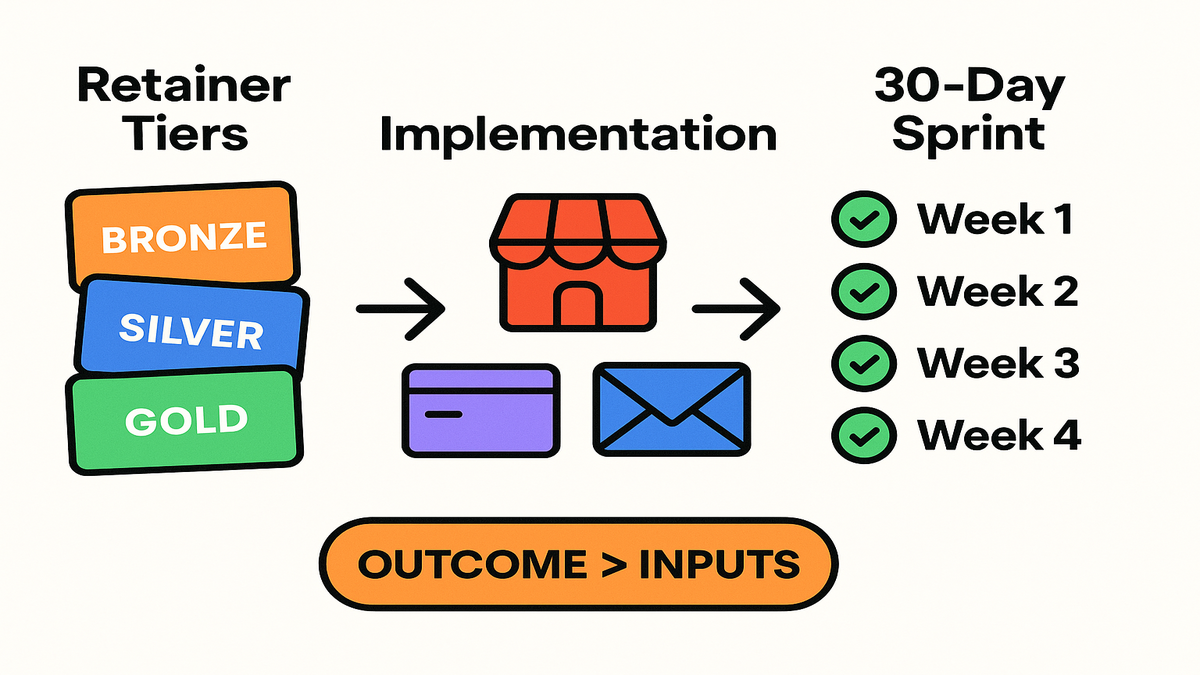
If you bill monthly, treat SP‑API fees like consulting costs. Build tiers that map to usage bands and include a service margin. Think Bronze, Silver, and Gold retainers. Tie them to data volume, refresh frequency, and support SLA. This turns variable API costs into predictable revenue. It also makes conversations cleaner.
Use language your customers already understand. “Retainer fee structure” and “expert consulting fee” land well. Also “how much does my consulting offer cost” maps fine to SaaS plans. It works best when value is outcome‑based, like inventory accuracy and time saved.
Add one more layer. Define what’s inside the retainer versus plus‑up work. Core workflows like order sync and basic catalog updates sit in Bronze. High‑frequency pricing intelligence or multi‑store rollups belong in Silver. Intensive forecasting, custom exports, or SLA‑backed incident response sit in Gold. Your SP‑API tier planning should mirror these bands.
Benchmarking and positioning
Top consultants don’t quote by the hour. They quote by outcome. Mirror that philosophy. Anchor on revenue impact, error reduction, and automation. Then back into price with cost‑plus as the floor, not the ceiling. If your feature replaces a project manager’s manual workflow, say that. Reference project manager consulting rates as the avoided cost. If you deliver training or SOPs, draw lines to curriculum development consultant fees.
Position your offer clearly:
- Lead with the win: “Reduce stockouts 30–60%” or “Recover hours weekly from reconciliation.”
- Translate the win to line items customers recognize: avoided labor and faster cash conversion.
- Use social proof: before‑after timelines and time‑to‑value. Share a simple ROI formula.
Example outcome inputs
You run a replenishment optimizer. Instead of itemizing API calls, offer a Growth Retainer. It guarantees weekly demand forecasts and stockout alerts. Inside your model, you budget for SP‑API tier, infra, and support. Outside, you sell performance: fewer stockouts and higher sell‑through. You’ve turned a usage cost into an outcome product.
To keep customers happy, publish a simple “What’s included” table and a one‑page SLA. People don’t churn when they know what they’re buying. And it matches the metrics they care about.
A quick pricing worksheet
- Floor: SP‑API tier + infra + support hours at efficient delivery rates.
- Target: floor plus 40–70% margin based on outcomes and differentiation.
- Guardrails: discounts capped at 10–15% for annual prepay or multi‑brand bundles.
- Expansion: usage‑based features priced as add‑ons, not hidden overages.
Implementation Playbook
Set up billing now
Log into the Solution Provider Portal. Add a valid charge method and tax info well before January 31, 2026. Double‑check account ownership, billing contacts, and notifications. Treat this like production. Do two‑person checks, save screenshots, and set calendar reminders for renewals.
Cross‑reference the SP‑API docs and release notes. Align SDK changes, auth flows, and fee‑related headers or reports needed for internal chargeback.
Pro tip: keep an internal “evidence doc” with timestamps, screenshots, and Amazon emails. If something goes sideways, you escalate with receipts, not guesses.
Clean up listing and authorizations
If your app is on the Selling Partner Appstore, audit your description and coverage. Check supported marketplaces and pricing copy. February 9 isn’t just enforcement. It’s a trust test. If you disappear from the appstore, prospects assume the worst. Make it boringly obvious you’re compliant and stable.
Add a reliability section to your listing. List supported regions, refresh cadence, and support hours. Tight, human language beats jargon. Also confirm OAuth screens, consent prompts, and post‑auth redirects are clean. First impressions matter. Especially while slower competitors are paused.
Proactive seller communications
Draft two emails. One pre‑Jan 31: “We’ve completed billing setup; no action required.” One contingency note if you hit a snag: “Temporary issue; resolved within X hours.” Publish a short status page update. Pin a message in your support portal. Beat Amazon’s automated notices to your customer’s inbox.
Here are simple templates you can adapt:
Assurance (send week of Jan 22–26): Subject: We’re ready for Amazon’s SP‑API changes — no action needed Body: We’ve completed Amazon SP‑API billing and tax setup ahead of the Jan 31 deadline. No changes to your plan, pricing, or features. We’ll keep you posted if anything evolves, but we expect no impact.
Contingency (only if needed): Subject: Brief SP‑API delay — resolving now Body: We’re finalizing Amazon SP‑API billing details and expect completion within [X hours]. Your data and features remain safe. We’ll update this thread and our status page as soon as we’re clear.
Example the calm not storm
A workflow app posts a status banner the week of Jan 20. It says, “We’ve completed Amazon SP‑API billing setup. No impact expected.” When Feb 9 hits, nothing changes for customers. That’s the point. Quiet beats heroics.
Cost control cut waste
- Cache read‑heavy endpoints for reasonable windows.
- Batch writes and run non‑urgent jobs during off‑peak hours.
- Only request fields you actually use. Trim payloads where supported.
- Back off intelligently and avoid pointless retries.
- Build a delta pattern. Fetch changes since last sync, not full refreshes.
Telemetry cheat sheet
- Per‑endpoint call counts by feature and plan.
- New authorizations versus churn by week. Catch Feb 9 effects fast.
- Error budget: timeouts, throttles, and auth failures.
- Cost per active account and per feature.
- Forecast versus actual usage with alerts at 70/90/100%.
Quick Pulse Check
- You’ve added a valid charge method and tax info in the Solution Provider Portal.
- You’ve modeled SP‑API tiers inside a retainer fee structure with outcome‑based pricing.
- You’ve refreshed your appstore listing and support macros for Feb 9 and Feb 16.
- You’ve scheduled customer comms before Amazon’s notices land.
- You’ve instrumented usage tracking to prevent overage surprises.
If you answered “no” to any of the above, assign an owner and a date today. Put the checklist in engineering standup and the customer success huddle. Keep it there until every box is checked.
Need a lightweight way to centralize SP‑API usage and performance telemetry? Consider Requery to unify queries, automate reporting, and keep usage on budget.
FAQ Real Questions
Professional selling plan needed
No. Third‑party developers will no longer need a Professional selling plan to access SP‑API under the new fee structure. That old requirement, and its monthly fee, goes away. It can offset some API charges for smaller teams.
February 9 vs February 16
On Feb 9, apps without valid payment and tax information are removed from the appstore. New authorizations are blocked. On Feb 16, those apps lose SP‑API access entirely. Selling partners are notified the app is no longer available. Feb 9 hits growth. Feb 16 hits operations.
How new tiers work
Amazon is aligning fees with service costs and usage. They’re offering flexible tiers for different sizes and profiles. Specific pricing depends on your usage. Budget by mapping expected call volume and feature mix to a tier. Then run 1.5x and 2x sensitivity checks to avoid surprise overages.
Pass costs without churn
Adopt a consulting‑style retainer. Package outcomes like forecast accuracy and refund recovery with a bundled monthly fee. Include API usage inside. Avoid itemized per‑call charges in your plans. Anchor value to alternatives like project manager consulting rates or manual ops.
Training SOPs pricing tip
Yes, bundle it. If you include structured enablement, reference value covered by curriculum development consultant fees. Position your plan as turnkey: software, enablement, and support. That supports an expert consulting fee, not commodity SaaS pricing.
Track changes confirm deadlines
Check Amazon’s official SP‑API docs and release notes regularly. Your Seller Central and Solution Provider Portal messages are canonical for your account. Bookmark them and set weekly reminders until you’re fully compliant.
Operate across marketplaces or regions
Keep billing and tax profiles accurate for each entity. Confirm your app listing shows marketplaces you truly support. Test authorizations in each region. Differences in catalog size and order volume can change usage shape. Plan tiers with regional headroom.
Reduce API usage without hurting
Prioritize caching, deltas, and off‑peak batches. Only sync what changed, when it matters. Let users choose refresh frequency per workflow. Hourly for pricing, daily for catalog. Instrument and prune unused endpoints tied to legacy features.
Contingency if slips Jan 31
Activate your comms plan immediately and share a clear ETA. Escalate billing issues through official channels with your evidence doc. Pause non‑critical launches. Keep the homepage and status page updated. Offer a goodwill credit once resolved for affected customers.
Readiness Sprint
- Week 1: Verify organization details. Add charge method and tax info in the Solution Provider Portal. Document confirmations.
- Week 2: Audit appstore listing, authorizations, and marketplace coverage. Update support macros and status page.
- Week 3: Model SP‑API tiers inside a retainer fee structure. Define Bronze, Silver, and Gold with outcome guarantees.
- Week 4: Send customer comms. Dry‑run a Feb 9 and Feb 16 incident playbook. Instrument usage alerts at 70/90/100% of expected tier.
Execution tips:
- Put a single owner on billing and a single owner on comms. They sync daily.
- Do a 30‑minute tabletop drill. “It’s Feb 9. Appstore removal just happened. What’s our move?” Capture gaps and fix them same day.
- Add a Friday weekly update to leadership until Feb 16 passes quietly.
Stick the landing. Set a calendar lock for Jan 31, 2026 at T‑7 days and T‑1 day. No surprises.
You’re not being punished; you’re being pushed to run tighter. The old “keep a selling plan to keep the lights on” hack is gone. In its place: usage‑tied fees, cleaner economics, and a hard timeline that forces discipline. Set up billing now. Price like a consultant, with outcomes first and cost transparency inside. Over‑communicate with sellers. You’ll skate through Feb 9 and Feb 16 while competitors scramble. The delta between prepared and panicked is a calendar invite and two emails. Take the easy win.
Want real‑world examples of how teams price, package, and communicate platform changes? Explore our Case Studies.
References
- Amazon Selling Partner API Documentation
- SP‑API Release Notes (official)
- Amazon Selling Partner Appstore (for app listing context)
- Sell on Amazon Plans and Pricing (background on selling plans)
2007: devs built for free. 2026: devs billed by usage. Same mission—ship value, just with better math.