

When a deprecated SP-API resource hits removal, success drops from 100% to zero overnight. No soft landings. No partial credit. Just instant failures.
If your app still leans on XML or flat files, or ignores Solution Provider Portal billing prompts, you’re playing chicken with revenue. Amazon already flagged what’s ending, what replaces it, and when charges start. Your next move decides if your logs scream errors or your roadmap keeps shipping.
The good news: you can future-proof this. Amazon’s JSON-first Listings pipeline is cleaner, easier to validate, and simpler to watch. The fees and portal migration hurt, sure—but they’re predictable. You have a playbook here.
Zoom out for a second. Deprecations aren’t gentle warnings; they’re timers. The new Listings flow gives real schemas, live validation, and clearer errors. The Solution Provider Portal gives billing that won’t blindside your CFO. Plan now, and you’ll hit the deadline like a green light. Wait, and you’ll debug 500s while sellers flood your inbox.
TLDR
- Deprecated SP-API endpoints work until removal, then every call fails hard.
- Migrate XML or flat file listings to JSON (Listings Items or JSONLISTINGSFEED).
- Move dev operations into the Solution Provider Portal and set up billing.
- Track Amazon’s posted dates for billing, Appstore removals, and SP-API access.
- Use validation mode, push notifications, and PTD schemas to cut listing errors.
- Subscribe to Amazon’s deprecation announcements and the changelog to stay ahead.
What’s changing and why
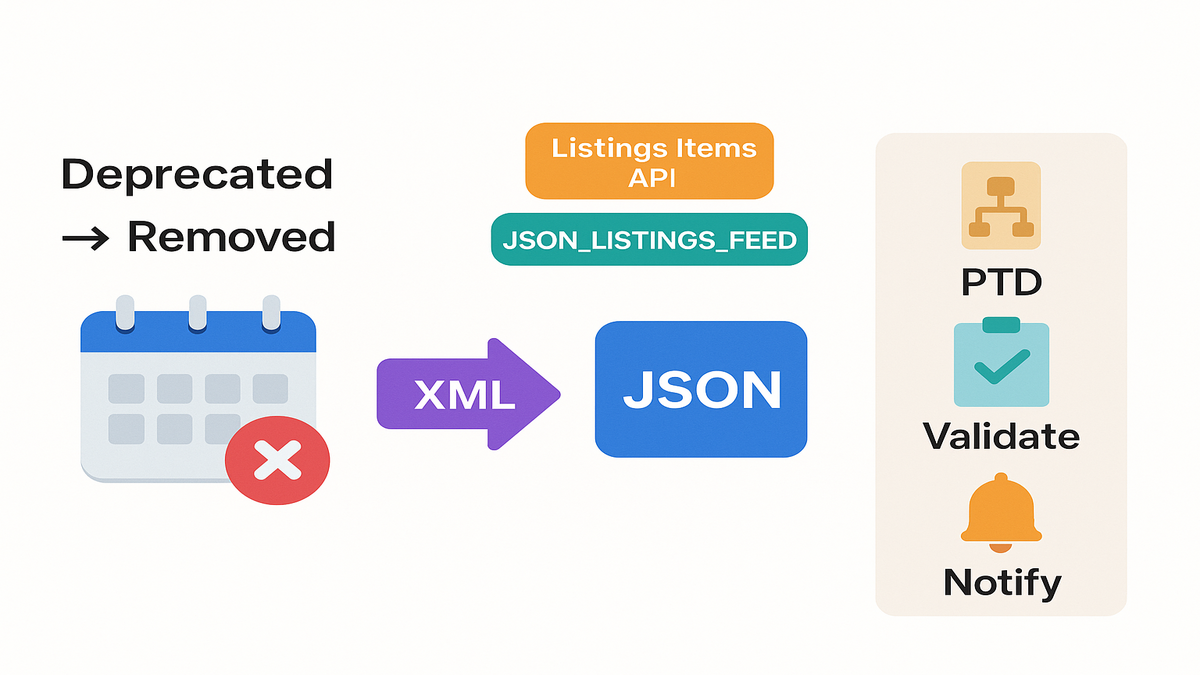
Deprecated vs removed
Amazon’s position is explicit: “Deprecated SP-API resources are no longer in active development. Calls to deprecated SP-API resources will continue to be successful until their removal date. After the removal date, calls will fail.” That’s from the Amazon Developer Docs, and it’s the only SLA that matters for migrations.
Practically, don’t treat deprecations like optional refactors. They’re expiring contracts. If an endpoint is on the clock, your maintenance window is scheduled. You just haven’t booked it yet.
Here’s the simple mental model: deprecation = warning light; removal = engine stall. Shift your timelines to treat removal dates as hard release deadlines. Put the date on the team calendar, assign a DRI, and tie it to a sprint. If last-mile tests still hit a deprecated route two weeks before removal, escalate now.
Also, watch downstream effects. If you rely on a partner library that still calls the old route, you inherit their risk. Ask vendors for their migration plan and pin a version verified on the new API.
The new billing reality
Starting in late 2025, Amazon opened billing setup in the Solution Provider Portal and rolled out a new SP-API fee model. Then come enforcement dates: add a valid charge method and tax info by the deadlines, or Amazon removes your app from the Selling Partner Appstore, blocks new authorizations, and finally cuts SP-API access.
Expert quote (Amazon Docs): “Applications without valid charge information will lose access to SP-API.” Translation: this isn’t a UI nag; it’s a service gate.
If you build or maintain apps for sellers, your operating model changes. Billing and compliance are now first-class build tasks—just like OAuth and throttling.
A quick setup checklist so Finance and Dev don’t ping-pong:
- Solution Provider Portal access confirmed for the right accounts and roles.
- Primary charge method added (corporate card or debit) and a backup method.
- Legal entity and tax profile completed per region, with IDs where required.
- Company contacts set (technical, billing, compliance) so notices don’t vanish.
- App metadata updated in the Appstore so sellers aren’t confused by notices.
Pro tip: add recurring calendar reviews, quarterly, to re-check billing data and card expiry. Lots of cutoffs happen because a card expired or an email alias died.
XML to JSON pivot
What actually moved
Amazon deprecated XML and flat file listing inputs in favor of JSON via Listings Items APIs or the JSONLISTINGSFEED submitted through the Feeds API. This touches pricing, inventory, relationships, images, and attribute-rich product data.
The backbone now is the Product Type Definitions (PTD) API, which gives fresh JSON schemas per product type. You stop guessing required attributes and start generating payloads the catalog actually expects.
In practice, your old flat files like Price, Inventory, and Product get replaced by:
- Listings Items APIs for real-time, item-level PUT or PATCH calls and attributes.
- JSONLISTINGSFEED for bulk submissions with many SKUs or heavy attributes.
- PTD API for schema discovery, required fields, allowed enums, and data types.
With PTD, you’ll query product type definitions per marketplace and locale. That matters because required attributes can change by category and region. Build payloads from the schema, not from memory.
Why JSON listings win
- One source of truth: PTD exposes the latest required and optional attributes.
- Clean validation paths: you can validate before sending to the catalog.
- Better error visibility: you’ll get clearer synchronous and async error details.
- Event-driven ops: push notifications for listing status and issue changes.
Quote (Amazon Docs): “Use the Product Type Definitions API to retrieve product type schemas and requirements.” It’s the schema contract you build around.
Add the speed factor: JSON APIs return clear, machine-checked responses you can route fast. Instead of a cryptic flat file result, you’ll see structured issues with codes and paths. That shortens triage and ends the “works on my machine” fights.
A pragmatic migration map
- Inventory your feed types. Map XML flat files to their JSON equivalents.
- Use PTD to pull the schema for each product type your catalog touches.
- Implement validation-mode first with Listings Items to catch issues early.
- Add Feeds API for bulk cadence (JSONLISTINGSFEED) where it fits best.
- Subscribe to Notifications API for listing changes and faster triage.
First-hand example: a mid-market apparel seller split workflows—real-time price and quantity via Listings Items patch, bulk new ASINs via JSONLISTINGSFEED. Result: fewer post-submit surprises and faster recovery when attributes change.
A few ground rules that save your weekends:
- Treat PTD like a living spec. Cache schemas, diff daily, and flag changes in Slack.
- Build one payload builder that takes a PTD schema plus your product model and outputs JSON. No one-off serializers.
- Start with one high-volume product type. Ship end-to-end, then clone the pattern.
- Use preview or validation requests before publishing. Fix at build time, not after.
Common pitfalls to avoid:
- Assuming attributes are global. They’re not; marketplace and product type matter.
- Forgetting relationships. Variations need the right parent and child structure upfront.
- Skipping image rules. Meet size, count, and role requirements per schema.
- Ignoring enums. If the schema says NEW or USEDLIKENEW, don’t invent values.
Dates that nuke uptime
2025 to 2026 recap
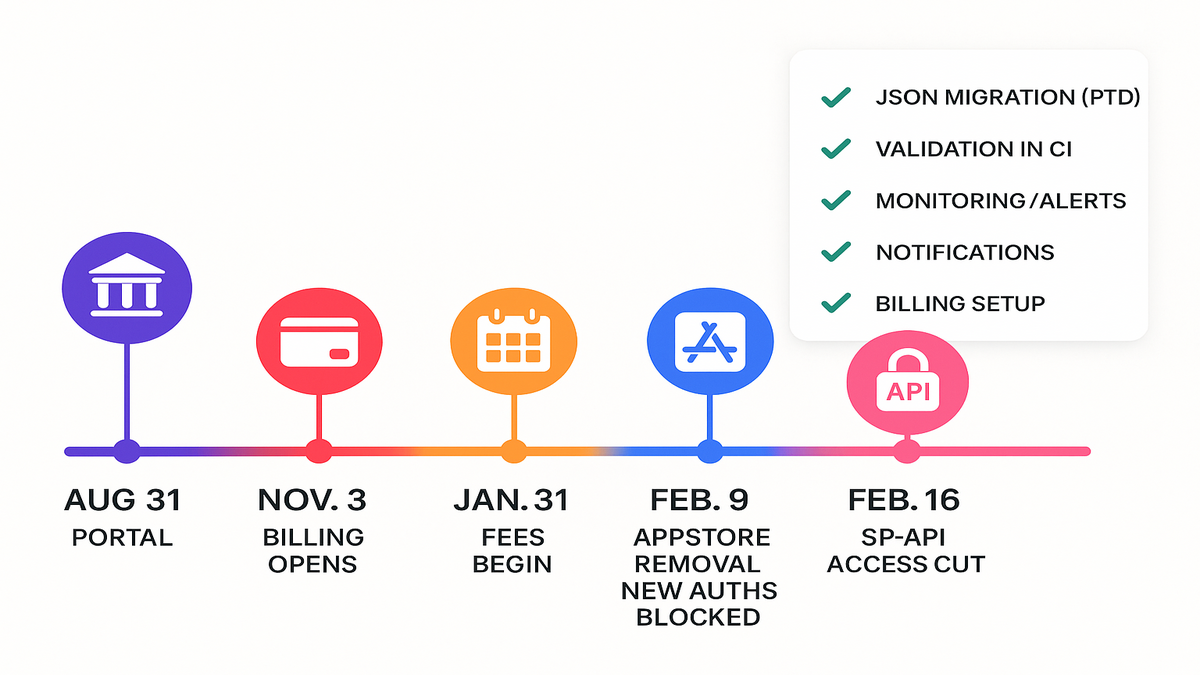
Amazon’s published milestones consolidate around portal migration, billing enforcement, and access control. Key dates, per Amazon:
- August 31, 2025: Existing SP-API developers migrate operations to the Solution Provider Portal.
- November 3, 2025: Billing setup opens in the portal (new fee structure).
- January 31, 2026: Annual Subscription Fee billing begins; charge method due.
- February 9, 2026: Apps without valid payment or tax info removed from the Appstore; new authorizations blocked.
- February 16, 2026: Apps without valid charge info lose SP-API access; sellers notified.
Always verify current deprecations and dates in Amazon’s changelog and Deprecations table before shipping.
Build your internal timeline backwards from the last possible day. Set a code freeze a week prior, with rollback to the last known-good JSON flow. Run a full catalog dry run, validation-only, two weeks out. Run product-type contract tests nightly during the final month.
What breaks and who
- Miss billing setup: Appstore removal lands first, and new auths get blocked.
- Miss charge or tax validation: full SP-API access is cut off entirely.
- Ignore endpoint deprecations: those calls hard-fail the day after removal.
Crucially, Amazon notifies selling partners when an app they authorized becomes unavailable. If you’re that app, downtime becomes a trust problem, not just an error budget. Loop CS and partner teams in early to prevent churn.
Expert quote (Amazon Docs): “After the removal date, calls will fail.” Architect like it’s certain—because it is.
Prep your comms now:
- Draft a seller email: what’s changing, zero action for them, cutover date, monitoring plan.
- Draft internal runbooks: rollback steps, who approves, and how to silence noisy alerts.
- Draft a Status Page post template: concise, with issue code links and next update time.
Futureproof your SP API
Versioning and test strategy
- Treat PTD schemas as code: cache, diff, and alert when they change.
- Add validation-mode to CI: fail builds on schema drift or new required attributes.
- Blue or green your feeds: switch producers without pausing ingestion.
- Build contract tests per product type: schema updates should fail tests loudly.
Take it one step further:
- Use idempotency keys so retries don’t duplicate changes across systems.
- Track feedId and requestId across logs. Keep correlation IDs end-to-end.
- Run nightly sandbox or small-marketplace trials to catch regressions early.
Monitoring and observability
Instrument per operation: Feeds, Listings Items, and Notifications. Track 4xx, 5xx, and throttling.
Add dead-letter queues for failed feed documents with replay controls ready.
Subscribe to Notifications API for listing issues; route on-call with context.
Create synthetic checks for deprecated endpoints—alert if they’re still called.
Extra signals to add:
- Alert on sudden drops in feed processing or spikes in issue counts.
- Watch for schema mismatch errors and bucket by product type.
- Capture Amazon headers for rate limits and request IDs to debug trends.
Governance that sticks
- Owner map: name a DRI for deprecations, billing, and PTD schema updates.
- Change calendars: line up deprecation dates with your sprint and release cycles.
- Documentation: standardize JSON payload builders; avoid one-off serializers.
- Comms: write seller status emails before you actually need them.
Add two simple controls:
- A weekly 15-minute “SP-API pulse” to scan the changelog and deprecations table.
- A quarterly audit where engineering, finance, and support confirm billing and scopes.
Quote (Amazon Changelog): “Refer to the Deprecations table and changelog for deprecation and removal dates.” Bake those docs into your weekly ops review.
Quick gut check
- Deprecated ≠ optional; removal flips working traffic into hard failures.
- JSON is now table stakes: PTD schemas, validation-mode, and notifications.
- Portal and billing aren’t admin chores—they’re uptime requirements now.
- Dates are public; your runbook should be public internally too.
- Monitor deprecated calls and schema drift like you would security issues.
If you can’t answer “Who owns each deprecation?” and “Are our top three product types passing validation today?”—that’s your to-do this week.
FAQs for busy builders
Selling account needed
No. Amazon says third-party developers can operate via the Solution Provider Portal without a Selling on Amazon account. If you keep a seller account for Seller Central access, normal Selling on Amazon fees still apply. But it’s not required for SP-API.
Fastest path off XML
Start with your highest-volume feeds. Use the Product Type Definitions API to fetch schemas, implement Listings Items PUT or PATCH with validation-mode for real-time updates, and use JSONLISTINGSFEED via the Feeds API for bulk. Ship one product type end-to-end, then templatize.
Which endpoints and when
Check Amazon’s Deprecations table and the public changelog. Both list deprecation and removal dates. Subscribe to release notes so changes hit your inbox, not your pager.
Missed billing deadlines
Amazon will remove your app from the Selling Partner Appstore, block new authorizations, and then cut SP-API access if valid charge and tax information aren’t on file by the dates. Your authorized sellers get notified that your app is unavailable.
JSON feed vs Listings Items
They complement each other. Use Listings Items for low-latency updates like price and quantity. Use JSONLISTINGSFEED for bulk, high-throughput tasks like new listings and large attribute sets. Many teams run both for coverage and cost control.
Different payloads per marketplace
Yes. Pull PTD schemas per marketplace and locale. Required attributes and allowed values vary by region and category. Don’t assume US and EU share the same rules.
Batching bulk feeds
Keep batches small enough to retry safely and large enough to be efficient. Group SKUs by product type and marketplace. Track each feedId and reprocess only failed items when possible.
Mix XML during transition
You can run a staged rollout, but plan to replace all XML or flat file flows before removal dates. Keep the JSON pipeline as the primary path and limit XML to legacy corners while you migrate.
Reduce noisy errors
Use validation or preview first. Add strict schema checks in CI. Normalize error codes into a common format in your logs. Route listing issues to a specialized queue so the right person sees them fast.
Sandbox testing
Yes, but expect partial coverage. Use the SP-API sandbox where available to test shapes. Still run small, controlled tests in live marketplaces to confirm behavior before a full cutover.
Performance wins
- Reuse feed documents when possible and compress with GZIP to speed uploads.
- Cache PTD responses with a sensible TTL and invalidate on changelog alerts.
- Parallelize feed creation and document uploads, but respect throttling and backoff.
What logs to keep
Retain request payload hashes, feedIds, requestIds, marketplaceIds, productType, schema version, and issue lists. That’s your black box when sellers ask, “what happened to my listing?”
Ship your SP API migration
- Audit: inventory deprecated endpoints and all XML or flat file usage.
- Dates: pull current deprecations and enforcement dates from Amazon’s docs.
- Schemas: fetch PTD schemas for top product types; version them in Git.
- Validate: add Listings Items validation-mode to CI; fail on schema drift.
- Convert: replace XML with JSON payload builders; add JSONLISTINGSFEED for bulk.
- Monitor: alert on deprecated calls, 4xx or 5xx spikes, and PTD changes.
- Portal: complete Solution Provider Portal migration and add charge and tax info.
- Comms: prewrite seller notices and internal runbooks for cutover day.
Here’s the punchline: Amazon told you the rules and gave you dates. Your risk is time, not uncertainty. Migrate to JSON using PTD schemas, wire validation into CI, instrument your feeds, and lock billing in the Solution Provider Portal. Do this now and you’ll glide past removal dates while others scramble.
Skip it, and you’ll be writing apology emails while your sellers scramble.
Looking for a faster path to validation, monitoring, and cutover? Explore our platform Features and see real outcomes in our Case Studies.
References
- Amazon SP-API Developer Hub: Amazon SP-API Developer Hub
- Deprecation reminders (November 2025): Deprecation reminders (November 2025)
- SP-API Changelog: SP-API Changelog
- Deprecations table: Deprecations table
- Product Type Definitions API guide: Product Type Definitions API guide
- Product Type Definitions API reference: Product Type Definitions API reference
- Listings Items API reference: Listings Items API reference
- Listings Items API use case guide: Listings Items API use case guide
- Feeds API reference: Feeds API reference
- Feeds API use case guide: Feeds API use case guide
- Notifications API guide: Notifications API guide
- Notifications API reference: Notifications API reference
- Usage plans and rate limits: Usage plans and rate limits
- SP-API sandbox overview: SP-API sandbox overview
- Authorization and authentication overview: Authorization and authentication overview
- Registering your application: Registering your application