


Tech debt compounds faster than interest; deprecation is your margin call.
Amazon is phasing out deprecated SP-API resources. Translation: your integration might work today… until it doesn’t. The November 2025 update doubled down on the timeline and nudged developers to move now for better functionality and support. Calls to old endpoints may limp along for a bit, but there’s no promise they’ll keep working. That uncertainty is the real risk here.
Here’s the opportunity: treat this like an upgrade, not a fire drill. Newer SP-API versions usually mean cleaner models, tighter validation, and support that won’t ghost you when you need it most. If you’re shipping seller tools, ops dashboards, or automation around Listings, Orders, Feeds, or Reports, this migration protects reliability and unlocks newer features immediately.
In this guide, you’ll get the no-BS rundown on what “deprecated API” really means, how to plan a smooth SP-API migration, and how to avoid sneaky landmines that kill timelines—plus quick notes on related searches like AEM Communities deprecation, AEM service packs, and “Illustrator CSS properties deprecated.” No fluff. Just a field-tested plan you can actually run this week.
- TL;DR
- Deprecation means “still available now, but on the way out.” Please act early.
- Amazon’s November 2025 update reaffirms SP-API migration timelines and expectations.
- Build a migration plan: audit calls, map gaps, add adapters, test, and cutover.
- Don’t rely on “temporary” behavior; feature parity is not behavior parity at all.
- For AEM and Illustrator queries, check official deprecation notes and MDN first.
If you only scan one section, make it the playbook below. It’s the difference between a clean cutover and a 2 a.m. incident.
Decode Deprecation Without The Headache
What deprecated API means
“Deprecated” is a formal heads-up from a platform: a resource or version is set for retirement. It still functions until the provider removes it or lets it quietly degrade in production. The key is expectations, not wishes. The provider stops adding features, may limit fixes, and can remove it on a published or updated timeline.
In practical terms, you can call deprecated endpoints today without much trouble. Tomorrow, you might get rate-limit shifts, edge-case breakage, or it may simply go dark. Amazon’s stance is clear: deprecated SP-API resources are callable for now but aren’t guaranteed long-term functionality. That’s not a stable contract you can rely on.
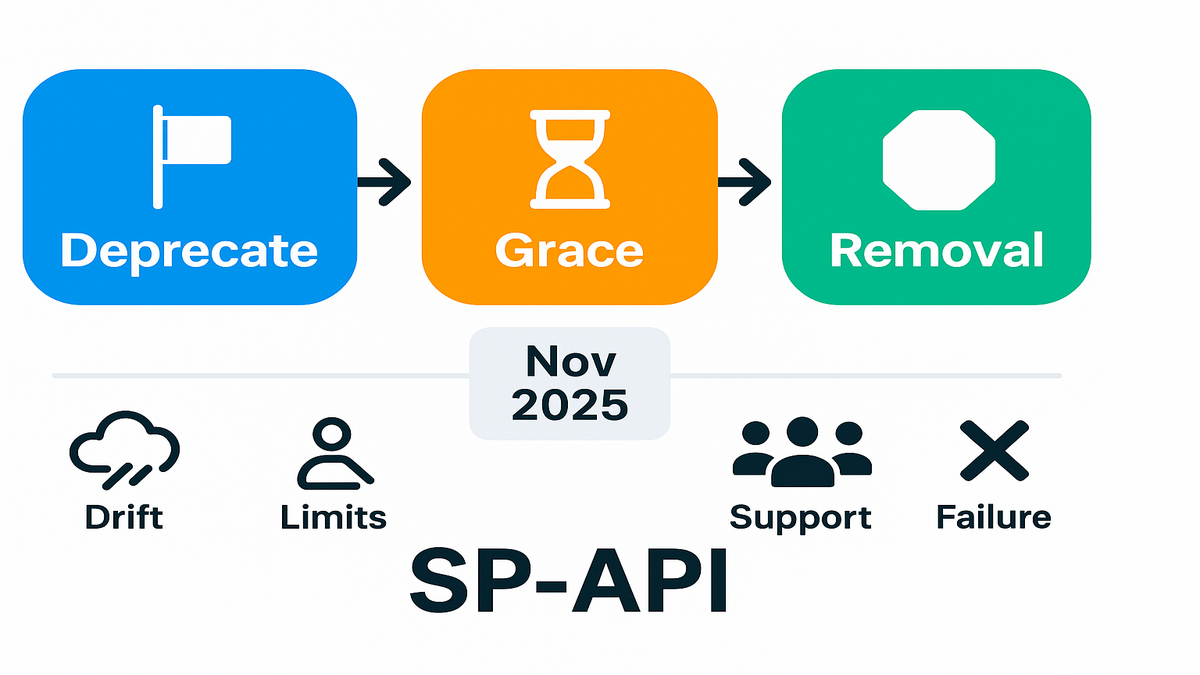
And this is bigger than one vendor or one team. Most mature platforms follow the same rhythm: announce, grace period, and then removal. Your best defense is staying inside supported versions so your integration rides the wave, not the undertow.
What it isnt
- Deprecated doesn’t mean “broken.” It works, but probably only for a while longer.
- Deprecated doesn’t mean “unsupported immediately.” You just move to the back of the support line.
- Deprecated doesn’t mean “optional.” If revenue rides on it, the timeline is not a suggestion.
Why Amazon is doing this
APIs evolve to reduce ambiguity, improve security, and standardize models over time. Newer SP-API versions often simplify pagination, normalize response schemas, or consolidate scopes for clarity. Deprecation signals a better path—and a cutoff date for old paths.
“Deprecation is a communication process as much as a technical one. The mistake is assuming time is on your side.” That’s the line a veteran platform engineer gave me years ago. Still true today.
A quick mental model
- Deprecate: provider flags version X as on the way out, loudly and clearly.
- Grace period: you keep calling X, but all momentum and fixes go to version Y.
- Removal: X stops working entirely. If you haven’t migrated, the outage is self-inflicted.
For Amazon specifics, track official SP-API announcements and release notes on the developer docs.
Pro move: build a tiny “lighthouse” script that pings doc pages weekly and posts a note in your team channel when release notes update. No heroics—just a lightweight tripwire so you never miss a change.
November 2025 Update
The November 2025 reinforcement
Amazon’s November 2025 update reiterates the deprecation path: deprecated SP-API resources keep working “for now,” but there’s no long-term guarantee. This is the final nudge to move to supported versions to keep access stable and get improved functionality quickly.
In other words, the countdown didn’t start yesterday, but the window is closing fast.
The risk window youre in
- Hidden drift: old endpoints can behave differently under new data constraints today.
- Limited fixes: bugs on deprecated versions tend to linger longer than you want.
- Support triage: you’ll spend more time in docs and forums, not with first-class support.
- Burst failure risk: one platform-side change can turn a minor warning into a hard failure.
A mid-market seller analytics app we reviewed last quarter ran mixed versions: Listings Items on an older spec and Reports on a newer one. It looked fine until a schema edge case in the older Listings call started throwing unexpected validation errors on certain ASINs. The bug wasn’t prioritized because, well, deprecated. The fix was simple: migrate. It cost a sprint instead of a day.
For more real-world migrations and outcomes, browse our Case Studies.
Where to read signals
- Announcements: scan for “deprecation,” “replacement,” or “sunset” language in SP-API news pages and release notes.
- Changelog deltas: any model or enum changes in newer versions that touch your payloads.
- Sandbox: parity changes show up early here—treat it like radar, not a toy environment.
Bottom line: the November 2025 note is your calendar invite to ship the migration.
Helpful habit: add a quarterly dependency review. List every external API, current version, announced deprecations, and owner. Ten minutes now beats ten hours of incident triage later.
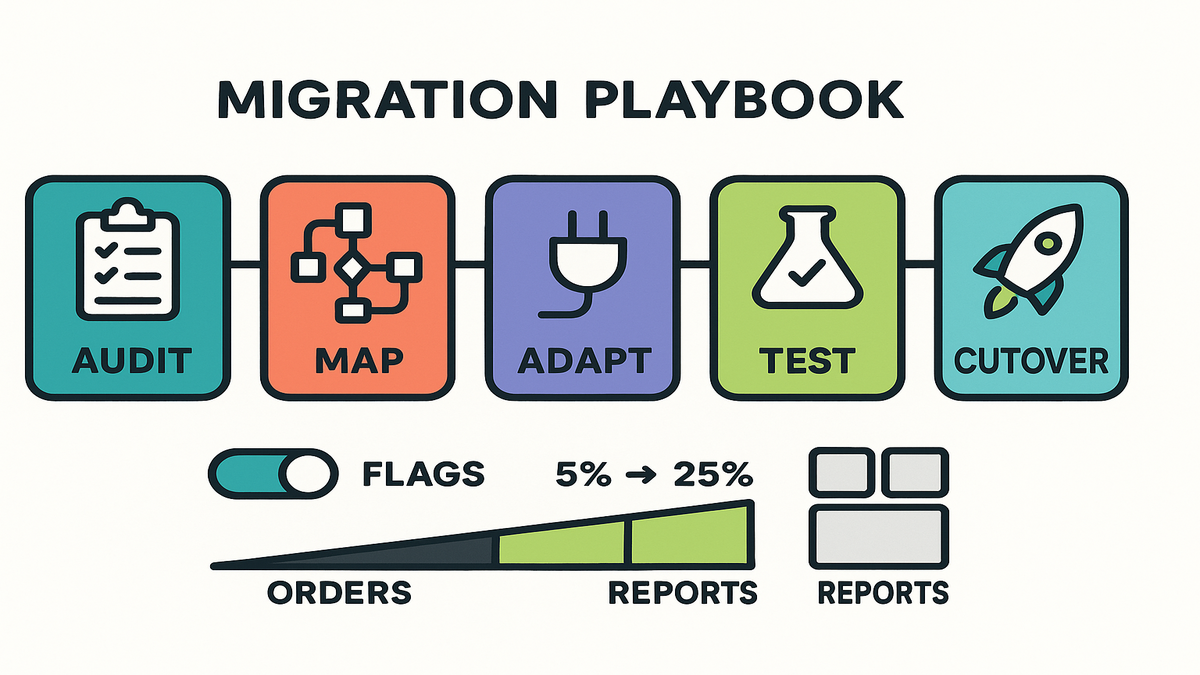
SP API Migration Playbook
Before you start, align on outcomes. Pick one or two business metrics you’ll improve during migration. For example, report generation time or retries per 1,000 calls. When migration ships with a measurable win, the org leans in next time instead of dragging feet.
Step 1 Audit surface area
Inventory every SP-API call by operation, version, scope, and frequency. Pull thirty days of logs. Identify anything marked deprecated or older than the current published version. Note response parsing code and downstream consumers carefully.
Pro tip: tag each operation with a business criticality score from one to three. A one-hour outage for Orders ingestion is not the same as a one-hour outage for a low-volume Feeds job.
Add depth to the audit:
- Map ownership: list the on-call team and code owners for each area like Listings, Orders, Reports, and Feeds.
- Capture dependencies: databases, queues, and batch jobs that touch each call in production.
- Log payload shapes: sample successful and failed responses so you know what “normal” looks like today.
- Note auth scopes: confirm tokens and scopes cover the newer endpoints you’ll adopt.
Step 2 Map behavior changes
Read the latest docs for your targets like Reports, Feeds, Listings, and Orders. Compare:
- Required or optional fields and how they’re validated in practice.
- Enum changes, since new values can break brittle switches silently.
- Pagination patterns or rate-limit notes that shift throughput and stability.
- Error models, since some move from 4xx to richer error bodies you must parse.
If the new version consolidates endpoints, plan to rewrite call graphs, not just swap URLs.
Also check downstream assumptions:
- Ordering: some lists may sort differently by default across environments.
- Nullability: fields once nullable can become required, or the reverse.
- Numeric precision: small rounding differences can skew financial rollups fast.
Create a one-pager per domain with “what’s new, what breaks, and decision.” You’ll thank yourself during code review.
Step 3 Add adapters
Wrap old calls behind an internal interface. Implement new-version adapters on the other side. This lets you flip traffic with a config flag, safely and quickly. Keep marshaling code, the mappers, tight and tested—this is where most bugs hide.
A real example: a tools vendor moved from legacy Reports flow to the modern create-and-poll pattern. They built a mapper that normalized report metadata and added idempotent retries. Cutover was a config switch during low-traffic hours. Rollback plan existed, but it wasn’t needed.
Adapter hygiene checklist:
- One mapper per endpoint, with no shared “god” mapper anywhere.
- Explicit null or unknown handling with metrics pushed to dashboards.
- Idempotent retries with exponential backoff and jitter on every path.
- Feature flag per capability, not per raw version string that might change.
Step 4 Test like pessimist
- Contract tests: validate request and response shapes for your real payloads.
- Replay: pipe a subset of production inputs into sandbox and new endpoints.
- Shadow: dual-write or dual-read in prod with metrics hidden from user views.
- Alerting: create version-specific dashboards and error budgets that are visible.
As one staff engineer put it, “You don’t find race conditions with hope. You find them with volume.”
Turn tests into telemetry:
- Track 95th and 99th latency deltas between old versus new.
- Count schema mismatches, unknown enum values, and retries honestly.
- Alert on any rise in 4xx or 5xx per endpoint version immediately.
Step 5 Cutover with rollback
Gradually ramp: five percent to twenty-five percent to one hundred percent, with health checks between steps. Keep the rollback switch live until you pass a full business cycle, week or month.
Make rollback boring:
- One-click toggle in your ops console, visible and simple.
- Clear “when to roll back” rules like error rate, latency, or data drift.
- Post-rollback play: capture samples, file a ticket, and retry after a fix.
Security side note: any time you change scopes or endpoints, re-check least privilege and rotate tokens if needed. Migrations are a natural moment to tighten access.
AEM and Illustrator Edge Cases
AEM Communities and service packs
If you’re here from “aem communities deprecated” or “aem service pack,” quick note: Adobe Experience Manager routinely publishes “Deprecated and Removed Features” and Service Pack release notes. If your site relies on AEM Communities features like forums or UGC, confirm current status in Adobe’s docs and plan upgrades accordingly. Service Packs can deprecate or replace modules—treat those notes like API deprecation notices: read early, test in lower environments, and migrate before the removal date.
This also answers “adobe experience manager support” vibes: supported paths are documented and tied to versions; you’ll get the best help when you’re on the current, supported line.
Illustrator and deprecated CSS properties
Designers exporting from Illustrator sometimes see CSS that’s marked deprecated or obsolete in modern browsers. The fix isn’t to fight Illustrator; it’s to post-process output instead. Run exported assets through a CSS pipeline using linters and PostCSS, and remove or replace deprecated properties per MDN guidance. This keeps front-end builds clean and avoids quiet layout regressions.
Practical steps:
- Add a CSS linter to CI that fails on obsolete properties every single time.
- Use Autoprefixer and PostCSS to modernize output without breaking builds.
- Check MDN’s deprecated list before shipping major style changes widely.
Multitenant apps one more landmine
If you run a multi-tenant seller app, pin tenants to capability flags, not versions. For example, use “newreportsapi=true” rather than “v2021=true.” This avoids rebuilds if version labels change and makes rollouts per-tenant trivial.
A platform lead told me their biggest win was operational: “Capabilities let us roll forward or back for a single merchant without redeploying. Support tickets fell off a cliff.”
Extra guardrails for multi-tenant:
- Maintain a tenant-to-capability matrix with start dates and owners noted.
- Throttle per-tenant to keep one heavy user from eating your rate limits.
- Run canary tenants from different segments to expose varied data shapes.
Speed Bumps You Can Predict
Schema mismatch the silent killer
Newer SP-API versions often tighten schemas a lot. If your parser is loose, stringly-typed, or nullable everywhere, you’ll miss changes until a downstream system explodes. Add JSON schema validation in tests and in observability by logging unexpected fields counts.
Mitigation:
- Validate inbound and outbound payloads against known schemas regularly.
- Add “strict mode” parsers that fail loudly in test and shadow environments.
- Snapshot critical transformations so diffs are easy to spot and discuss.
Enum expansions will break switches
If you switch on enum values, like a status, new values can fall into defaults and be misrouted. Protect with explicit “unknown” handling and dash-to-alert when seen in production logs.
Quick fix:
- Add a metric counter for every fallback or default case you have.
- Alert on first sight of an unknown enum to force a codepath review.
Rate limit behavior can shift
Rate limits and throttling semantics evolve over time. Don’t hardcode magical backoffs anywhere. Implement exponential backoff with jitter and honor “Retry-After” or equivalent hints faithfully. This is boring engineering, and it saves your bacon during traffic spikes.
Checklist:
- Respect per-endpoint throttles; don’t assume global behavior or shared limits.
- Centralize retry logic so changes are one edit, not twenty across services.
- Track retry count and backoff duration in metrics for visibility.
Partial parity is real
Feature parity isn’t behavior parity at all. A response might look “the same,” but include edge-case differences like ordering, rounding, or nullability. Test business scenarios, not just JSON equality, before you trust it.
As a reminder from Google’s API guidance, summarizing a common industry practice: clients should be given clear timelines and migration paths; providers owe stability, clients owe agility. That dance is how you keep systems resilient long-term.
Documentation bugs and gaps
Docs can lag behind reality sometimes. When behavior seems off, compare sandbox versus production and check release notes for clarifications. File reproducible examples so support can route quickly and get you help.
Snapshot Check
- You’ve inventoried every SP-API call and tagged the deprecated ones.
- You know the target versions and the exact schema deltas in detail.
- You’ve built adapters and mappers with unit and contract tests that pass.
- You’ve replayed real payloads against the new endpoints with confidence.
- You have dashboards, alerts, and a kill switch ready for rollback today.
- You’ve scheduled a phased cutover during low-risk hours already.
If you can’t check all six, pick one gap and fix it today. Momentum beats perfection.
FAQ
Deprecated API meaning
It means the provider is keeping an older API around temporarily while signaling it will be removed later. It may still work today, but fixes and support are limited, and removal is on the roadmap. Use the successor version to stay supported.
Deprecate an API right way
Publish a clear notice, document a migration path, provide a grace period, and keep the old version live while encouraging adoption of the new one. Offer changelogs, code samples, and migration guides. When removal happens, it should surprise no one.
November 2025 update change
It reinforced the existing direction: deprecated SP-API resources may continue working for a time but are not guaranteed long-term. Developers are encouraged to move to newer versions for improved functionality and reliable support. Treat it as a final reminder to migrate.
Mixed SP API versions
It’s common, but risky for reliability. Mixed versions create drift and test gaps quickly. Prioritize migrating high-impact operations, like Orders and Reports, first. Use capability flags and adapters so you can ramp traffic, monitor, and roll back safely.
AEM Communities deprecated check
Adobe maintains official “Deprecated and Removed Features” pages and Service Pack release notes. Always confirm current status there and plan upgrades accordingly. If Communities features are in your stack, verify support and timelines before your next release train.
Illustrator CSS properties deprecated warnings
When Illustrator exports assets, some generated CSS may include properties considered deprecated or obsolete in modern browsers. Run exports through a CSS linter and consult MDN’s deprecated features list to swap in modern equivalents that are supported.
Typical SP API migration time
It depends on scope and team, but many teams can migrate a single high-impact area, like Reports, in one to two sprints if they use adapters, replay tests, and phased rollout.
New API version lacks feature
Escalate via official support with a minimal repro and business impact details. Meanwhile, isolate the gap behind a capability flag and keep the old call only for that path while migrating everything else. Don’t let one missing feature block the entire program.
Parallel run versions indefinitely
You can shadow for a while, but you shouldn’t rely on deprecated versions long term. Use shadow traffic to build confidence, then cut over and remove dead paths to reduce maintenance risk and confusion.
SP API Migration Sprint
- Pull thirty days of API logs; list every operation, version, and scope.
- Mark deprecated endpoints; map each to its supported successor clearly.
- Diff schemas like fields, enums, pagination, and errors; note code hotspots.
- Implement a mapper and adapter for one high-impact operation immediately.
- Write contract tests; replay real payloads in sandbox or the new version.
- Add feature flags, dashboards, and a rollback toggle; ship to five percent traffic.
Close the loop with health checks. If clean, ramp to twenty-five percent, then one hundred percent.
Bonus: a one-week plan
- Day 1: Audit and capability flags scaffold for your top areas.
- Day 2–3: Mapper and contract tests for the top endpoint you selected.
- Day 4: Replay and shadow in production with alerts and dashboards.
- Day 5: Five percent to twenty-five percent ramp, review metrics, prep rollback.
- Day 6–7: Full cutover, remove dead code paths, and write a short retro.
Here’s your closer: deprecation is not a plot twist—it’s the screenplay. Platforms evolve because they have to. Your job isn’t to fight it; it’s to surf it cleanly. If you treat Amazon’s November 2025 update as a deadline, you’ll rush. If you treat it as a forcing function to modernize, you’ll win. Move your critical endpoints first, ship behind flags, and bake observability into every step. That’s how you convert platform change into a reliability upgrade your users can feel.
Need battle-tested tooling for feature flags, shadow traffic, and rollbacks? Explore our Features.
References
- Amazon Selling Partner API documentation: Announcements and news
- Amazon Selling Partner API documentation: Release notes
- Amazon Selling Partner API documentation: Rate limits
- Amazon Selling Partner API documentation: Sandbox
- Google Cloud API deprecation policy
- Adobe Experience Manager 6.5: Deprecated and removed features
- Adobe Experience Manager 6.5: Service Pack release notes
- MDN Web Docs: CSS obsolete and deprecated features
- MDN Web Docs: Retry-After header
- AWS Architecture Blog: Exponential Backoff and Jitter
- Martin Fowler: Feature Toggles
- Pact: Contract testing docs
- Autoprefixer (PostCSS)