

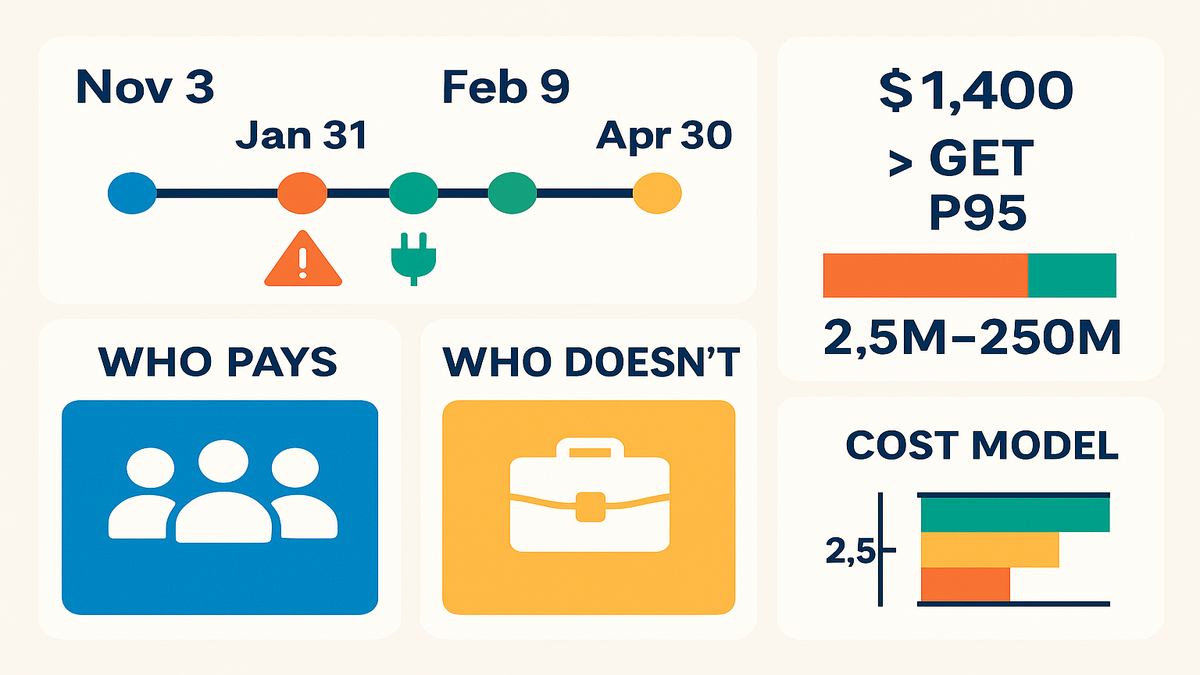
Amazon just put a price tag on your SP‑API habit. Starting November 3, 2025, billing goes live in the Solution Provider Portal. By January 31, 2026, you need a valid charge method and tax profile. Miss it, and your app gets booted from the Selling Partner Appstore by February 9, 2026—and your API access goes dark on February 16, 2026.
This isn’t a scare tactic. It’s Amazon funding SP‑API dev, new features, and partner support with a predictable model: a $1,400 annual fee plus tiered monthly charges for GET calls starting April 30, 2026. The message is clear: build efficiently, cache smart, and pay for what you actually use.
If you build tools for multiple sellers, this applies to you. If you’re a seller or vendor using SP‑API only for your own catalog, this does not. The opportunity? Use this shift to clean up call patterns, sharpen pricing, and win trust by staying online while competitors scramble.
Think of this like Amazon changing the road rules from “no tolls” to “EZ‑Pass.” You still drive, just smarter. The winners will be teams who know their GET footprint, set up billing on time, and squeeze more value from fewer calls. That’s not a tax—it’s a forcing function to tighten your ops.
TLDR
- Billing live now; submit payment + tax info by Jan 31, 2026.
- Appstore removal on Feb 9, 2026; API access suspended Feb 16, 2026 if missing info.
- $1,400 annual subscription fee starts Jan 31, 2026.
- Monthly usage fees begin Apr 30, 2026, based on GET calls.
- Four tiers from 2.5M to 250M monthly GET calls; overages at $0.40 per 1,000.
- Third‑party multi‑seller tools pay; single‑seller internal use is not charged.
Whats Changing Who Pays
The rollout and the why
Amazon opened billing in the Solution Provider Portal on November 3, 2025. To keep uninterrupted SP‑API access, you must add a valid payment method and tax details by January 31, 2026. Starting April 30, 2026, a monthly tiered fee for GET calls kicks in. The stated goal: sustainable funding for API improvements and better partner enablement.
Here’s the practical read: predictable, usage‑based billing lets Amazon invest in stability and features without mystery costs. For you, it’s an incentive to stop doing full‑table reads for fun. Expect better tooling, clearer quotas, and more pressure to design like an adult.
If you haven’t touched the Solution Provider Portal in a while, block time this week. You’ll likely need your legal entity name, tax ID, billing address, and a charge method that won’t decline mid‑month. Don’t wait for end‑of‑month crunch to test a new card.
Who gets charged and doesnt
If you’re a third‑party dev building tools that serve multiple sellers, you’re in the fee program. If you’re a seller or vendor using SP‑API purely for your own business, you’re not in scope. Translation: multi‑tenant SaaS tools and agencies should budget; single‑tenant internal tooling avoids these fees.
Some quick heuristics:
- If your login supports more than one Amazon account, you’re almost certainly in scope.
- If your product page is in the Selling Partner Appstore, plan for fees.
- If your code runs for a single brand’s internal ops, you’re likely out of scope for this program—but keep your Seller Central tax and business info clean.
First hand example two outcomes
- Example A: You run a catalog optimizer serving 300 sellers. You submit billing, pay the $1,400 annual fee, choose a GET‑call tier, and tune usage. You keep shipping.
- Example B: A vendor with a private integration for internal listings ignores this. No fee applies, but they still must ensure their Seller Central and tax info are correct for their own operations.
Zooming in on Example A: they also add budget alerts, cap retries, and put P95 usage on a wallboard. When April hits, their costs land inside forecast, and they use pricing levers to protect margin. Zero drama.
Zooming in on Example B: they’re “not charged,” but they still depend on SP‑API for day‑to‑day ops. If their creds break or rate limits spike, they feel it. The lesson stays the same: practice good API hygiene even if you’re not paying the new fees.
If you came here searching for “medical billing setup fee structure launch” or a “billing setup fee structure launch calculator,” heads up: this article is specific to Amazon’s SP‑API fees. Different industry, different rules—keep reading for an SP‑API‑specific calculator approach.
Build Your Cost Model
Know your baseline audit GET
Before you guess tiers, instrument your GET calls by operation, marketplace, and customer. Pull 90–120 days of logs to capture seasonality. Identify your P50, P95, and P99 monthly call counts. Assign each heavy route an owner and document why it’s needed. If you can’t explain a call, it probably shouldn’t exist.
How to do this without a six‑week project:
- Tag every outbound SP‑API request with operation name, marketplaceId, sellerId, and a correlation ID.
- Log response status including 200/304/429. 304s help you confirm conditional requests are working.
- Roll up counts per operation per day; then aggregate monthly totals to compute P50/P95/P99.
- Watch retry multipliers. If your 429 rate is >1%, you’re likely paying twice for the same data.
- Create a “Top 10 endpoints by volume” list and a “Top 10 by growth.” Work those first.
Definitions in plain English:
- P50: your typical month. Fine for marketing.
- P95: the 1‑in‑20 heavier month. Price to this.
- P99: the outlier. Plan mitigation for spikes above P95, like graceful degradation.
Your lightweight fee structure launch
- Annual fixed: $1,400 starting Jan 31, 2026.
- Monthly variable: choose the tier that covers your expected GET calls, from 2.5M to 250M. For calls above your tier, budget $0.40 per 1,000.
- Model: Monthly Cost = Tier Fee + max(0, (ActualCalls − TierIncluded)) × $0.0004.
- Choose your tier off P95, not the average. Spikes get pricey if you land in overages.
Three quick scenarios:
- Slightly under tier: 2.4M calls on a 2.5M tier. Overage: $0. You’re golden.
- Slightly over: 2.7M calls on a 2.5M tier. Overage: 200,000 × $0.0004 = $80.
- Big launch spike: 6.1M calls on a 5M tier. Overage: 1.1M × $0.0004 = $440. Manageable if you planned it.
Note on taxes and location: your payment profile, like a US entity with a California billing address, determines applicable taxes. Amazon hasn’t announced state‑specific SP‑API fee differences, so plan for standard taxation in your jurisdiction and validate in the portal.
First hand example sanity check
You average 3.1M GET calls per month with P95 at 3.8M. You’d pick the tier covering slightly above 3.8M to avoid frequent overages. If you overshoot by 400k in a big launch month, overage is 400,000 × $0.0004 = $160. Your annual $1,400 is amortized at about $116.67 per month on top of tier and overages.
Add some guardrails: set budget alerts at 80%, 100%, and 120% of your expected monthly calls. When you hit 80%, drop freshness for long‑tail SKUs and pause non‑critical reports. When you hit 100%, notify customers, politely, that near‑real‑time views are temporarily on a slower cadence. When you hit 120%, trigger a post‑mortem and bake in a fix.
Beat the Clock
The non negotiable timeline
- Nov 3, 2025: Billing setup opens in the Solution Provider Portal.
- Jan 31, 2026: Deadline to submit valid charge method + tax info.
- Feb 9, 2026: Apps without valid info removed from the Selling Partner Appstore.
- Feb 16, 2026: SP‑API access suspended for non‑compliant apps.
- Apr 30, 2026: Monthly tiered GET‑call charges begin.
Treat these as production cutovers. Put them on your engineering calendar, finance calendar, and your customer‑facing roadmap. Build reminders two weeks and two days before each milestone.
What happens if you miss
Removal from the Appstore kills lead flow and credibility; losing API access halts ingestion, reconciliation, and automation. That means stale catalogs, broken alerts, and refunds you can’t reconcile. If you run an ops‑critical tool, treat this like a production dependency.
Also: data drift. Your dashboards will lie quietly while reality moves on. Support tickets spike. Churn risk follows. Avoidable with one afternoon of billing setup.
First hand example pre mortem
A repricer planned a Q1 feature rollout. They ran a pre‑mortem: “What if we lose SP‑API on Feb 16?” They accelerated billing setup, verified tax numbers, and created fallback read models, like last known prices with safe bands. The feature shipped on time, and they dodged a revenue dip their competitor suffered during a 48‑hour outage.
Their extra moves: they rehearsed credential rotation, added status page updates tied to SP‑API health, and set a one‑click switch to broaden cache TTLs during incidents. Customers noticed the transparency—and stayed.
Cut GET Calls Without Killing
Quick wins stop silent leaks
- Cache aggressively with short TTLs for high‑churn endpoints; revalidate with conditional requests where applicable.
- Batch pulls by seller and marketplace; schedule non‑urgent GETs during off‑peak windows.
- De‑duplicate: collapse identical requests in flight; add request coalescing at the service edge.
- Back off on 429s and errors; retries amplify cost and noise.
Add two technical details that pay off:
- Use ETags/If‑None‑Match and If‑Modified‑Since where responses support them. A 304 Not Modified avoids a full payload.
- Normalize parameter order and rounding so equivalent requests hit the same cache key.
Deeper cuts redesign for deltas
- Use delta patterns, only fetch what changed, rather than full syncs.
- Store computed views, materialized tables, for dashboards so the UI doesn’t trigger fresh GETs.
- Align SLAs with reality. Most sellers don’t need 60‑second freshness for long‑tail inventory.
- Kill vanity features that spray endpoints but don’t move revenue.
Where the SP‑API gives you event hooks, use them. Subscriptions and notifications can reduce polling for certain domains, like order or listing changes. Combine events with periodic reconciliation sweeps rather than hammering full reads every minute.
Product angle: offer “update frequency” as a visible control. Give customers the choice of 5‑minute versus 15‑minute updates on non‑critical data. People love knobs that lower their bill.
Business mechanics pricing packaging
- Introduce usage‑aware pricing. Tie higher plan tiers to freshness, account count, and report frequency.
- Offer an “optimized” plan that caps GETs with clear SLAs, plus a “pro” plan for real‑time folks.
- Communicate clearly: “We tuned our API usage to keep costs fair and reliability high.” It builds trust.
Also, update your terms. Add a fair‑use clause with transparency: “If API costs materially exceed plan assumptions, we’ll contact you to right‑size your tier or refresh settings.” Most customers prefer a conversation over a surprise throttle.
First hand example call reduction
A listing analytics app mapped its top 10 GET endpoints and found duplicate pulls across microservices. They added a shared read service with a 3‑minute cache and introduced delta polling for stable SKUs. Result: 42% fewer GETs, no user‑visible latency change, and predictable costs heading into April.
They also built a “request ledger” UI. For any card in the dashboard, they can see which SP‑API calls it triggers and when those calls last changed. This simple transparency caught two redundant fetches and one mis‑scoped query multiplying calls by marketplace.
Pit Stop Recap
- Set up billing and tax info before Jan 31, 2026—no exceptions.
- Model GET usage using P95, not averages; pick a tier accordingly.
- Build a lightweight calculator to forecast monthly spend and overages.
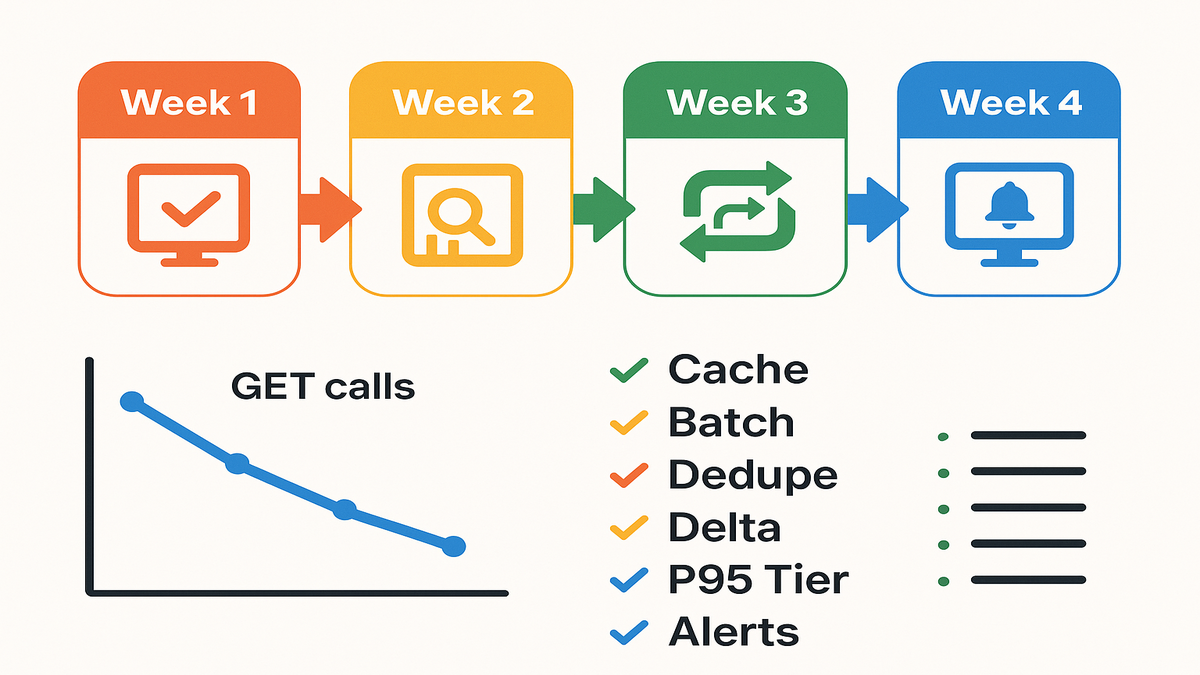
- Cut calls with caching, dedupe, batching, and delta pulls.
- Align product SLAs and pricing with data freshness and cost realities.
Add one more: put monitors on. If you can’t see your GET rate in real time, you can’t manage it.
FAQ
Does this apply to sellers
No. The fees apply to third‑party developers building tools that serve multiple sellers. If you’re a seller or vendor using SP‑API purely for your own catalog or ops, the announced fees do not apply.
What exactly is being charged
The monthly usage fee is based on the volume of GET calls. Amazon’s announcement specifies tiered charges for GET requests. Plan and optimize around read patterns, and keep an eye on future updates for any scope changes.
What are the tiers
There are four monthly tiers, with bundled GET calls ranging from 2.5 million to 250 million. Choose a tier that comfortably covers your P95 monthly usage to minimize overage risk. Calls above your tier are charged at $0.40 per 1,000.
Is there a free tier
No free tier was announced. Budget for the $1,400 annual subscription and the GET‑call usage fees starting April 30, 2026. If you’re early‑stage, reduce call volume with caching and scope features to avoid higher tiers.
I operate out of California
Your billing and tax profile, like a US entity with a California address, affects applicable taxes. Amazon hasn’t announced state‑specific differences to SP‑API fees. Ensure your tax details in the Solution Provider Portal are accurate and current.
Where do I set this
Set up payment and tax info in the Solution Provider Portal starting November 3, 2025. If you miss the January 31, 2026 deadline, your app can be removed from the Selling Partner Appstore on February 9, 2026 and lose API access on February 16, 2026.
Do retries count toward GET
Assume yes. Each GET you send is work the platform must handle, even if it’s a retry after a 429 or transient error. Build exponential backoff, jitter, and idempotent logic, and fix the root cause so you don’t pay twice for the same data.
Can I offset costs
Yes—many vendors align plan tiers to data freshness, number of connected accounts, and report frequency. Be transparent. Share that Amazon introduced SP‑API billing for GET calls and you optimized to keep costs fair. Give customers levers, like adjustable update frequency, instead of surprise fees.
How should I monitor usage
Expose a simple dashboard: calls by operation, calls by seller, 429 rate, cache hit rate, and projected month‑end total versus tier. Set alerts on anomalies, like a new endpoint suddenly spiking. The goal is boring predictability.
Your SP API Billing Plan
- Week 1: Log into the Solution Provider Portal; add payment and tax info. Pull 90–120 days of GET‑call logs.
- Week 2: Compute P50/P95/P99 monthly GET calls; draft your tier choice. Identify top 10 endpoints by volume.
- Week 3: Ship caching and dedupe for top 5 endpoints; add request coalescing and backoff.
- Week 4: Finalize tier, stakeholder sign‑off, and comms to customers. Set monitors and budget alerts for overages.
Make it stick:
- Week 1 bonus: Validate your charge method with a small test purchase if available, or at least verify authorization and expiration dates. Add a secondary payment method.
- Week 2 bonus: Run a spike drill. If calls jumped 40% tomorrow, what would you turn down first?
- Week 3 bonus: Add conditional GETs where supported, like If‑None‑Match or If‑Modified‑Since. Measure 304 rates.
- Week 4 bonus: Publish a changelog post: “We optimized SP‑API usage to improve reliability and keep pricing stable.”
Wrap this up before January 31, 2026 so February is a non‑event, and you glide into April with clean usage and predictable costs.
In the end, this change is a forcing function. It rewards lean engineering and honest SLAs. If you know your GET footprint, align your pricing, and ship the obvious optimizations, you’ll handle the $1,400 subscription and usage tiers without drama. More importantly, you’ll turn cost discipline into a feature—reliability. That’s the real moat when competitors are rate‑limited by architecture, not policy.
Need help auditing GET‑call logs, setting usage monitors, and automating caching strategies? Explore our Features, and see real‑world outcomes in our Case Studies.
Note: If you were searching for “billing setup fee structure launch calculator” in a medical context or “billing setup fee structure launch California,” this guide is scoped to Amazon’s SP‑API. Different domains, different rules—use the modeling framework here, but validate specifics with your provider and tax advisor.
References
- Amazon Selling Partner API documentation
- SP‑API Docs index
- Usage plans and rate limits, reference for API efficiency concepts
- Selling Partner Appstore
- Notifications API, reduce polling where applicable
- Reports API, design delta and report strategies
- Throttling and best practices, manage 429s and retries
- Authorization and onboarding overview, Solution Provider context