

You want custom LLMs that actually fit your use case. Not a prompt band-aid. But the old way—instances, GPUs, logs—turns into weeks of DevOps karaoke. And money burns while you wait.
You shouldn’t need a PhD in clusters to ship clear emails or invoice parsers. Or to follow your compliance rules without a fight. You want short loops, clean evals, and a simple path to prod. Basically: less yak-shaving, more shipping.
Here’s the flip: Amazon SageMaker AI just added serverless model customization. It gets you from idea to deployed endpoint in hours or days, not months. No instance guesswork. No MLOps yak-shaving. No late-night fire drills. Pick a model (Nova, Llama, Qwen, DeepSeek, GPT-OSS), add data, and go. The platform auto-scales, recovers fast from failures, and tracks everything.
That means your team can try three ideas before lunch. Kill the losers with real metrics, then double down on the winner. No infra blockers. No quota begging. It feels like dial-up to fiber.
If you googled ‘amazon sagemaker serverless model fine tuning tutorial’, good. You’re done with theory. You want steps. You’ll get the playbook here. We’ll cover pitfalls and deployment too. And endpoint timing. Yes, creating a SageMaker endpoint usually takes minutes, size dependent.
TLDR
- Fully serverless fine-tuning for popular LLMs—no instance selection required.
- AI agent guides spec, synthetic data, training, and eval.
- Techniques supported: SFT, DPO, RLAIF, RLVR (for verifiable goals).
- LLM-as-judge eval compares your custom model vs. base—fast.
- Deploy to SageMaker endpoints or Amazon Bedrock with a few clicks.
- MLflow logs metrics serverlessly; rapid recovery and autoscaling built-in.
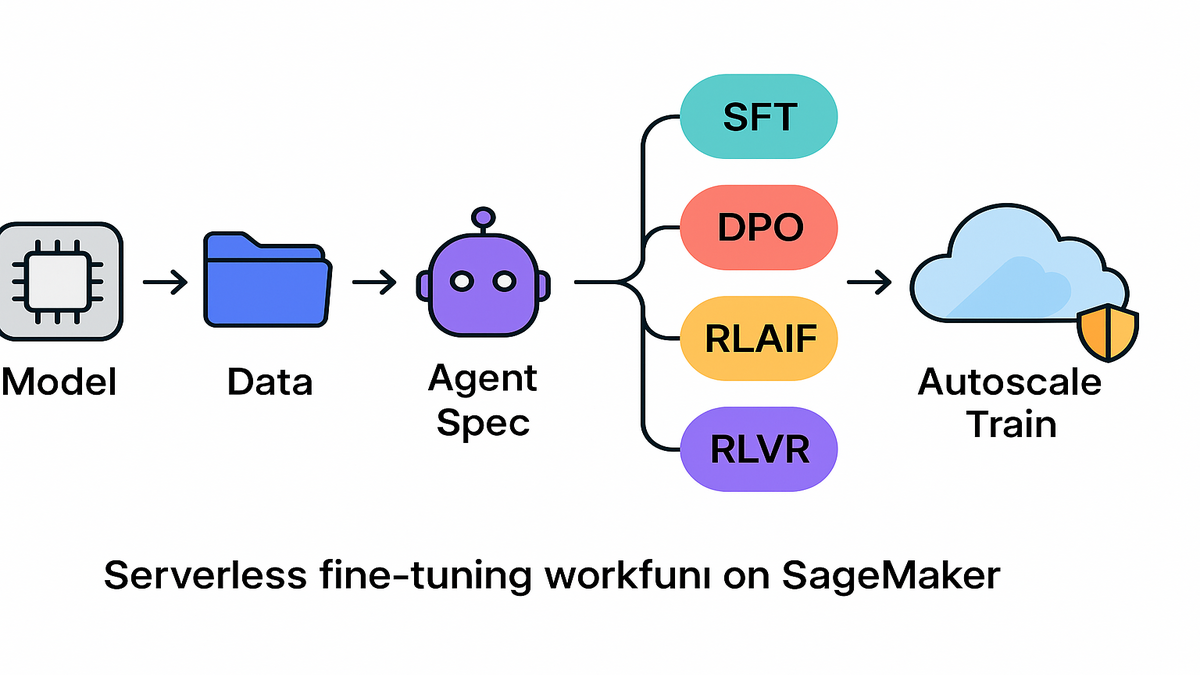
Serverless customization explained
Zero DevOps overhead
SageMaker AI’s new serverless model customization does provisioning and scaling for you. You don’t pick instances. You don’t set up clusters. No yak-traps. It sizes compute to your model and dataset, then scales during training. When training ends, it winds down. If a job fails, it recovers quick. You keep momentum instead of combing logs at 2 a.m. like a zombie.
- What changes for you: faster loops. Less waiting for capacity or config rewrites.
- Where it shines: legal, finance, healthcare. Tailored style, safety, compliance.
Under the hood, you get ephemeral compute that spins up only when needed. Caching cuts download time on common containers. No idle boxes burning cash. You pay for what you use, not for forgotten servers. More tries per week. Fewer “we’ll get to it next sprint” delays that stall teams.
Agent guided workflow
An AI scientist (agent) helps scope the job with plain language. It generates a spec: tasks, techniques, data needs, and metrics. It can create synthetic data, check quality, and run training and eval. Think of it as your co-pilot. It shrinks the “what now?” time a lot.
It won’t magically fix a messy dataset. But it will:
- Suggest schema and labeling rules. Stop twelve spellings of ‘refund’ madness.
- Propose sample sizes for a first pass. Start with 3–10k clean SFT pairs.
- Draft an evaluation template with safety prompts and tricky edge cases.
Example
Your legal team needs contract-risk summaries in plain English. Start with Amazon Nova or Llama. Upload 20k annotated clauses and notes. Ask the agent for a concise, accurate, neutral-tone summary bot. It proposes SFT plus DPO for tone. Then spins up a run. It compares outputs vs. the base. You get clear win rates. Robin AI-style legal workflows go from idea to useful in days. Not quarters spent waiting and explaining.
Layer in a small golden set—maybe 300 clauses with lawyer-written summaries. Add pass/fail rules for definitions, dates, and obligations. The agent bakes those into eval. See where your model wins or hallucinates. Catch issues before anyone in Legal hears the word ‘deploy’.
Choose the right technique
Supervised fine tuning SFT
Use SFT when you’ve got labeled input-output pairs that show good work. You want the model to imitate high-quality examples for your tasks. It’s the fastest on-ramp for grounding tasks like invoice parsing or Q&A. Start with SFT to cut hallucinations and match your brand’s tone.
- Best for: domain specialization, structured tasks, deterministic mappings.
- Tradeoff: SFT sets the baseline, but may miss nuanced preferences.
Practical tips:
- Keep demonstrations consistent. If you want bullets, always show bullets.
- Balance the dataset. Don’t let ‘password reset’ drown every other ticket.
- Start small and clean, then scale. A tight 5k beats a noisy 50k set.
Direct preference optimization DPO
DPO learns from preference pairs where one response is preferred. It avoids heavy RL infra by optimizing a direct objective from preferences.
- Best for: style, harmlessness, helpfulness, formatting consistency.
- Play: collect A/B choices. The agent can bootstrap with synthetic pairs.
Practical tips:
- Use diverse prompts. Don’t overfit to one tone or vibe.
- Track preference win rate on a held-out set. Watch for stalls. If it stalls, fix pair quality or add harder negatives.
RLAIF
Instead of human ratings for every output, use a strong model-as-critic. It scales alignment signals, popularized by Constitutional AI methods. Great when human raters are scarce or too expensive for volume.
- Best for: safety policies, refusal behaviors, helpful-but-safe replies.
- Note: use carefully. Keep a human slice to sanity-check drift.
Practical tips:
- Write a short “constitution” the critic will apply to outputs. Add rules like no PII exposure and medical disclaimers.
- Compare critic judgments to human reviews often. Catch bias or over-refusal.
RLVR
When you can write a checker, you can use RLVR for objective goals. Think math correctness, schema validation, or unit tests as rewards. If the checker passes, the model gets rewarded. If not, it learns.
- Best for: code gen, step-by-step reasoning, templates that must validate.
- Upshot: fewer reward hacks, more measurable wins you can trust.
Practical tips:
- Start with simple checks like JSON schema and field presence.
- Keep verifiers fast. Slow checkers bottleneck training loops hard.
Example
Customer support bot plan: start with SFT on resolved tickets. Add DPO using responses tied to five-star ratings. Teach stronger style. Layer RLAIF to sharpen refusals and safety policies. Use RLVR when you can verify claims against a rules engine. Like refund eligibility rules that always must pass validation.
Pro move: tag each training example with metadata. Include product line, region, language, and sentiment. Slice evals by those tags. See issues fast. You might find Spanish refunds lag English by eight points. Then you know exactly where to invest next.
From prompt to endpoint
Instant experiments LLM judge
SageMaker AI spins up a customization environment in minutes. After training, it evaluates your model vs. the base across scenarios. It uses an LLM as a judge, which correlates well with humans when designed. You get side-by-side outputs and metrics like win rate and latency. Ship or iterate based on a real scorecard, not vibes.
- Why it matters: you avoid death-by-demo. Every run has a scorecard.
- Add-on: define success criteria like exact match, BLEU/ROUGE, or citations. For RLVR, use checker pass rates too. The agent bakes it in.
Make the judge honest:
- Randomize output order to reduce position bias.
- Add canary tests with known answers like math and schema checks.
- Keep a small human-reviewed set to calibrate judgments.
Deployment options without friction
Once the model clears your thresholds, deploy to one of two places:
- SageMaker inference endpoints with flexible autoscaling and VPC isolation.
- Amazon Bedrock for fully managed, serverless inference at scale.
Provisioning a SageMaker endpoint typically completes in minutes. Timing varies by model size and region, of course. For a giant 70B model, expect more time than an 8B model. Containers download and memory warm-up takes longer, naturally.
Day-one checklist:
- Set autoscaling policies so you don’t pay for idle peak capacity.
- Enable logging for latency, tokens, and errors right away.
- Put the endpoint in a VPC if compliance is required for your team.
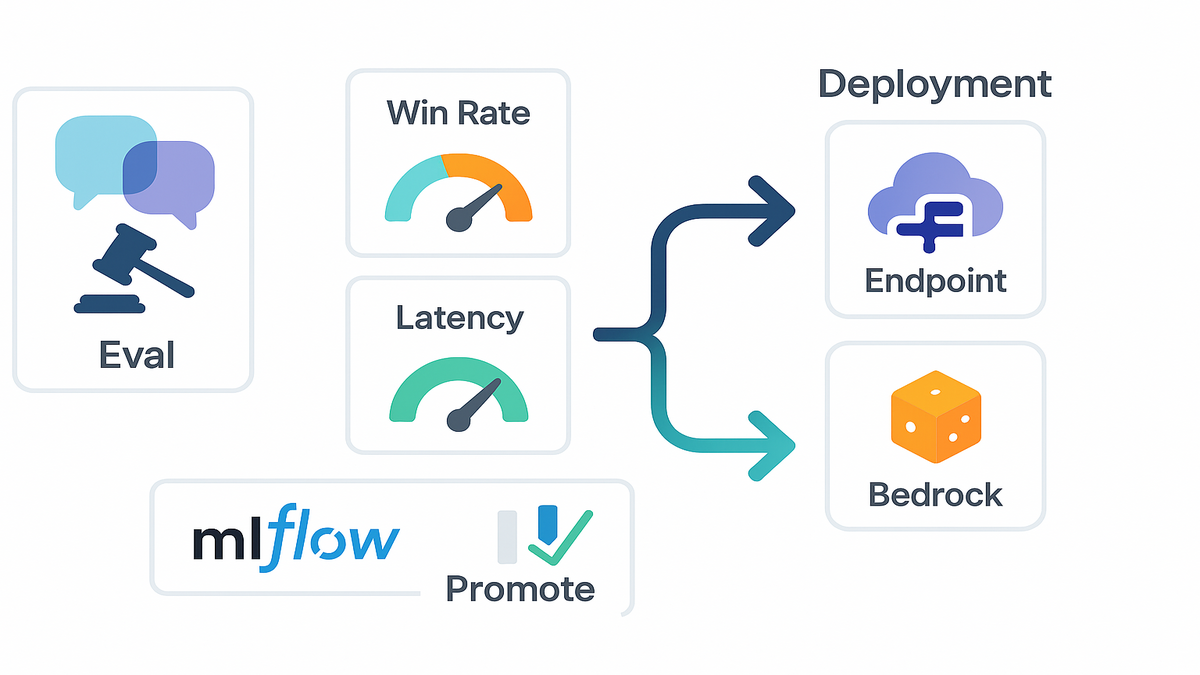
Pipeline friendly by design
Want a sagemaker pipeline create endpoint step baked in?
Add a post-train stage that registers the model and runs eval.
Only on pass, promote to a prod endpoint automatically.
This gates deployment on measured quality, not hopes and prayers.
Add approvals too. Require sign-off if safety violations exceed a threshold. Or if latency regresses by more than ten percent vs. baseline.
Example
You customize Qwen for call summarization tasks. The platform evaluates on 500 test calls vs. the base model. It shows a 28% win rate on accuracy. Hallucinations drop 35% by checker. You ship to a production endpoint by end of day. Clean.
Then you schedule nightly eval runs on a rolling sample of calls. If accuracy dips below 90% or hallucinations tick up, the pipeline halts. It pings Slack with a short report and the worst offenders. Tight loops mean fewer 3 a.m. surprises for the team.
LLMOps MLflow inside
Serverless experiment tracking
SageMaker AI integrates with MLflow. Your runs log automatically. Parameters, metrics, and artifacts are captured without extra servers. You get tracking and charts on demand with zero ops overhead. See side-by-side runs like SFT vs. DPO with win and loss metrics. Artifacts include checkpoints, eval sets, and confusion matrices too.
- Nice touch: autoscaling training and rapid recovery from failures. If a node hiccups mid-epoch, the system recovers fast. Your logs remain intact for analysis. No mystery gaps.
Name your runs with the “why,” like sft_v3_lora_rank16_dedup_on.
Tag them with dataset hashes. Answer audit questions in seconds.
When Legal asks which data trained the March 2 model, you’ll know.
No multi-day scramble or spreadsheet archeology.
Metrics that matter
Don’t just stare at loss curves till your eyes glaze over. Track the real stuff:
- Preference win rate (DPO), refusal accuracy (RLAIF), verifier pass rate (RLVR)
- Latency and cost per 1k tokens
- Safety violations per 100 prompts
- Hallucination rate using LLM-as-judge with retrieval checks
Line these up against your acceptance criteria. If cost per task trends the wrong way, pull some levers. Try LoRA adapters, batch inference, or smaller model variants. If safety violations spike, increase RLAIF weight or tighten the constitution.
Example
You run five SFT jobs on Amazon Nova with variant prompts. Then three DPO passes using different preference datasets for coverage. In MLflow, the best run shows a 22% higher win rate at 18% lower latency. You pin that run, promote it, and archive the rest. Clean lifecycle, no spreadsheets or copy-paste chaos.
Bonus: set budget alarms per run and per day. If an experiment burns tokens without accuracy lift, auto-stop and notify. Money saved is runway gained. Your CFO will smile.
Data prep and eval
Clean beats big. Do this before your first run every time:
- Deduplicate near-identical examples to avoid overweighting one pattern.
- Mask or remove PII unless your task truly needs it. If it does, limit access and log usage.
- Standardize formats like dates, currency, and units. Stop guesswork.
Build a tight evaluation set with clear stakes:
- 100–300 golden prompts with high-stakes answers. Think contract clauses, refund rules, and medical summaries.
- 50–100 trick prompts that trigger hallucinations or safety issues.
- A few long-form tasks to test latency and chunking behavior.
If you can automate a check, absolutely do it. Schema, math, and factual grounding to a reference are perfect. Verifiers are your superpower. Lean on them early and often.
Quick hits pricing models constraints
Costs and capacity
Serverless isn’t free. You still pay for training and inference compute. You just skip paying for idle infrastructure you forgot to turn off. Use smaller base models when possible. Prefer adapters for cheaper updates. If you came via ‘amazon sagemaker canvas pricing’, note this is different. Canvas is a separate low-code product with its own pricing. This guide covers serverless customization for LLMs only.
Cost levers you control:
- Token budget per prompt and response
- Batch size and gradient accumulation settings
- Adapter ranks, like LoRA rank 8 vs. 32 tradeoffs
- Caching frequency and warm pools for endpoints
Supported models and data
Popular bases like Amazon Nova, Llama, Qwen, DeepSeek, and GPT-OSS are supported. Keep your datasets clean: dedupe, guard PII, and set clear success criteria. The AI agent can synthesize data, but always validate samples first. Don’t unleash huge runs on junk. That’s pain.
If you’re unsure on size, start smaller. A tuned 8B model often beats a lazy 70B with prompts. You can scale up once you prove real lift and value.
Compliance and safeguards
For regulated teams, use private networking and encryption at rest and transit. Add human-in-the-loop review on a subset of outputs. Log everything in MLflow so audits aren’t a fire drill. If you searched ‘amazon sagemaker tutorial pdf,’ export your runbook. Share metrics dashboards with reviewers for peace of mind.
Add a red team eval with prompts that probe for policy breaks. Look for PII leaks, unsafe advice, or compliance violations. Track violation rates like you track latency. Treat it as a top metric.
Example
Healthcare summarization plan: start with SFT on de-identified notes. Add RLVR with a HIPAA-safe checker for redaction and term accuracy. Deploy behind a VPC endpoint. Monitor hallucination rate every week.
Pro tip: rotate a small human QA panel monthly. Catch drift early and update checkers as guidelines evolve in the field.
Halfway checkpoint acceleration summary
- You fine-tune LLMs serverlessly—no instance wrangling or cluster guilt.
- An AI agent drafts specs, synthesizes data, and evaluates results.
- SFT, DPO, RLAIF, and RLVR cover tasks, preferences, safety, and goals.
- LLM-as-judge plus custom checkers give fast, useful evals you trust.
- Deploy to SageMaker endpoints or Bedrock; endpoint creation typically minutes.
- MLflow tracks experiments automatically; autoscaling and recovery keep runs steady.
Add a steady rhythm of small experiments and tight loops. Bias toward measurable wins. You’ve turned model building into weekly sprints. Not a quarterly gamble that eats budget and patience.
FAQ
1.
Create a SageMaker endpoint
Typically minutes, depending on model size, image pull time, and region. Bigger models like 34B–70B take longer to download and warm up. Enable autoscaling warm pools for faster cold starts after that.
2.
Amazon SageMaker Canvas pricing
Yes. Canvas is a low-code UI product with separate pricing. Serverless customization focuses on fine-tuning LLMs with autoscaling and an agent. Check official AWS pricing pages for current numbers and regions.
3.
Which technique should I start
Start with SFT to ground task behavior and cut nonsense. Add DPO to encode style or preference orderings. Use RLAIF to scale alignment with a model-as-critic. If you can write a checker, layer RLVR for verifiable outcomes.
4.
Track without MLflow servers
Yes. MLflow integration is serverless in this flow. Runs, params, metrics, and artifacts log automatically. You get comparisons and charts without a tracking backend to run.
5.
Build a sagemaker pipeline
Absolutely. Put eval and governance in the pipeline. After training, evaluate. Only on pass, register and create or update the endpoint. This helps you avoid shipping regressions that bite later.
6.
Support my favorite base models
Yes. The flow covers Amazon Nova, Llama, Qwen, DeepSeek, and GPT-OSS. Pick the smallest that hits your accuracy and latency targets. Adapters can deliver big wins at much lower cost.
7.
Evals disagree with LLM judge
Keep a human-reviewed slice and some verifiable checks. If the judge fails canary tests or disagrees with ground truth, change it. Tune the prompt, switch the judge model, or boost objective metrics.
8.
Control costs as traffic grows
Use autoscaling with a sane min capacity and batch where possible. Cache frequent prompts. Measure cost per successful task, not just tokens. Review cost dashboards weekly and adjust.
Run your first serverless fine tune
- Define success: task, metrics, constraints like tone, safety, and latency.
- Pick a base model sized to your use case and traffic.
- Ask the AI agent to draft a spec. Review and tweak as needed.
- Upload data. Use the agent to synthesize extras and check quality.
- Start with SFT. Add DPO, RLAIF, or RLVR if your goals need them.
- Evaluate with LLM-as-judge plus verifiers. Compare against the base.
- If it passes, deploy to a SageMaker endpoint or Bedrock.
- Log everything in MLflow and schedule a weekly eval job.
Pro checklist after deploy:
- Add alerts on latency p95 and safety violation rate.
- Track cost per successful task every single week.
- Refresh your evaluation set monthly with real edge cases.
- Plan a retrain path: small refresh every 2–4 weeks, major quarterly.
Good news: you don’t need a ‘sagemaker model model’ mental model. You just need a repeatable loop you can run again and again.
You don’t win by renting bigger GPUs. Not usually anyway. You win by tightening the loop: define, fine-tune, evaluate, deploy, repeat. Serverless model customization in SageMaker AI gives you that loop. Start with SFT to anchor behavior, then stack DPO for preferences. Use RLAIF or RLVR when you can scale feedback or write verifiers. Ship the smallest model that clears the bar and measure ruthlessly in MLflow. Let autoscaling handle bursts. The result isn’t just a faster model. It’s a faster team with fewer headaches.
References
- Amazon SageMaker (product overview)
- Amazon Bedrock (product overview)
- Amazon SageMaker Canvas pricing
- Amazon SageMaker endpoints (deploying models)
- Amazon SageMaker serverless inference
- MLflow documentation
- Direct Preference Optimization (Rafailov et al., 2023)
- Constitutional AI / RLAIF (Anthropic, 2022)
- Learning to Reason with Verifiable Rewards (OpenAI, 2024)
- LLM-as-a-Judge (Kojima et al., 2023)
- Robin AI