

You’ve got a model that absolutely crushes multimodal tasks in production. But when traffic spikes, your bill sweats, latency creeps, dashboards blink red—super fun.
Here’s the twist: Amazon SageMaker Inference now supports custom Amazon Nova models. You get real dials to actually tune your stack. Pick instance types, set auto-scaling, tweak concurrency, and hold steady performance without melting budgets.
This is built for operators who really hate guesswork. Flexible scaling adjusts in real time as traffic changes. AWS Trainium and Inferentia chips can deliver up to 50% cost savings. CloudWatch sends signal, not noise, so you move faster and sleep better.
If you run e-commerce recs, healthcare imaging, or real-time analytics, this finally unlocks missing knobs. It matters most when “good enough” simply isn’t good enough anymore.
Let’s be honest: generic managed endpoints feel great until limits and surprise costs hit. With Nova on SageMaker, pricing, scaling, and performance levers sit in your hands. Now you tune for your traffic, not refactor traffic to fit a black box.
Think of it like moving from a rental to your own place. More responsibility? Sure, you own more of it now. But you get keys, set rules, and choose what stays warm versus spins up. That’s how a flashy demo becomes a reliable, margin-friendly product.
- TL;DR
- Custom Amazon Nova on SageMaker gives real control over scaling, hardware, and concurrency.
- Trainium or Inferentia can cut inference costs by up to 50% with the right workload.
- CloudWatch plus data capture makes monitoring, alerting, and optimization feel straightforward.
- Real-time, asynchronous, or serverless modes fit different latency and throughput needs.
- Perfect for e-commerce recs, imaging pipelines, and streaming analytics at serious scale.
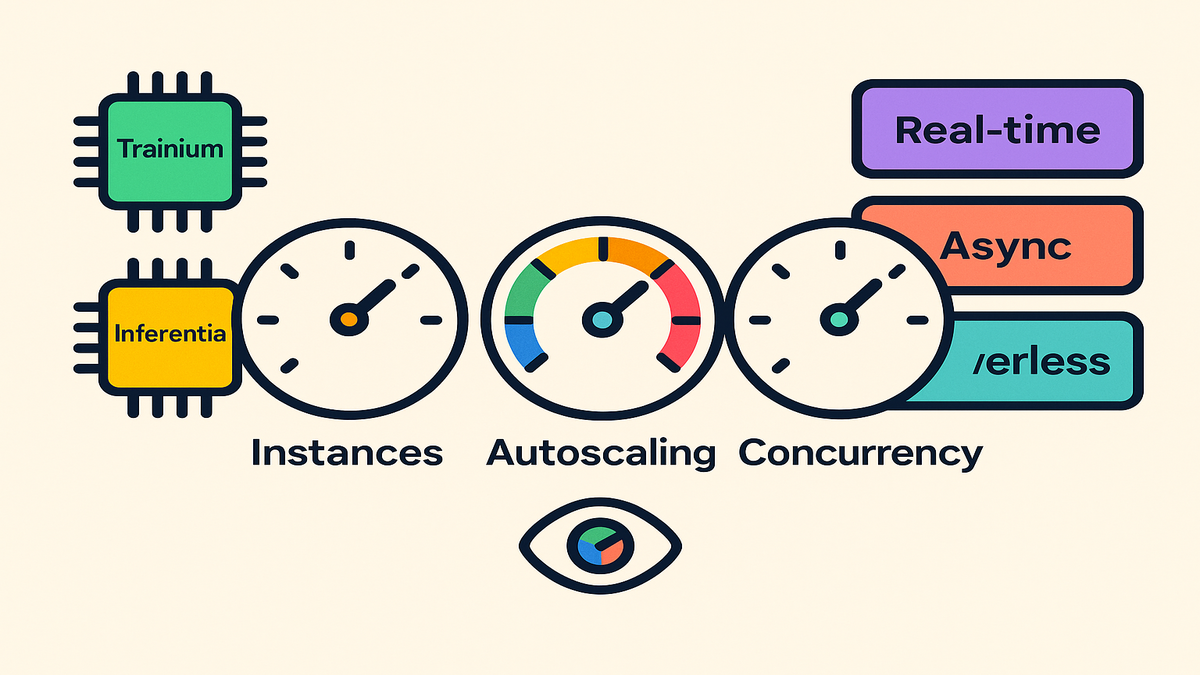
Nova SageMaker Inference Control
The headline
You can now run custom Amazon Nova models on SageMaker Inference with full control. Pick instance types, set auto-scaling targets, and manage concurrency exactly as needed. That’s the short version of “AWS launches SageMaker Inference for custom Nova.” It’s the combo you’ve wanted if you want Nova without lock-in or mystery pricing.
Put differently: you bring your Nova weights and logic, SageMaker brings the hardened plumbing. You get fleet management, health checks, rolling updates, and scaling policies with your hands on the wheel. No more praying someone’s “default latency” meets your SLOs under peak.
Why you should care
- Performance and cost are trade-offs until you actually add better knobs. With instance tuning and scaling policies, you choose your target and drive toward it.
- Trainium and Inferentia target deep learning price‑performance hard. The headline promises up to 50% cost savings, which is real money.
- CloudWatch integration bakes observability in from day one. You’ll catch p95 latency drifts before customers ever feel them.
The practical upshot: fewer fire drills, calmer promo launches, and bills that map to value. You’ll still make trade-offs, because you always do, but they’re yours now. You’ll have numbers behind them, which is what you trust at 3 a.m.
How it fits your stack
- Real-time inference for recommendation clicks or chat-like interactive features.
- Asynchronous jobs for heavier multimodal tasks where users can wait a bit.
- Serverless inference for traffic that’s spiky or totally unpredictable.
“As AWS puts it, SageMaker lets you deploy models to fully managed endpoints for real-time inference”—you bring the model; the platform handles fleets, scaling, and health checks.
Think of these modes like lanes on a highway during rush hour. Interactive paths ride the fast lane, heavy jobs cruise the right lane, and spiky features ramp on only when needed. Same road, different lanes, no needless gridlock.
Performance Instances Chips Concurrency
Pick the right silicon
- Inferentia (Inf2) is designed for high throughput inference at low cost per unit. It’s great when you care about cost per token or image.
- Trainium (Trn1 or Trn1n) shines for training and selective inference patterns at scale. In many shops, Trainium with Inferentia gives end-to-end efficiency.
- The promise is up to 50% cost savings using AWS ML silicon for Nova inference, depending on size and traffic.
A simple rule of thumb helps a ton in practice. If your bottleneck is inference spend or massive serving volume, begin on Inferentia. If you train Nova variants often, keep Trainium in play to shrink training time and cost, then deploy on Inferentia.
Precision matters a lot, maybe more than you think. If your use case allows, test reduced precision modes to boost throughput. Always validate with your real inputs, not lab toys, before you commit.
Right size your endpoints
- Start with an instance family that fits Nova’s memory footprint with headroom. Then load test with real image sizes, sequence lengths, and multimodal mixes.
- Measure p50 and p95 latency plus throughput, either RPS or TPS. For multimodal cases, test mixed batches to mirror actual user behavior.
- Use Provisioned Concurrency when you’ve got tight SLAs to honor. Combine with target tracking so you don’t massively over-provision during lulls.
Treat right-sizing like getting a suit tailored, not bought off-rack. Begin with one or two instance types that fit with room for batching. Replay a day’s traffic, then push until p95 starts threatening your target.
Don’t forget payload ergonomics, because they quietly matter. Compress images where acceptable without hurting quality and outcomes. Trim prompt context that adds fluff, not signal, to responses.
Concurrency and autoscaling
- Set a per-instance concurrency that keeps p95 under your SLA target. Then let Application Auto Scaling handle capacity moves automatically.
- For heavy bursts, tune scale-out faster with shorter cooldowns and steps. For cost control, let scale-in work harder during off-hours and weekends.
First-hand scenario: your product image-to-caption microservice spikes hard at lunch. You set concurrency at eight per instance, target tracking near seventy percent, and step scaling for p95 above 300ms. Result: steady latency, fewer abandoned carts, and no triple over‑provisioning.
Avoid a few classic anti-patterns that hurt more than help. Don’t push concurrency so high that swapping kills latency and patience. Don’t set it so low you pay for idle capacity and wasted headroom either.
Pro tip: align autoscaling rules with your actual calendar. Pre-scale before launches, drops, or press moments you’ve already planned. Stagger minimum capacity by region if demand rolls across time zones daily.
Realtime Async Serverless
Realtime endpoints
Use real-time endpoints when requests must return within seconds. Think e‑commerce recommendations or on-page multimodal summarization under load. Configure health checks, min and max capacity, and a warm‑pool strategy.
Keep timeouts honest and fair to actual users. If your UI can stream or progressively render, let it do exactly that. For everything else, define a crisp fallback the team trusts under pressure.
Asynchronous inference
For high‑res imaging, document processing, or batch conversions, async is your friend. You post jobs to a queue in S3, the endpoint works it, then writes results to S3 and notifies you.
Build idempotency in from the very start here. Tag jobs with unique IDs and deterministic output paths. Make retries safe, so blips don’t cause double bills or duplicate writes.
Serverless inference
When traffic is spiky or wildly unpredictable, go serverless. It removes idle costs by spinning up only when jobs arrive. Expect cold starts, and offset them with provisioned concurrency on hot paths.
Real example framing: your analytics dashboard runs a Nova explain function on demand. Move it to serverless with provisioned concurrency set to one during business hours. You erase most idle spend while keeping excellent response times for analysts.
Keep payloads compact so cold starts hurt less on the edge. Pre-tokenize or pre-resize inputs anywhere that actually makes sense. If bursts build queues, add a small reserved capacity window during peaks.
Observability and Cost Control
CloudWatch in the loop
Turn on CloudWatch metrics, logs, and alarms right out of the gate. Track request counts, 4xx and 5xx rates, latency percentiles, and CPU or memory utilization. Create alarms for p95 latency targets and error spikes your users would notice.
Keep dashboards simple so teams don’t drown in graphs. Start with a top-row SLO view, then drill down by endpoint, region, and model version. If you must wake someone up, alert on user impact, not random blips.
Trace and optimize
Enable inference data capture for payloads and predictions with proper scrubbing. Sample one to five percent of requests to isolate slow paths and painful outliers. Spot oversized payloads and set limits or add lightweight pre-processors.
Close the loop by reviewing captured samples on a cadence. If p95 jumps after a model update, you’ll know which inputs got slower. Pair this with A/B rollouts so comparisons are clean and objective.
Guardrails and governance
Lock endpoints into a VPC and use KMS for encryption at rest. Keep TLS in transit, tag resources for chargeback, and set budgets with alerts. For healthcare or fintech, document choices and keep audit trails tidy.
Also, write runbooks people actually read at 2 a.m. When an alarm fires, there’s a five‑step checklist ready to go. Check metrics, peek at queues, verify autoscaling, test a known‑good payload, then rollback if needed.
Quoting the docs: “Amazon CloudWatch monitors your AWS resources and the applications you run on AWS in real time.” Translation: use it to catch regressions before customers even smell them.
Ecommerce Healthcare Analytics
Ecommerce recommendations
- Pattern: real-time endpoint with Provisioned Concurrency and target tracking autoscaling.
- Nova multimodal inputs score related items while caching a top-N per SKU.
- Pre-warm for peak promos, then scale in overnight to save money sensibly.
- Failure plan: when latency breaks SLA, fall back to cached embeddings immediately.
Bonus moves: segment SKUs by traffic so spend matches value clearly. Top tier rides higher-concurrency pools, long tail moves to lean pools or serverless. Keep a safe model version warmed during major launches for stability.
Healthcare imaging
- Pattern: asynchronous inference with job queues and clean S3 IO.
- Run high‑res scans with Nova analysis, push results to PACS or EHR systems. Add human review in the loop where required.
- Governance: VPC endpoints, KMS encryption, audit logs, and tight access policies. Batch overnight when costs are lower and windows are open.
Operational tips: use deterministic output paths per study for traceability. Attach metadata for provenance, store intermediates for QA, and separate urgent cases. Keep concurrency caps so urgent work doesn’t get starved by bulk runs.
Realtime analytics
- Pattern: serverless inference in front of an event stream like Kinesis or MSK. Use provisioned concurrency during trading hours or large events.
- Enrich feeds with Nova captions or summaries, then store features for BI.
- Watch p95 latency and throttle strategies under real load, not assumptions. Control payload sizes so cold starts stay a rounding error.
If you support multiple regions, deploy near data to reduce jitter. Use lightweight schemas, and add backpressure when downstream sinks lag. Shedding noncritical work beats exploding queues every single time.
First-hand framing: a retailer’s “shop the look” used serverless for long-tail items. Provisioned endpoints handled the top five percent where latency truly matters.
Half Time Check
- You can run custom Nova models with full control on SageMaker Inference.
- Choose Inferentia or Trainium to chase up to 50% lower costs here.
- Match mode to job type: real-time for interactive, async for heavy workloads.
- Turn on CloudWatch, sensible alarms, and data capture from day zero.
- For sensitive domains, lock down VPC, KMS, and clean audit trails.
If any bullets above feel squishy, pause and fix them today. Hours spent on SLOs, right-sizing, and alarms pay back tenfold when traffic slams.
Prototype to Production Nova
Prep and packaging
- Freeze your Nova artifact and tokenizer, and version them cleanly in S3.
- Containerize your inference server with a stable /invocations contract inside.
- Add health and readiness probes, plus strict payload size limits early.
Make the container boring in the best way possible. Minimal dependencies, pinned versions, predictable logs, and graceful shutdowns help a ton. Document schemas so nobody reverse‑engineers payloads during a crisis.
Load testing and SLOs
- Recreate real payload mixes, not friendly lab inputs that lie. Measure p50 or p95 latency, CPU or memory, and cost per thousand.
- Trial multiple instance types and chip families under honest load tests. Validate the cost curve with your very own traffic patterns.
Run tests at steady-state, expected peak, and the dreaded “oh no.” Capture the p95 breakpoints, rising errors, and bend points where costs spike. Write these thresholds down, since they become scaling and alert rules.
Rollouts and safety
- Use canaries that go one, then ten, then fifty, then one hundred percent. Monitor latency and errors at each step without cutting corners.
- Keep a rollback alias pinned to your last stable version always. Automate cutover so nerves don’t break when minutes do matter.
Bake observability straight into rollout steps as a hard requirement. At each jump, compare p95, errors, and cost per thousand against prior. If any metric regresses, pause, investigate, or cleanly roll back.
A senior SRE mantra fits right here: “If it isn’t measured, it isn’t managed.” Your Nova setup should absolutely be both.
Nova SageMaker FAQ
Pick a mode
Match mode to latency tolerance and payload size very directly. Real-time for under two seconds, async for seconds to minutes, serverless for spiky needs.
Cost savings
It’s workload-dependent, so test it with your traffic. Model size, precision, batching, and traffic shape all matter for savings.
Scaling and concurrency
You can set min or max capacity, target tracking, and step scaling rules. Also per-instance concurrency plus provisioned concurrency for cold-start control.
Monitor latency
Turn on CloudWatch metrics and alarms for p95, errors, and utilization. Enable data capture, inspect slow payloads, and right-size instances thoughtfully.
Security and compliance
Yes, with the right controls in place and enforced. Use VPC endpoints, KMS, TLS, IAM, audits, and change approvals.
Compared to generic APIs
SageMaker Inference gives low-level control on key levers. You tune instances, autoscaling, concurrency, and networking for your workload.
Batching vs latency
Batching boosts throughput and cost, but can add delay, of course. Use small batches for interactive paths and larger for async jobs.
Zero downtime updates
Use aliases or blue/green endpoints and canary traffic ramps. Switch when metrics hold steady, and keep the previous version warmed.
Ship It
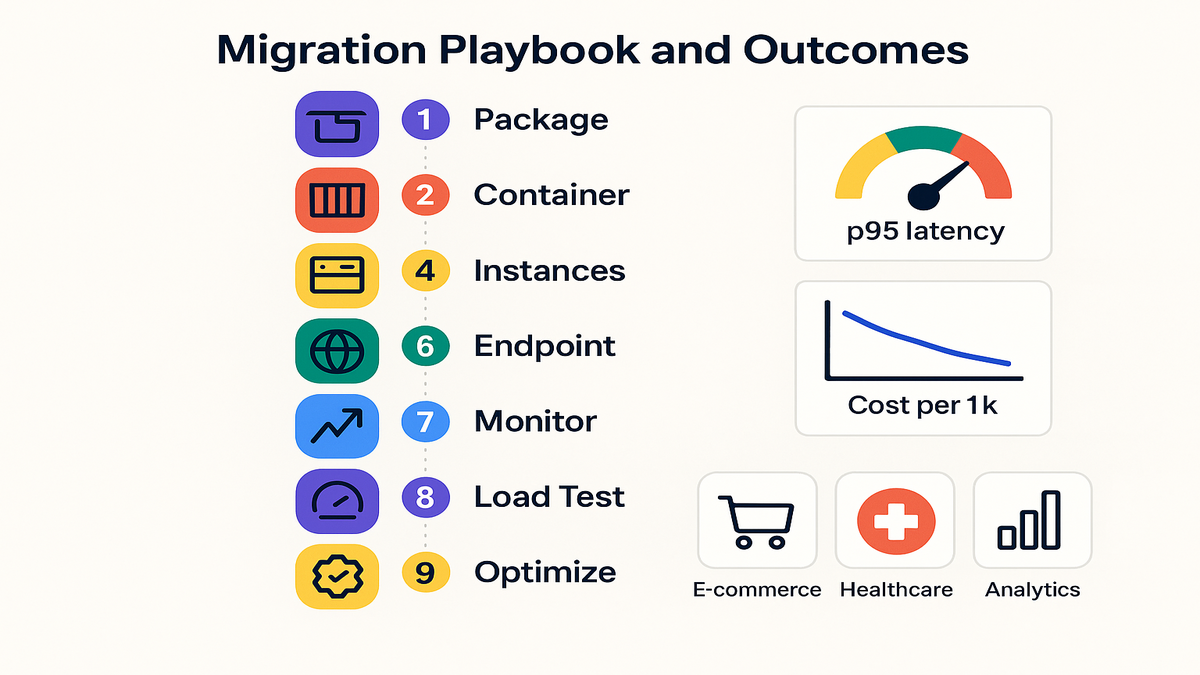
1) Package your custom Nova model and dependencies; store in S3 with versioning. 2) Build an inference container with health checks and a stable /invocations API. 3) Choose the right instance family, considering Inferentia or Trainium for cost. 4) Create a SageMaker model and endpoint config; set both min and max capacity. 5) Define autoscaling targets and step rules plus per‑instance concurrency settings. 6) Enable CloudWatch metrics, logs, and alarms; turn on inference data capture. 7) Load test with real payload mixes; tune batch size and precision choices. 8) Roll out with canaries plus automatic rollback guards, tested and trusted. 9) Review cost per thousand weekly; adjust scaling windows and instance types.
You’re now effectively “announcing Amazon SageMaker Inference for custom Amazon Nova models” inside your org. Because you’ve got it running, tuned, and already paying back dividends.
When you control the dials—instances, autoscaling, concurrency, and observability—you stop praying to latency gods. You start shipping reliably, and that’s the real difference. Pick one high‑impact path and run the full loop end‑to‑end.
If you’ve read this far, you don’t want another shiny tool, just control. Nova plus SageMaker gives you that, in a very direct way. Start small, instrument everything, and iterate like you actually mean it.
References
- Amazon SageMaker Inference endpoints
- Amazon SageMaker Asynchronous Inference
- Amazon SageMaker Serverless Inference
- Application Auto Scaling for SageMaker
- Amazon CloudWatch overview
- AWS Inferentia (Inf2) overview
- AWS Trainium (Trn1) overview
- Inference data capture for endpoints
Tweet-sized take: “Hardware gets cheaper. Bad architectures don’t. Nova + SageMaker lets you fix the latter.”