
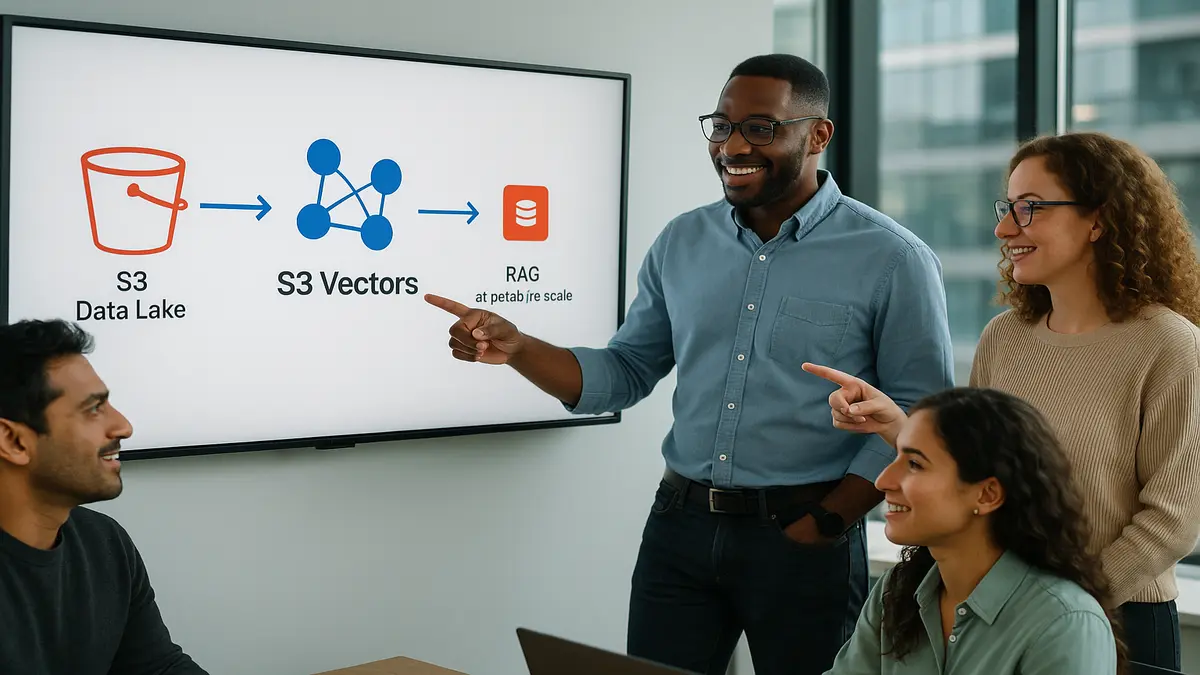
Big vector stores just had their cloud moment. Amazon S3 Vectors is now GA. It jumps to 40x scale beyond the preview. Translation: keep embeddings beside your S3 data and query them natively. No twisting your stack or hand-rolled, sharded vector infra anymore.
If you’ve fought vector databases that choke at billions, this flips things. Or paid a fortune to park cold embeddings in hot clusters. You now get S3’s durability and scale with vector-native search. That’s exactly what RAG and semantic search need right now.
The win isn’t just size. It’s simplicity. Your data lake already lives in S3. Your model outputs can live there too. Chunks, metadata, embeddings. Now your retrieval layer can tap S3 directly. Fewer moving parts and sync jobs. Fewer places for entropy to creep in.
Bottom line: eyeing RAG at petabyte scale? S3 Vectors becomes the default store-of-record. It’s also the query engine to beat.
TLDR
- Amazon S3 Vectors is GA with 40x scale beyond the preview.
- Ideal for RAG and semantic search on petabyte-scale data lakes.
- Keep vectors with your objects; query natively in S3.
- Use OpenSearch (or similar) for ultra-low-latency front-ends; keep S3 Vectors as source-of-truth.
- Pricing: expect storage + request charges; see AWS pricing for details.
S3 Vectors Explained
What It Is And Why
Amazon S3 Vectors adds native vector storage and querying to S3. Instead of scattering embeddings across a separate vector database, you keep them in S3. Right next to the docs, chunks, and metadata they represent. That matters because your data gravity already lives in S3.
‘Amazon S3 is designed for 99.999999999% durability.’ That’s straight from AWS. It’s the durability you want for long-lived embeddings. GA scale is reportedly 40x beyond preview now. So you’re looking at billions to trillions of vectors without blinking.
If you’ve explained to security why sensitive embeddings sit in a sidecar database, breathe. This tight coupling is a relief. Same S3 security model and IAM controls. Same encryption stance with SSE-S3 or SSE-KMS. You can apply the same governance used for your data lake. Fewer audit surprises. More simple ‘Yep, it’s S3.’
Co-location isn’t just a neat diagram trick. It shrinks your blast radius a lot. Your data, metadata, and vectors share a control plane. They also live in the same region by default. Replication, access logging, and bucket policies extend to your vector collections. Operationally, there are fewer places to misconfigure.
How It Works
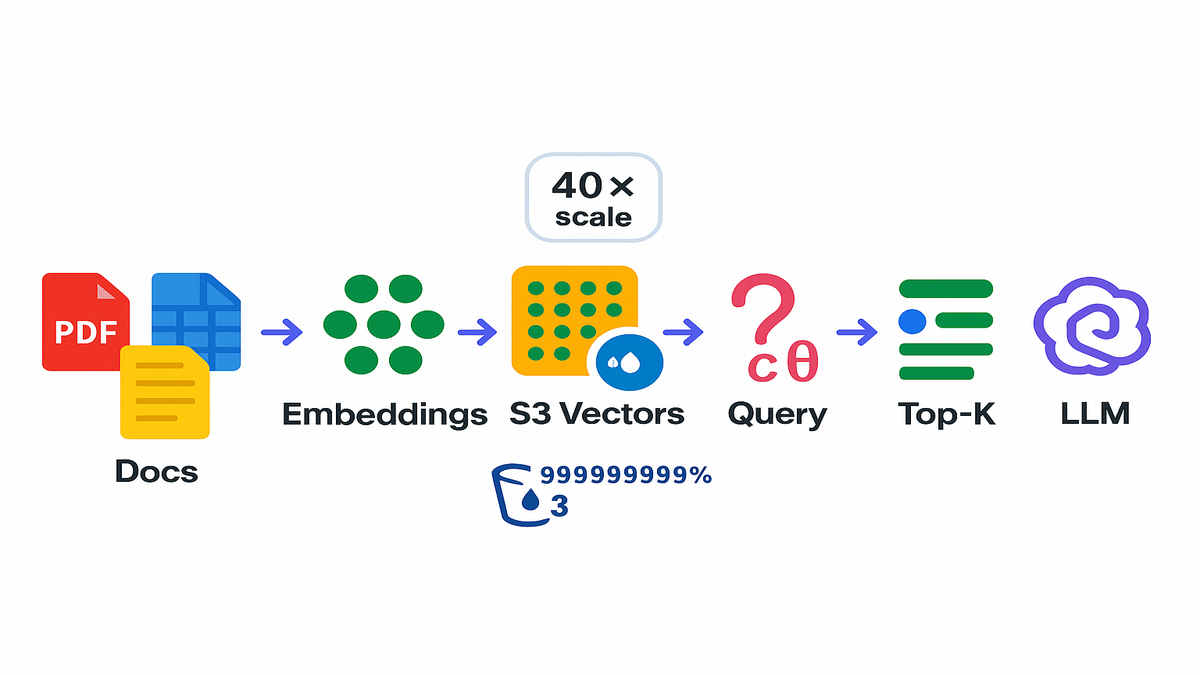
- You generate embeddings from your content like PDFs, parquet, or transcripts.
- You store vectors and metadata in S3 Vectors collections by bucket and region.
- You run vector similarity queries like cosine to get nearest neighbors.
Example: You’ve got 60 TB of product manuals inside S3. You chunk and embed them, then store embeddings in S3 Vectors. At query time, run similarity search to fetch top-K passages. Those go into your LLM prompts. No more nightly syncs to external indexes that go stale.
Quote to remember: ‘Keep data where it lives.’ S3 Vectors makes that mantra real for AI.
A few build notes that save headaches:
- Keep vector dimension consistent across a collection. Mixing dims hurts fast. Version embeddings with model name and date in metadata.
- If you use cosine, normalize vectors at write time for consistent scoring. Document the choice in your schema.
- Store rich metadata with each vector: doc_uri, chunk offsets, section, tags, timestamp, and permissions. You’ll want filters for multi-tenant or role-based retrieval.
- Treat ingestion as idempotent. Use stable IDs like docid + chunkid. Retries shouldn’t create dupes. Keep a separate index of what you embedded.
Operational patterns:
- Batch ingest big backfills using parallel workers close to the data. Same region and VPC endpoints. Then stream incremental updates from S3 object events.
- Plan for re-embedding. Models change and users expect fresh spaces. Keep both current and prev versions during migrations. Then cut over slowly.
Why This Changes RAG
Data Gravity Unlock
RAG breaks when retrieval lags your data lake. S3 Vectors closes that gap. Your source-of-truth stays in S3. Your vectors do too. The net effect is simpler pipelines and fresher results.
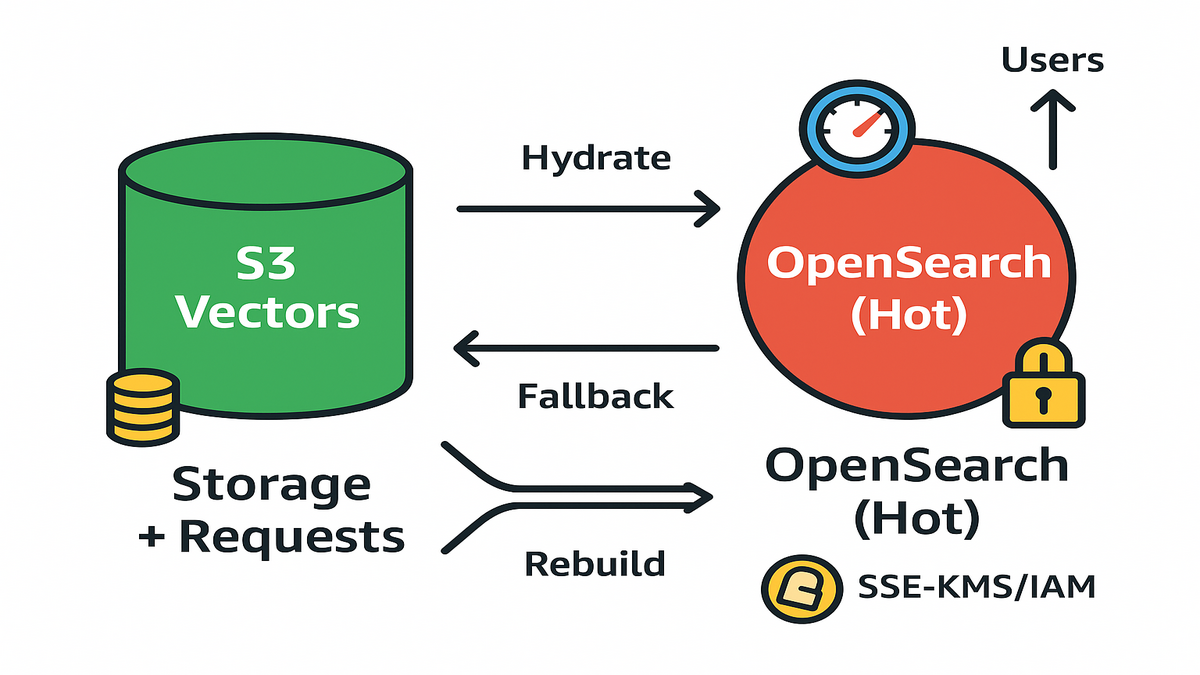
In practice, teams go with a two-tier pattern:
- Tier 1 (front-end): a low-latency vector index like OpenSearch k-NN for interactive queries.
- Tier 2 (source-of-truth): S3 Vectors as the massive, durable, cost-efficient vector lake.
You hydrate Tier 1 from Tier 2 on a schedule or on demand. If Tier 1 fails or needs reindexing, rebuild it straight from S3 Vectors. No touching raw source systems needed anymore.
Think of Tier 2 as canonical memory. Tier 1 is working memory. You can rebuild working memory any time. That means fewer late-night shard splits and more boring reliability. You can also decide per query how deep to reach. Fast and local when confidence is high. Broader and slower when you need recall.
Common triggers to refresh the hot tier:
- New docs land via S3 event → embed → write to S3 Vectors → hydrate OpenSearch.
- Relevance drift detector fires on clicks or answer success drops → refresh hot index.
- Product launches or live events → expand OpenSearch coverage, then shrink it later.
Cost And Ops
You stop paying for oversized hot clusters holding cold embeddings. S3 pricing is known and predictable. You’ll also see request charges for queries. For many workloads, that’s a net win. Especially with infrequent reindexing or bursty queries.
Example: A media company keeps 5B chunk embeddings across archives. Search spikes around big live events. Normal days are quiet. With S3 Vectors as the reservoir and a slim OpenSearch tier, they avoid overprovisioning all year.
Expert note: AWS has pushed separation of storage and compute for years. S3 Vectors applies that idea to retrieval. Scale storage first, then dial compute where latency matters.
Ops side benefits you’ll feel immediately:
- One lifecycle: backups, replication, and encryption are uniform at S3-level. No custom backup scripts for one-off vector clusters.
- Faster disaster recovery: lose your front-end index? Rehydrate from S3 Vectors. Lose a region? Cross-Region Replication policies carry you.
- Cleaner compliance story: IAM, bucket policies, KMS keys, and audit logs. You’ve done this for S3 already.
S3 Vectors vs OpenSearch
When S3 Vectors Wins
- Scale: petabyte-and-beyond vector lakes where embeddings live with objects.
- Durability and compliance: S3-level durability, encryption, policies, and auditing.
- Simplicity: one place to store, govern, back up, and replicate.
When OpenSearch Wins
- Millisecond interactive search at high QPS for user-facing apps.
- Rich search features like filters, hybrid BM25+vector, and aggregations.
- Built-in ANN tooling. OpenSearch k-NN uses FAISS and NMSLIB under the hood. That stack is battle tested.
Pragmatic Combo
Use ‘S3 Vectors as the lake; OpenSearch as the cache.’ Hydrate OpenSearch for hot segments like last 90 days or trending topics. For cold queries or rebuilds, fall back to S3 Vectors. That two-tier design gives predictable costs and performance where it matters.
Example: An internal support copilot queries OpenSearch for instant answers. If confidence is low or the doc is old, it hits S3 Vectors. It widens recall, then refreshes OpenSearch with newly relevant embeddings.
Guardrails that help this combo hum:
- Put a time budget on Tier 1. If it can’t answer confidently in 30ms, punt to S3 Vectors.
- Log recall gaps. When S3 Vectors rescues a query, record missing content from the hot tier. Schedule a targeted hydrate.
- Keep features consistent. Use the same embedding model and chunking rules in both tiers. Otherwise, relevance drifts.
Pricing And Performance
Pricing Expectations
- Storage: S3 rates per GB-month, familiar and transparent.
- Requests: vector query operations likely bill similar to other S3 request classes. See Amazon S3 pricing for the latest info.
- Data transfer: same S3 playbook. Keep compute close to data to avoid egress.
If your main concern is ‘amazon s3 vectors pricing,’ benchmark two paths: 1) All-in vector DB clusters sized for peak traffic and headroom. 2) S3 Vectors as the reservoir plus a slim, autoscaled front-end index.
Total cost often favors path #2 for large, spiky, or compliance-heavy datasets.
Budgeting tips that avoid surprise bills:
- Tag everything by env, team, and workload. Set AWS Budgets with alerts.
- For rebuilds, schedule off-peak windows and cap concurrency.
- Keep embeddings deduped. Identical chunks across versions? Reuse vector IDs. Update metadata.
Performance Reality Check
- Latency: S3 Vectors targets huge scale and durability over raw latency. Sub-10ms SLAs need in-memory indexes. Pair them smartly.
- Throughput: batch ingestion and large scans shine with S3’s parallelism.
- Index maintenance: no more ‘oh no, we need to re-shard.’ The store won’t crumble.
Example: A research org bulk-ingests 300M embeddings nightly with EMR and Glue. Then it trickle-updates an OpenSearch hot tier. Build times shrink because the source-of-truth lives locality-friendly inside S3.
Quote: ‘Optimize for rebuilds, not for never-fail.’ S3 Vectors makes that practical day one.
Real-world knobs that move the needle:
- Top-K isn’t sacred. Start with K=20–50 and measure MRR and NDCG. Tune with latency budgets.
- Use diversity. Re-rank with MMR or simple de-dupe to avoid near-duplicate chunks.
- Filter early when possible. Narrow by tenant, product, or recency to save tokens. It also boosts answer quality.
Build It
S3 Vectors Docs
- Read Amazon S3 docs for security, encryption, lifecycle, and replication.
- Review OpenSearch k-NN docs if you’re pairing the two tiers.
- Confirm SDK or CLI support for S3 Vectors in your language.
Add a short checklist before you touch code:
- Identity: which IAM roles write vectors and which roles query. Least privilege wins.
- Keys: will you manage customer-managed KMS keys? Who rotates them and when?
- Network: will you use VPC endpoints for private S3 access?
- Regions: where must the data live for latency or compliance? Need cross-region replication?
AWS S3 Vector Example
- Ingest: chunk source objects like PDFs, HTML, and transcripts with a stable scheme. Use docid, chunkid, startoffset, and endoffset.
- Embed: generate vectors like 768–4096 dims and store metadata. Include doc_uri, section, timestamp, and tags.
- Store: write embeddings into S3 Vectors collections co-located with your S3 region.
- Query: at runtime, embed the question and run nearest-neighbor search. Return top-K plus metadata. Then assemble the prompt for your LLM.
- Cache: optionally hydrate OpenSearch for hot slices or recent content.
Practical schema hints:
- Keep a visibility field like public, internal, or confidential. Enforce it during retrieval.
- Record model and tokenizer version. You’ll thank yourself during upgrades.
- Track a checksum of the source chunk. If the object changes, detect staleness and re-embed.
Infra As Code
- Check if CDK exposes L2 constructs for S3 Vectors. If not, use L1 (Cfn*) or a CustomResource calling the SDK during deploys.
- Keep KMS keys, bucket policies, VPC endpoints, and IAM roles in one stack.
- Wire in Step Functions or EventBridge for async ingestion and backfills.
Example: A fintech provisions an S3 bucket with KMS encryption. It defines VPC interface endpoints for S3 and deploys a Lambda-based embedder. A Step Functions pipeline handles retries. If CDK support is pending, they wrap create and update calls in a CustomResource. Rollbacks stay safe and auditable.
Quote: ‘Infrastructure that’s boring is infrastructure that scales.’ CDK plus S3 Vectors aims for that.
Operational polish that pays off:
- Blue or green your hot tier. Spin a parallel OpenSearch index, warm it, then swap.
- Add dead-letter queues on embedding workers. Bad docs shouldn’t block the line.
- Emit CloudWatch metrics: ingest latency, error rates, top-K time, rerank time, and answer acceptance.
Quick Pulse Check
- GA means production-ready. S3 Vectors scales 40x beyond preview for petabyte vector lakes.
- RAG gets simpler. Store vectors next to your data and query natively.
- Use a two-tier design. S3 Vectors is source-of-truth. OpenSearch is the hot cache.
- Pricing basics: storage plus requests. Compare TCO vs always-on clusters.
- CDK path: use native constructs or CustomResources until dedicated ones arrive.
FAQ
What Changed In GA
Scale jumped. AWS says GA delivers up to 40x beyond preview. GA also usually brings broader region coverage and stability. SDK and CLI polish improve so you can standardize in production.
Pricing Structure
Expect familiar S3-style pricing. Per-GB storage plus request charges for vector ops. For exact rates, check the Amazon S3 pricing page. Also keep compute near data to avoid cross-AZ and region costs.
S3 Vectors Or OpenSearch
Use both for different jobs. S3 Vectors is your durable, petabyte-scale vector lake. It is your store-of-record. OpenSearch shines for ultra-low-latency search, filters, and aggregations. Many teams hydrate OpenSearch from S3 Vectors for hot slices. Then they rebuild easily from the lake.
Real Time Latency
For strict sub-10 to 20ms lookups at high QPS, use a front-end index. OpenSearch or similar helps there. Use S3 Vectors for scale, durability, and freshness. Use an index cache for snappy UX.
Security And Compliance
Yes. S3 supports encryption at rest with SSE-S3 and SSE-KMS. It also supports bucket and IAM policies, access logs, replication, and VPC endpoints. Those controls carry into S3 Vectors through the S3 control plane. Validate against your compliance checklist.
Docs And Examples
Start with Amazon S3 docs for security and operations. Check AWS News and What’s New for feature details. For OpenSearch pairing, read its k-NN docs for ANN details and query patterns.
Updates And Deletes
Version your chunks and keep a deleted flag in metadata. For hard deletes, remove the vector and tombstone the doc version. Then trigger a hot-tier refresh. For soft deletes, filter by visibility so historical states remain queryable.
Chunk Size For RAG
Common practice is 300–800 tokens per chunk with 50–100 overlap. Start there and measure retrieval quality and latency. Smaller chunks improve precision but might need higher K for recall.
Embedding Model Choice
Choose a model with a dimension you can commit to for a quarter. Domain-tuned models often beat general ones on enterprise docs. Store model and version in metadata. That helps compare old and new embeddings during migrations.
Evaluate Retrieval Quality
Build an offline eval set of question and answer pairs. Track recall@K, MRR, and NDCG. In production, monitor acceptance, clickthrough, and time-to-first-token. When S3 Vectors rescues a query, log it. Then consider hydrating that content into the hot tier.
Multi Tenant And RBAC
Partition by tenant with separate collections or strict metadata filters. Enforce IAM conditions at query time as well. Include ACL tags in metadata and validate at both tiers. Keep audit trails of who queried what for compliance.
Ship This
- Define your schema: docid, chunkid, offsets, tags, and vector dimension.
- Chunk and embed content. Store vectors and metadata in S3 Vectors.
- Implement query flow: embed question, nearest-neighbor search, top-K fusion, and prompt assembly.
- Add a hot tier if needed. Hydrate OpenSearch for interactive queries. Rebuild from S3 Vectors on demand.
- Secure it: SSE-KMS, least-privilege IAM, VPC endpoints, and audit logs.
- Automate with CDK: construct S3, KMS, and IAM. Use L1 or CustomResource if Vectors constructs aren’t ready.
You don’t win RAG by hand-tuning a single index. You win by making retrieval boring, scalable, and close to your data. S3 Vectors finally makes that design obvious. Keep embeddings where your data lives and query natively. Cache only what must be instant. Pair with a lean front-end index when UX demands it. Your system gets simpler, cheaper, and easier to rebuild than all-hot setups that keep ops up at night.
References
- Amazon S3 FAQs (durability, security, and storage model)
- Amazon S3 Pricing
- AWS Shared Responsibility Model
- Amazon OpenSearch Service k-NN (vector search) documentation
‘Hot indexes are expensive. Cold lakes are cheap. The trick is knowing when to use which.’
References
- Amazon S3 FAQs (durability and security)
- Amazon S3 Pricing
- Server-side encryption with AWS KMS for S3 (SSE-KMS)
- Amazon S3 VPC interface endpoints (PrivateLink)
- Amazon S3 Replication (CRR/SRR)
- AWS Step Functions (for pipelines and retries)
- Amazon EventBridge (event-driven pipelines)
- AWS Glue (data processing at scale)
- Amazon EMR (big data processing)
- AWS Well-Architected Framework
- Amazon OpenSearch Service k-NN (ANN search)
- AWS Shared Responsibility Model