
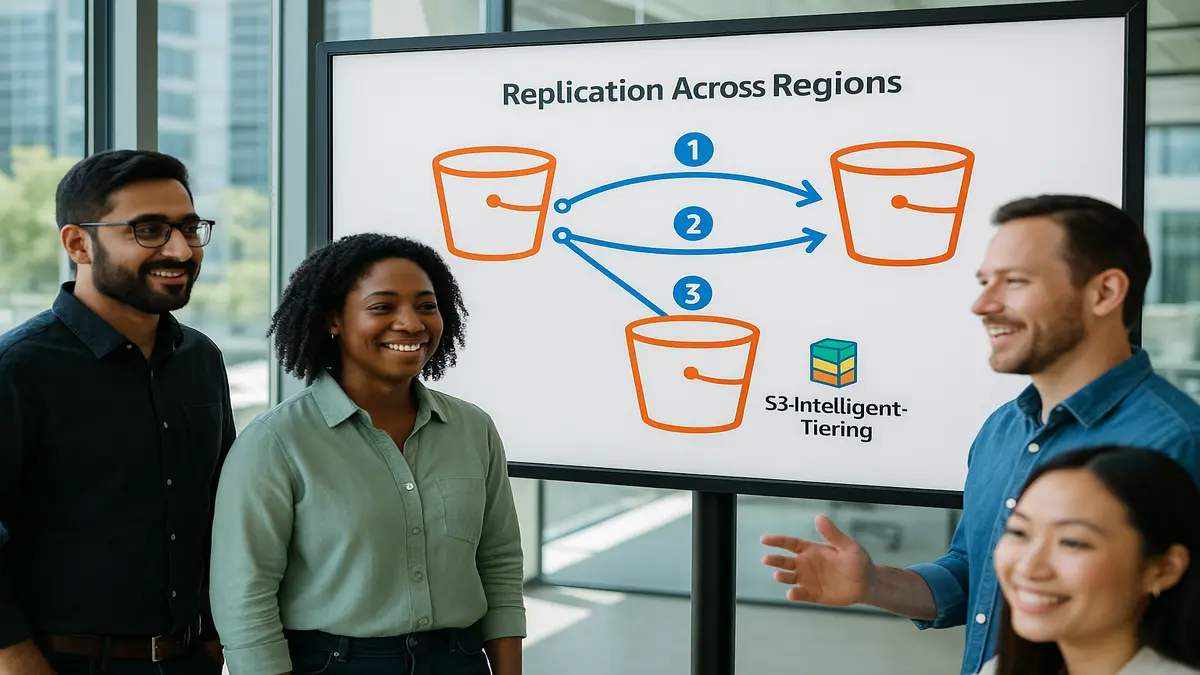
You’re probably paying too much for your data lake. Not because your data is huge (it is). It’s because your storage plan is still stuck in 2019. Meanwhile, your analysts wait on stale copies that break at the worst time.
Here’s the flip. Amazon S3 Tables just added automatic replication for Apache Iceberg tables. And it now supports S3 Intelligent-Tiering on replicas. Translation: you get near real-time, consistent copies across Regions and accounts. And you stop guessing which storage class to pick.
If that sounds basic, it isn’t. The hard part of Iceberg at scale isn’t writing files. It’s keeping catalogs, metadata, and snapshots perfectly in sync. So Athena, Redshift, or EMR can query replicas without weird results.
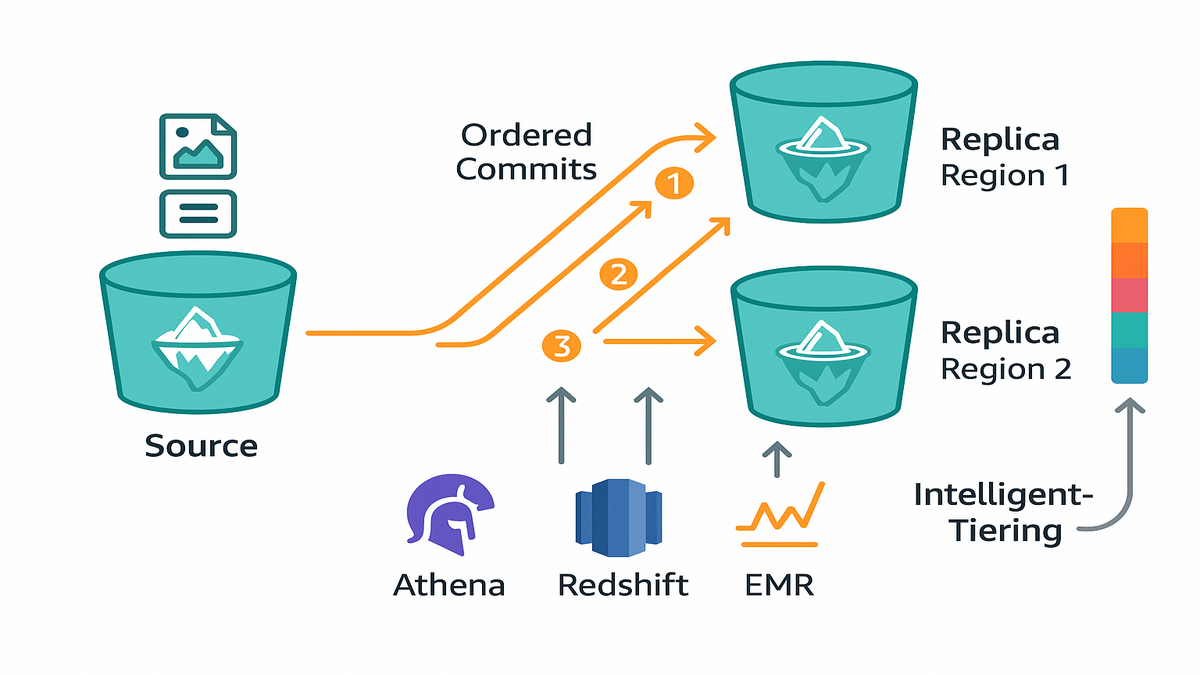
With S3 Tables replication, updates commit in the same order as the source. Usually within minutes. Add Intelligent-Tiering on the destination buckets and your cold-but-critical replicas slide into the cheapest viable tier automatically. No cron jobs. No headcount. No drama.
TLDR
- Near real-time Iceberg replication across Regions/accounts with ordered commits.
- Read-only replicas stay queryable by Athena, Redshift, EMR—no custom glue.
- Turn on S3 Intelligent-Tiering in destination buckets to cut storage costs.
- Keep performance: Intelligent-Tiering reacts to access patterns—no manual moves.
- Use lifecycle policies for deterministic archiving; Intelligent-Tiering for dynamic.
- Expect fewer ops tickets, fewer surprises, and lower storage bills.
Replication that stays consistent
Consistency you can trust
Replicating Iceberg is more than copying parquet files. You need snapshots, manifests, and metadata to land in the same order as the source. Otherwise you’ll query ghost data or miss fresh updates. S3 Tables replication handles this for you. New snapshots, metadata changes, and data file adds/removes are replayed in sequence. Replication is asynchronous, but updates usually land within minutes. You get near real-time read-only replicas.
Why this matters: consistency lets you point an engine straight at a replica and just query. No custom sync scripts, no “hold while we re-index” drama. If a write committed in us-east-1, your replica in eu-west-1 commits the same write, in the same order.
Think of Iceberg like a journaled file system for analytics. Each table keeps a pointer to the current snapshot. That snapshot references the exact set of data and delete files to read. Ordered replication means the snapshot pointer and its manifest lists reach the replica in clean sequence. Queries always see a valid, atomic table state. That’s the difference between a clean SELECT and a 2 a.m. Slack thread.
Time-travel is a bonus here. Iceberg tracks snapshot history, so your replica can do point-in-time reads. As long as you retain the right metadata. That makes audits and backfills safer across accounts. Just align snapshot retention between source and destination.
Where it shines
- Disaster recovery: If a Region goes sideways, your read-only replicas stay available elsewhere.
- Compliance residency: Park copies in required geos without exposing your primary.
- Performance: Put replicas near users or apps to lower read latency.
- Safe sharing: Share replicas with partners or other accounts without risking your primary.
“Apache Iceberg is an open table format for huge analytic datasets,” per the project. That’s the scale you’re playing at. So ordered commits and catalog consistency aren’t nice-to-haves; they’re the whole game.
In practice, teams lean on replicas for noisy hours or bursty reporting. Finance can hit a local replica in eu-west-1 every morning. No hammering your primary in us-east-1. Observability teams can run anomaly detection on a replica during an incident. Without starving batch jobs. And when regulators ask for read-only access, a dedicated replica gives you clean separation. Simple access controls, less stress.
Operationally, this reduces glue code. You’re not duct-taping cron jobs, object replication rules, and catalog rebuilds. All to keep Iceberg consistent. The replication flow respects Iceberg semantics by design. That means fewer race conditions, fewer “works on my laptop” moments, and kinder on-call.
Cost control without guesses
How Intelligent Tiering decides
Replica buckets are a perfect fit for S3 Intelligent-Tiering. Many replicas are touched infrequently, until you really need them. Intelligent-Tiering watches access patterns and moves objects across cheaper tiers automatically. When a replica gets hot—say during an incident—objects move to the right tier. You don’t write a single lifecycle rule.
Key idea: stop pre-picking storage classes that might not fit next month. Let real access behavior drive tier placement. No performance tuning tax. No “oops, wrong class” penalties.
Iceberg tables naturally mix hot and cold objects. Recent partitions get queried. Old partitions mostly sit. The tiering algorithm maps well to that reality. Newer data stays in frequent access tiers. Older objects drift to lower-cost tiers until someone needs them again. You don’t maintain per-prefix rules. Or remember to update lifecycle policies when partitioning changes.
Pricing cues you should know
- Intelligent-Tiering has multiple access tiers, including Archive Instant Access and deeper archive tiers for colder data. Tiering is based on last-access patterns.
- There’s a small monitoring and automation fee per object. Pricing varies by Region. No retrieval fees for data accessed in standard Intelligent-Tiering access tiers. Details live on the AWS pricing page.
- For very small objects or extremely hot data, do the math. It’s not always cheaper. But for large, mostly cold replicas, it’s often a net win.
Bottom line: apply S3 Intelligent-Tiering to your destination table buckets. Let the replica’s actual behavior pay your storage bill.
If you’re worried about performance, breathe. The frequent and infrequent tiers still deliver milliseconds latency. Archive Instant Access gives a lower storage rate with instant access. That’s a sweet spot for replicas that cool off but must be queryable anytime. Deeper archive options exist for extra-cold data. Review retrieval behavior before enabling them on active replicas.
A practical trick: pair Intelligent-Tiering with ongoing file compaction. Bigger, well-compressed parquet files cut per-object overhead. They can improve scan efficiency in engines like Athena and EMR. You’ll pay fewer per-object monitoring charges. And get better query performance on the hot path.
Multi Region Iceberg boring
DR pattern
A common pattern: write in Region A on the hot path. Replicate to Regions B and C as read-only. Analytics teams in B and C point Athena or EMR to the local replica for routine reports. If Region A has issues, promote a replica per your governance playbook. Keep calm. Because replication preserves commit order, readers don’t see partial states.
Query engines: Athena, Redshift, and EMR speak Iceberg. You don’t need to transform files or maintain separate schemas. Point to the replica’s catalog or location, and you’re off. Want to standardize SQL and automate reporting across engines? Check out Requery.
In real life, “boring” means dashboards keep loading even when a Region is grumpy. It means nightly workloads don’t pile up because a partner query went rogue. And your cost curve doesn’t pop off the chart at quarter-end. Not because two teams decided to backfill the same year at the same time.
Data sharing without fear
Need to share with a partner or another account? Replicated, read-only tables are safer to expose. You cut blast radius, protect primary performance, and keep compliance happy. Clear boundaries, clean logs.
Operationally, S3 Tables replication is set-and-forget. Configure in the console or CLI. Target one or more destination buckets, even cross-account. Let the service maintain order and freshness. Most changes land in minutes. That’s good enough for analytics, observability, and governance.
This is how you get multi-Region without duct tape. A single table format (Iceberg). A single storage substrate (S3). And a managed replication flow that respects your metadata semantics.
Pro move: keep replicas read-only by policy. Route all writes back to the primary Region except during formal failovers. This prevents accidental drift and makes promotion steps crisp. When you do promote, document the cutover in your runbook. Update catalog writers, pause compaction briefly, and confirm the latest snapshot pointer. Then resume writes.
Lifecycle rules vs Intelligent Tiering
When lifecycle policies win
- Deterministic retention: Objects older than X days must move to Glacier or be deleted. Lifecycle rules shine here—simple, auditable, predictable.
- Strict governance workflows: If approvals or legal holds drive timing, lifecycle gives a rulebook for auditors.
- Object-class heterogeneity: Tag data classes and set explicit movement paths by tag. Lifecycle is surgical.
When S3 Intelligent Tiering wins
- Unpredictable access: Replicas get touched sporadically—until they don’t. Intelligent-Tiering adapts without you rewriting rules.
- Cost drift protection: As usage shifts, your storage class follows behavior, not last year’s guess.
- Operational simplicity: Fewer rules, fewer policies, fewer misconfigs. This matters at tens of billions of objects.
The best combo? Use lifecycle to enforce retention and deletion. Rely on Intelligent-Tiering for dynamic cost-optimization inside those windows. If you’re Googling “s3 intelligent-tiering vs lifecycle policy,” the answer is usually both. Intelligent-Tiering on replica buckets and lifecycle for governance gates.
Example: keep 90 days of snapshots for time-travel. Then expire older snapshots with lifecycle. Inside that 90-day window, let Intelligent-Tiering place older, less-touched partitions in cheaper tiers. You meet audits and still squeeze the bill.
What savings look like
Back of the envelope model
Say you manage a 200 TB Iceberg dataset in us-east-1. You replicate to eu-west-1 for DR and low-latency reads. Historically, you’d pick one storage class upfront, often overpaying. With S3 Intelligent-Tiering on the destination bucket, objects cool down automatically.
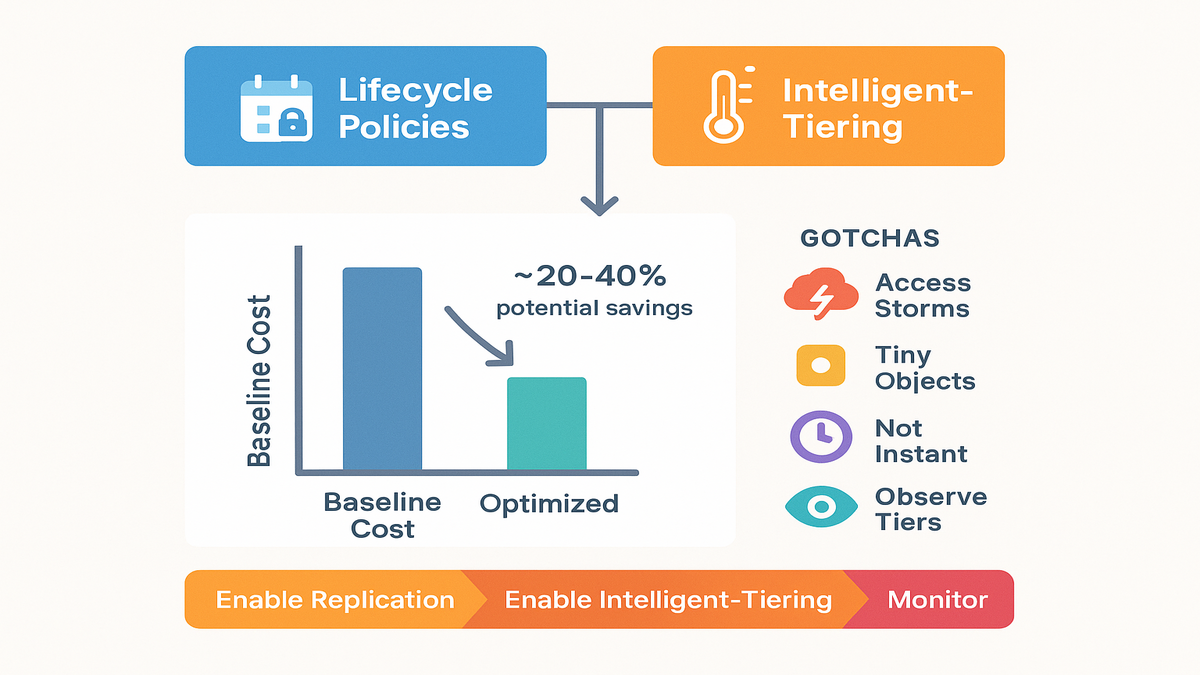
If 70–85% of replica objects aren’t read in a month, tiering kicks in. Intelligent-Tiering shifts a big chunk to cheaper access tiers while keeping a hot subset ready. A conservative pattern many teams see: low double-digit savings at small scale. Moving toward 20–40% as replicas get larger and colder. Your number depends on access frequency, object sizes, and Region pricing.
The bigger the replica, the more likely Intelligent-Tiering wins. The cold majority drags your mean cost down. Just don’t forget the per-object automation charge. Especially with tiny objects or trillions of files.
How to validate in your account:
- Establish a baseline: measure current replica costs by Region and bucket.
- Use S3 Storage Lens or similar to see object counts by size and access frequency.
- Turn on Intelligent-Tiering for a pilot table or partition prefix.
- Track month-over-month costs and tier distribution. Expand once the pattern holds.
Gotchas to avoid
- Access storms: You can rewarm tiers fast, but mind budgets if you hit Archive tiers. Archive Instant Access helps, deeper archive behaves differently and may add fees.
- Over-partitioning: Too many tiny objects blunt savings due to per-object charges. Use compaction.
- Assuming “minutes” means “instant”: Replication is fast, not synchronous. Set SLAs accordingly.
- Tier blindness: Always tag and observe. Track which tiers hold most bytes. Watch trends after launches or seasonal spikes.
- KMS request costs: Encrypt with SSE-KMS (good), but remember key request costs during heavy write or compaction bursts. Budget for it and consider bucket keys.
- Version sprawl: Watch object versioning and Iceberg snapshot retention. Don’t quietly double-store data you meant to expire.
Quick pulse check
- Replication preserves commit order for Iceberg metadata and snapshots.
- Read-only replicas are queryable by Athena, Redshift, and EMR.
- S3 Intelligent-Tiering on replica buckets cuts costs automatically.
- Use lifecycle for deterministic retention; Intelligent-Tiering for dynamic tiering.
- Expect bigger savings as replicas grow and access gets spiky.
If that’s your checklist, you’re already ahead of most teams.
FAQs pricing and setup
How fast is replication
It’s asynchronous and typically completes within minutes of source updates. That’s fast enough for most analytics and DR use cases. But it’s not synchronous. Build SLAs with that in mind.
Query replicas with Athena
Yes. Replicas stay consistent with ordered commits. They’re safe to query with Iceberg-compatible engines like Athena, Redshift, and EMR. Point the engine to the replica’s catalog or table path per your setup.
Archive Instant Access tier
Archive Instant Access is an extra Intelligent-Tiering option for colder, still-instant data. It offers lower storage rates than frequent or infrequent tiers. While keeping millisecond access. It’s great when data cools off but must remain immediately available. Check the AWS docs for Region pricing and behavior.
Is Intelligent Tiering cheaper
They’re different tools. Lifecycle policies move or delete objects at fixed ages. Great for compliance and deterministic retention. S3 Intelligent-Tiering reacts to real access to reduce costs without manual tuning. Many teams use lifecycle for retention and Intelligent-Tiering for dynamic optimization inside those windows.
Where find S3 pricing
Pricing varies by Region and tier. See the AWS S3 pricing page for the latest numbers. Intelligent-Tiering avoids retrieval fees for standard access tiers. There’s a small per-object monitoring and automation charge. Archive and deep archive have different retrieval behavior. Review the docs before enabling them.
Replicate across accounts Regions
Yes. You can configure multiple destination buckets across Regions and accounts. Replication preserves commit order and consistency. Each replica can be queried independently.
Need to crawl data
Not necessarily. Iceberg stores table metadata in a catalog. Engines like Athena, Redshift, and EMR can use that catalog to discover schema and files. Crawlers aren’t required to infer schema from data files. If you already use a catalog integration, point it to the replica and go.
Deletes and compaction with replication
Iceberg tracks data and delete files through snapshots. When you compact or perform row/position deletes, those changes land in the next snapshot. Replication replays them in order. The replica ends up with the same logical table state as the source.
Time travel on replicas
Yes, as long as snapshots and metadata are retained per your rules. Align snapshot expiration between source and destination if you rely on historical reads.
Test failover safely
Use a staging account or a non-critical table. Point queries at the replica for a day. Verify row counts and results against the primary. Document promotion steps. Practice cutover, rollback, and re-promotion until it’s muscle memory.
Turn this on in minutes
Enable replication
1) In the AWS Management Console or CLI, open S3 Tables and select the source Iceberg table. 2) Add one or more destination table buckets. Same Region, cross-Region, and/or cross-account as needed. Ensure IAM roles and bucket policies allow writes. 3) Choose which table updates to replicate: snapshots, metadata, data files. Save and enable.
Tips that save time:
- Start with a single high-value table. Measure lag and costs, then scale out.
- Set basic alarms on replication metrics. Know if lag grows beyond your comfort zone.
- Document who can promote a replica and exactly how to do it.
Enable S3 Intelligent Tiering
4) For each replica bucket, set the storage class to S3 Intelligent-Tiering. Use console or PUT Object with the right storage class. 5) Optionally enable Archive Instant Access or deeper archive tiers per workload needs. 6) Monitor with S3 Storage Lens or metrics to validate tier movement and cost trends.
You now have near real-time replicas that self-optimize storage costs. No cron jobs required.
Here’s the quiet superpower you just gained. Iceberg tables that replicate across Regions/accounts in minutes. And replicas that auto-tune storage costs as access changes. That’s operational leverage. Less policy sprawl, fewer “wrong class” surprises, and a cleaner DR story that doesn’t crush your budget. Use lifecycle rules for the guardrails you must have. Let Intelligent-Tiering do the rest.
If you’re planning multi-Region analytics, start by placing replicas where reads actually happen. Turn on S3 Intelligent-Tiering there, watch the data cool, and let savings stack up. Your future postmortem will thank you.
For real-world outcomes and architectures, browse our Case Studies.
References
- Amazon S3 Intelligent-Tiering overview
- Amazon S3 pricing (Intelligent-Tiering section)
- Archive Instant Access tier (S3 Intelligent-Tiering)
- Amazon Athena with Apache Iceberg
- Amazon Redshift + Iceberg overview
- Amazon EMR and Iceberg
- Apache Iceberg project
- Apache Iceberg table metadata and snapshots
- Amazon S3 Storage Lens
- Amazon S3 Lifecycle policies
- AWS Key Management Service pricing considerations