

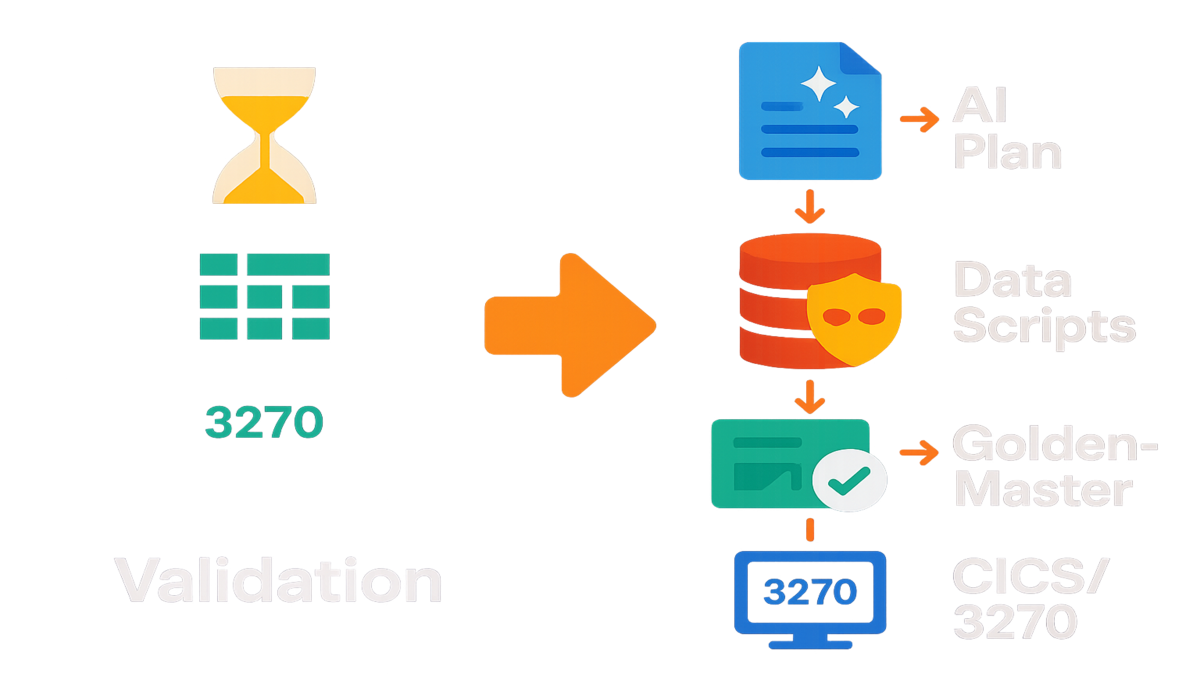
In modernization, code isn't the slow part. Validation is.
You don’t miss deadlines because your team can’t write Java or refactor COBOL. You miss them because testing drags, and it drags hard. Endless spreadsheets eat hours you never planned to ever spend. Manual comparisons slow every check and invite mistakes at scale. Too much guesswork around parity, which makes folks nervous fast. Meanwhile, the mainframe keeps humming and your migration sits in limbo.
Here’s the unlock you need right now: automate the validation. With AWS Transform and automated testing tools, you get serious help fast. AI builds test plans and collects data with almost no hands. You also get golden-master comparisons and terminal checks for gnarly CICS flows. That means less risk, faster timelines, and fewer 2 a.m. war rooms.
Testing has long eaten a big slice of budgets and schedules. The World Quality Report shows automation boosts speed and coverage without hurting confidence. You want that on a mainframe program right now, seriously.
This guide shows exactly how to pull it off, step by step. What to automate, how to prove equivalence, and which metrics to track. So leadership sees the risk curve actually collapsing, not just vibes. No fluff. Just a playbook you can run right away.
TLDR
- Automated testing trims the biggest modernization bottleneck: validation, not coding.
- AWS Transform integrates four automations: plan generation, data scripts, functional parity checks, and terminal connectivity testing.
- Use golden-master comparisons to prove the new stack matches legacy outputs.
- Track defect escape rate, coverage, and regression time to show ROI.
- Start with high-value journeys (batch and CICS) and scale patterns.
Testing Is Your Bottleneck
The hidden bottleneck
Shipping modern code is exciting. Validating against decades of mainframe behavior? Not fun. Most delays come from proving the new system matches the old one. Down to rounding rules, edge-case dates, and quirky field parsing. Manual steps make test plan creation and data wrangling swell and stall schedules.
A real baseline from industry surveys helps set context here. Quality spend often eats a big share of delivery costs. Automation is a top lever to move faster and keep confidence high. That matters with tight migration windows and zero tolerance for bad balances. Also for claims and trades, which must be right always.
Manual validation also creates a painful coordination tax across teams. SMEs explain 20-year-old rules now buried deep in code. QA turns that into steps, and engineers stitch environments and data. Every handoff adds latency and risk, even for simple stuff. Then multiply it by environments, data subsets, and cutover waves. Small frictions scale into big delays, fast.
What parity really means
Parity is not the screens look similar. It’s tighter than that. It means same inputs produce the same outputs within agreed tolerances. Across batch and interactive flows. That’s functional equivalence, plain and simple.
A clean example helps make it real. Capture a daily COBOL batch job’s outputs and rerun on the new job. Then diff record counts, keys, and calculated fields. For CICS, script an end-to-end customer journey with real steps. Log in, update an account, submit a transaction, then verify every downstream effect. Automating these checks removes the human comparison fog that causes rework.
When you treat parity like engineering, not spreadsheets, you shrink risk and timelines.
Common parity gotchas you’ll catch only with automation:
- Numeric edge cases: packed decimals vs floating point; banker’s rounding vs round-half-up.
- Collation and code pages: EBCDIC vs ASCII sort orders change which record appears first.
- Dates and time: end-of-month rollovers, leap years, daylight saving transitions, time zone offsets.
- Field semantics: sign overpunch characters, trailing spaces trimmed vs preserved, zero-padding.
- State handling: idempotent retries creating duplicates, soft deletes vs hard deletes.
- Batch windows: late-arriving files, clock skew between systems, reprocessing after partial failures.
- Integration behaviors: message formats on MQ, correlation IDs, ordering guarantees.
These aren’t nice-to-check items. They are traps that sink schedules late. Automated, repeatable checks surface them early, and save weeks.
Four Automations
Test plan generation
Test plans used to take weeks of guessing and copy-paste. AWS Transform’s tools draft detailed plans tailored to your target app. They include scenarios, steps, inputs, and expected outcomes you can run. You still review and refine, but you start from a strong baseline. Faster coverage, less tribal-memory guessing. Nice.
Examples help show the shape here. Map requirements to test cases with clear links and tags. Generate parameterized scenarios for edge dates and currency formats. Handle EBCDIC-to-ASCII conversion quirks without manual busywork, too. Align tests with release trains so teams move in lockstep. This is where many 'automated testing functionality reddit' threads land. How do you go from requirements to executable checks? You start by letting the system draft the scaffolding.
To make those AI plans production-grade, add:
- Risk tags (regulatory, financial impact, customer visibility) to drive priority.
- Data contracts for each test (source tables, file layouts, masking rules) so it’s runnable, not just readable.
- Expected artifacts per step: files on S3/VSAM, MQ messages, DB rows, logs.
- Exit criteria per suite: parity threshold, performance target, and stability runs required.
You still review, but you edit a solid draft, not invent from scratch. That cuts time and reduces blind spots across teams.
Test data collection scripts
Mainframe data is precise and very regulated, so treat it carefully. Scripts should fetch the right snapshots, mask PII, and stage inputs. Then your runs are trustworthy and repeatable, every single time. No more ad hoc extracts from last month’s dataset that rot.
All types benefit here: functional, integration, end-to-end, and performance. They all need clean data to be real and stable. Automating the data layer removes flaky tests from mismatched tables or stale records.
Build your data scripts with these habits:
- Version everything: each dataset snapshot gets an immutable tag and checksum. You must be able to reproduce a past run exactly.
- Mask at source: apply irreversible masking or tokenization before data leaves the secure boundary. Keep a clear audit trail.
- Seed clocks: for time-dependent tests, freeze 'now' via config so today’s run looks like tomorrow’s.
- Blend synthetic with production-like: combine generated edge cases with realistic distributions so you hit both weird corners and common paths.
Bonus: add data fitness checks for counts, nulls, and key uniqueness. That way you don’t burn a day chasing a bad extract.
Functional validation scripts
This is the heart: scripts compare legacy outputs to new outputs. Use checksums for files and field-by-field diffs for key records. Add tolerance rules for numeric fields like floating-point versus packed decimal. These tools confirm equivalence fast, without drama.
Example: run nightly premium calculation on both systems in parallel. Generate canonical CSVs and compare deltas by policy and coverage tier. Alert only on material variances, not noise.
Make your comparison engine explainable with:
- Deterministic sorting and keys: sort by composite key so you compare apples to apples.
- Tolerance catalogs: e.g., 0.01 absolute tolerance on currency; ignore harmless whitespace; case-insensitive comparisons where appropriate.
- Ignore maps: known, documented deltas (e.g., new audit fields) that should not fail tests.
- Variance categories: expected (formatting), benign (rounding within tolerance), defect (logic error). Report them separately.
Store diffs as CSV or JSON that anyone can open fast. Skip mystery binaries no one can read under pressure. If a failure hits at 3 a.m., the report should be boring.
Terminal connectivity testing
If you have terminal apps, connectivity is non-negotiable. Scripts that simulate 3270 flows validate logins, navigation, and submissions. They catch surprise timeouts or misrouted sessions before users do. In practice, they catch SSL/TLS ciphers, session pooling, and LU name mapping issues.
Strengthen terminal tests by:
- Recording canonical journeys (screen-by-screen) with stable selectors, not pixel positions.
- Asserting screen content plus side effects: DB rows written, MQ messages emitted, audit entries captured.
- Exercising failure paths: invalid credentials, session expiry, network blips, reconnect behavior.
- Running across network topologies: on-prem, VPN, and cloud egress—because routing can change behavior.
Online journeys turn 'it worked on my machine' into public failure, fast. Automate them to remove drama and save face.
Proving Parity
Capture legacy truth
Golden-master testing turns your live mainframe into the oracle you trust. You:
- Capture inputs and outputs from real production-like runs (with masking where required).
- Re-run identical scenarios on the new platform.
- Diff results automatically with clear tolerances and rules.
This approach scales from batch to interactive flows without heavy lift. For batch, compare file counts, record schemas, and key field aggregates. For interactive, script journeys and verify messages, rows, and audit logs. Assert state equivalence so nothing slips through unnoticed in testing.
Treat the golden master like an artifact:
- Store masters and diffs in versioned buckets or repos. If a rule changes, you approve a new master.
- Tie each master to a specific code commit and data snapshot. Provenance matters.
- Require sign-off on new masters from both business and tech owners to avoid accidental approval by fatigue.
Batch vs online
Batch wrinkles include order dependence, time windows, and late files. Use stable cutoffs, seeded clocks, and idempotent replays to fix them. Online wrinkles include session stickiness, contention, and message formats. Use scripted think-times, correlation IDs, and protocol-level assertions there.
A first-hand style walkthrough you can adapt today:
- Pick a high-value batch job (e.g., end-of-day reconciliation).
- Export legacy outputs to a canonical format (CSV or Avro), including hashes.
- Run the new job with identical inputs.
- Compare per-key totals and field-level values. Gate the release on zero or explained deltas.
Do this consistently, and the debates stop cold. You ship based on evidence, not hope.
For online parity, add a 'shadow' mode:
- Mirror real transactions to the new stack (read-only state) while the legacy remains source of truth.
- Record both outcomes and compare asynchronously to avoid user impact.
- Triage variances daily; only when green for sustained runs do you flip traffic.
This lets you practice the cutover before the real cutover.
What Good Looks Like
Define done before you test
You can’t declare victory if you never defined it, honestly. Agree with stakeholders on a crisp acceptance frame:
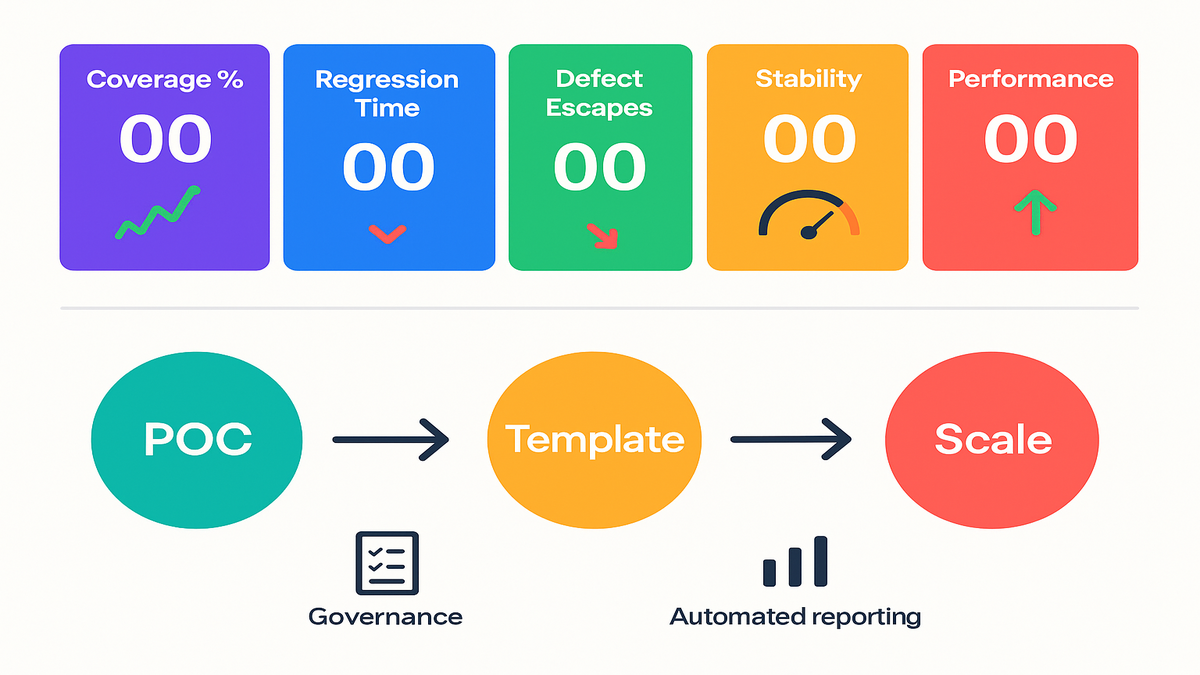
- Coverage: top X customer journeys and Y% of batch volume automated.
- Parity: 99.5%+ field-level match for critical records; defined tolerances for remaining.
- Stability: pass rate of Z consecutive runs in production-like environments.
- Performance: meets or beats legacy SLAs for throughput and response times.
Document it and tie it to go or no-go. Then the talk shifts from vibes to agreed bars.
Watch these KPIs
You need numbers that translate to time and risk:
- Regression time: reduced from days to hours per release.
- Defect escape rate: fewer production defects post-cutover.
- Automated test ratio: percent of total test cases executable end-to-end.
- Mean time to explain variance: how fast you classify parity diffs (expected vs real defects).
These metrics turn testing from a black box into a steady machine. They also justify investment in automation with real, visible wins. You can show faster cycles and fewer late-stage surprises.
Pro tip: tag each test to a clear business capability. When a VP asks, you can answer with facts, not vibes. Yes, the claims adjudication path is 100% covered and green lately.
Operationalize the metrics:
- Automate collection: pipeline writes results to a data store after every run—no spreadsheets.
- Trend over time: show velocity (runs/week), stability (pass rate), and scope (coverage growth).
- Benchmark pre/post: track the same KPIs before and after automation to prove lift.
- Add cost visibility: hours saved per regression cycle multiplied by releases per year. Simple, credible ROI.
Rollout Without Drama
Start focused
Begin with one high-value batch job and one CICS journey. Use AWS Transform’s automated testing features to:
- Generate a draft plan.
- Script data collection with masking.
- Implement golden-master comparisons.
- Validate terminal connectivity.
Lock the pattern and then templatize it for reuse. Rinse and scale across domains without blowing scope. This keeps scope controlled and shows quick, credible wins.
Work the pattern like a product:
- Build a shared library for diffing and tolerance rules so teams don’t reinvent.
- Publish example pipelines and red/green dashboards any squad can copy.
- Host enablement sessions—one hour to onboard a team to the pattern.
Governance that doesn’t crush velocity
Create a lightweight test architecture board with architects, QA leads, and ops. The board approves templates and tolerances once, not every time. Teams then reuse proven patterns without extra reviews. You get consistency without new bottlenecks.
Finally, automate reporting with clear dashboards folks trust. Show parity by domain, diff trends, and SLA conformance in one place. When leaders see risk trending down in real time, life gets easier.
Add pragmatic guardrails:
- Change control for masters: any change to a golden master or tolerance requires a pull request with justification.
- Segregated environments: keep a clean, production-like lane for parity runs separate from noisy dev.
- Cutover rehearsals: simulate traffic flips with runbooks, rollback plans, and comms. Treat it like game day.
Quick Pulse Check
- You can spin up a new test plan in hours, not weeks.
- Data fetch and masking are scripted, repeatable, and auditable.
- Parity diffs produce actionable reports, not mystery screenshots.
- Batch and CICS journeys both have golden-master coverage.
- Regression runs finish in hours with clear red/green results.
- Leadership sees parity KPIs on a single dashboard.
FAQ
What are the main types
Focus on functional, integration, performance, and regression first. Add security and accessibility as your surface grows.
How do functional automation testing
They compare legacy and modern outputs with deterministic rules that hold. Use file checksums, record diffs, and tolerance for numbers and dates. Results are versioned, repeatable, and explainable to auditors.
Do I still need manual
Yes, for exploratory, UX, and edge-case validation you still need humans. Automation handles the high-volume, repeatable checks humans hate and miss. Manual testers then focus on risk-based discovery that finds surprises.
An automated testing example
Automate login, navigate to an account, update a field, and submit. Verify DB updates, message queue content, and audit logs match. Repeat with varied data to stress validation and edge cases.
The practical answer
Start with what moves risk, not theory or long threads. Automate parity for top transactions and batch jobs first. Wire in data scripts and make your diffs deterministic and visible. Opinions fade when the evidence is automated and on a dashboard.
How do I handle sensitive
Automate masking and synthetic data generation right in the pipeline. Keep lineage and approvals visible and enforced. Treat test data like code, versioned and auditable always.
How do we deal with unavoidable
Normalize or ignore them with clear, documented rules. Strip volatile fields or compare within windows, like timestamps. Map generated IDs with a stable key to compare the real object.
What if my legacy batch
Export both outputs to a canonical format like CSV, Avro, or JSON. Use the same schema and compare at that level. If needed, compute per-record hashes to keep things fast.
How should we
Run parity suites under expected load, not baby traffic. Track throughput and response times next to functional checks. Your go or no-go should ask match and SLA questions.
Any tips for terminal
Use reliable 3270 tools that identify fields by attributes, not pixels. Record flows, parameterize inputs, and assert screens and side effects. Start with a smoke suite and grow coverage over time.
Ship Faster
- Inventory top 10 journeys (batch and CICS) by business impact.
- Define parity rules and tolerances with stakeholders.
- Use AI to generate draft test plans and refine.
- Script data collection and masking; lock repeatability.
- Implement golden-master comparisons with clear diff outputs.
- Add terminal connectivity scripts for interactive flows.
- Automate dashboards for parity and regression KPIs.
- Gate releases on parity thresholds; iterate patterns across domains.
Automation doesn’t make modernization easy. It makes it predictable, which you actually need.
In modernization, the riskiest step is proving you didn’t break the logic. It’s baked into decades of mainframe code, and it’s touchy. When you automate plans, data prep, comparisons, and terminal checks, things change. You convert uncertainty into measurable signals that everyone can trust. That’s how you move faster without gambling production days. Start small: one batch job, one CICS flow, lock the pattern, then scale. By cutover, you’re not hoping anymore. You’re verifying and you know.
References
- World Quality Report 2023–24 (Capgemini/Sogeti/Micro Focus)
- AWS Mainframe Modernization service overview
- IBM CICS Transaction Server documentation
- Golden Master and Approval Testing (ApprovalTests)
- IBM 3270 terminal background
- Martin Fowler, Characterization Test
- IBM MQ documentation
- AWS Glue DataBrew (data preparation and masking)
- x3270 3270 terminal emulator project