

You know that sinking feeling when a single Region hiccup locks everyone out of AWS? Yeah, not fun. Here’s the plot twist. You can keep Identity Center warm in multiple Regions, so access doesn’t blink.
Multi-Region replication in AWS IAM Identity Center puts identities and permission sets closer. Closer to your users, and closer to your compliance rules too. Translation: higher resiliency, lower latency, and auditors who smile more.
If you’re juggling cross-Region SSO hacks, this is your exit ramp. Replicate Identity Center to another AWS Region, or more if needed. Read locally and still manage centrally. Exactly what you want for modern, global teams.
This guide breaks it down clean. What it is, why it matters, where it shines, and how to start. You’ll get crisp patterns, gotchas to dodge, and a step-by-step to ship.
One more thing before we dive in. You’re not rebuilding your IdP or rewriting apps. You’re placing the same Identity Center data in more places. So sign-ins and role launches feel local, and faster. Think "copy and serve," not "fork and pray." This move is low drama and high upside for busy teams. The ones who live in Slack, ship daily, and hate access outages.
TLDR
- AWS IAM Identity Center now supports multi-Region replication for identities and permission sets.
- You get better resiliency, faster sign-ins, and a simpler data residency posture.
- Manage centrally, read locally: writes stay in primary; reads fan out in Regions.
- Start small: replicate to one Region, validate, then roll it out globally.
- Watch for eventual consistency and plan clear failover runbooks.
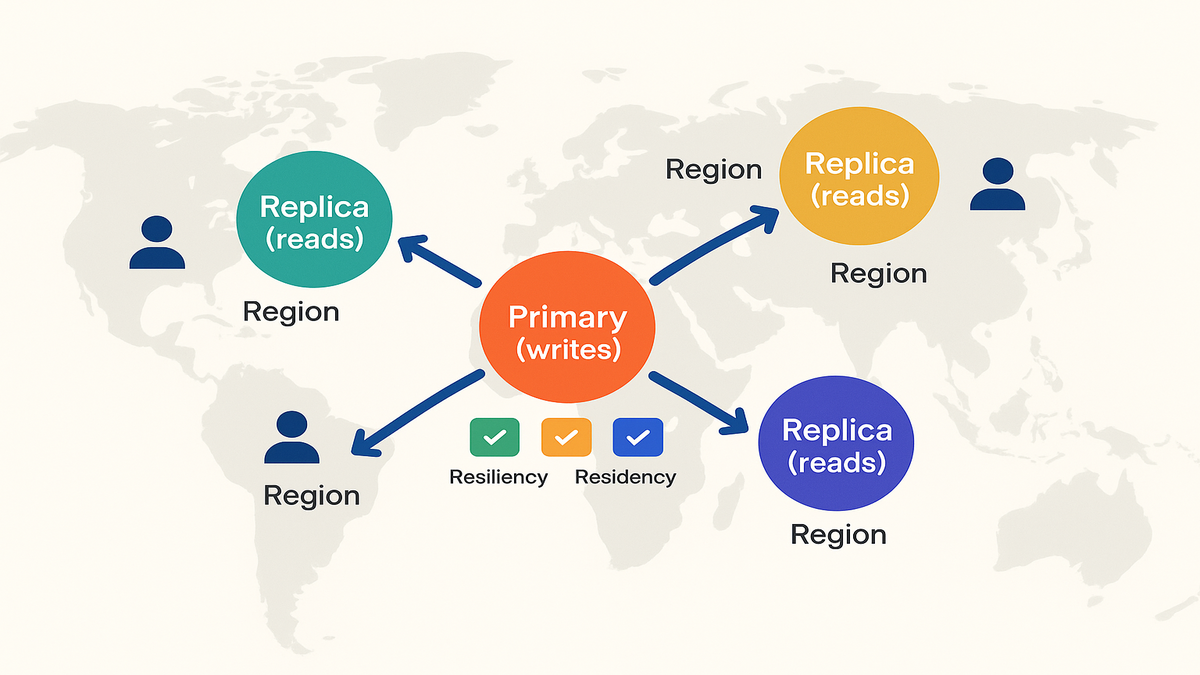
Multi Region Identity
The short version
When you use AWS IAM Identity Center across multiple Regions, core objects replicate. Users, groups, and permission sets copy to additional Regions. You keep one primary Region for all config and write operations. Other Regions serve reads for sign-in and assignments. This cuts auth latency for distributed teams and protects you during wobbly Regions.
In practice, users see and launch roles with data stored near them. A developer in Sydney opens the AWS access portal, and it answers locally. No long trip across the planet just to ask, "What can this person do?" It answers faster, with less drama, and the same truth. You still control everything from one place, so change stays clean.
Different from SAML
SAML from a single Region into many accounts still adds risk and latency. You’re concentrating all access decisions in one spot. Multi-Region Identity Center spreads identity and authorization metadata near users and workloads. So access checks and logins don’t hinge on one Region’s health or distance.
- With single-Region SAML, your blast radius is basically the whole map.
- With Multi-Region Identity Center, one truth remains, but reads happen locally.
- Result: fewer "SSO is slow" escalations and fewer "+1" alerts during busy hours.
Where it fits
- Upstream IdP: Okta/Azure AD/Entra/AD via SAML/OIDC and SCIM. That stays the same.
- In AWS: Identity Center replicas hold the same permission sets and assignments. Engineers launch the same roles, just from endpoints closer to them.
- Downstream: Console, CLI, and custom apps integrate as usual, only faster and sturdier.
Add a tiny bit of discipline, and this sings.
- Document which Region is "primary" in runbooks, tickets, and pinned Slack posts.
- Set clear expectations for propagation timing across Regions.
- Keep permission sets and assignments in code to avoid drift as you scale.
Pro tip: keep permission sets consistent with IaC. Use CloudFormation or Terraform so replication is distribution, not divergence.
Why You Should Care
Resiliency design and regional behavior
"Everything fails, all the time." That’s not doomsday. That’s Werner Vogels reminding you to design for failure. Multi-Region replication shrinks your identity blast radius. If the primary control plane gets sluggish, replicas still serve read-heavy operations. That includes user sign-ins and role launches.
- Reduce RTO: you’re not scrambling to rewire identity in a crisis.
- Reduce risk: one Region’s issue won’t become a company-wide outage.
- Keep ops boring: role launches stay predictable across your fleet.
Give your incident runbook a quick upgrade.
- Step 1: Check replication health in CloudWatch and the AWS Health Dashboard.
- Step 2: If primary is degraded, favor read paths from replicas, pause admin writes.
- Step 3: Tell stakeholders, "Reads are healthy; writes are queued in primary."
Data residency and audit posture
Some teams need identity data to live in specific geographies. By using Identity Center across Regions, you align placement with residency needs. You simplify audit narratives with documented replication behavior. Not "it’s somewhere far away," but "it resides in-region with documentation."
Audit season gets easier.
- You can show where identity metadata is stored and replicated.
- You can map Regions to internal policies, like EU users to EU Regions.
- You can show change control on who writes where, and when.
Always validate with compliance and the latest AWS docs. Residency is about clarity and proof, not vibes.
Performance is a feature
Auth latency isn’t just annoying; it taxes productivity. Replicate Identity Center to a Region closer to developers or support teams. This trims round trips that slow logins and token refreshes. Your CLI users will feel it, and browser SSO users too. Your CFO will notice happier, faster teams.
Focus on the highest-friction paths.
- The first console sign-in of the day with cold caches.
- Role switching for incident responders on a tight clock.
- Short-lived sessions for engineers bouncing across many accounts.
Trim seconds here and you win back hours every month.
Real World Patterns
The hub and spoke
Pick a primary Region as your identity hub. That’s where writes and config happen. Add one or more spoke Regions with many users or strict rules. Standardize permission sets and assignments to avoid policy drift.
- Baseline: replicate to a second Region in the same geo. Example: eu-central-1 plus eu-west-1 for residency and resilience.
- Global: add replicas in Americas, EMEA, and APAC where your teams live.
Operational tips that pay off.
- Name your primary clearly in docs, like "Primary: us-east-1."
- Add a "Replica Map" to onboarding so new hires pick what’s closest.
- Use the same naming for permission sets everywhere to stay sane.
Pairing with your IdP
Using SCIM from Okta or Entra ID to provision users and groups? Keep SCIM aimed at your primary Region’s Identity Center directory. Replication will distribute the objects safely. That avoids dual-writes and keeps identity truth clean.
Practical moves.
- Keep attribute mappings simple and clear, like email and groups.
- Test a single new group end to end before scaling wide.
- Add a short "SCIM change freeze" during big rollouts to cut noise.
A first hand style example
Say you run a fintech with engineers in Berlin and Singapore. Your Identity Center lives in eu-central-1 today. Berlin logins are fine; Singapore logins lag, and folks complain. You replicate to ap-southeast-1 and test. Result: APAC launches feel snappy, and audits relax on residency. Your 3 a.m. on-call page no longer says "identity is slow again." You didn’t restructure the org, just added a replica and validated.
Extend the win.
- Start a small APAC pilot: route 10% of users to the new path.
- Gather feedback on login speed and role switching.
- Roll to 100% with a rollback plan, just in case.
Keep permission sets versioned
Treat permission sets like app releases. Version them, test in a sandbox, then roll out. Replication won’t save you from a bad policy, discipline will. Store definitions in Git and use pipelines to apply changes. Multi-Region then multiplies good changes, not mistakes.
A simple flow.
- Define permission set v1.4 in code.
- Apply to a dev account and validate access boundaries.
- Promote to staging accounts when it looks good.
- Roll to production during a low-traffic window.
- Tag the release and document what changed.
If you need to revert, roll back the tag and push. No finger-pointing, no guesswork.
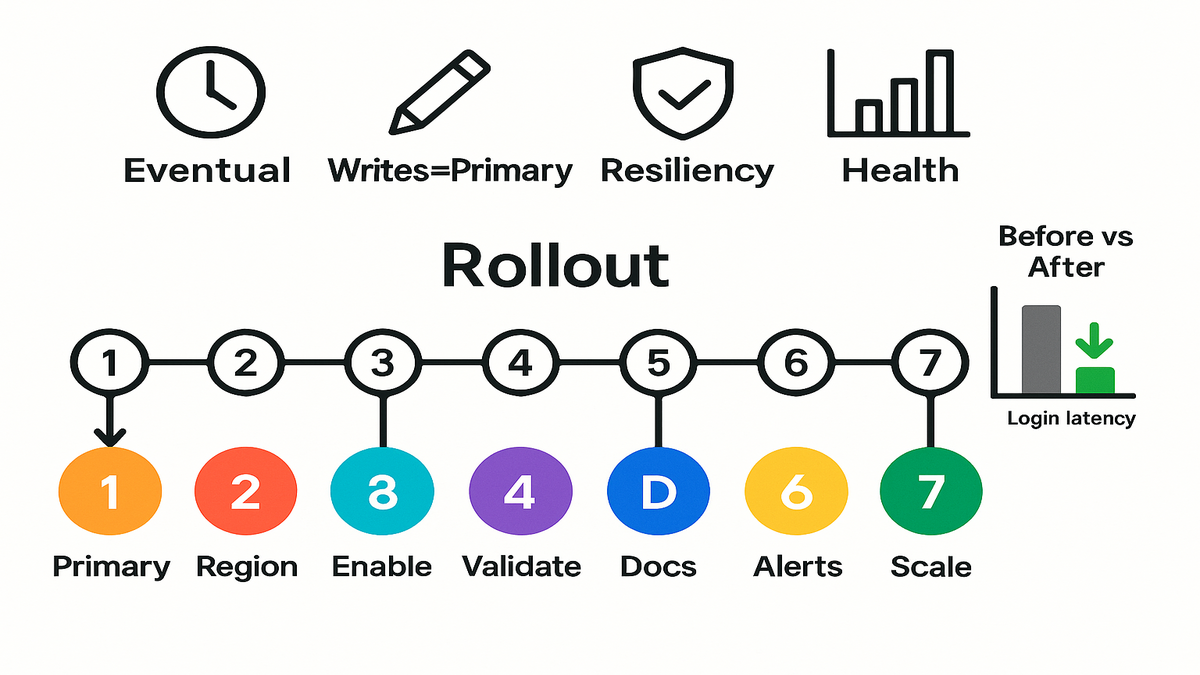
Guardrails and costs
Writes in one place
You still pick a primary Region for writes. That keeps administration sane, but funnels change workflows there. Things like new group-to-permission-set assignments must originate in primary. Your runbook should shout, "writes happen in primary; validate in replicas."
Make it hard to forget.
- Add a banner in your admin wiki: "All writes → Primary Region."
- Include the Region name in your automation environment variables.
- Require tickets to note the Region of the write step.
Expect eventual consistency windows
Replication isn’t magic, it’s engineering. There may be short windows before changes appear in replicas. Plan change windows and runbooks to allow for that lag. Tell developers, "If you don’t see it yet in another Region, wait a beat."
What helps.
- Batch non-urgent changes and announce a short propagation window.
- Validate in primary first, then spot-check in a replica.
- Add synthetic tests that log in and list assignments per Region.
Endpoint selection and CLI
Developers keep using the AWS access portal and SSO profiles they know. Now the service can serve reads from the closest healthy Region. Update internal docs so users know the preferred portal URL. Do this especially if you publish regionalized access URLs.
Quality-of-life tips.
- Post the official portal URL in channels and onboarding docs.
- Standardize AWS CLI profile names so scripts just work.
- Add a tiny FAQ: "If login feels slow, try this Region URL."
On pricing and quotas
Identity Center pricing and quotas live in AWS docs, not on vibes. Before scaling replicas, review current limits and the pricing page. Make sure it aligns with your growth plan and budget. Expect the main costs to be operational, not the toggle itself.
- Check quotas before rollout and watch them as you grow.
- Alert on replication health signals in monitoring.
- Document the failover path like your job depends on it.
Also, watch downstream effects of more Regions. More places to monitor, more dashboards to maintain, more ownership questions. Assign owners up front so nothing falls between chairs.
Speed Round Recap
- IAM Identity Center now supports multi-Region replication for identities and permission sets.
- You manage centrally in primary and read locally in replicas. That improves resiliency and performance right away.
- This helps with data residency when auditors ask where identity lives.
- Use Infrastructure as Code for permission sets, treat changes like releases.
- Plan for eventual consistency and write-locality in your runbooks.
Bookmark this mental model. One brain (primary), many eyes (replicas). The brain writes; the eyes read. Keep the brain healthy, and the eyes keep teams moving.
FAQs
What changes day to day
Your admin workflows still center in a primary Region. Your users now get faster, more resilient access in additional Regions. You’ll define permission sets, group mappings, and assignments as usual. Replicas just serve reads closer to users.
Replicate to another Region
Yes. Keep SCIM and SAML/OIDC integrations pointed at the primary Region. Replication distributes users, groups, and permission sets automatically. No dual-homed provisioning needed. Validate in a test account before a global rollout.
Resiliency and regional behavior
It reduces single-Region dependence for read-heavy paths. That includes logins and role launches. If primary degrades, replicas still serve many operations. Combine this with clear failover steps for administrative writes.
Data residency with replicas
Replicas let you align identity data placement with regional policies. Keep European identity metadata in EU Regions if required. Deploy another replica in APAC to serve teams there. Always confirm details with compliance and AWS documentation.
Disaster recovery plan
No, it strengthens it. You still need DR for your IdP, apps, and accounts. Replication removes identity as a single failure point. But you must still test cutovers, rollbacks, and comms plans.
Monitor replication health
Use CloudWatch and relevant AWS Health dashboards for Identity Center. Document what "healthy" means and alert on anomalies. Add synthetic checks for login flows in each replica Region.
CLI and SSO changes
Probably not. Keep the same profiles you already use. Refresh docs with the preferred portal URL and any Region notes. If you publish separate URLs, make the choice obvious.
Failover runbook contents
- A named owner for declaring failover conditions, not just a team.
- Steps to pause non-critical writes in primary Region.
- Validation steps to confirm read paths are healthy in replicas.
- A comms template: "Reads healthy in X/Y; admin writes paused until recovery."
Avoid policy drift
Put permission sets and assignments in code, with pull requests required. Test in a non-prod account before promotion. Tag every release so history stays clear. Replication spreads the truth you define once.
Five Minute Fast Path
- Pick your primary Region and name it in runbooks. Document that all writes happen here.
- Choose one additional Region with many users or strict residency needs.
- Enable multi-Region replication for IAM Identity Center targeting that Region.
- Validate: create a test group and permission set in primary. Assign to a test account and confirm it appears in the replica.
- Update internal docs: portal URLs, CLI profile notes, and contacts for lag.
- Add alerts: replication health, propagation metrics, and sign-in success per Region.
- Scale out: add Regions as demand grows and bake checks into CI/CD.
In short, crawl with one replica, walk with two, then run globally.
Bonus tips to make this stick.
- Shadow-launch: silently add a replica and let a small cohort try it.
- Host a 30-minute brown bag to show the flow and answer worries.
- Record a 3-minute Loom of the login path and pin it for onboarding.
Here’s the bottom line. Identity is your company’s front door. Multi-Region replication for IAM Identity Center brings that door closer to users. And it’s a lot harder to jam. Start with one extra Region, verify propagation, then expand where it pays. You’ll get faster logins, steadier ops, and cleaner compliance stories.
If you’ve waited for a low-drama way to harden AWS access, this is it. Invest a single sprint to implement, then reap benefits every day after.
"Latency is a feature. Resiliency is a promise." Make both true.
References
- AWS IAM Identity Center (What it is)
- AWS IAM Identity Center permissions sets
- Automatic provisioning (SCIM) with IAM Identity Center
- AWS CLI SSO configuration
- AWS IAM Identity Center quotas and limits
- AWS Global Infrastructure (Regions & AZs)
- Regional services list (check where Identity Center is available)
- AWS Well-Architected Framework – Reliability Pillar
- AWS Data Residency
- AWS Health Dashboard
- Amazon CloudWatch
- AWS IAM Identity Center service page
- AWS What's New
- All Things Distributed (Werner Vogels’ blog)