


In ops, every second kills momentum. Multi‑Region identity turns seconds into zero.
You know the pain. Identity stuck in one AWS Region, apps stranded elsewhere. A "switch Regions" plan that feels like a rebuild. Before now, AWS IAM Identity Center (formerly AWS SSO) forced one Region. Want to move? Nuke and pave. Users, groups, permission sets, app configs—the whole identity world—rebuilt from scratch.
That’s over. IAM Identity Center now supports multi‑Region replication. Your directory data, users, groups, permission sets, and assignments mirror to other Regions automatically. Resiliency goes up. Latency goes down. App teams stop waiting on identity.
If you run global workloads, this is your oh finally moment. You get local auth for apps like Amazon SageMaker, regional redundancy for AWS account access, and a sane path for data residency. No swapping URLs. No retraining people.
One more perk: your current access portal stays the same front door. Behind the scenes, replicas keep identity close to users. Sign‑ins feel faster without changing how people log in.
TLDR
- Turn on multi‑Region replication to mirror users, groups, permission sets, and assignments.
- Run apps closer to users while keeping IAM Identity Center consistent everywhere.
- Improve DR: if a Region fails, access continues from replicas.
- Cut auth latency for cross‑Region apps; users sign in once and go.
- Start in default‑enabled Regions; reduce opt‑in busywork across accounts.
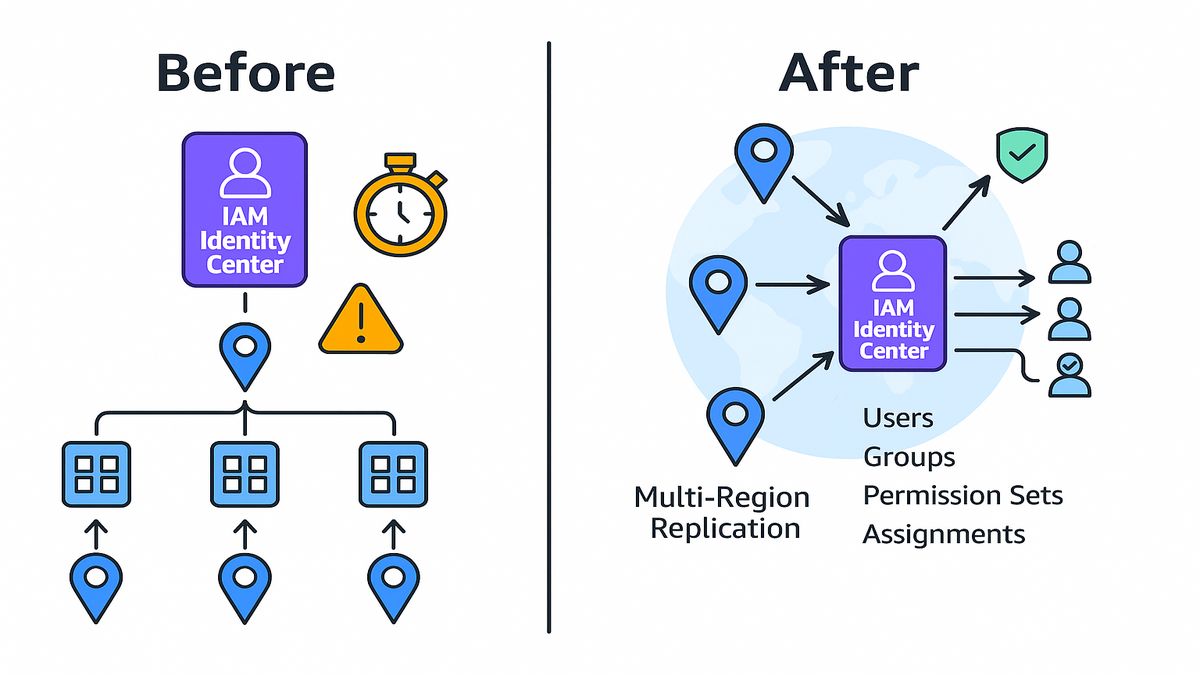
Escape the Single Region Trap
The old bottleneck
Before replication, IAM Identity Center lived in one Region. Apps tied to it, like SageMaker, had to run there for clean SSO. Switching Regions meant deleting your instance and rebuilding users and permission sets. Then reassigning apps and updating the access portal URL. Translation: downtime, risk, and a pile of toil.
If you’ve moved identity before, you know it’s not a few clicks. It’s weeks of spreadsheets and runbooks. Reprovisioning permission sets across dozens or hundreds of accounts. Fixing broken app configs and handling "I can’t log in" tickets at 2 a.m. One Region looked tidy on paper, but brutal in practice.
The new default
Multi‑Region replication mirrors your workforce identities and permission sets to extra Regions automatically. You enable IAM Identity Center in a primary Region, pick target Regions, and AWS handles it. Replication makes AWS account access resilient and supports auth for apps closer to users. It borrows from patterns like AWS Managed Microsoft AD replication and S3 Cross‑Region Replication.
You still operate a single logical instance. You manage users, groups, and permission sets centrally. Replicas sync changes so the identity plane looks identical everywhere. No new sign‑in URL to memorize. No "which Region is identity today?" confusion.
Why it matters now
- Global teams hate 150ms+ cross‑ocean auth calls. Local replicas remove login friction.
- DR becomes real. If your primary Region blips, replicas keep the lights on.
- Data residency gets simpler when identity can live where your data does.
Example: A SaaS with users in North America, Europe, and APAC runs IAM Identity Center in us‑east‑1 and replicates to eu‑west‑1 and ap‑southeast‑2. Users log in once. App sessions and AWS account access work locally.
Think about the ripple effects. Faster day‑one access for new hires. Fewer timeouts during heavy windows. A realistic path to serve new geographies without re‑architecting login.
How Replication Works
What gets mirrored
IAM Identity Center now replicates:
- Directory data: users and groups
- Permission sets and assignments for AWS account access
- App integrations and configurations used for SSO
That keeps your identity plane consistent, whether in two Regions or ten. You still manage centrally; replicas sync automatically, so changes propagate quickly.
Bonus: centralization reduces drift. One source of truth plus replicas means fewer weird surprises. No more "why does Europe show different apps than the U.S.?" mysteries from manual copies and quick scripts.
What stays regional
Some managed apps still have regional nuances. Your IAM Identity Center instance stays anchored in a primary Region. Replicas enable resilient auth and access. Organization‑wide instances and account‑level instances remain distinct. There’s no auto‑merge across separate instances. If you run multiple by design, plan migrations, not magic sync.
Keep in mind: application data and control planes stay regional per service. Replication helps identity reach those Regions. It doesn’t make every service global by default. If you intentionally run multiple IAM Identity Center instances, treat them as separate environments with their own lifecycle and governance.
Resiliency and latency in practice
- Resiliency: If the primary Region has an outage, replicated data keeps AWS account access and app logins alive in secondary Regions.
- Latency: Intercontinental round trips often exceed 100ms. Placing replicas near users cuts auth overhead and boosts perceived speed.
Example: A trading platform authenticates from Frankfurt for EU workloads and Sydney for APAC. Permission set updates are made once and propagate quickly, avoiding stale access during incidents.
User experience shines here. Fewer redirects, fewer timeouts, fewer "try again" moments. The sign‑in portal feels familiar, but the backend skips ocean hops.
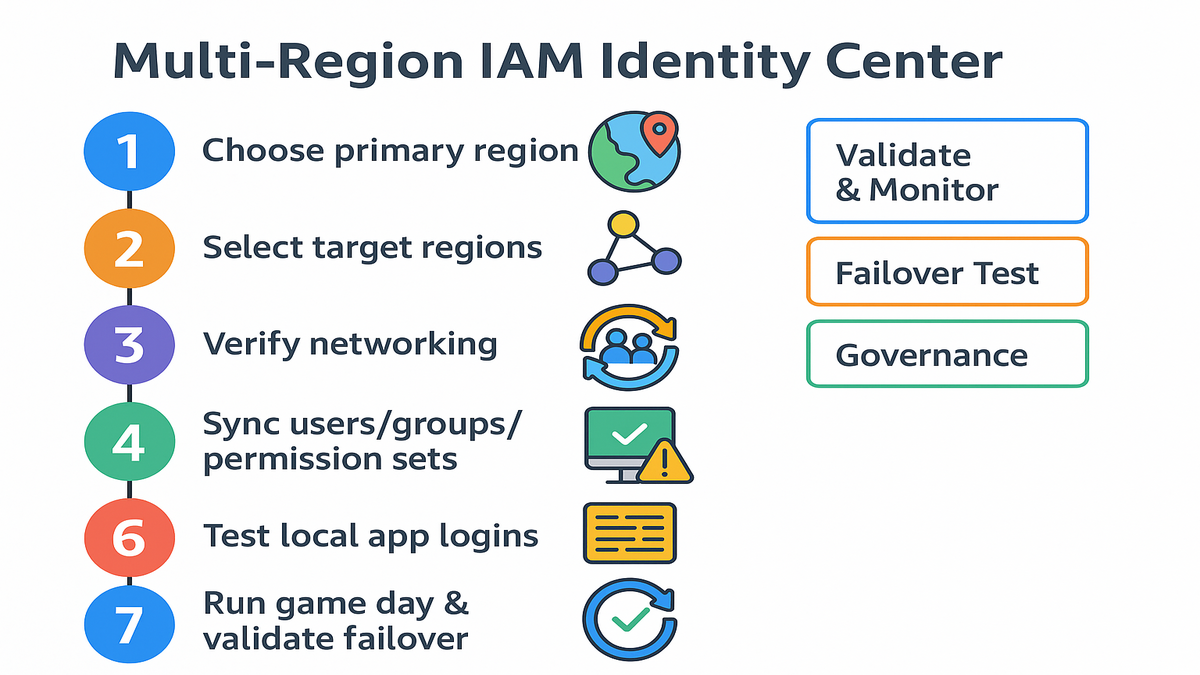
Nail the Setup
Pick the right Regions first
- Start with default‑enabled Regions (e.g., us‑east‑1, eu‑west‑1) to avoid opt‑in toggles.
- Choose Regional hubs that match user clusters and data residency rules.
- Target two to three Regions first; expand as traffic patterns justify it.
A simple rubric:
- Where are your users? Place replicas on the same continent, same country when needed.
- Where are your apps? Prioritize Regions hosting latency‑sensitive services like SageMaker, CI/CD runners, or portals.
- What are your compliance anchors? Map replicas to regulated data locations so auth lives nearby.
Wire up the network
AWS handles the heavy bits, but your environment still matters:
- Ensure VPC connectivity where directory components will land in target Regions.
- If you use private access, confirm routing via Transit Gateway or VPC peering.
- Keep security groups and NACLs friendly to directory replication and SSO flows.
Also worth doing:
- Confirm endpoints and egress so identity traffic reaches AWS APIs without hairpinning.
- Standardize DNS and time sync across Regions to avoid clock skew or split‑brain.
- Practice in a sandbox account first. Validate auth from a jump host in each target Region.
Security that scales with you
- Pair IAM Identity Center with IAM least privilege and permission boundaries. Review sets often.
- Use AWS KMS multi‑Region keys to encrypt across boundaries and simplify key management.
- Centralize logs in your primary Region via CloudTrail and aggregate findings in Security Hub.
Layer a few more guardrails:
- Turn on MFA for workforce users via Identity Center policies. Cheap, high value.
- Prefer attribute‑based access control where it fits. Tag resources and let attributes decide.
- Set session durations thoughtfully: long enough for work, short enough to limit risk.
Example: A healthcare org picks us‑east‑1 as primary, replicates to eu‑west‑1 for EU patients, and ap‑southeast‑2 for AU compliance. Logs land in a dedicated us‑east‑1 audit account S3 bucket, with Security Hub feeding a global SOC.
Apps and SSO
Apps local to users
With replication, apps like Amazon SageMaker authenticate against local replicas. Result: lower sign‑in latency, fewer timeouts, and cleaner multi‑Region AI/ML workflows. Homegrown apps using Identity Center also benefit. Auth stays consistent wherever the app runs.
This helps bursty workflows a lot. Training jobs that spin up fleets. Analysts jumping into notebooks. Engineers hopping between accounts. Every login saved keeps focus.
Common gotchas to avoid
- Don’t assume every feature is magically global. Some apps remain region‑scoped.
- If you see "you have already registered another region" while enabling, the instance exists elsewhere. Use replication instead of a second primary.
- Organization‑wide and account‑level instances don’t sync across each other. Plan migrations if consolidating.
Two more reality checks:
- Expect eventual consistency during propagation windows. Change centrally, wait for replicas, then announce.
- Keep a change calendar. Noon in the U.S. may be mid‑day for EU too. Communicate.
Pricing clarity you actually want
IAM Identity Center doesn’t add a separate line item. You pay for underlying services you use. That includes AWS Directory Service for Microsoft AD if applicable, networking, logging, and KMS keys. Translation: replication boosts resiliency without blowing up your identity bill.
Watch the usual suspects. Log storage with CloudTrail. KMS key policies. Cross‑Region data transfer for centralized logs. Any directory service you run. Most teams see small, predictable bumps, not outage‑level costs.
Example: A media company runs editorial tools in eu‑west‑1, training in us‑east‑1, and rendering in ap‑southeast‑2. Replication removes the auth hairball. Teams sign in once and move across tools without a Region wall.
Operate like a pro
Validate and monitor continuously
- Console checks: use the Identity Center dashboard to verify replication health and statuses.
- Logs: send CloudTrail to a central S3 bucket; alert via GuardDuty and Security Hub.
- APIs: list users, groups, and assignments to confirm changes match across Regions.
Add a little automation:
- Nightly job: call Identity Center APIs to count objects per Region and flag drift.
- Weekly test: run a headless browser sign‑in for a test user in each Region. Alert on latency spikes.
- Query CloudTrail Lake for unusual sign‑in patterns, like bursts from unserved Regions.
Test failure the right way
Run game days. Disable access to the primary Region and verify:
- Users can access AWS accounts from secondary Regions
- App logins complete locally
- Permission set updates still propagate during partial outages
You don’t want to find a route table issue mid‑incident.
When you run the drill:
- Pick a low‑risk window and freeze nonessential changes.
- Pre‑stage a playbook: owners, checks, and rollback steps.
- Record results: login times, error rates, and any manual steps needed.
Governance that doesnt slow builders
- Document a Region strategy: primary, replicas, roles, and ownership.
- Define change windows for permission set updates and communicate propagation expectations.
- Tag identities and permission sets for auditability; report quarterly to compliance.
Make it easy to do the right thing:
- Standardize permission set names and descriptions so teams pick correctly.
- Use tickets or lightweight approvals for high‑risk changes, like expanding admin access.
- Keep a break‑glass role with tight controls and out‑of‑band approval. Test it, then lock it.
Example: A fintech automates a daily replication drift check across Regions. If drift appears, a runbook triggers investigation before it becomes an incident.
Quick pulse
- You remove single‑Region lock‑in for workforce identities.
- Replication keeps users, groups, permission sets, and assignments consistent globally.
- Apps authenticate locally, shaving cross‑ocean latency from login flows.
- DR is real: outages in a primary Region no longer stall access.
- Governance improves with centralized changes and regional verification.
- Costs stay predictable; you’re not paying an identity tax for resiliency.
FAQs
Q: Do I still have to recreate users and permission sets when moving Regions? A: No. With multi‑Region replication, users, groups, permission sets, and assignments mirror automatically. Manage once, consume everywhere.
Q: What about the error "you have already registered another region" when enabling? A: That message means your Identity Center instance already exists in a different Region. Don’t enable another primary. Configure replication from the existing primary to target Regions.
Q: Can I run multiple IAM Identity Center instances across Regions and have them sync? A: Organization‑wide instances and account‑level instances are distinct and don’t sync. If you have multiple by design, plan manual migrations or consolidation.
Q: Does replication help with data residency? A: Yes. Replicating identities to specific Regions aligns auth flows and data access with residency needs, especially for sensitive workloads.
Q: How does pricing work for replication? A: IAM Identity Center has no standalone fee. You pay for underlying services like Directory Service, network transfer, KMS, and logging. Most teams gain resiliency without a big cost jump.
Q: What apps benefit most from this? A: Latency‑sensitive and region‑scoped apps—SageMaker notebooks, training jobs, internal tools—see big gains. Auth can happen against a local replica.
Q: Does the sign‑in URL change when I enable replication? A: No. Your existing access portal stays your front door. Replication runs behind the scenes, so bookmarks stay valid.
Q: How fast do changes propagate to replicas? A: Propagation is quick, but treat it as eventual consistency. Roll changes, allow time, then confirm.
Q: Any limits I should know before scaling? A: Yes. Review Identity Center quotas for users, groups, assignments, and apps. Plan naming, tagging, and lifecycle so you don’t hit ceilings.
Rollout cheat sheet
1) Enable IAM Identity Center in a primary, default‑enabled Region. 2) In Settings, choose Multi‑Region Replication and select target Regions. 3) Verify networking and security groups where replicas will live. 4) Confirm users, groups, and permission sets sync to replicas. 5) Test app logins locally in each Region, like SageMaker and internal apps. 6) Centralize logs in one Region and set alerts in Security Hub. 7) Run a game day to validate failover and propagation.
You don’t win points for perfect theory. You win with a clean rollout.
This change removes the worst part of global identity: inertia. With Identity Center replication, you keep one source of truth. AWS does the heavy lifting across Regions. Users sign in once. Apps authenticate locally. Auditors get cleaner controls and logs.
Next step: pick your two most critical Regions and replicate. Run a game day. If your team barely notices a failover test, that’s the point. Identity should be boring, fast, and invisible, so builders can ship without Region politics.
References
- AWS IAM Identity Center (successor to AWS SSO)
- Getting started with IAM Identity Center
- Permission sets in IAM Identity Center
- IAM Identity Center API Reference
- IAM Identity Center limits and quotas
- Enable and manage AWS Regions (opt‑in)
- AWS Organizations overview
- AWS Managed Microsoft AD multi‑Region
- AWS KMS multi‑Region keys
- Amazon S3 Replication
- AWS CloudTrail user guide
- CloudTrail Lake
- AWS Security Hub
- Amazon GuardDuty
- AWS Transit Gateway
- VPC Peering Guide
- Enable MFA in IAM Identity Center
- Session duration for permission sets
- Attribute‑Based Access Control (ABAC) in AWS
- Building multi‑Region applications on AWS (whitepaper)