

You ship code. Your users hate downtime. And if your app speaks TCP or UDP, you probably hacked rollouts with scripts, maintenance windows, and crossed fingers.
That changes now. Amazon ECS just added native support for NLB canary and linear deployments. Translation: you can slowly shift real traffic, connections and all, without duct tape. That means smaller blast radius, faster rollbacks, and fewer 3 a.m. texts asking if prod is down.
Here’s the kicker: NLB is built to scale. AWS says it can handle millions of requests each second with ultra-low latency. Pair that with ECS traffic shifting, and gaming servers, IoT backends, and trading gateways finally get sane, safe deploys.
If you’ve been googling amazon ecs network load balancer tutorial, this is your field guide. What changed, why it matters, and how to run your first canary without bricking long-lived sessions.
If you’ve dealt with sticky sessions, static IP needs, or strict allowlists, you get it. NLB gives you raw TCP or UDP power, keeps source IPs, and plays nice with TLS. Now ECS can shift traffic natively, so you get L4 speed with canary and linear guardrails.
Think of this as the missing playbook for real-time stuff. We’ll compare NLB and ALB, explain ECS traffic shifting under the hood, share rollout patterns for stateful apps, and hand you a 10-step runbook to use today. Less guessing. More green graphs.
TLDR
- ECS now supports NLB for native linear and canary deployments, no custom scripts needed.
- Great for TCP or UDP apps needing low latency, static IPs, or long-lived connections.
- Linear ramps traffic in steps; canary tests a small slice, then promotes.
- Monitor with Amazon CloudWatch for errors, latency, and connection resets to cut risk and MTTR.
- Use cases: gaming, IoT, finance, anything where connection persistence is king.
- Compare NLB vs ALB: choose NLB for L4 speed; ALB for HTTP routing features.
- Use CodeDeploy configs, like time-based canary or linear, with ECS blue or green services.
- Tune deregistration delay and health checks so in-flight sessions drain clean.
Why NLB canaries change math
Quick contrast NLB vs ALB
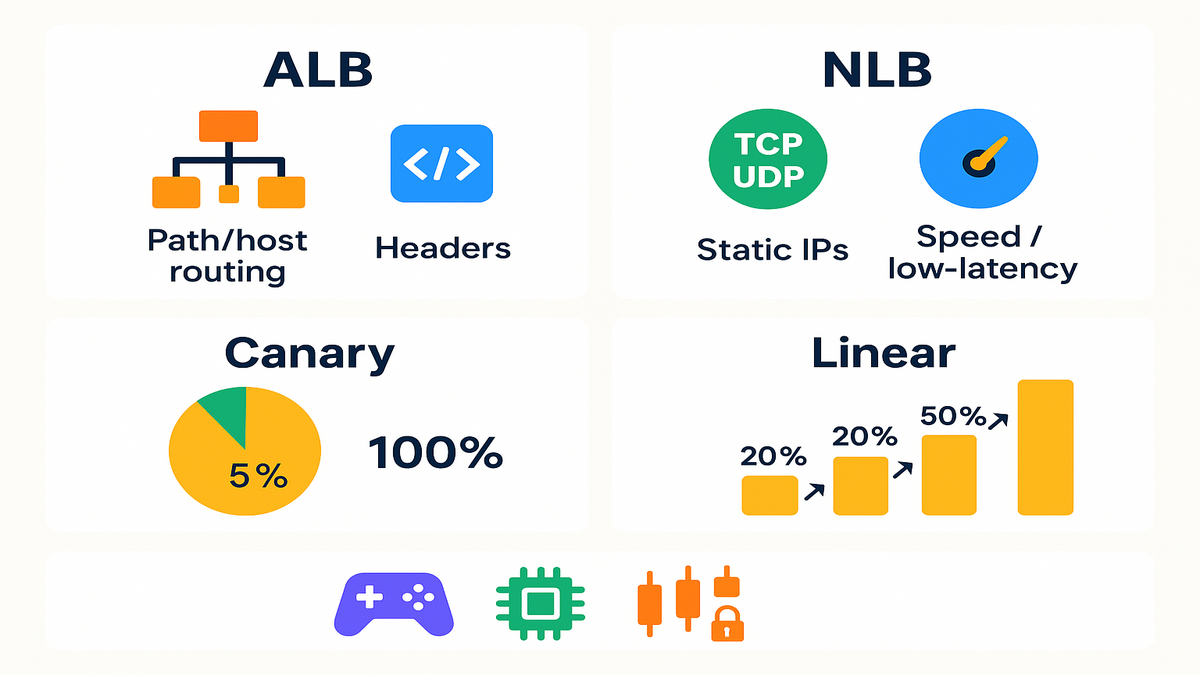
Here’s the 60-second version. ALB is Layer 7: HTTP headers, cookies, path or host rules, and routing. NLB is Layer 4: raw TCP or UDP, static IPs, TLS passthrough or termination, and very low latency. For long-lived connections or game-level performance, pick NLB. For path rules or WAF, pick ALB.
AWS says NLB handles millions of requests per second with ultra-low latency. That’s your north star if you care about real-time loads.
A simple rule to choose: if your packet needs header logic or rules like /api versus /admin, go ALB. If your packet is a long stream, like game, chat, FIX, MQTT, or custom binary, go NLB. Some teams run both: ALB for web or app, NLB for real-time ports, behind the same ECS cluster.
Why gradual traffic beats deploys
Canary and linear cuts the failure blast zone. You don’t flip 100% of traffic at once. You start at 5–10%, watch errors and latency, then go forward or bail. This matters most for stateful or connection-heavy apps where fails cascade hard.
- Gaming servers: keep sessions sticky while you test a new build with a small group.
- IoT backends: validate protocol tweaks without bricking a fleet.
- Trading gateways: soak test latency spikes before they hit the book.
As Werner Vogels likes to remind us, everything fails all the time. Canarying lets you fail in private before you fail in public.
Bonus: gradual shifts make rollbacks boring, in the best way. If you only moved 10%, rollback is a flick, not a fire drill. MTTR drops, the pager stays quiet.
What changed for ECS teams
Before: blue or green and canary for NLB meant scripts, fragile listener swaps, or outside tools. Now: ECS manages the rollout, shifts traffic natively behind your NLB, and hooks into CloudWatch for health and rollback. Less YAML yoga, more safety.
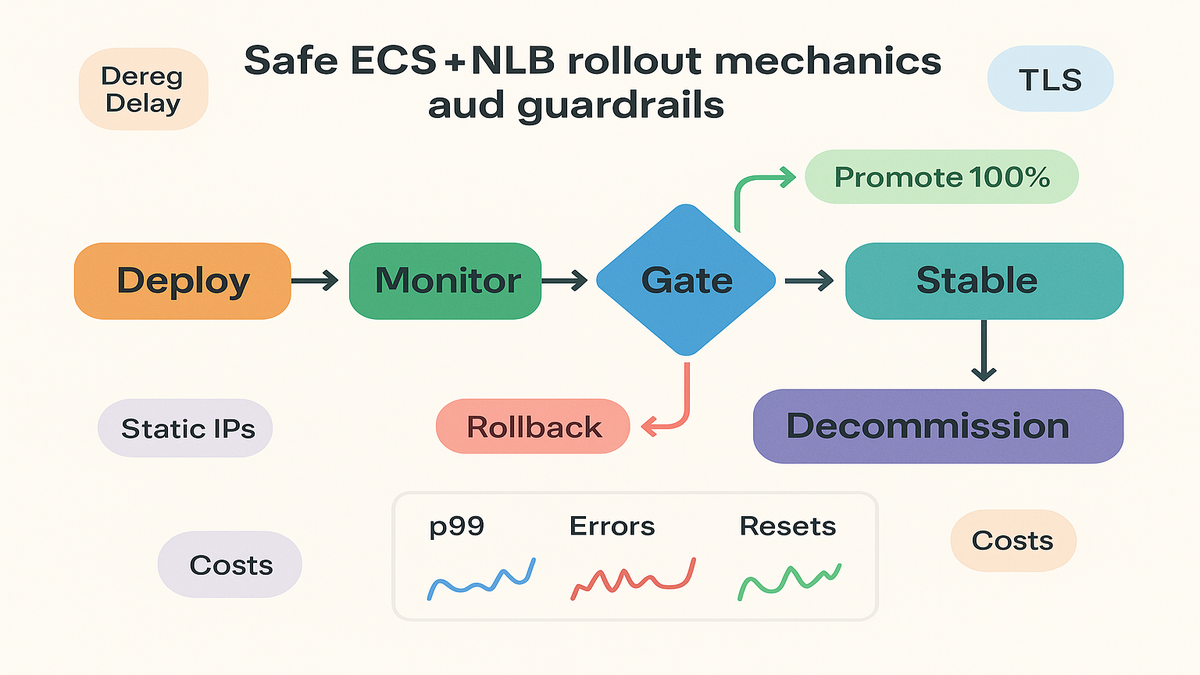
Under the hood, ECS blue or green services tie into CodeDeploy traffic routing configs, canary or linear. You set the plan, attach CloudWatch alarms, and ECS plus CodeDeploy shift traffic between two target groups behind your NLB. If alarms fire, rollback is automatic. If metrics stay green, promotion is hands-off.
How traffic shifting works
Linear predictable ramps
Linear deployments move traffic in fixed steps on a timer. Example: shift 10% every 3 minutes until 100%. If metrics go red, like error spikes, resets, or bad p99, ECS halts or rolls back. It’s a steady curve that’s easy to explain and reason about.
Practical tip: set steps based on peak traffic, not instance count. Ten percent at off-peak might be noise. Ten percent at peak is a real test.
Common defaults in CodeDeploy style setups: 10% every 1 minute, or 10% every 3 minutes. Pick intervals long enough to see effects on caches, pools, and GC pauses. Fast ramps tempt you, but slow ramps catch edge cases.
Canary trust but verify
Canary tests a small slice first, like 5% for 10 minutes, then 100% if healthy. It’s perfect for schema changes, protocol tweaks, or new TLS configs. With NLB, connection stickiness matters a lot. Tune deregistration delay so in-flight sessions on the old task set don’t get dropped mid-chat.
Health is your contract. Use CloudWatch to watch:
- Target health and reset counts
- New versus active flow counts, is connection churn spiking
- App error rates and latency, export custom metrics if needed
Pro move: pair the canary window with a feature flag or config toggle. If you hit a subtle bug, like a weak handshake or keepalive mismatch, you can disable the feature while keeping the binary.
Rollbacks and guardrails
When the canary trips a wire, you need fast, clear rollback. ECS tracks deployment state and can return traffic to the prior task set. Configure:
- Sensible error and latency thresholds
- Minimum bake time per step, don’t promote on a lucky minute
- Alarms that fail safe, one clear alarm beats five noisy ones
Pro move: test rollback paths in staging with production-like patterns. If rollback isn’t tested, it’s hope, not a plan.
Also consider partial rollbacks. If one Availability Zone shows high resets or latency, pause promotion. Check AZ-level metrics before calling a global revert.
Design patterns for stateful workloads
Keep connections stable during shifts
Long-lived TCP sessions hate surprises. Three levers matter most:
- Deregistration delay: give enough time for active flows to drain before removal.
- Connection tracking: let NLB keep routing packets of an existing flow to the same target.
- Health checks: gentle and accurate checks, TCP or TLS, to prevent flapping.
For chatty or custom binary protocols, test idle timeouts and keepalives. Canary with real session mixes, not just simple pings.
Two more practical notes:
- If you use Proxy Protocol v2 for client IPs, confirm your target parses it right during canaries. A parsing bug can look like an LB issue.
- If you terminate TLS on targets, with passthrough at NLB, rehearse cert rotation in a small canary. Watch TLSNegotiationErrorCount during shifts.
Static IPs and compliance needs
NLB can use static IPs per Availability Zone or assigned Elastic IPs. That’s gold for partner allowlists, payment rails, or strict data paths. ECS handles task churn behind the scenes, so your egress IP stays stable while you ship updates.
TLS note: if you terminate TLS on NLB, manage certs with ACM and watch for TLS negotiation errors during rollouts. If you pass TLS through to targets, validate app-level cert rotation during canary.
Bonus: if partners require whitelisting, document exact NLB EIPs per AZ. Set change windows for rare IP moves, like AZ scaling or migration. With pinned EIPs, moves are rare.
Example architecture that just works
- One NLB, a listener per protocol or port
- Two target groups, current and new task set
- ECS service manages both task sets and traffic weights during deploy
- CloudWatch alarms on error rate, resets, and custom p99 latency
If you need HTTP routing plus raw TCP or UDP, run a hybrid. ALB for web front-end, NLB for game, chat, or gateway ports. NLB and ALB isn’t either or, it’s a topology.
Add resilience:
- At least two AZs for the NLB and tasks, so one AZ issue won’t wreck canary.
- Separate target groups per protocol if you host many ports. Roll each one alone to isolate risk.
Costs signals and safeguards
Network Load Balancer pricing
You pay per load balancer hour and usage. Pricing counts new connections, active flows, and processed bytes into capacity units, plus data transfer. Turn on cross-zone load balancing only if you need it. It helps spread traffic but changes transfer costs. Read the pricing page, then estimate with real traffic histograms.
Rule of thumb: small, frequent canaries are cheap compared to one outage. MTTR drops when promotion is automated and rollback is instant.
Cost guardrails you’ll be glad for:
- Alert on NLB capacity unit spikes, are canaries causing connection churn
- Track cross-zone transfer before and after enabling cross-zone
- Cache warm-ups churn connections and bytes, run them during the canary window
What to monitor exactly
- NLB: healthy or unhealthy targets, flow counts, processed bytes, connection resets
- ECS service: task health and deployment state transitions
- App SLOs: p95 or p99 latency, error budgets, and tail timeouts
Build promotion gates on CloudWatch alarms tied to your SLOs. For TCP or UDP, you don’t get HTTP request metrics like ALB. Push custom app metrics, like auth errors or match fails, to CloudWatch.
Concrete signals to wire up:
- ActiveFlowCount versus NewFlowCount, rising new flows with flat active flows can mean churn
- TCPClientResetCount and TCPTargetResetCount, spikes during canary means pause
- TLSNegotiationErrorCount, watch during cert rotations or TLS version changes
- Custom: handshake fails, login timeouts, dropped matches, or queue leaves
Risk reducers most teams skip
- Stagger AZ drains to avoid synchronized brownouts during shifts
- Bake times longer than event loops, let GC, JIT, caches, and pools settle
- Schema drift checks, canary DB and protocol changes before promotion
- Synthetic checks that mimic real clients, not just a port open test
If you’re writing an amazon ecs network load balancer example, show success and rollback paths. Real guides include what to do when things go sideways.
Primer on ECS deployment models
- Rolling update: replace tasks in place. Simple, but not great for long sessions.
- Blue or green with traffic shifting: run old and new task sets, shift gradually. Best for stateful or high-risk changes.
- External controller: bring your own logic if you must. But now ECS supports NLB canary and linear natively, so default to managed unless you need exotic.
If you have hand-rolled listener swaps, this is your cue to retire the bash.
Playbook connecting the dots
Imagine a chat backend on TCP 443 with TLS passthrough:
- Current version runs in target group A; new version spins up in group B.
- You define a canary, 10% for 10 minutes, then 100% if healthy.
- During the 10-minute bake, you watch ActiveFlowCount flat, NewFlowCount slight bump, and TCPClientReset_Count flat. App shows steady login success and stable p99 connect latency.
- A narrow reset spike hits one AZ. You pause promotion, check logs, find a mis-tuned keepalive. You patch, restart that subset, and resume promotion. No headlines, no pager drama.
This is the point: canaries turn surprises into tweaks, not incidents.
Quick pit stop locked in
- NLB is your go-to for TCP or UDP, static IPs, and long sessions.
- ECS now ships linear and canary rollouts with NLB, no custom tooling.
- Linear means steady ramps; canary means small slice, then promote.
- CloudWatch is your truth for errors, latency, resets, and custom app metrics.
- Design for stability with deregistration delays, TLS checks, and static IPs.
- Pricing is hourly plus usage; cross-zone changes cost patterns, so measure first.
FAQ ECS NLB questions answered
Use both Network and Application
Yes. Use ALB for HTTP features like host or path rules and WAF. Use NLB for TCP or UDP, static IPs, and very low latency. Many teams run ALB for web and NLB for real-time behind the same ECS cluster.
Canary and linear differ
Linear shifts traffic in fixed steps on a schedule, like plus 10% every few minutes. Canary starts with a small percent, like 5–10%, for a bake period. If healthy, it jumps to 100%. Both can roll back fast if alarms fire.
Will connections drop during deployment
They shouldn’t, if you set deregistration delay and health checks right. NLB keeps existing flows to targets until they close. Test real client behavior, keepalives and timeouts, in staging to confirm.
Monitor in CloudWatch during canary
Target health, connection resets, active and new flows, processed bytes, and your app SLOs. Add custom metrics for domain errors like logins, matches, or protocol rejects.
Network Load Balancer pricing ALB
NLB pricing uses load balancer hours and usage via capacity units, plus transfer. ALB uses LCUs tied to L7 features. For TCP or UDP without L7 needs, NLB is usually cheaper.
Replace blue or green
No. It makes it smoother. Canary and linear are flavors of traffic shifting inside blue or green. You still run old and new task sets, shift traffic, then retire the old when ready.
Run this ECS NLB canary
1) Pick your service and port, TCP or UDP. Ensure the ECS service uses blue or green so traffic shifting is available.
2) Attach an NLB with listeners per port. Confirm listener protocol, TCP, TLS, or UDP, matches your app. Enable Proxy Protocol v2 if targets expect it.
3) Create two target groups, current and new. Register existing tasks in group A, and configure the deploy to register new tasks in group B.
4) Enable health checks and set deregistration delay. Use TCP or TLS checks for L4. Set deregistrationdelay.timeoutseconds high enough to drain long sessions.
5) Define canary or linear, percent plus interval plus bake time. Start small, 5–10% for 5–10 minutes, and use longer bakes for protocol or cipher changes.
6) Add CloudWatch alarms for error rate, resets, and latency. Wire alarms to fail the deploy if thresholds break. Fast rollback beats slow debugging at 100%.
7) Deploy new task set and start at 5–10%. Warm caches and pools during canary so promotion won’t cause a cold-start wave.
8) Watch metrics; fix or roll back on alarms. Check per-AZ metrics and global ones, problems can be local.
9) Promote to 100% when stable. Keep the old task set briefly as a safety net until it survives peak load.
10) Decommission the old task set and confirm zero unhealthy targets. Clean up any temp alarms or feature flags you used for rollout.
End with a quick post-mortem: what surprised you, and what to automate next.
Here’s the truth: you don’t need heroics, you need guardrails. NLB brings the speed; ECS now gives you the wheel. Add observability and pricing sense, and you’ll ship stateful real-time systems without dread.
References
References
- AWS Network Load Balancer product page, performance and features
- NLB pricing, capacity units and data transfer
- NLB CloudWatch metrics, flows, resets, and health
- ECS services and load balancing, service to NLB
- Blue or green deployments with ECS and CodeDeploy, traffic shifting configs
- Elastic Load Balancing features and comparisons
- Werner Vogels on resilience, everything fails all the time