


You’re probably paying too much for containers. Like, way too much. Here’s the kicker: you can cut up to 90% off compute by running Amazon ECS Managed Instances on EC2 Spot. Same workloads. Same AWS backbone. Just smarter capacity.
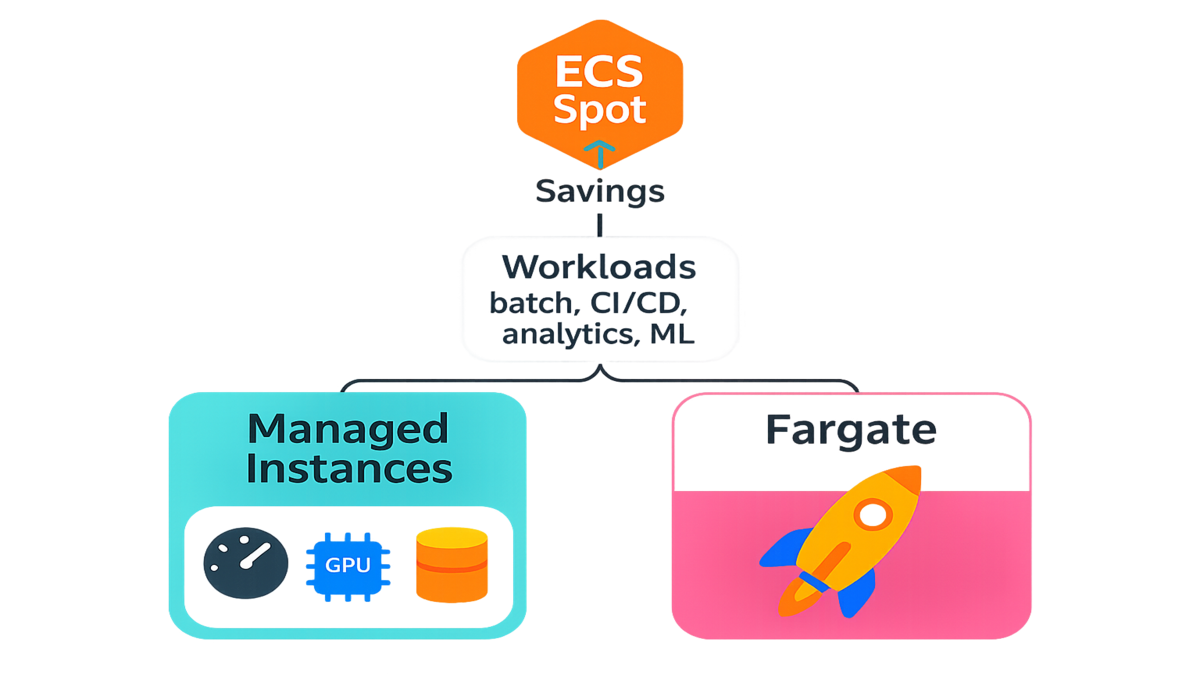
And now it’s turnkey. AWS handles the undifferentiated heavy lifting—scaling, patching, maintenance—so you can run fault-tolerant tasks (batch, CI/CD, analytics, ML training) on discounted, spare EC2 capacity without babysitting servers.
If you’ve tested Fargate Spot but need more control, or you rolled your own EC2 + ECS capacity provider setup and hated the toil, this is your middle path: managed EC2 control with Spot economics and ECS simplicity.
The net: your jobs don’t care where they run as long as they finish on time. With ECS Managed Instances on Spot, they run cheaper—much cheaper.
Think of it like flying standby for compute—you still land at the same airport, you just paid a fraction of the ticket price. If your jobs can handle a brief restart and you design for it, you’re golden. This guide breaks down how to use Amazon ECS Managed Instances on EC2 Spot, where it shines, and how to avoid gotchas.
TL;DR
Run Amazon ECS Managed Instances on EC2 Spot for up to 90% savings vs On-Demand.
Best for fault-tolerant tasks: batch, CI/CD, data pipelines, ML/AI training.
Mix Spot + On-Demand via ECS capacity providers to balance reliability and cost.
ECS handles scaling, patching, and maintenance so you focus on apps.
Consider Fargate Spot for zero-infra; use Managed Instances for control/perf.
Meet the move
What this actually is
Amazon ECS Managed Instances brings AWS-managed infrastructure to ECS on EC2. AWS handles provisioning, scaling, and routine maintenance of the instance fleet behind your ECS cluster. Pair that with EC2 Spot Instances—spare capacity at steep discounts—and you get elastic, low-cost compute for containers without wrangling autoscaling.
AWS’s own docs emphasize the model: Spot provides “up to 90% discounts” with a “two-minute interruption notice” before an instance is reclaimed. Translation: you get extreme savings for workloads that can retry, checkpoint, or tolerate brief restarts.
Under the hood, you’re still using familiar building blocks—Auto Scaling groups, capacity providers, task definitions—but with a lot less toil. Managed scaling nudges your Auto Scaling group to match task demand, and ECS keeps placing tasks while draining instances marked for termination. You get the control of EC2 with the ergonomics of ECS.
Here’s the mental model:
- You define two pools of capacity: On-Demand and Spot.
- ECS capacity providers connect your cluster to those pools and understand how to scale them up or down.
- You set a default strategy (base + weights) so the scheduler spreads tasks the way you want.
- When Spot capacity gets reclaimed, ECS drains gracefully and retries tasks per your rules.
This isn’t a science project. It’s a pattern AWS has documented for years: use multiple capacity pools, plan for interruptions, and let the scheduler do the heavy lifting.
Why it matters right now
- AI and agentic workflows are bursty. You train, you fine-tune, you batch-infer, you iterate. Spot is perfect for the spiky parts.
- Data engineering windows are bounded. ETL, feature stores, nightly compactions—these don’t need 24/7 guarantees; they need to finish by morning. Spot thrives here.
- CI/CD is inherently fault-tolerant. If a test runner restarts, your pipeline grumbles but moves on. Why pay On-Demand rates for that?
If you’ve avoided Spot because the infra glue felt fragile, ECS Managed Instances eliminates most of that friction. You focus on tasks and capacity strategy, not patch baselines and instance drains.
References to dig deeper: EC2 Spot overview (up to 90% off) and ECS capacity providers for mixing capacity sources.
Bonus: you can bring broad instance menus into your Spot pool (multiple families, sizes, generations). The more pools you allow, the higher your odds of getting capacity at the best price when you need it.
ECS Managed Instances vs Fargate
The big question
When should you choose Amazon ECS Managed Instances vs Fargate (including Fargate Spot)? Here’s the quick lens:
- Control and performance: Managed Instances give you instance-level control (families, sizes, EBS, networking, GPUs). That matters for ML training, I/O-heavy jobs, and custom AMIs. Fargate is serverless—no instances to manage—but less low-level tuning.
- Cost profile: EC2 Spot can reach up to 90% off On-Demand. Fargate Spot typically offers large discounts (AWS commonly cites up to ~70% vs Fargate On-Demand). If you can utilize dense, right-sized EC2 capacity, Managed Instances often win the cost game—especially at scale.
- Operations: Fargate is zero-infrastructure. ECS Managed Instances removes most of the grunt work, but you’ll still think in capacity pools, instance types, and placement.
In practice, many teams run both. Use Fargate for always-on services where simplicity rules. Use ECS Managed Instances on Spot for batch, analytics, and ML where you want bigger boxes, GPUs, or custom drivers. You can standardize on ECS for orchestration and switch runtimes per workload.
The nuance
- ECS Fargate Spot is amazing when you want pure simplicity and are OK with availability variability. AWS states there’s “no guarantee of capacity availability” on Spot—true for both EC2 and Fargate flavors.
- Amazon ECS Managed Instances on Spot lets you mix capacity providers: On-Demand for baseline reliability, Spot for surge savings. You tune weights and base capacity so critical tasks land.
If you’re searching “amazon ecs managed instances vs fargate,” here’s the punchline: choose Managed Instances when you need GPUs, huge RAM, custom storage, or predictable per-instance performance; choose Fargate when your time-to-value and ops simplicity trump fine-grained control.
One more angle: startup times. With EC2, you can pre-warm capacity or keep a small buffer of instances around for immediate task placement. With Fargate, you don’t manage hosts, but you also don’t pre-warm. If your workloads are ultra-latency-sensitive on scale-up, Managed Instances give you more dials.
Architecting for interruption
Blend capacity like a portfolio
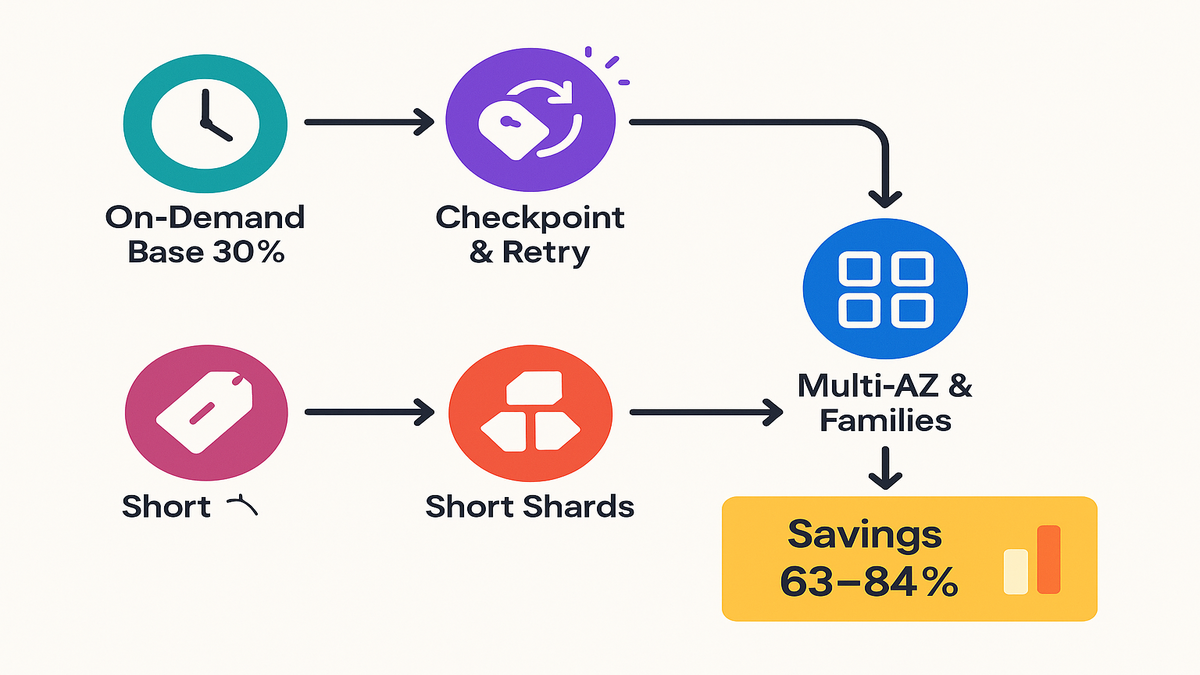
Use ECS capacity providers to mix On-Demand and Spot. Set a small On-Demand base (e.g., 20–30%) for steady reliability, then let Spot handle bursts. Managed scaling adjusts the Auto Scaling group to track your task demand. This blend evens out Spot hiccups while preserving big savings.
“Design for interruptions” is the golden rule in AWS’s Spot playbooks. Expect occasional reclamations. Plan to roll with them.
Treat it like asset allocation: On-Demand is your bonds; Spot is your high-yield equities. The bond portion keeps you moving during rough patches; the equities portion delivers the returns.
Make tasks
- Idempotent and checkpointed: Write progress to durable storage (S3, DynamoDB, RDS) so task restarts don’t redo hours of work.
- Shorter shards: Break big jobs into smaller chunks (e.g., 5–15 minutes). Faster retries, less wasted work.
- Graceful draining: ECS will stop placing new tasks on instances marked for termination; use container preStop hooks and SIGTERM handlers to flush buffers.
- Retry with exponential backoff: Standard practice recommended in the AWS Well-Architected Framework to avoid thundering herds.
Also wire up interruption signals. EC2 posts a two-minute warning to instance metadata for Spot interruptions; when your container host sees that, ECS begins draining, and your tasks should exit gracefully. Your apps don’t need to know everything about Spot—but they should know how to save state and stop clean.
Placement matters
- Use multiple instance families and sizes (m, c, r, a, t, g/gpu) to widen your Spot pools. More pools = higher availability.
- Spread across AZs for diversity.
- Avoid sticky resource constraints (e.g., huge single-task memory) unless you need them; flexible task sizes get scheduled more easily during Spot scarcity.
Expert note, straight from AWS guidance: Spot delivers the best results when you “tap into multiple capacity pools” and handle that “two-minute interruption notice” cleanly.
Add two more tweaks that help:
- Enable capacity rebalancing on your Auto Scaling groups so new Spot instances launch early when AWS signals risk; ECS will drain the old ones as they wind down.
- Check Spot placement scores or advisor pages before you commit a region/instance mix; this helps you pick pools with better odds of getting capacity.
Quick pulse check
- Run ECS Managed Instances on EC2 Spot to slash compute costs—aim for up to 90% off On-Demand when tolerant.
- Mix Spot + On-Demand with capacity providers; keep a small reliability base.
- Fargate = simplicity; Managed Instances = control and often lower $ at scale.
- Design tasks with retries, checkpoints, and short shards to shrug off preemptions.
- Use diverse instance families/sizes/AZs for better Spot availability.
If you follow those five points, you’ll remove 80% of the risk while keeping 80% of the savings. The rest is tuning and observability.
The money math
A simple way
Start with your On-Demand baseline cost. If you can move a chunk of it to Spot, your blended rate drops.
Example thought experiment:
- Assume 1,000 vCPU-hours/day of containerized batch.
- If On-Demand EC2 is your baseline cost unit (call it 1.0x), and you move 70% of hours to Spot at a 70–90% discount, your weighted average cost can drop to roughly 0.37x–0.16x. That’s a 63–84% cut.
Actual dollars vary by region, instance type, and current Spot markets. But the direction is stable. The more tolerant your workload and the broader your instance pools, the better your realized savings.
Here’s a simple formula to sanity-check your plan:
- Blended cost multiplier = (ODshare × 1.0) + (Spotshare × (1.0 − Spot_discount))
- Example: (0.3 × 1.0) + (0.7 × 0.3) = 0.51 → ~49% savings
- If Spot discount rises to 80%: (0.3 × 1.0) + (0.7 × 0.2) = 0.44 → ~56% savings
Even with conservative discounts, you get meaningful cuts. The goal is to keep retry costs small by sharding work and checkpointing.
Blended capacity scenario
- Base capacity (On-Demand): 30% of workload for steady reliability.
- Variable capacity (Spot): 70% for bursts and nightly crunch.
- If Spot dries up momentarily, the On-Demand base continues, and retries fill gaps when Spot returns. ECS Managed Instances automates scaling and drains.
You can adjust this mix by workload:
- CI/CD: Base 10–20% On-Demand; tolerate retries.
- ETL windows: Base 20–40% depending on deadlines.
- ML training: Base 20–30% for schedulers, orchestration, and critical controllers; put workers on Spot.
Hidden costs to watch
- Bigger EBS for I/O-heavy tasks can be a good trade, but price it in.
- Data transfer and cross-AZ traffic can dwarf compute if you’re sloppy with placement.
- Interruption cost: long-running tasks with no checkpoints lose progress—keep shards small to cap waste.
For live prices, see EC2 On-Demand and Spot pricing. For clarity on Fargate Spot discounts, check AWS Fargate capacity provider docs.
Pro tip: Turn on budgets and anomaly detection. If someone ships a chatty service that blasts cross-AZ traffic, you’ll want to know fast.
From zero to shipping
Configure capacity providers
- Create two capacity providers in ECS: one for your On-Demand Auto Scaling group, one for your Spot group. Enable managed scaling.
- Attach them to your ECS cluster with default strategy (e.g., base 30 on On-Demand, weight 1 on both). Tune later.
Make your Spot Auto Scaling group a mixed-instances policy. Add multiple families and sizes so the scheduler has options, and turn on capacity rebalancing. For the On-Demand group, keep it small but steady.
Make tasks
- Add lifecycle hooks: handle SIGTERM, flush buffers, save checkpoints.
- Use smaller task units and job queues (SQS/SNS/EventBridge) to retry safely.
- Leverage container health checks and short timeouts.
If your app writes to local disk, sync progress to S3 or a database every few minutes. If you’re processing from a queue, include a visibility timeout longer than your shard length and let failed messages reappear for retry.
Test like production
- Trigger Spot interruption simulations with AWS fault injection tooling or by terminating an instance to verify graceful draining.
- Monitor with CloudWatch metrics, ECS service events, and Spot termination notices. Alert on elevated evictions.
As AWS’s Spot guidance puts it: “Architect for interruption” and you’ll unlock the economics that make cloud fun again.
Run a game day: kill a Spot instance during a run and watch the system recover. If it’s boring, you did it right.
FAQ
What are ECS Managed Instances
They’re AWS-managed EC2 capacity backing your ECS cluster. AWS handles provisioning, scaling, and routine maintenance of the instance fleet. You keep the control you need (instance types, sizes, GPUs, storage), minus most of the ops overhead.
How Spot interruptions work
EC2 Spot provides a two-minute interruption notice before reclaiming capacity. ECS marks the instance for drain, stops new task placement, and your tasks should exit gracefully. Design for retries and checkpoints so progress isn’t lost.
Better than Fargate Spot
It depends. If you value zero-infrastructure and can live with availability variability, Fargate Spot is excellent. If you need custom AMIs, GPUs, bigger disks, or tighter performance control (common in ML and big data), ECS Managed Instances on Spot often wins.
Mix On Demand and Spot
Yes. Use ECS capacity providers to define a base On-Demand capacity and a Spot pool for bursts. The scheduler spreads tasks according to your weights and base settings.
Does this help workloads
Definitely. Training jobs, hyperparameter sweeps, embedding generation, batch inference, and feature store builds are classic fault-tolerant patterns. Use checkpoints and chunked work units so retries are cheap.
How often do interruptions happen
It varies by instance family, size, Region, and time of day. Some pools are extremely stable; others churn more. Check advisor tools and spread across multiple pools to reduce risk.
What about stateful services
Run state on durable services (RDS, DynamoDB, EFS, S3) and keep stateless compute on Spot. If you must run stateful containers, pin them to On-Demand via placement or use a higher On-Demand base.
What observability to add
CloudWatch alarms for task failures, queue latency, and backlog; ECS service event alerts; and a dashboard for Spot interruption notices, drain times, and retry counts. The faster you see retries, the faster you can tune shard size or capacity mix.
Where are the best docs
Start with the ECS documentation (Welcome guide), ECS capacity providers, and the EC2 Spot overview plus interruption behavior. Those cover the core mechanics end-to-end.
Ship it
- Create an ECS cluster and enable capacity providers for On-Demand and Spot.
- Attach Auto Scaling groups with broad instance families and sizes.
- Set a default strategy (e.g., base On-Demand 20–30%, balanced weights).
- Update task definitions with graceful shutdown handlers and checkpoints.
- Shard jobs; drive via SQS/EventBridge for retries.
- Run a canary service and simulate interruptions; validate drains.
- Add CloudWatch alarms for task failures and Spot interruptions.
- Roll out gradually; tune weights by error rate and queue latency.
You don’t need a big-bang migration—start with a single batch pipeline or CI workload and expand.
The big idea: your compute bill is a lever, not a law. With Amazon ECS Managed Instances on EC2 Spot, you get AWS-managed infrastructure and capacity diversity, with economics that actually scale. If your jobs can tolerate a restart (and many can), you’re leaving real money on the table by sticking to all On-Demand or overpaying for simplicity.
Start with one fault-tolerant workload—say, nightly ETL or embedding generation—and measure. Tune your capacity provider mix, diversify instance families, and add checkpoints. In a week, you’ll have data proving whether the savings curve is worth chasing (spoiler: it usually is).
Two final tips before you press go:
- Keep the feedback loop tight: track dollars saved per day and tasks retried per day. Optimize for that ratio.
- Write down your “abort criteria” (e.g., retry rate > X% for Y hours) so you can fail safe, bump base capacity, and try again.
References
- Amazon EC2 Spot Instances overview
- EC2 Spot interruption behavior (two-minute notice)
- Amazon ECS documentation (Welcome)
- ECS Capacity Providers
- AWS Fargate capacity providers (Fargate Spot)
- EC2 On-Demand pricing
- EC2 Spot pricing guidance
- AWS Well-Architected Framework – Reliability Pillar (retries/backoff guidance)
- EC2 Auto Scaling capacity rebalancing
- Spot Instance Advisor (interruption rate and savings guidance)
- AWS Fault Injection Simulator (for interruption testing)