

Your database isn’t slow. Your memory bus is choking.
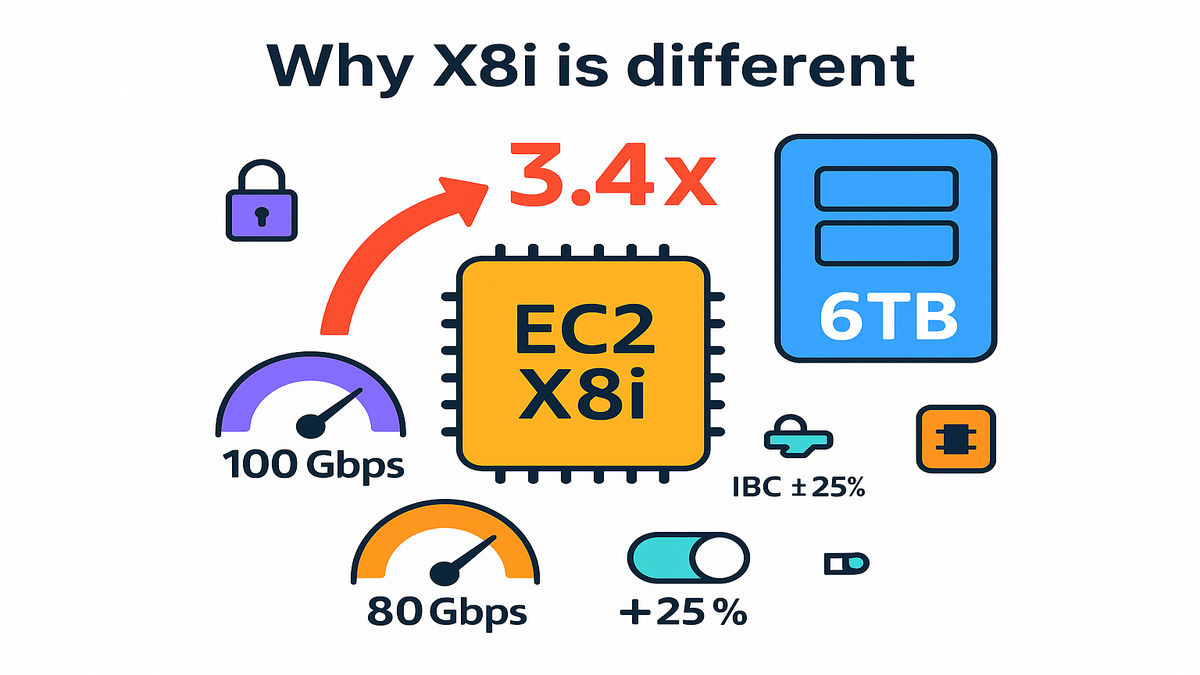
AWS just dropped Amazon EC2 X8i instances with custom Intel Xeon 6. The headline number is kinda rude: up to 3.4x higher memory bandwidth than X2i. Max memory hits 6TB per instance. Translation: you stop paging to disk, tail latencies calm down, and in-memory stuff finally acts like… in-memory.
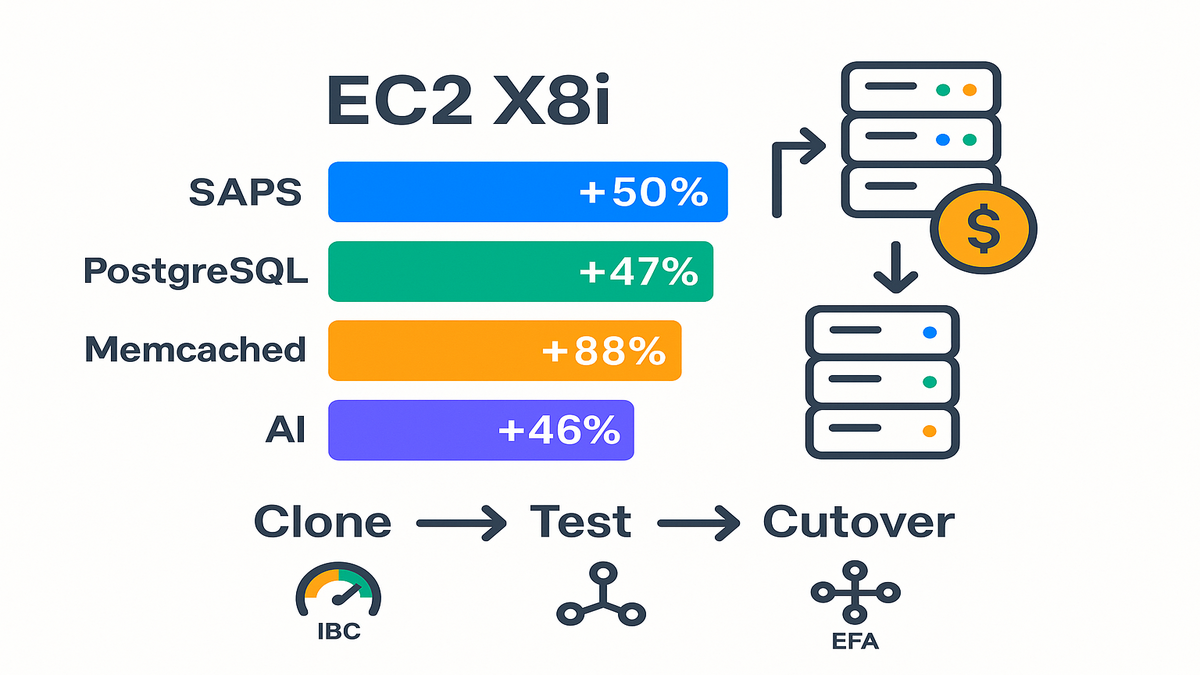
X8i is SAP-certified, pushes sustained all-core turbo at 3.9 GHz, and has always-on memory encryption. AWS benchmarks show chunky lifts: up to 50% higher SAPS, +47% PostgreSQL, +88% Memcached, and +46% AI inference. If you run SAP HANA, big Postgres, or hate cache misses, this is your fast lane.
In this guide, you’ll get the what, the why, and the ship-it plan. How to size, when to use EFA, how to tune IBC, and the cleanest migration path from X2i. Keep reading if you want fewer nodes, faster queries, and lower TCO.
TLDR
- X8i = next-gen memory-optimized instances (Intel Xeon 6) with up to 6TB memory and 3.4x higher memory bandwidth vs X2i.
- Real gains: up to +50% SAPS, +47% PostgreSQL, +88% Memcached, +46% AI inference.
- Network up to 100 Gbps, EBS up to 80 Gbps, EFA on bigger sizes, and IBC to tilt bandwidth 25% between network and EBS.
- 14 sizes, including metal-48xl and metal-96xl for bare metal.
- Ideal for SAP HANA, large in-memory DBs, analytics/EDA, and low-latency inference.
Why X8i is different
Core specs that actually move
You get the memory ceiling you’ve been waiting for. X8i scales to 6TB per instance (x8i.96xlarge and metal-96xl). It holds sustained all-core turbo clocks at 3.9 GHz. Memory bandwidth jumps up to 3.4x over X2i. That’s the choke point for most in-memory systems. X8i opens the pipe.
Security doesn’t tax your throughput. Always-on memory encryption is built-in. Pair it with sixth-generation AWS Nitro hardware for isolation and lower overhead. On larger sizes (48xlarge, 96xlarge, and their metal twins), you can enable Elastic Fabric Adapter (EFA). That gives low-latency, high-throughput traffic across distributed nodes.
Network caps at up to 100 Gbps, and EBS bandwidth peaks at 80 Gbps. With Instance Bandwidth Configuration (IBC), you can shift up to 25% between network and EBS. Pick based on what’s hot: replication traffic, log writes, or huge result sets.
Here’s how that bandwidth boost shows up day-to-day:
- Fewer CPU stalls. Cores wait less on memory fetches. CPU graphs look healthier at the same load.
- Better cache effectiveness. More data feeds from memory quickly. You cut last-level cache misses.
- Smoother tail latency. When the memory bus stops thrashing, stubborn P95/P99 spikes calm down.
- Less spill. Hash joins, sorts, and aggregations stay in memory more often. Fewer disk detours.
Why this matters for your
Most CPU problems are actually memory problems in disguise. Scaling Postgres reads? Running Memcached near its hit limit? Juggling SAP HANA column stores? X8i’s bandwidth keeps hot data on-die and out of swap hell.
A scenario you’ll recognize. You’ve got a 1.5TB working set. On X2i, P99 latencies stay high because the memory bus is the bottleneck. On X8i.24xlarge (1.5TB), the full dataset stays in memory. Cores get fed fast enough to flatten your latency curve. It’s not magic. It’s physics—bigger pipe, same workload.
Quick checklist to confirm you’re memory-bound, not CPU-bound:
- CPU looks busy, but perf or CPI shows many stalled cycles per instruction.
- High last-level cache miss rate. Frequent major page faults under peak.
- IO wait rises when buffer pools overflow. Checkpoints or compactions get choppy.
- P95/P99 latency tracks with dataset size more than with request volume.
- Swap activity shows up during spikes. Even small swap can tank tail latency.
If two or three ring true, X8i’s bandwidth and capacity are what you want.
Real performance gains decoded
Enterprise apps SAP HANA lift
AWS reports up to 50% higher SAP Application Performance Standard (SAPS) versus X2i. X8i is SAP-certified for mission-critical deployments. That matters because SAP HANA is both bandwidth-hungry and latency-sensitive. Net effect: simpler clusters with fewer nodes and less cross-node chatter.
Example you can model. You ran a 2-node HANA on X2i for memory headroom. X8i’s 6TB top end lets you consolidate to a single X8i.96xlarge. You keep performance without splitting. Fewer licenses, less inter-node coordination, tighter failover story.
Extra HANA notes to keep you out of trouble:
- Match instance size to column-store footprint, plus growth and delta merges. Leave headroom for row-store and working memory.
- Keep NUMA in mind on larger sizes. Balance process placement to avoid cross-socket hops.
- Validate log volume throughput. Higher memory bandwidth pressures logs harder during bursty commits.
Databases and caching
- PostgreSQL: up to +47%. Expect faster complex joins, less spill to disk, and lower tail on analytical queries.
- Memcached: up to +88%. Higher hit rate usable at speed. Lower latency during peak cache churn.
- AI inference: up to +46%. Models that fit in memory stall less. Think real-time recommendations or scoring pipelines.
What this means for daily choices. Move hot tables into sharedbuffers more aggressively. Raise MAXMEMORY for Memcached. Pack more models per host for inference while meeting P99 SLAs.
A scenario to steal. A read-heavy Postgres analytics cluster sits at x8i.16xlarge (1TB). You profile buffer hits and see IO wait on checkpoints. Upgrade to x8i.32xlarge (2TB) to keep more working set resident. Use IBC to tilt 25% toward EBS during nightly compaction. Day dashboards get snappier. Night jobs stop thrashing.
PostgreSQL tuning playbook when moving to X8i:
- Increase shared_buffers to capture more hot relations. Test increments to avoid bloating autovacuum or checkpoint times.
- Calibrate workmem for common query patterns like hash joins and sorts. More RAM lets you raise workmem for parallel queries.
- Check effectivecachesize to reflect OS page cache. It guides the planner’s join strategy.
- Monitor pgstatstatements and temp file usage. Less temp usage post-migration is your win signal.
Memcached tuning notes:
- Raise -m (memory) to reduce evictions. Track slabs and hot keyspace residency under load.
- Watch get_misses and evictions during traffic spikes. They should drop meaningfully on X8i.
- Check connection limits and thread counts. CPU threads need to use the extra bandwidth.
Inference stack patterns:
- Co-locate larger embedding tables in memory. Latency drops when lookups stop round-tripping to storage.
- Use the capacity to hold more models per node and still meet P99. Right-size batch sizes to avoid queuing delay.
- If you shard features, EFA on larger sizes helps when features live across nodes.
Move the bits faster
Nitro and networking
X8i rides sixth-generation AWS Nitro cards that offload virtualization, storage, and networking. You get lower jitter and more predictable throughput. That’s critical when micro-batching analytics or fanning out inference requests.
Networking tops out at 100 Gbps on the largest sizes. EFA support (48xlarge, 96xlarge, metal-48xl, metal-96xl) lets you scale distributed systems with low latency. If you’re doing EDA or complex simulations all day, EFA keeps nodes in lockstep.
On storage, EBS bandwidth hits 80 Gbps on top-end instances. That’s plenty for write-heavy logs, high-QPS OLTP with frequent checkpoints, or streaming checkpoints in data pipelines.
When to reach for EFA vs standard ENA:
- Use EFA when nodes chat constantly. Think MPI-style workloads, large shuffles, or tightly-coupled services. You need low-latency, high-throughput communication.
- Stick with ENA for typical microservices, web tiers, or databases not doing cross-node compute.
- Placement groups help either way. Cluster placement groups reduce inter-node latency for chatty systems.
Storage planning pointers:
- Choose EBS volume types that match IO needs. Fast memory makes slow disks show up fast. Monitor throughput and latency during peak.
- Parallelize volumes with RAID at the OS layer if you need higher aggregate IOPS or throughput.
- Set CloudWatch alarms on VolumeQueueLength and BurstBalance. Catch saturation before it hits your SLA.
Instance Bandwidth Configuration
IBC is the underrated feature here. You can bias the instance up to 25% toward network or EBS bandwidth. Think of it like a performance equalizer you set per workload phase.
Two practical plays:
- Log-heavy burst. During heavy ingest or vacuum or checkpoints, tilt toward EBS. Keep writes smooth and avoid queues.
- Shuffle-intensive jobs. During cross-node joins or inference fan-out, tilt toward network. Keep packets flowing.
Example setup. Your ML inference fleet on x8i.48xlarge serves spiky traffic. During day peaks, bias network to support fan-out to feature stores. At night, during backfills and compaction, bias EBS to stream writes at full speed. Same hardware, different dials.
How to decide IBC settings per phase:
- Watch NetworkPacketsPerSecond, NetworkIn/Out, and EBS throughput or IOPS in CloudWatch.
- Spot phases where queues build, like replication lag or disk write queues. Flip the bias accordingly.
- Re-evaluate monthly. As workloads evolve, your best bias can change.
Sizing costs migration path
Pick a size
You’ve got 14 sizes, from x8i.large (32 GiB) for dev to x8i.96xlarge (6,144 GiB) for big prod. Need bare metal? metal-48xl and metal-96xl skip the hypervisor for OS-level control or custom drivers.
Rule of thumb: size for memory headroom first. Then back into vCPU and bandwidth. If you’re over 85% memory used or see swap during peak, jump a tier. For SAP HANA, keep the full column store in memory plus a growth buffer.
Estimating your working set fast:
- Databases: size for hot tables, indexes, common intermediate results, and buffer overhead. Track buffer residency during busy periods.
- Caches: count the active keyspace you must guarantee under peak, not average. Add headroom for churn.
- Inference: sum model footprints, feature caches, and batch buffers. Add a safety margin for spikes.
Cost levers that actually
- Savings Plans or Reserved Instances: lock in baseline 24/7 capacity.
- On-Demand: burst for monthly closes, model launches, or big ETL windows.
- Spot: safe for stateless caches or sharded inference with fast rehydration.
Because X8i does more work per node, you can consolidate. One 6TB node can replace two 3TB nodes. That means fewer EBS volumes, fewer replication hops, and lower cross-AZ traffic.
Play the consolidation game smartly:
- Check licensing. Some software is licensed by core or socket. Make sure consolidation doesn’t raise costs there.
- Validate blast radius. One bigger node is a larger failure point. Pair with HA plans and regular failovers.
- Reinvest savings into resilience. Spread across AZs, keep warm standbys, and test DR.
Migration path from X2i
- Snapshot and clone: use EBS snapshots for DB volumes. Stand up an X8i shadow stack.
- Warm validation: replay prod traffic read-only against X8i. Validate latency and cache behavior.
- Cutover window: stop writes, take a final snapshot, promote the X8i stack, and reopen.
- Post-cutover tuning: increase buffer pools, adjust MaxConnections, and set IBC based on hot paths.
Example move. A finance risk engine on X2i.32xlarge moves to X8i.32xlarge. You double memory bandwidth without changing topology. After cutover, P95 settles. Nightly risk recomputes finish 30–40% faster thanks to less page churn.
Preflight checklist before you flip the switch:
- Record baseline: capture P50/P95/P99 latency, throughput, CPU steal, and IO wait.
- Warm caches: pre-warm the new instance if you can. Avoid cold start confusion.
- Plan rollback: keep the X2i stack ready for quick re-promotion if anything regresses.
- Test failure modes: simulate an instance reboot and storage failover. Make sure it’s boring.
How X8i stacks up
X8i vs X2i
You’re getting roughly 43% higher overall performance on average versus X2i. Gains are bigger on memory-bound tasks. Memory bandwidth scales up to 3.4x, and max memory jumps to 6TB. If you hit memory ceilings or chase tail latency, this is a direct lift.
Where you’ll feel it most:
- High-concurrency OLTP with tight SLAs.
- Columnar analytics that previously spilled.
- Large caches that felt full under peak churn.
- Inference paths with feature lookups that used to stall.
X8i vs C8i
Compute-optimized like C8i is great for batch CPU-heavy work. But if your bottleneck is memory access, X8i is the right choice. Think HANA, in-memory analytics, caches, or inference with big embeddings. Also note: with IBC, X8i gives you knobs older gens don’t. You can keep the same fleet and retune as workload phases shift.
Example decision: a CI fleet compressing and compiling? Use C8i. A lookup service serving 100ms P99 from a 1TB keyspace? Use X8i.
Latency math you can feel:
- If 10% of requests miss cache, speeding memory fetch and reducing spills cuts P99.
- Faster memory keeps CPUs fed, so you avoid the 70% CPU but still slow paradox.
Quick pulse check
- X8i’s superpower is memory bandwidth and capacity: up to 6TB and as much as 3.4x bandwidth vs X2i.
- Benchmarks land hard: up to +50% SAPS, +47% PostgreSQL, +88% Memcached, +46% AI inference.
- Nitro + EFA + IBC = fewer bottlenecks and dials you can tune live.
- Fourteen sizes, including two bare metal options. Right-size for memory first.
- Migrate by cloning, shadow testing, and cutting over. Then retune buffers and IBC.
FAQ
Where are X8i instances
They’re in US East (N. Virginia), US East (Ohio), US West (Oregon), and Europe (Frankfurt) at launch. Spin them up via the AWS Management Console, CLI, or SDKs. Expect broader region rollout over time as capacity ramps.
Practical difference vs X2i
More headroom and a fatter pipe. X8i delivers up to 43% higher overall performance. It has up to 3.4x higher memory bandwidth and scales to 6TB per instance. If you’re memory bound, you’ll see quick wins with fewer nodes.
When should I pick X8i
Pick X8i if your graphs trend with memory metrics. Think cache hit rate, buffer pool residency, swap activity, and P95 under load. C8i crushes CPU-bound tasks like compiles and batch processing. X8i crushes memory-bound tasks.
Do I need bare metal
Use bare metal if you need direct hardware access or specialized drivers. Or OS-level tweaks that benefit from skipping the hypervisor. Most apps will be fine on virtualized sizes thanks to Nitro offload.
How does Instance Bandwidth Configuration
IBC lets you bias up to 25% toward network or EBS bandwidth. Treat it like a phase knob. Push network during cross-node shuffles or inference fan-out. Push EBS during heavy ingest, compaction, or checkpointing. No code changes, just capacity tuning.
Is X8i SAP-certified
Yes. X8i is SAP-certified with up to 50% higher SAPS vs X2i in AWS benchmarks. You can run mission-critical SAP HANA and ERP with fewer nodes. You get simpler HA and steadier performance for monthly closes and reports.
Will I need to change
In most cases, no. You’ll see gains by moving to X8i and retuning memory settings. Start with configuration before touching code.
How do I prove memory
Profile with perf or similar tools for stalled cycles per instruction. Track last-level cache misses, major page faults, and temp file usage for DBs. If better memory settings reduce tail latency, X8i will likely amplify the gains.
Any NUMA considerations
Yes. On the largest instances, watch thread placement. Keep processes and hot memory local to minimize cross-socket access. Check OS scheduler defaults and test.
What about storage selection
Match volume types to your IO pattern. Scale parallel volumes for more throughput. Monitor queue depth and latency. Fast memory often exposes slow storage, so keep write paths unblocked.
Ship X8i with confidence
- Benchmark current workload and capture P95/P99, buffer hit rates, and IO waits.
- Size up memory first. Pick the smallest X8i where your working set fits comfortably.
- Launch a shadow stack using EBS snapshots of prod data.
- Enable EFA on 48xlarge or 96xlarge or metal if you run distributed clusters.
- Test with replayed traffic. Validate latency, throughput, and CPU-steal.
- Tune DB buffers, cache sizes, and GC to exploit the extra memory.
- Set IBC to favor EBS during ingest or compaction, network during shuffles.
- Schedule a short write cutover. Promote X8i and monitor closely.
- Right-size after a week. Drop underutilized nodes and lock in Savings Plans.
Pro tip: make the first week a learning window. Watch CloudWatch metrics and app traces closely. Expect lower temp file usage, less IO wait, and flatter P99. Use those wins to justify consolidation and cost cuts.
You came here for faster results, not a hardware scavenger hunt. X8i’s pitch is simple: bigger memory, faster pipe, saner clusters. With Intel Xeon 6 and Nitro doing heavy lifting, you get predictable low-latency performance. Not just more cores. Start by sizing for memory headroom. Migrate cleanly with a shadow stack. Then use IBC and EFA to iron out bottlenecks. The payoff isn’t just nicer graphs. It’s fewer nodes, lower licensing, and happier SLAs.
Working with privacy-safe marketing analytics or clean room workloads on AWS? If Amazon Marketing Cloud is on your roadmap, explore AMC Cloud for managed, production-ready AMC pipelines. And if heavy AMC queries are the bottleneck, Requery can speed up SQL, cut compute costs, and keep SLAs tight.
References
- AWS EC2: Instance Types overview
- AWS Nitro System
- AWS Elastic Block Store (EBS)
- AWS Elastic Fabric Adapter (EFA)
- SAP HANA on AWS
- Intel Xeon 6 Processors
- Amazon EC2 and CloudWatch metrics
- PostgreSQL resource configuration
- Memcached project
- SAP Standard Application Benchmarks (SAPS)
- Amazon EC2 placement groups
- Amazon EBS volume types
“Bandwidth beats cleverness. When memory stops being the bottleneck, everything else suddenly looks well-architected.”