

If you chase milliseconds, or even microseconds, AWS just dropped a cheat code. Amazon EC2 M8azn instances are now GA. They boost clocks to 5 GHz and push up to 200 Gbps with Nitro. Translation: faster compute, fatter pipes, fewer chokepoints for the work that prints money.
Here’s the wild part: AWS now ships over 1,160 EC2 instance types. That’s… a lot, honestly. You don’t need all of them, but the right pick cuts cost and p99. M8azn is the new general‑purpose, high‑frequency hammer for jittery, cache‑hungry work.
Versus prior‑gen M5zn, you get up to 2x compute performance. Up to 4.3x memory bandwidth. 10x L3 cache. Up to 2x networking. And up to 3x EBS throughput, up to 60 Gbps. Weighing M8a vs. M8azn? AWS says M8azn hits up to 24% higher performance. That’s not a rounding error. That’s a new tier.
Run real‑time analytics, trading engines, HPC sims, CI/CD, or latency‑sensitive microservices? M8azn is your new default. We’ll cover when to pick it over aws m8a and Graviton. Yes, including those “amazon ec2 m9g” searches. Plus tuning for speed, and benchmarking without lying to yourself.
- TL;DR
- Up to 5 GHz single‑core turbo + bigger L3 + faster memory = lower tail latency for spiky, high‑frequency workloads.
- Versus M5zn: up to 2x compute, 4.3x memory bandwidth, 10x L3, 2x networking, 3x EBS throughput.
- Versus aws m8a: up to 24% higher performance for latency‑sensitive and network‑heavy apps.
- Great fit: HFT, real‑time analytics, HPC sims, CI/CD, gaming servers, low‑latency microservices.
- Start with On‑Demand; drop to Savings Plans or Spot for cost wins. See ec2 pricing and region availability.
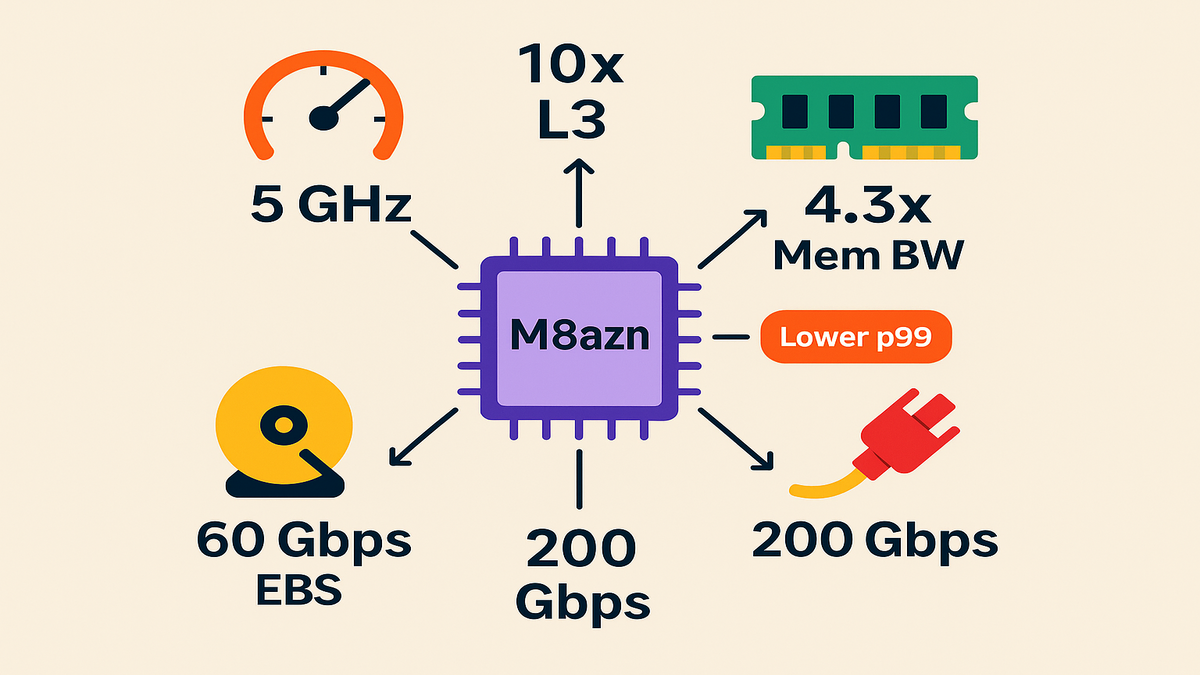
5 GHz low latency workhorse
Why M8azn exists
You don’t need more cores. You need faster ones that don’t choke on cache misses. M8azn runs on next‑gen AMD EPYC, formerly “Turin,” with 5 GHz max clocks. It stacks high memory bandwidth and a large L3 cache on top. With the AWS Nitro System, you get line‑rate networking and storage offload. So vCPUs do real work, not babysit I/O.
Real talk: when orders, ticks, or events land at p99, users feel it. Your margins get taxed. M8azn hits the tail with frequency, cache, and bandwidth.
Here’s the day‑to‑day impact. Fewer cache misses mean fewer pricey trips to RAM. Higher clocks finish tight loops before the next burst hits. Nitro offload means fewer cycles wasted on interrupts and packet shuffles. Add it up, and services feel snappier without a rewrite.
Been stretching architecture with extra replicas, queue hacks, or warm pools to hide jitter? M8azn gives fresh headroom. It won’t fix bad code or an unbounded queue. But it raises both the floor and the ceiling for latency.
What’s actually faster
- Compute: up to 2x over M5zn for tight, CPU‑bound loops.
- Memory: up to 4.3x bandwidth—fewer stalls, better SIMD or vector performance.
- Cache: 10x L3—hot datasets stay hot; fewer painful trips to DRAM.
- Network: up to 200 Gbps—great for feed handlers, gateways, and sharded microservices.
- EBS: up to 60 Gbps—fast checkpoints, logs, and scratch space.
First‑hand example: running a Go order router that spikes on market opens? Pin critical threads, keep hot symbols in cache, and move queueing to shared memory. With bigger L3 plus higher clocks, you’ll see fewer cache evictions and tighter p99s. Pair with placement groups and ENA and you’re cooking.
Links you’ll use right away:
Beyond the headline numbers, remember the compounding effect. Faster memory feeds faster cores; larger L3 reduces cross‑core chatter; stable clocks cut jitter from frequency scaling. It’s not one magic trick. It’s a stack of small wins that show up at p95 and p99.
If your team ships in Java, C++, Go, or Rust, you’ll feel this. Long GC? Bigger caches and faster threads make pauses less brutal. SIMD‑heavy analytics? Higher memory bandwidth keeps vector units fed. Chatty microservices? 200 Gbps plus Nitro slashes queuing and context switching.
M8azn vs aws m8a Graviton
Pick M8azn over aws m8a
If your app is latency‑critical, chatty on the network, or branchy, choose M8azn. The 5 GHz headroom plus cache is a cheat on tail latency. AWS notes up to 24% higher performance vs. M8a. That’s your budget for fewer pods, fewer hosts, and simpler autoscaling.
Pick aws m8a when your workloads are steady, scale linearly, and aren’t tail‑sensitive. Think Java app servers, internal APIs, and background tasks. You’ll likely save on dollars per vCPU while staying close on throughput per dollar.
A quick rule of thumb:
- If one slow request can wreck a user session or trade, bias to M8azn.
- If your system does big parallel batches, like ETL or nightly jobs, M8a is pragmatic.
- If you’re unsure, canary both for a week and track cost per 10k at p99.
What about Graviton and m9g
Graviton still wins price or perf for many workloads, like M7g or R8g families. If you’re AArch64‑friendly—Go, Java 17+, Rust, Python, Node—Graviton is a strong baseline. For those “amazon ec2 m9g” queries: M8azn is x86_64 and high‑frequency. Graviton SKUs use “g” names, like M7g. Choose by ISA fit and latency needs, not hype.
Migration note: Porting to ARM can be easy for managed runtimes. But native deps, JNI, or old C or C++ libs can derail timelines. If latency is the top KPI and you’re mid‑migration, park the hot path on M8azn. Move the rest when you’re ready.
Flex your spend
- On‑Demand to validate performance.
- Savings Plans, compute or EC2, once steady‑state lands.
- Spot for bursty CI or batch.
- “ec2 flex instances”: for a budget‑friendly general‑purpose baseline, try M7i‑flex for steady fleets. Then reserve M8azn for hot paths and edge services.
First‑hand example: a CI or CD fleet with mixed Java and Node builds often wins on M8azn. Single‑threaded steps like javac, linkers, and tests with I/O waits love clock and cache. Keep M8a for parallel test workers and artifact jobs. Schedule M8azn for build leaders and packaging.
Budget play: start 100% On‑Demand for a week, then buy a 1‑year Compute Savings Plan. Cover 60–70% of the steady baseline. Keep the burst buffer in Spot if jobs retry cleanly. You’ll pocket wins without overcommitting.
Design for speed
Make the 200 Gbps count
- Use ENA and enable SR‑IOV; it’s default on modern AMIs. Docs
- Cluster chatty services with cluster placement groups to cut cross‑AZ hops. Docs
- Jumbo frames, MTU 9001, for big payloads; smaller MTU if packet‑per‑event.
- Tune RSS or RPS so IRQs spread cleanly across cores; pin hot threads to cut context switches.
Extra credit:
- If your setup supports it, test ENA Express for lower network latency on some paths. Canary first.
- Keep connection pools warm. TCP or TLS handshakes are tail killers under burst. Reuse sessions hard.
- Watch packet drops and softirqs. If they spike, rebalance IRQ affinity and NIC queues.
EBS respect your storage budget
- M8azn supports up to 60 Gbps EBS throughput. Pair with gp3 or io2 for IOPS‑sensitive apps.
- Separate logs, scratch, and data volumes. Align filesystems with scheduler, mq‑deadline or none, for NVMe.
- See EBS types and performance limits
Pro tips:
- For gp3, set throughput and IOPS explicitly. Don’t trust the defaults.
- Pre‑warm big volumes before cutover to dodge cold‑cache surprises.
- Snapshot often for fast rollback, but write them off the hot path.
CPU and OS tuning
- Set CPU options to match your thread model. Keep hyperthreading if you’re I/O‑bound; consider isolcpus for hot loops.
- Mute noisy neighbors in software. Pin processes with taskset or numactl, trim GC pauses with ZGC or Shenandoah, use hugepages for heavy JNI or ML libs.
- Keep clocks hot. Use the performance governor on Linux to avoid frequency dithering.
First‑hand example: for a low‑latency gateway, we’ve seen real wins. One, pin NIC IRQs and the packet dispatch thread to the same NUMA node. Two, dedicate two cores to busy‑poll plus ring buffers. Three, move protobuf decode off the hot path with SPSC queues. On M8azn, the larger L3 cuts cross‑core cache traffic, and 5 GHz trims decode time.
Helpful docs:
Also worth doing:
- Use cgroups v2 so background jobs don’t steal cycles.
- Keep kernel and glibc versions consistent across environments. Tiny mismatches skew perf.
- Lock your container base image for benchmarks so patches don’t move goalposts mid‑test.
Benchmark without fooling yourself
A clean repeatable methodology
- Warmup matters: run at least 5–10 minutes before sampling.
- Measure p50, p95, and p99—and the gap between them. Tail at scale is a tax. Google’s classic paper is a must‑read.
- SUT isolation: dedicated placement group, no noisy neighbors, fixed AMI and kernel.
- Use realistic payloads: same sizes, same serialization, same TLS ciphers as prod.
Add these guardrails:
- Fix concurrency and request mix. Random RPS changes make charts lie.
- Record CPU throttling and softirqs. Latency spikes often show up there first.
- Keep the same MTU and LB config as prod. Lab‑only tweaks give fantasy numbers.
Good enough tooling
- Network: iperf3 for throughput, hping or fortio for latency probing.
- Storage: fio with realistic queue depths and block sizes.
- Services: wrk, k6, or vegeta with connection reuse, TLS on, and think time.
- CPU: perf plus flamegraphs to catch branch misses, cache misses, and syscalls.
What to log every run:
- Kernel version, AMI ID, instance size, region or AZ, placement group.
- MTU, ENA driver version, TLS ciphers, and JVM flags if you use one.
- Test duration, warmup duration, RPS, error rates, and retries.
Cost per result
“Faster” that costs double isn’t a win. Tie dashboards to cost per transaction, cost per build, or cost per million messages. After a short On‑Demand bakeoff, move steady capacity to Savings Plans. Keep a Spot buffer for bursts.
First‑hand example: treat your M5zn or aws m8a fleet as baseline. Clone infra to M8azn in a canary ASG, replay real traffic like Kafka or pcap, and compare p99. Track cost per request over 24 hours. If M8azn cuts replicas by 20–30% with equal or better tails, lock a Savings Plan on that delta.
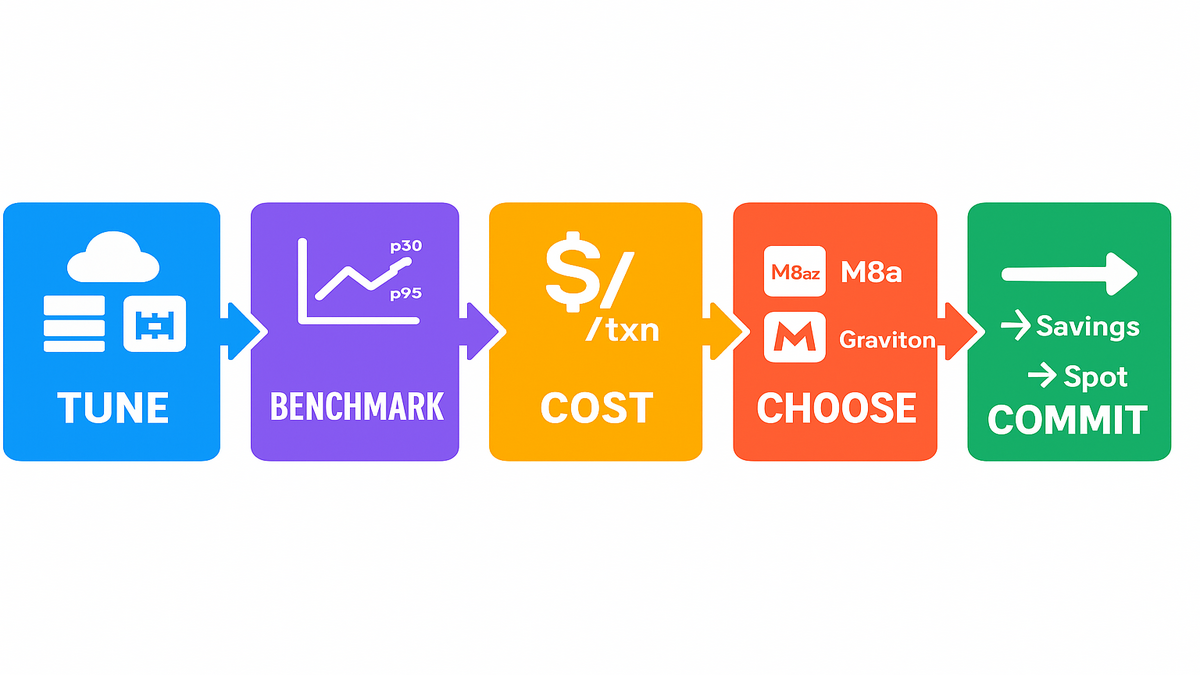
Quick pit stops
What you can launch today
- Initial regions: US East (N. Virginia), US West (Oregon), Asia Pacific (Tokyo), and Europe (Frankfurt). Availability evolves—check your console.
- EBS‑only storage, enhanced networking by default, dual‑stack support, and FIPS or regional endpoints where needed.
- Bare metal variants exist if you need direct hardware access for special agents or perf tooling.
Reality check:
- New families roll out in waves. Don’t build around one size that’s rare in your AZ.
- For multi‑region apps, confirm instance parity before you commit infra‑as‑code changes.
- If you handle regulated work, map controls for transit encryption, at‑rest encryption, and FIPS‑mode libs.
Sizing without the guesswork
M8azn keeps a 4:1 GiB‑per‑vCPU ratio across sizes. Nice mental math for memory‑bound apps. Start smaller than ego says; measure; then right‑size. Many teams overprovision RAM to paper over cache misses. M8azn’s larger L3 reduces that crutch.
Right‑size loop:
- Start at the smallest size that fits steady‑state memory with 30–40% headroom.
- Run a one‑hour load test at 1.5× normal traffic.
- If CPU is over 70% and p95 rises, scale up. If CPU is under 40% with steady p99, scale down.
Pricing and procurement
- On‑Demand to test; Savings Plans when stable; Spot for burst. Pricing varies by region and size.
- For regulated workloads, confirm FIPS endpoints and encryption policies match your compliance needs.
First‑hand example: game servers see nightly spikes. Keep your control plane on M8a for steady duty. Scale game sessions on M8azn during peaks. You’ll hold tick rates tighter under load, and can drop Spot capacity as waves fade.
Real world workload recipes
Low‑latency trading gateway
Co‑locate market data handlers and order routers in a cluster placement group.
Pin feed handler, parser, and risk check threads to distinct cores on the same NUMA node.
Use busy‑polling for the hottest queues; move logging to an async thread with a bounded buffer.
Outcome: fewer cache bounces, more consistent tick‑to‑ack time.
Real‑time analytics, feature joins plus scoring
Keep hot features in a local cache, Caffeine or Redis, sized to L3‑friendly working sets.
Precompute common joins on a sidecar; keep network round trips off the hot path.
Use gp3 with explicit throughput for spill files; cap GC with region‑based collectors.
Outcome: stable p95 during spikes, and less over‑scaling.
CI or CD pipelines
M8azn builds faster when the step graph has serial chokepoints, like packaging.
Cache Maven or NPM on instance store or a fast EBS volume; hash keys per branch.
Split test runners, M8a or Spot, from coordinators, M8azn or On‑Demand, to balance cost and speed.
Multiplayer game servers
Keep authoritative servers on M8azn during peak windows to hit tight tick budgets.
Use smaller MTUs for UDP‑heavy transports to reduce fragmentation.
Move analytics and telemetry off‑box or batch it; don’t tax hot cores with extra work.
Microservices mesh
For chatty services, bias to M8azn for the top 5% most latency‑sensitive nodes.
Use connection reuse and circuit breakers; throttle retries to prevent storms.
Consider smaller instance sizes with more shards to limit blast radius.
Migration playbook M5zn to M8azn
- Take a golden AMI snapshot of your current fleet. Lock kernel and userland.
- Create a new ASG with M8azn in a cluster placement group. Keep the same target tracking policy.
- Mirror 5–10% of production traffic using your canary or shadow tooling.
- Record p50, p95, p99, CPU steal, softirqs, and EBS throughput. Note GC pauses if on the JVM.
- After 24–72 hours, compare cost per 100k requests and error budgets. Promote if tails shrink with equal or lower cost.
- Move steady‑state capacity to a Savings Plan; keep a small On‑Demand slice for experiments.
Risk reducers:
- Use deterministic rollouts, one AZ at a time. If an AZ has supply issues, you’ll catch it early.
- Keep Envoy or Nginx and TLS ciphers identical. Crypto choices can dwarf CPU gains in tests.
- Tag test traffic so analytics and billing traces stay clean.
Observability checklist
- CPU: user or system split, context switches, run queue length, throttling.
- Memory: page faults, hugepage use, heap size vs. GC pause time.
- Network: retransmits, packet drops, softirqs, connection churn.
- Storage: device queue depth, read or write latencies, EBS burst credits if any.
- App: p50, p95, p99, tail spread from p99 minus p50, error rates, retries.
- Cost: On‑Demand hours, Savings Plan coverage, Spot interruptions, cost per outcome.
If one chart moves but the others don’t, that’s noise, not signal. Validate with a second run.
Three bullet halftime rewind
- M8azn is the new general‑purpose, high‑frequency king. 5 GHz clocks, bigger L3, faster memory, and fatter pipes kill tail latency.
- Choose M8azn over aws m8a when jitter hurts revenue. Keep M8a or Graviton where throughput per dollar rules and ISA fits.
- Tune networking, EBS, and CPUs. Benchmark honestly. Optimize for cost per outcome—not cores per server.
Launch M8azn in 10 minutes
- Pick a supported region and create a cluster placement group for low latency.
- Spin an M8azn size that fits your memory footprint, 4:1 GiB to vCPU, EBS‑only.
- Enable ENA; set MTU to 9001 if your payloads benefit; verify SR‑IOV.
- Attach gp3 or io2 volumes; split logs, scratch, and data; pre‑warm if needed.
- Apply CPU options, isolcpus, and IRQ affinity; set tuned to performance.
- Roll AMI with the same kernel, TLS ciphers, and libs as prod.
- Bake with real traffic; watch p95 or p99, context switches, softirqs, and GC.
- Compare cost per request vs. baseline; lock Savings Plans; add a Spot buffer.
Bonus checklist for day two
- Right‑size volumes after a week based on fio traces.
- Turn on autoscaling cooldowns to prevent thrash during brief spikes.
- Document your IRQ and CPU pinning plan so it survives on‑call rotations.
FAQs
Q: What’s the difference between M8azn and aws m8a instances? A: M8azn is built for low‑latency and high‑frequency needs. Up to 5 GHz clocks, larger L3 cache, higher memory bandwidth, and higher networking or EBS ceilings. AWS reports up to 24% higher performance vs. M8a. M8a is great for steady, general‑purpose throughput when tail latency isn’t the villain.
Q: How does M8azn compare to M5zn? A: It’s a big generational leap. Up to 2x compute performance, up to 4.3x memory bandwidth, 10x L3 cache, up to 2x networking throughput to 200 Gbps, and up to 3x EBS throughput to 60 Gbps. Expect tighter p99s and more headroom for bursts.
Q: Are M8azn available in my region? A: Initial availability includes US East, N. Virginia, US West, Oregon, Asia Pacific, Tokyo, and Europe, Frankfurt. Check the EC2 console for current regions and sizes because AWS rolls out in waves.
Q: Where do “amazon ec2 m9g” or Graviton fit here? A: M8azn is x86_64 and high‑frequency. Graviton, “g” SKUs like M7g or R8g, is ARM‑based and often wins on price or perf for compatible workloads. If you’re searching for “amazon ec2 m9g,” note Graviton families follow their own cadence. Choose by ISA fit, latency goals, and total cost.
Q: What are “ec2 flex instances,” and should I use them instead? A: “Flex” options like M7i‑flex offer a cost‑efficient baseline for steady fleets. Use them where tail latency isn’t critical. Reserve M8azn for hot paths, gateways, and spots where jitter hurts conversions or SLAs.
Q: How do I estimate cost? A: Start with On‑Demand to validate performance, then move predictable capacity to Savings Plans. Use Spot for burst buffers. See pricing by region and size.
Q: Any common footguns to avoid on day one? A: Three. One, forgetting to set MTU consistently across instances and load balancers. Two, mixing kernel versions between baseline and test fleets. Three, benchmarking with unrealistic payloads, no TLS, tiny bodies, and no think time. Fix those and your charts get honest fast.
If speed is your moat, M8azn is the shovel. The 5 GHz turbo, bigger L3, higher memory bandwidth, and up‑to‑200 Gbps networking raise the floor and ceiling. Don’t just cheer a lower p50. Engineer for smaller gaps between p50, p95, and p99. That’s where user experience and margin really live. Your next step: canary a slice of your latency‑critical fleet on M8azn. Replay real traffic, measure the tail and cost per outcome, then commit capacity where it pays.
References
- Amazon EC2 instance types overview
- AWS Nitro System
- EC2 pricing
- Savings Plans
- EC2 Spot Instances
- Enhanced Networking, ENA
- Placement groups
- EBS volume types and performance
- CPU options for EC2 instances
- Network MTU for your VPC, jumbo frames
- The Tail at Scale, Barroso and Dean
- ENA Express, overview and support