


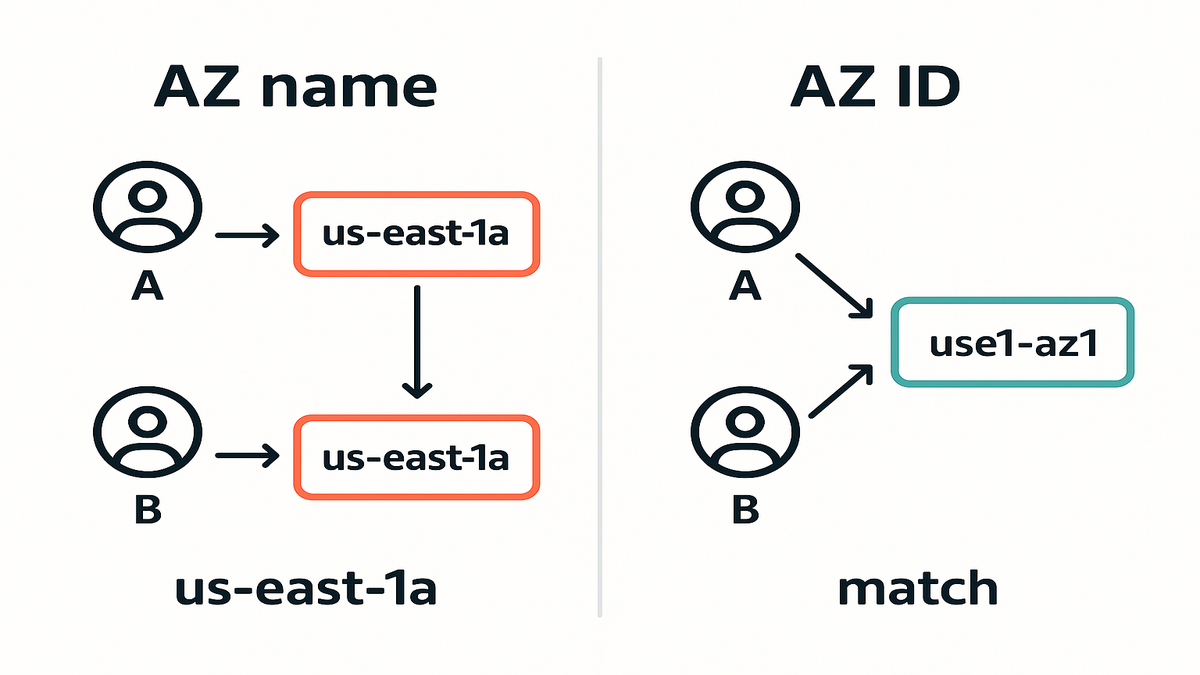
You see “us-east-1a” on your screen? Surprise: your coworker’s “us-east-1a” isn’t the same place. That mismatch has caused latency spikes, surprise data transfer, and flimsy HA builds for years.
Now there’s a clean fix. EC2 supports Availability Zone IDs (AZ IDs) across its APIs. Stop relying on account-specific AZ names. Target the same physical zone with IDs like “use1-az1.”
If you run multi-account, multi-region, or DR-heavy stacks, this is big. You can co-locate with certainty, simplify migrations, and make “same-zone” actually same. Less guesswork. More reliability. Fewer 2 a.m. incidents.
Here’s why this matters in real life. Shared services like NAT gateways, queues, and caches sit in one account. Apps live in another. If “same AZ” labels don’t align, traffic silently hairpins across zones. That adds milliseconds (annoying for p99s) and shows up as cross-AZ transfer on your bill. AZ IDs stop that drift and put everything exactly where you intend—no detective work.
TLDR
- AZ names lie (kinda). AZ IDs are consistent across accounts.
- Use AZ IDs (e.g., use1-az1) to ensure true co-location for EC2, subnets, and more.
- Discover your mapping with DescribeAvailabilityZones; encode IDs in IaC.
- You can’t “change” an EC2 instance’s AZ; you recreate it in the target AZ.
- For region counts and AZ options, use the AWS Global Infrastructure page.
AZ IDs over names
Why AZ names trip up
AZ names are per-account labels. Your “us-west-2a” could be my “us-west-2c.” That’s fine if you live in a single account. It breaks fast at org scale. You think two services are in the “same AZ,” but they’re different physical zones. Cue latency and cross-AZ data transfer.
“Because AZ names are mapped to underlying AZs differently for each account, you can use AZ IDs (for example, use1-az1) to uniquely and consistently identify an AZ across accounts.” — AWS documentation
Common AZ name symptoms
- Cross-AZ data transfer when you expected none (for example, app in Account A talks to a database in Account B that’s actually in a different physical zone).
- Latency outliers between services labeled “same AZ” that don’t behave like it.
- DR tests fail because replicas weren’t spread across distinct physical zones as planned.
- NAT gateway or load balancer traffic hairpinning across zones because subnets don’t line up.
Meet AZ IDs
AZ IDs are static, region-scoped identifiers like “use1-az1.” They represent the actual physical zone and stay consistent across accounts. If you launch with the same AZ ID in two accounts, you land in the same place. That’s the key to reliable co-location in multi-account designs.
Quick AZ ID notes
- AZ IDs are unique within a Region. “use1-az1” is in us-east-1; “usw2-az1” is in us-west-2.
- The friendly AZ name you see (us-east-1a) is an alias. The AZ ID is the real coordinate.
- Some UIs and APIs still show only the AZ name. When that happens, anchor placement with subnets created using an AZ ID.
Why this unlocks better architectures
- Deterministic placement: lower latency for tight services that need true same-zone placement.
- Cleaner DR: mirror exact zone layouts across accounts without guessing.
- Safer migrations: move apps across accounts or VPCs and keep zone affinity.
- Clearer debugging: when you say “same AZ,” it’s actually the same AZ.
- Smarter capacity planning: with zonal Capacity Reservations, AZ IDs place instances where capacity exists.
AZ IDs by default
Discover AZ ID mapping
First, map AZ names to AZ IDs in each Region you care about. With the AWS CLI:
- aws ec2 describe-availability-zones --region us-east-1 --query 'AvailabilityZones[*].{Name:ZoneName,Id:ZoneId,State:State}' --output table
You’ll see ZoneName (e.g., us-east-1a) and ZoneId (e.g., use1-az1). Store this mapping if you must reference names for legacy pieces, but prefer IDs.
Discovery and inventory tips
- Capture mappings in all active Regions often and commit them to a shared repo.
- Expose a tiny internal API or config package returning allowed AZ IDs per Region.
- In each account, tag subnets with the AZ ID and a human-readable label.
Use AZ IDs for subnets
Subnets anchor resources to a specific zone. Create subnets with an AZ ID, and everything launched inherits the right location. Do this across accounts for consistent results. It’s your foundation for deterministic placement.
- Example: create subnets with an AZ ID parameter so “public-a” means the same place everywhere.
- Launch EC2 into those subnets. Even if an API lacks AZ ID for instances, the subnet handles it.
Tip: many EC2 APIs and IaC tools now support AZ IDs. Subnet creation takes Availability Zone IDs. Prefer the AZ ID option where possible.
More implementation tips
- CloudFormation: use AvailabilityZoneId on AWS::EC2::Subnet, not just AvailabilityZone.
- Terraform: prefer availabilityzoneid in awssubnet over availabilityzone.
- Launch Templates: don’t hard-code AZ names. Use subnets tied to AZ IDs.
Hard code policy parameterize placement
- In IaC, parameterize target AZ IDs per Region: [“use1-az1”, “use1-az2”, …].
- Keep an org-wide mapping so platform and app teams stay aligned.
- In CI/CD, validate requested zones are AZ IDs, not names.
This creates a single source of truth and kills ambiguous deployments. You keep flexibility without surprise shifts.
Guardrails that catch mistakes early
- Add a linter that rejects values like “us-east-1a” and accepts “use1-az1.”
- Require subnet selection for EC2 placements so curated subnets drive placement.
- Add a step that lists final subnets and their AvailabilityZoneId before merge.
DR and multi-account gains
True colocation for dependencies
If you run latency-sensitive microservices, brokers, or shared caches, same-zone matters. AZ IDs guarantee you’re pointing to the same physical zone across accounts. No accidental cross-zone hops.
- Example: a payments API in Account A and a risk engine in Account B can deploy to “use1-az1” and avoid hairpins.
Deep dive scenario
- Shared Redis or Memcached clusters often sit in a platform account. If app pods live in different physical zones than the cache nodes, tail latency jumps and cross-AZ transfer starts ticking. Pin both to the same AZ ID to steady p95/p99 and cut surprise costs.
Cleaner blue green migrations
When moving from a legacy account to a new landing zone, you want like-for-like. With AZ IDs, mirror subnets and instances in precise zones. Testing becomes apples-to-apples. Cutovers go smoother.
- Strategy: build the target VPC with subnets pinned to the same AZ IDs, then shift traffic gradually using DNS or target groups.
Extra notes
- Keep AMIs and Launch Templates identical across accounts; only the subnet changes.
- During cutover, validate by querying AvailabilityZoneId via DescribeInstances or the console.
DR matches blast radius
You design for AZ independence in a Region and Region failover for disasters. AZ IDs help you:
- Ensure spread: place replicas in distinct AZ IDs (e.g., use1-az1 + use1-az3).
- Align infra: ensure networking, compute, and storage replicas match intended zones across accounts.
Paired with quotas, reservations, and warm failover, AZ IDs reduce surprises. They matter most when you need them most.
Practical additions
- If you use zonal On-Demand Capacity Reservations, place instances in those AZ IDs.
- For stateful systems, align data replication with your AZ spread for real failover.
Regions and AZs overview
What is an AWS Region
A Region is a separate geographic area (e.g., us-east-1 in Northern Virginia). Each Region has multiple isolated Availability Zones. Regions help with residency, compliance, and latency needs. Services are priced and deployed per Region. That affects budget and strategy.
How many AZs per Region
Most Regions have three or more AZs, though some have two. The exact count varies by Region and changes over time. The only reliable source is the official AWS list. Use it to plan spread.
Find AWS Regions and AZs
Bookmark this for the canonical “aws regions and availability zones list”: AWS Global Infrastructure: Regions and Availability Zones
You’ll get the “aws regions list,” each Region’s “aws availability zones list,” and new expansions. Pair that with AZ ID discovery to build stable, portable architectures.
Extra tips
- New AZs can appear in existing Regions. Don’t assume a fixed count.
- Local Zones and Wavelength Zones have different naming. This guide sticks to standard AZs.
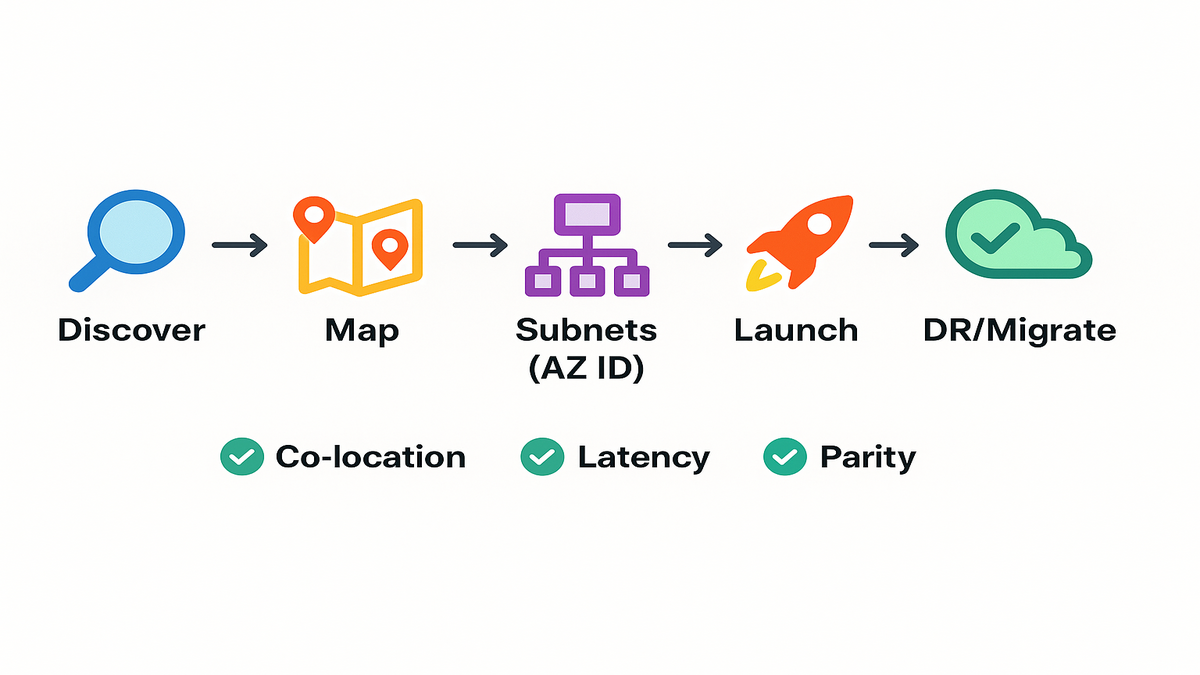
AZ ID readiness check
- If you use AZ names for placement, you risk cross-account mismatches.
- Discover AZ IDs via DescribeAvailabilityZones and document them.
- Create subnets with AZ IDs; launch EC2 into those subnets.
- Parameterize AZ IDs in Terraform/CloudFormation and validate in CI/CD.
- For migrations/DR, mirror AZ IDs across accounts for true topology parity.
Quick verification trick
- Query a few running instances: list InstanceId, Placement.AvailabilityZone, and Placement.AvailabilityZoneId. If you see only names in tooling, route placement through subnets created with AZ IDs.
AZ ID FAQs
Change EC2 instance AZ
No. You can’t edit an instance’s AZ in place. To “move” it, create an AMI or snapshot, then launch a new instance in the target AZ. Update IPs or target groups, then retire the old one.
Pro tip: if you use Elastic IPs or ENIs, plan the handoff. Some identifiers are AZ-scoped. Test this in non-prod first.
Same AZ name across accounts
No. AZ names are account-specific labels. Your “us-east-1a” might be my “us-east-1c.” That’s why AZ IDs (e.g., use1-az1) exist—to consistently identify the same physical zone.
Find AZ ID mapping
Use the EC2 API or CLI to call DescribeAvailabilityZones in a Region. You’ll get ZoneName and ZoneId for each AZ. Record and use the ZoneId for deterministic placement across accounts.
Bonus: store the mapping in Parameter Store, Secrets Manager, or a tiny config service.
Service support for AZ IDs
Coverage varies by service and API. EC2 and networking constructs support AZ IDs. Some APIs still expect AZ names. When launching compute, placing storage, or creating subnets, prefer flows that take AZ IDs.
A safe default: if a service doesn’t accept AZ IDs, place it inside a subnet that does.
See Regions and AZs list
Check the AWS Global Infrastructure page. It’s the source of truth for the aws regions list and each Region’s aws availability zones list. Numbers change as AWS expands, so don’t hard-code them.
How many AZs per Region
It varies by Region and time. Many Regions offer three or more AZs, some have two. Confirm current counts on the Global Infrastructure page, then plan your spread.
Cost, latency, and DR
Both. Misaligned AZs create cross-AZ data transfer, which is billable in many cases. Aligning with AZ IDs often reduces that hidden tax. Plus, fewer 2 a.m. incidents saves real money.
Move an EC2 instance
- Stop trying to “edit” the AZ—it’s immutable.
- Create an AMI from the instance (or snapshot volumes, then use a launch template).
- Choose a subnet in the target AZ (created with the correct AZ ID).
- Launch a replacement instance from the AMI or template into that subnet.
- Reattach or restore data volumes as needed; update security groups or ENIs.
- Shift traffic (ALB target group, DNS, or service registry) and retire the old instance.
Close gaps by scripting this flow so “change availability zone of EC2 instance” becomes a safe redeploy.
More gotchas to watch
- If your NAT gateway lives in a different AZ than your instance, outbound may cross AZs. Keep one NAT gateway per AZ and route locally.
- Placement Groups and EBS volumes are AZ-scoped—recreate or attach in the right AZ.
- If you rely on static private IPs, plan ENI reattachment or DNS updates in the move.
Strong move: adopt AZ IDs at the edges—subnets, templates, and policies. Then every launch lands exactly where you intend. That’s how you kill the “same name, different place” chaos for good.
“Infrastructure gets easier when your coordinates stop changing.” The punchline is simple: AZ IDs turn fuzzy labels into precise locations. Use them by default, especially across accounts. If you build VPCs, subnets, and templates around AZ IDs, you get predictable performance, smoother migrations, and DR that behaves.
Next step: audit your Regions, discover AZ IDs, lock them into IaC, and standardize subnet creation with AZ IDs. Flip this switch early, and you’ll dodge a pile of future surprises.
References
- AWS Global Infrastructure: Regions and Availability Zones
- EC2 API: DescribeAvailabilityZones
- Working with Availability Zone IDs (AWS docs)
- EC2 API: CreateSubnet (supports Availability Zone ID)
- AWS CloudFormation: AWS::EC2::Subnet (AvailabilityZoneId)
- Terraform AWS Provider: awssubnet (availabilityzone_id)
- Amazon EC2 On-Demand Capacity Reservations
- Amazon EC2 pricing: Data transfer
- NAT gateways (best practices and availability)
- AWS Well-Architected Framework: Reliability Pillar