

One account is convenience. Multiple accounts with global tables is resilience.
Wait — your global app still tied to one AWS account? That’s like a factory with one power line, hoping storms behave.
Amazon DynamoDB global tables now replicate across multiple AWS accounts. You get multi-Region, multi-active, low-latency reads and writes. And you don’t cram it all into one big blast-radius account. Governance gets cleaner. Cost allocation gets cleaner. DR gets measurable.
This is a big unlock for multi-tenant SaaS and regulated stuff. Also for teams that want dev, test, and prod split clean, without sad data silos. You keep point-in-time recovery, on-demand capacity, and that single-digit millisecond punch. Now you get it with cross-account isolation too.
‘Everything fails, all the time,’ like AWS CTO Werner Vogels says. Cross-account global tables turn that truth into a real edge.
TL;DR
Cross-account DynamoDB global tables give multi-Region, multi-active replication. You also get per-account isolation for governance, cost, and blast radius.
Strong consistency stays Region-bound; across Regions you get eventual consistency. Design for it.
Pricing: writes fan out to every replica; budget for replicated write capacity, storage, Streams, and inter-Region data transfer.
Set up by console or API: create replicas in other Regions or accounts, wire IAM and KMS, and let last-writer-wins resolve conflicts. Or use Streams plus Lambda for custom logic.
Best for multi-tenant SaaS isolation, disaster recovery, and global apps needing low-latency local reads and writes.
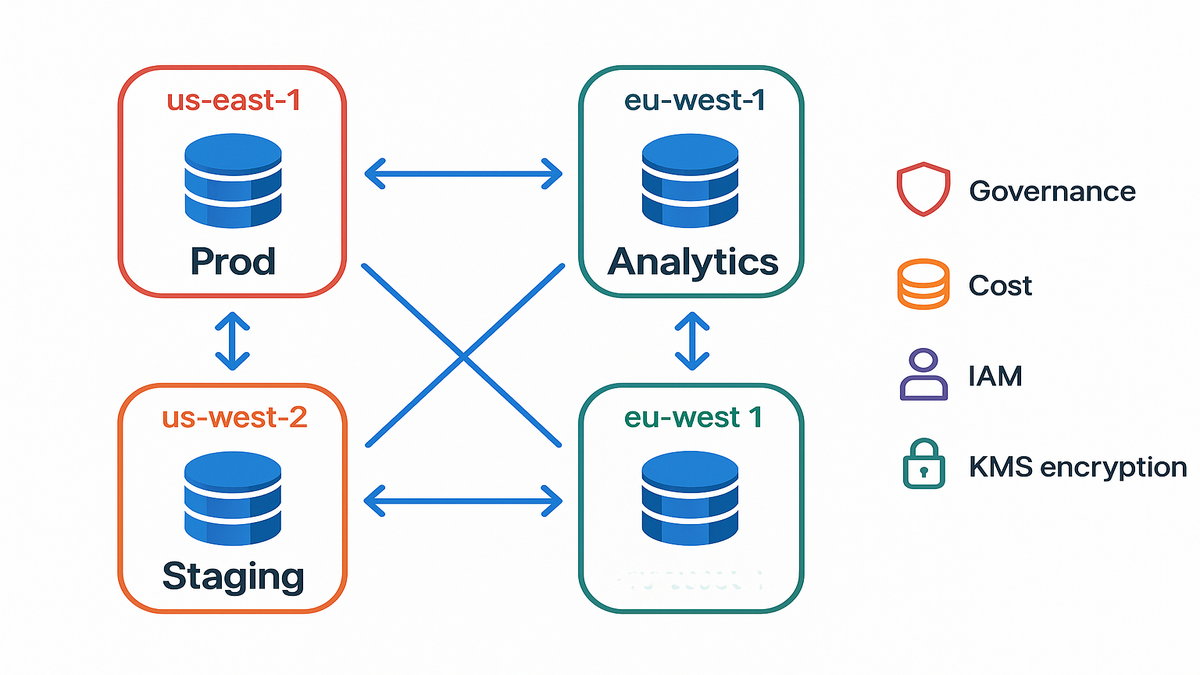
If you used global tables inside one account, the power is the same. It’s finally mapped to how real orgs actually run. Different accounts for prod, staging, and tenants. Different KMS keys. Different budgets. Same dataset, replicated fast and safe.
Want the mental picture? Think of each account like a walled garden. You can prune or water one without touching the others. When one garden gets weeds, your other gardens still bloom.
What Cross Account Global Tables Change
From single account blast radius
Historically, global tables gave you multi-Region and multi-active in one account. That works… until risky deploys, noisy neighbors, or policy changes hit everything. Cross-account replication breaks that tie. It’s a nice break, honestly. You can keep prod, staging, and tenant stacks in separate accounts now. And you don’t lose a single, unified, globally replicated dataset.
This isolation isn’t hand-wavy. Account borders give you real guardrails. Use different service control policies, budget alarms, and incident playbooks. When staging goes sideways, you still keep rights to fix prod. When one tenant surges traffic, it won’t spike your whole bill.
Governance and cost clarity
Separate accounts mean separate budgets and clean cost categories. Chargeback gets saner. Your blood pressure does too. Apply per-account IAM boundaries, service control policies, and KMS keys. You still get point-in-time recovery and on-demand capacity. Now they map cleanly to who owns what.
In practice, quarterly reviews stop hurting so much. Finance sees costs by account and Region. Easy. Security audits access centrally, while keeping least-privilege local. Engineering moves faster, without one shared-account ticket pileup.
Real world example
A fintech with tight controls splits prod US and EU into one account, staging and canary into a second, and analytics into a third. Global tables replicate data across them all. If staging breaks IAM or spikes capacity, prod stays calm. Compliance loves the account-level blast radius. Engineering loves the global, low-latency writes.
‘Everything fails, all the time,’ and cross-account makes failure boring.
Zoom out and the pattern fits other industries too. Healthcare isolates PHI-holding tenants in dedicated accounts per Region. Gaming separates live ops from wild experiments. Retailers carve out regional pushes without risking the core store.
Since each account runs its own encryption keys and IAM boundaries, separation-of-duties becomes real, not just a slide. Key custodians rotate in one account without pausing the rest. Auditors get precise scope. You get sleep.
Designing Multi Account Multi Region
Tenancy dev prod org structure
Start with AWS Organizations. No, really, start there. Put prod in a hardened account, staging in another, and tenant or Region-specific stacks in their own when needed. Tag everything, same schema, every time. Use SCPs to block scary actions in prod, like table deletion. Let builders move fast elsewhere.
A simple blueprint:
- Root: AWS Organizations with consolidated billing and central security tooling.
- OUs: Prod, Non-Prod, and Tenants.
- Accounts: prod-core, prod-analytics, staging, dev, and one-per-enterprise-tenant if needed.
- Tag schema: Application, Environment, Owner, CostCenter, DataClass.
This pays off when you must prove who touched what, where money went, and why a change was safe to deploy.
IAM KMS trust handshake
You need permissions in both source and target accounts to add replicas. Encrypt tables with KMS keys scoped per account and Region. Grant cross-account KMS access to the replication roles. Keep key policies explicit. Key misconfig is the top reason replication stalls.
Pro tips:
- Prefer customer managed KMS keys per account and Region for clear control. Also for clean audit trails.
- Add cross-account grants that let DynamoDB use the key on behalf of the replica account’s role.
- Keep key policies narrow; test a dry run with a tiny table. Add and remove a replica to be sure.
- Rotate keys on a schedule and document the steps. Replication should flow through rotation when grants are correct.
Network and ops hygiene
DynamoDB is serverless with public endpoints, so no VPC peering needed. You still want logging and alarms, day one. Use CloudTrail across accounts, CloudWatch alarms per replica, and AWS Config rules that flag drift. For rollback posture, use AWS Backup or DynamoDB PITR.
Watch these metrics per Region:
- ReplicationLatency to track lag.
- ConsumedWriteCapacityUnits and ConsumedReadCapacityUnits for demand spikes.
- ThrottledRequests and UserErrors to catch bad callers and hot partitions.
- SuccessfulRequestLatency to spot app slowness versus network pain.
First hand style example
Consider a multi-tenant SaaS. You put each enterprise tenant with strict SLAs in its own account. That isolates noisy spikes and custom compliance. A shared control-plane account provisions tables and adds replicas by code. Each tenant account enforces its own IAM and cost guardrails. Write paths stay local and fast via the nearest Region.
Build a golden-path automation. One pipeline creates a tenant account, bootstraps KMS, deploys IAM roles, creates the local replica, and tags everything. The control plane tracks status and can re-run without side effects. When sales lands a new APAC customer, you press one button. The data shows up where it should, safely.
Operational patterns youll reuse
- Runbooks: document break-glass roles, replica remove or add steps, and KMS key rotation behavior.
- DR tests: quarterly drills that simulate a Region isolation. Validate RTO and RPO on real workloads.
- Drift detection: Config rules to enforce encryption, PITR, and tags across all accounts.
- Cost controls: budgets and alerts by account and Region. Enforce reserved capacity or autoscaling where it fits.
Consistency Conflicts And Reality Checks
DynamoDB global tables strong consistency
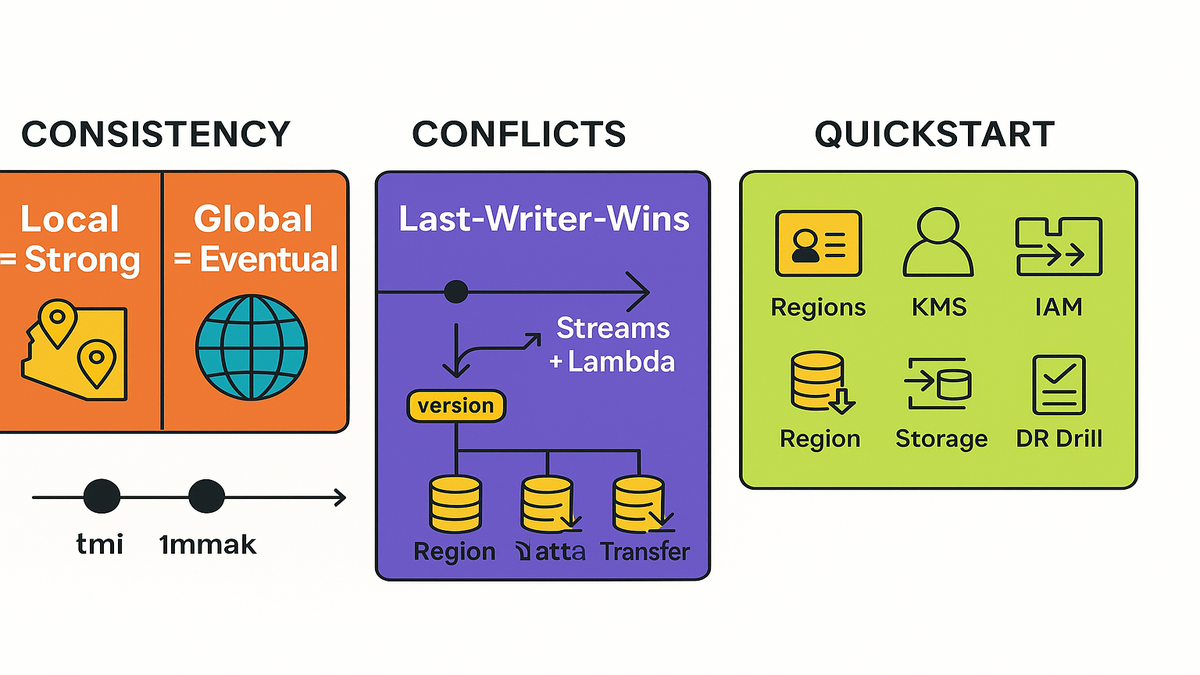
Inside one Region, you can do strongly consistent reads for that replica. Across Regions, global tables are eventually consistent by design. Cross-account doesn’t change that, not even a bit. If you need cross-Region read-after-write, your app must coordinate. Use version checks, idempotency, or wait for a small lag window.
A simple guardrail helps. When a user reads right after a write, route that read to the same Region. For cross-Region flows, add a short poll or use change events before you proceed.
Conflict resolution built in vs custom
Global tables use last-writer-wins based on write timestamps. For many use cases, that’s fine. It’s boring and it works. If you need app-specific merges, like counters or cart edits, pipe DynamoDB Streams into Lambda to detect and fix conflicts. Keep a version attribute to reject stale writes.
Add these patterns:
- Optimistic concurrency: store a version attribute. Use ConditionExpression so updates pass only if version matches. Then increment it.
- Idempotency keys: include a requestId attribute and ignore duplicate retries.
- Reconciliation jobs: scan for conflicted items you marked and heal them. Do it in a deterministic way.
Cross Region replication vs global tables
You can roll your own with Streams, Lambda, and BatchWriteItem. But global tables give managed, multi-active replication with conflict handling. Fewer moving parts. Fewer 2 a.m. surprises. If you need near real-time fan-out to analytics, Streams still help. Just don’t rebuild the core replication wheel.
If your domain needs pre-processing before writes land, keep that logic in your app tier. Let global tables handle the transport and conflict choice. Not your business rules.
Practical example
A gaming company stores player profiles worldwide. Writes go to the closest Region for sub-10ms latency. Profile lastUpdatedAt timestamps drive idempotency. Last-writer-wins is fine for user preference updates. For sensitive credits counters, they use conditional updates with version checks. No drift allowed there.
Transactions uniqueness and reality checks
- DynamoDB transactions are scoped to a single Region. They replicate out, but atomicity is local.
- Global secondary indexes replicate like base tables. Keep access patterns consistent everywhere.
- Uniqueness constraints still need a pattern. Write a lock item with a ConditionExpression per Region where writes happen.
Halfway Mark The TLDR Upgrade
- Strong consistency is local only; global reads are eventually consistent.
- Cross-account replicas cut blast radius and make budgets clearer.
- Use KMS with explicit cross-account grants; watch those key policies.
- Conflicts default to last-writer-wins; Streams plus Lambda give custom merges.
- Pricing scales with replicas: writes, storage, Streams, and data transfer matter.
- Perfect for multi-tenant SaaS, DR drills, and global low-latency apps.
If you remember one thing, remember this. You can finally match DynamoDB’s global muscle to your org chart. No more shoving it all into one risky account. Same speed. Saner boundaries.
Pricing Capacity And Throughput Math
DynamoDB global tables pricing basics
You pay for write and read capacity in every Region. Use provisioned or on-demand, your call. You also pay for replicated write I/O to each replica. Storage is billed per Region. Streams add cost. Inter-Region data transfer applies for replication traffic. Cross-account itself adds no extra premium. Replication is per Region either way.
The mental model
If you write 1M items per month in Region A, and replicate to B and C, you pay the original write in A and two sets of replicated writes. Then add any reads in each Region. It stacks up fast. PITR also bills per Region based on retained history.
Keep in mind:
- Backfill on replica creation moves existing data across Regions. Expect a short spike in transfer and write activity.
- Storage multiplies across Regions. Store 200 GB in each Region across three Regions? You pay roughly 600 GB total, plus PITR overhead.
- Streams consumers you run, like conflict resolvers and CDC fans, exist per account and Region. Tune batch sizes and errors.
Right sizing tips
- If traffic is bursty, start on-demand. Switch hot partitions to provisioned once you learn the shape.
- Use composite keys to avoid hot partitions. Replication won’t fix bad partition math.
- TTL old data to trim storage across all replicas.
- Keep Streams consumers efficient; they run in every account and Region you need.
Add-ons to consider:
- Autoscaling for provisioned capacity on known patterns.
- Table class choices, Standard vs. Standard-IA, for colder datasets. Dial down storage spend.
- Export to S3 for analytics to avoid heavy scans on live replicas.
Example outcome
A SaaS vendor added a replica in EU for latency and another in APAC. They projected a 2.1x write-cost increase, not 3x. They offloaded a chunk of reads to EU and APAC and used TTL to keep hot data slim. Net-net: happier users and predictable bills.
Cross Account Replicas Fast
Prep accounts roles and keys
- Pick your Regions. Create destination AWS accounts: prod, staging, tenant, etc.
- In each account and Region, set up KMS keys for DynamoDB encryption. Grant cross-account usage to the source replication role.
- Ensure IAM permissions in both accounts to create or update tables and manage replicas.
- Turn on CloudTrail org trails and baseline CloudWatch alarms. You want visibility from day one.
Create or upgrade the table
- If starting fresh, create the table in your primary Region. Use on-demand or provisioned. Turn on PITR.
- If you have an existing global table, you can add replicas. If not, convert your table to global table v2.
- Validate GSIs, TTL, and Streams settings. Replicas inherit the model, so get it right early.
Add replicas across accounts
- In the console wizard, choose Add Region. Then pick the destination account and Region. Or use UpdateTable with ReplicaUpdates in code.
- DynamoDB handles backfill and starts ongoing replication. Watch CloudWatch metrics like ReplicationLatency and UserErrors.
- Confirm KMS key usage via CloudTrail. Make sure the right keys and grants are used.
Handle conflicts and ops
- Accept last-writer-wins or add Streams plus Lambda for domain logic.
- Test failover: write in one Region or account, read in another. Simulate a Region isolation.
- Document runbooks: break-glass IAM roles, key-rotation plans, and PITR restores.
- Practice restoring from PITR to a new table. Then re-attach it as a replica if needed.
Example dev test prod
Dev writes to a staging account in us-east-1. Prod writes in eu-west-1. Both replicate to each other. They also replicate to a shared analytics account in us-west-2. Each account owns its cost center and IAM. Deploy risk in dev never blocks prod, while data stays globally reachable.
10 Minute Cross Account Quickstart
- Choose Regions and target accounts: prod, staging, tenant-specific.
- Create or confirm KMS keys in each account; add cross-account grants.
- Ensure IAM roles can call CreateTable and UpdateTable and manage replicas in both accounts.
- Create or identify the source table; enable PITR and Streams.
- Add replicas in target accounts and Regions via console or API.
- Verify encryption, Streams status, and replication metrics.
- Implement conflict strategy: accept last-writer-wins or add a Lambda merge.
- Run a failover drill: write in one account or Region, read in another.
- Tag resources for cost allocation; set CloudWatch alarms per replica.
- Document runbooks and set a quarterly DR test.
FAQ Your Spiciest Questions Answered
Does cross account change consistency
No. Strong consistency is only for reads within the same Region replica. Across Regions, reads are eventually consistent. Cross-account doesn’t change that.
Conflict resolution across accounts
Same as standard global tables: last-writer-wins using write timestamps. If you need smarter merges, like counters, use DynamoDB Streams plus Lambda. Do idempotent updates with a version attribute.
Global tables vs local tables
A local table lives in a single Region and account. It has no cross-Region replication. A global table spans Regions, and now accounts, for multi-active writes with managed replication and conflict handling.
Global tables pricing basics
Writes fan out to every replica, so plan for replicated write capacity. Also plan for storage in each Region, Streams, and inter-Region data transfer. On-demand simplifies capacity, but not replication economics. Use TTL and smart access patterns to cut waste.
Cross Region vs global tables
Build your own only if you need custom event flows before writes land, and you can carry the extra complexity. For most OLTP use cases, global tables are simpler, faster, and safer at scale.
Point in time recovery support
Yes. Enable PITR per replica to restore to any second in the window. Restores occur in the Region and account where you run them.
Global tables item size limits
No changes there. Item size caps and request limits are the same. Design for the 400 KB item size limit and keep items narrow.
Pause replication temporarily
There isn’t a pause switch. To stop replication to a Region, remove that replica. You can add it back later. DynamoDB will backfill from current state.
Restores and global tables
Restoring from PITR or a backup creates a new table in that Region. It is not a replica by default. Add it as a new replica or promote it through your plan if needed.
Transactions across Regions
Transactions commit atomically within a single Region. They replicate out as normal writes. If you need cross-Region coordination, layer it in your app using conditional writes, sagas, or queues.
In short: cross-account global tables give you governance and blast-radius wins. You keep the speed and simplicity that make DynamoDB shine.
Your next move: map Regions to accounts, wire KMS and IAM, add replicas, and schedule a failover drill. You’ll sleep better. Your pager buzzes less.
References
- Amazon DynamoDB Global Tables — Developer Guide
- DynamoDB Pricing
- DynamoDB Point-in-Time Recovery — PITR
- Read and Write Capacity Modes — On-Demand and Provisioned
- DynamoDB Streams
- AWS What’s New — Amazon DynamoDB updates
- AWS Organizations
- Amazon CloudWatch metrics for DynamoDB
- DynamoDB Transactions
- Exporting DynamoDB table data to Amazon S3