


You’ve been updating Amazon Brand Stores like it’s 2018. Clicking tiles, swapping ASINs, and hoping the last-minute promo actually shows up. Here’s the plot twist: as of February 2026, the Brand Stores management API is generally available. Translation: you can finally automate the boring stuff and scale the fun stuff.
This isn’t just a shiny toy. It lets you programmatically retrieve Store page content, update product selection, and submit changes for moderation. No more whack-a-mole edits across dozens of pages and marketplaces. You ship changes once, and the API handles the orchestration.
If you own a Brand Store, this is your green light. Tie it into your CMS, your PIM, even your promo calendar. Keep product info fresh. Ship seasonal refreshes globally before lunch. And make your Store a living, breathing growth asset, not a static brochure that goes stale.
One catch: you still respect moderation and policy, but now it’s baked into your workflow. So you move faster without breaking things, or waking up to a Store that’s out of sync. Build it once, automate the checks, and let the API be your repeatable lever for growth.
TLDR
- Brand Stores management API is now generally available (GA) for all Brand Store owners.
- You can retrieve Store content, update products and tiles, and submit updates for moderation.
- Plug it into your CMS/PIM to keep product data fresh and reduce manual edits.
- Pair with Brand Home APIs and Amazon Marketing Cloud for end-to-end insights.
- Build CI/CD-like workflows (yes, GitHub) to scale updates across locales.
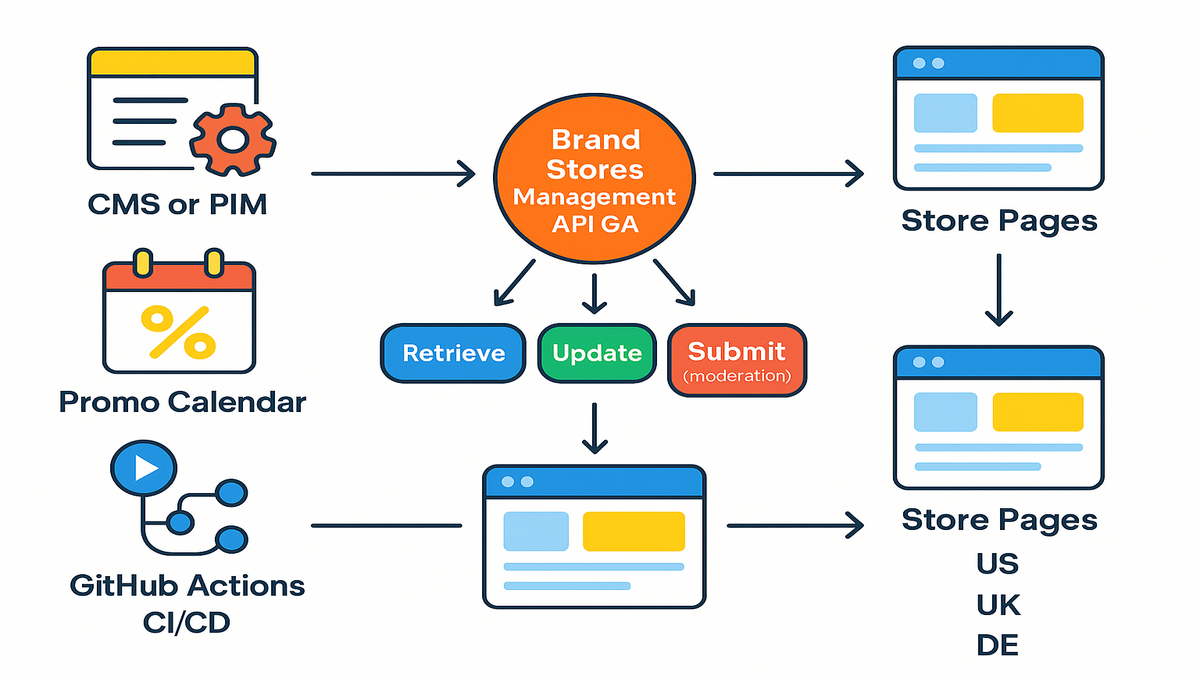
What GA Really Unlocks
Retrieve update submit
The Brand Stores management API gives you two big levers. First, retrieve your Brand Store page content. Second, programmatically update product content and selection, then submit those updates for moderation. It’s the trifecta you need to keep Stores accurate without manual churn. As Amazon Ads docs say, the API is production-ready for scale and built for Store owners who want programmatic control.
Why this matters right now
- Always-on accuracy: your catalog changes daily—prices, stock, variants. Treat your Store like a product, not a poster. Automate updates tied to your PIM or ERP.
- Faster launches: new collection or holiday drop? Push a full refresh across Store pages and subpages in one workflow.
- Global coherence: running multiple marketplaces? Sync templates and product logic so UK, DE, and US evolve together, without copy-paste chaos.
Built for real world workflows
- Retrieval endpoints let you map your Store’s current state to your internal content model.
- Update endpoints let you modify tiles, modules, or product slots at scale.
- Submission endpoints send changes for moderation, so your governance stays intact.
Quote to pin on the wall: 'Submit store updates for moderation' isn’t a bottleneck—it’s your brand-safety moat. Programmatic doesn’t mean reckless; it means precise.
For official capabilities and specs, start with Amazon Ads’ Brand Stores management overview and API references.
Quick example
- Monday morning: PIM flags a new variant and marks three legacy SKUs as end-of-life.
- Your job runs hourly, pulls current Store JSON, and applies selection rules, like 'replace EOL SKUs in the Best Sellers grid'.
- It validates assets and product eligibility, submits the update for moderation, and pings Slack when approved.
- The Store stays fresh without a midday scramble or a dozen tab-switches.
Patterns reuse
- Central templates, local rules: one layout, market-specific ASIN pools and copy.
- Rule-based selection: top-rated last 30 days, back-in-stock, new arrivals, not manual tiles.
- Scheduled refreshes: weekly hero swaps and monthly seasonal modules that update while you sleep.
Plug Into Your Stack
Your architecture your rules
The API follows RESTful principles, works with modern toolchains, and lives in the Amazon Ads developer ecosystem. That means you can:
- Call endpoints from your CMS or PIM when product eligibility changes.
- Trigger Store refreshes from a promo calendar, like weekly hero swaps on Sunday night.
- Run sanity checks and tests in a sandbox before you ship to production.
Practical pattern: mirror your Store structure in your content model. Keep module IDs, tile positions, and ASIN rules in source control. Now your Brand Store becomes versioned infrastructure.
GitHub and automation
You won’t find a magical 'brand stores management api generally available github' repo from Amazon. But you can wire a GitHub Actions pipeline to:
- Pull the latest Store JSON via retrieval endpoints.
- Diff against your canonical content state.
- Apply allowed updates.
- Submit for moderation.
- Post a run summary to Slack.
Treat it like CI/CD for your Store. Rollbacks are easy—re-apply a prior config and resubmit.
Dev notes that save headaches
- Use the sandbox to validate edge cases, like missing ASINs or invalid tiles.
- Build idempotent jobs so retries don’t create duplicate submissions.
- Log moderation responses and map them to Jira tickets for quick fixes.
Where to start: check the Brand Stores management overview and technical specifications for endpoint details and authentication flows.
Authentication permissions and secrets
- Use Amazon Ads API auth flows with least-privilege access. Keep tokens out of code; load them via secrets managers and rotate regularly.
- Separate dev, staging, and prod credentials. A mis-scoped token in prod is how 'just testing' turns into 'why is our hero blank?'
- Gate high-impact updates, like homepage hero, behind manual approvals in your CI.
Data model playbook for Stores
- Canonical objects: define modules, tiles, and selection rules as first-class content types in your CMS.
- Fallbacks: predefine safe fallback assets and ASIN pools per market, so a moderation rejection doesn’t leave an empty slot.
- Validation: add lightweight validators for image dimensions, copy length, locale strings, and product eligibility before you call the API.
Scheduling rate limits and resilience
- Batch where possible: bundle page updates per locale to cut round trips.
- Respect rate limits: back off and queue. Your pipeline is a marathoner, not a sprinter.
- Observability: emit metrics like updates submitted, approvals, and time-to-live so you can tune workflows.
Security and auditability
- Store all change requests and responses. If moderation denies a module, you’ll want the exact payload and reason code.
- Standardize PR templates: include screenshots, locales impacted, and links to assets.
- Keep a single Store change log channel where marketing and engineering meet. No more Slack archaeology.
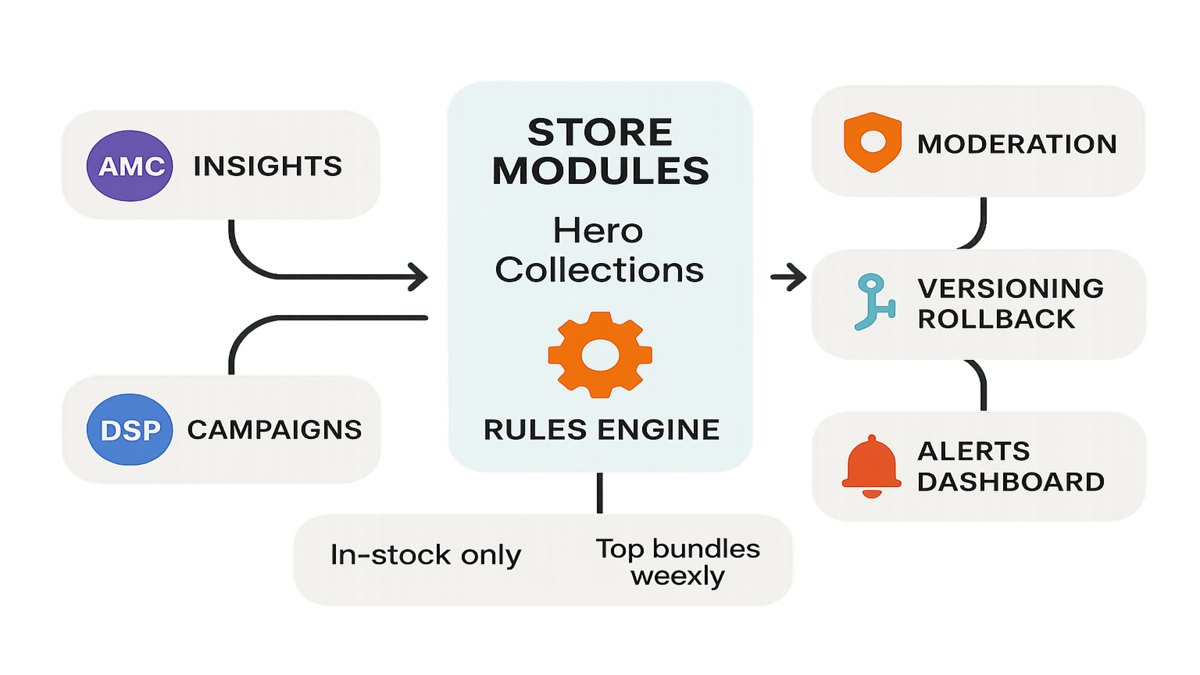
Operations into insights
Connect your dots
Your Brand Store is prime real estate, so tie it to your media and measurement stack. While the Brand Stores management API handles structure and updates, Amazon Marketing Cloud, AMC, gives you privacy-safe analytics to see how media touches lead to Store engagement and conversions. Use AMC API documentation to query trends, like which campaigns lift Store visits before high-value actions.
Want a faster, privacy-safe way to operationalize those AMC queries and dashboards? Explore AMC Cloud.
Then close the loop with Amazon DSP campaigns. Align your Store hero modules with what’s winning in DSP, and refresh featured ASINs when you see momentum. Keep the message-to-merch match tight.
For planning, activation, and optimization support that aligns to your Store strategy, check out our DSP Services.
Practical integrations that compound
- Weekly sync: pull Store content via API, pull AMC Store engagement metrics, and adapt modules accordingly.
- Promo guardrails: if DSP flighting changes midweek, your Store updates should track the new creative and featured products.
- Insights to action: run a rules engine—if an ASIN is out-of-stock in PIM, auto-remove it from Store modules and submit an update.
Metrics that matter
- Store engagement: visits, dwell time, and clicks to featured ASINs.
- Module performance: hero vs. grid vs. video tiles—what actually moves traffic to PDPs.
- Creative consistency: how closely Store copy and assets match active DSP lines.
- Freshness: percent of modules backed by up-to-date product data, measured by your pipeline.
Terminology sanity check
You’ll see terms like adsp api, amazon dsp api documentation, and amc api documentation floating around. Net-net: you can combine Amazon Ads APIs for management, Brand Stores, measurement, AMC, and media, DSP, so your Store is never out of sync with your campaigns.
Pro tip from the field: decouple content logic from presentation. Keep your selection rules, like new arrivals, top-rated, best-sellers, in code, not in tile copy. The API then becomes your distribution rail.
Lightweight workflow
- Monday: run AMC queries and tag rising ASINs.
- Tuesday: update Store modules via API with the top movers; auto-validate images and copy.
- Wednesday–Friday: watch module engagement; rotate underperformers.
- Next Monday: rinse, refine, repeat.
Governance and moderation
Moderation QA layer
Every update flows through moderation. Build your pipelines to anticipate that:
- Pre-validate assets: image dimensions, video specs, and product eligibility before submission.
- Stage changes: test everything in sandbox first, then schedule production submissions during low-traffic windows.
- Handle responses: parse moderation outcomes, route fixes, and re-submit cleanly.
Versioning beats panic edits
Keep each Store revision immutable in source control. Tag releases by market and season. If a module breaks or a campaign pivots, roll back a prior configuration and re-submit. No more 'who changed this tile?' detective work.
Observability for humans
- Dashboards: track submission volume, approval rates, and time-to-live.
- Alerts: if a critical page falls out of sync, like a missing hero module, page the right owner.
- Audit trail: keep a single timeline of what changed, why it changed, and who approved it.
As Amazon’s overview highlights, the Brand Stores management API is designed to help you 'maintain product information freshness'. The discipline is on you: automate checks, gate risky edits, and keep humans in the loop for high-impact pages.
Policy pitfalls to watch
- Misleading claims: don’t promise what you can’t prove. Keep claims factual and compliant with Amazon’s creative policies.
- Price whiplash: avoid hard-coded prices in evergreen assets. Use rules to swap or hide pricing where appropriate.
- Localization: ensure copy, legal, and imagery meet local norms and requirements before submission.
SLAs and runbooks
- Define time-to-publish targets by page type. Not everything must be instant; high-impact modules do.
- Keep a playbook for common denials, like missing trademark symbol or text-heavy images, with pre-approved fixes.
- During peak seasons, move to a daily or hourly submission cadence with on-call rotation and clear escalation.
Quick pulse check
- If your Store updates still depend on screenshots and Slack approvals, you’re leaking time.
- A retrieval-update-submit pipeline with sandbox tests will cut rework and missed promos.
- Pairing Brand Stores with AMC insights equals better bets on what to feature.
- GitOps for Stores lets you ship safely across five marketplaces without late-night scrambles.
If you nodded at two or more of the bullets above, you’re ready. Start small, one page and one locale, prove the loop, then scale template-first across markets.
Five playbooks this quarter
Seasonal drop
- Source-of-truth: your PIM flags seasonal SKUs by tag.
- Automation: the API pulls Store structure, swaps seasonal ASINs into hero and collection modules, and submits updates for moderation across US, UK, and DE.
- Safety: if DE moderation flags a localized image, the pipeline auto-falls back to a compliant alt asset.
Add-ons to make it sing:
- Tools: calendar-triggered job, locale-specific asset bundles, and an approval gate for hero modules.
- Signals to watch: per-locale approval timing and module engagement lift vs. last season.
Inventory aware merchandising
- Logic: if an ASIN dips below your stock threshold, remove it from the hero within an hour.
- Data: sync inventory signals to your content rules. The API updates modules and submits changes for moderation.
- Outcome: no more out-of-stock hero clicks.
Add-ons to make it sing:
- Tools: webhooks from your inventory system, plus a retry queue.
- Signals to watch: clicks-to-OOS rate, substituted ASIN performance, and time-to-replace.
Promo calibration
- Insight: AMC shows that upper-funnel media drives higher Store exploration for bundles.
- Action: create a dynamic Top Bundles module populated by a rules engine. Refresh weekly via API.
- Review: compare AMC engagement week-over-week, then iterate.
Add-ons to make it sing:
- Tools: scheduled AMC queries and an auto-generated diff report for merch changes.
- Signals to watch: bundle module CTR, add-to-cart rates, and CAC proxy movement.
Launch war room
- Pre-flight: build a staging Store config, validate assets, and schedule the production submission.
- Rollout: on launch day, run a single job. If moderation delays hit, your fallback config keeps the Store aligned.
- Post: tag the release in Git and attach assets and copy in the PR notes.
Add-ons to make it sing:
- Tools: feature flags for modules, plus a 2-hour rollback timer.
- Signals to watch: time-to-live, first-24h engagement, and denial reasons, if any.
Localization at scale
- Template: keep a shared layout across locales with market-specific copy and ASIN pools.
- Automation: apply locale rules, like VAT badges and compliance imagery, before submission.
- QA: use sandbox to validate right-to-left or long-string languages.
Add-ons to make it sing:
- Tools: locale linting, length, script, currency, and screenshot diffs by market.
- Signals to watch: approval rate by locale, copy truncation issues, and asset reuse efficiency.
These are repeatable. The API doesn’t just make them possible—it makes them reliable.
FAQs
Who can use API
All Brand Store owners. GA means you don’t need special beta access or approvals. If you manage a Brand Store, you can integrate today.
What can I automate
Core capabilities include retrieving Brand Store page content, updating product content and selection across Store pages, and submitting updates for moderation. Consult the technical specifications for supported modules and fields in your locale.
Changes go live instantly
No. Updates are submitted for moderation. Your pipeline should account for moderation time and status handling. That’s how you protect brand integrity at scale.
Run across marketplaces
Yes. Many teams design a shared template with market-specific rules. Keep each marketplace’s config versioned and submit updates per locale to respect local moderation and content nuances.
Official code on GitHub
There isn’t a single official 'brand stores management api generally available github' repository. Most teams implement with their own CI/CD, like GitHub Actions, and reference the official docs for endpoints, auth, and payloads.
How does this relate
Use the Brand Stores management API to run your Store updates, Brand Home APIs to streamline brand presence workflows, AMC for privacy-safe analytics, via amc api documentation, and DSP for media activation, see amazon dsp api documentation. Together, you align content, media, and measurement.
Still need Stores UI
Yes, for strategy, design, and cases where a human needs to review or draft new layouts. The API shines when you’re updating products, modules, and rules at scale without manual clicks.
Rate limits and errors
Build with retries, exponential backoff, and idempotent operations. Log all responses, especially moderation and validation errors, and surface them to the right owners.
Agencies and partners
Yes—just ensure proper developer registration, permissions, and a clean separation of credentials by client and environment.
Sandbox mirror production
It’s meant for integration testing and validation. Use it to catch payload and asset issues early, then treat production submissions like release candidates with approvals and alerts.
Ship Your First Refresh
- Get developer credentials and read the Brand Stores management overview.
- In sandbox, call retrieval endpoints to export your Store structure.
- Map modules and tiles to your source-of-truth, CMS or PIM, model.
- Define selection rules, like top-rated, in-stock, and new arrivals.
- Generate an update payload and validate assets and ASIN eligibility.
- Submit for moderation; capture and log the response.
- Schedule a production job and set alerts for approval or remediation.
Pro move: start with a low-risk subpage in one locale. Once you see clean moderation approvals and the Store looks correct, templatize the approach and expand. Add approvals for hero modules and homepage tiles. Bake photospec and copy validators into your pipeline so oops, wrong dimensions, never blocks a campaign again.
You wanted leverage. GA gives it to you. The Brand Stores management API turns your Store from a static artifact into a living system—wired to your catalog, your media, and your calendar. If you build the right guardrails, sandbox tests, moderation handlers, and versioning, you’ll ship faster and break fewer things. The punchline: operations don’t have to be a tax. With retrieval-update-submit on rails, your team spends less time clicking tiles and more time orchestrating growth.
References
- Brand Stores management overview, Amazon Ads: https://advertising.amazon.com/API/docs/en-us/guides/brand-store/user-guide
- Brand Stores management technical specifications, Amazon Ads: https://advertising.amazon.com/API/docs/en-us/amazon-ads/1-0/brand-stores
- Amazon Ads API documentation home: https://advertising.amazon.com/API/docs/en-us/
- Amazon Marketing Cloud, AMC, documentation: https://advertising.amazon.com/API/docs/en-us/amazon-marketing-cloud/overview
- Amazon DSP API documentation: https://advertising.amazon.com/API/docs/en-us/dsp
- Amazon Ads API authorization guide: https://advertising.amazon.com/API/docs/en-us/guides/authorization
- Amazon Ads API sandbox guide: https://advertising.amazon.com/API/docs/en-us/guides/sandbox
- Amazon Ads Creative Acceptance Policies, Stores and creatives: https://advertising.amazon.com/en-us/resources/ad-policy/creative-acceptance-policies
In software, the fastest team isn’t the one that types quickest—it’s the one that deletes the most clicks.