

You’re done duct-taping APIs to your LLM. Good. Because Amazon Bedrock just shipped agent plugins that meet you where you build. Inside AWS, server-side, and wired into tools your org already uses.
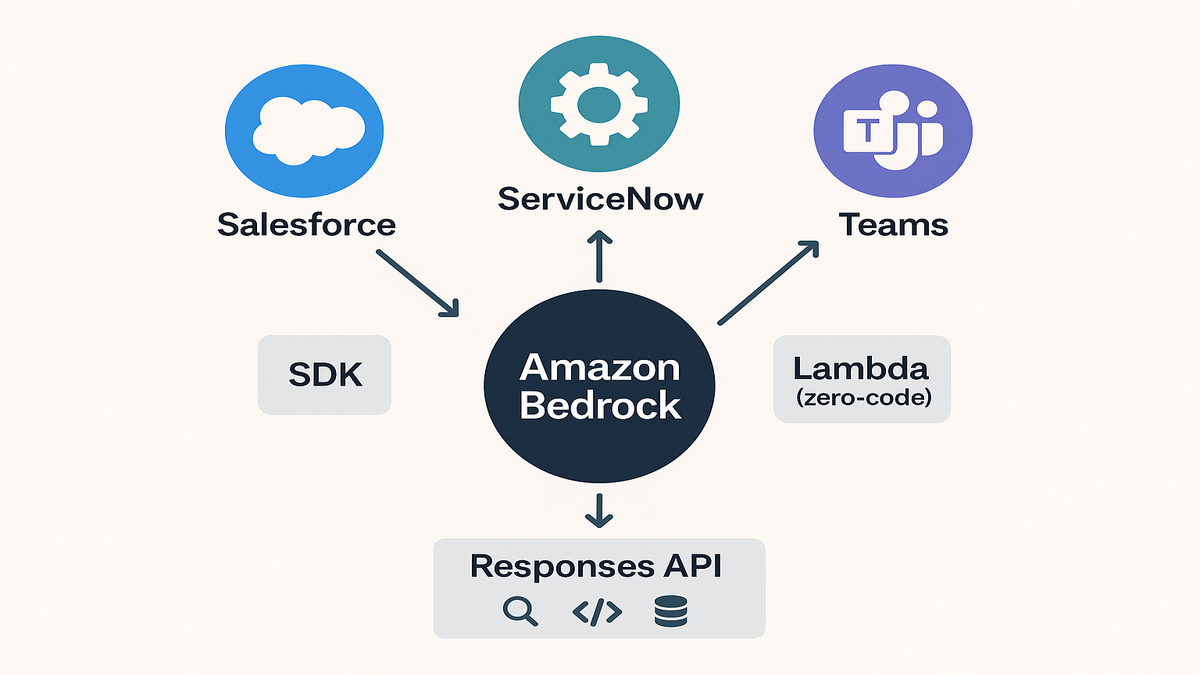
The headline: pre-built connectors for Salesforce, ServiceNow, and Microsoft Teams. A simplified SDK for custom plugins, with zero-code options via AWS Lambda. Plus server-side execution that keeps data movement minimal and predictable. Translation: fewer flaky hops, more reliable workflows, and agents you can ship without a 50-tab debug session.
Even better, this builds on Bedrock’s server-side tool use in the Responses API. So your agents can web search, execute code, and talk to databases without leaving AWS boundaries. That’s the gap between a cool demo and a durable system.
You want examples, not hype. Below, you’ll get a concrete path. Where to start (amazon bedrock agents documentation + workshop). How to plug in real systems (aws bedrock agent api + GitHub examples). And what to watch on security, latency, and cost.
Here’s the vibe: practical steps, minimal jargon, and patterns you can copy this week. Think of this like a build guide from a teammate. One who already blew up staging so you don’t have to.
TLDR
- New Bedrock agent plugins integrate Salesforce, ServiceNow, and Teams out of the box.
- Build custom plugins fast via a simplified SDK or zero-code Lambda wiring.
- Everything runs server-side in AWS for lower latency and tighter control.
- Use the Responses API for tool use (search, code, DB) without leaving AWS.
- Get started fast with the amazon bedrock agents documentation, workshop, and GitHub examples.
Meet the plugins
Pre built connectors
You can now drop in pre-built plugins for Salesforce, ServiceNow, and Microsoft Teams. No fragile one-off scripts. Think common ops: fetch a Salesforce Account, open a ServiceNow incident, or post a Teams message with context. Because execution stays inside AWS, tokens and payloads don’t bounce through random layers.
First-hand example: imagine a support triage agent that gets escalated. It pulls customer entitlements from Salesforce, opens a ServiceNow P1 with logs, then posts a Teams alert to on-call. All in one flow. No browser automations. No local executors.
If you’ve been burned by brittle UI automations or OAuth token spaghetti, breathe out. You map an action, hand it a clean request, and let AWS run the path. Less glue code. Fewer “why did prod 500 at 2 a.m.” messages. A faster path from prototype to something ops actually trusts.
What this looks like in practice:
- Input: the LLM decides to call fetch_account with a customer email.
- Plugin: the Salesforce connector translates that into the right SOQL or API call.
- Output: structured JSON—name, tier, open opportunities, last renewal date.
- Follow-on: the agent chains that into create_incident on ServiceNow, then notifies Teams.
You still define what “good” means. Fields, validation, and fallbacks. But the plumbing isn’t your full-time job anymore.
Custom plugins
When the pre-built set doesn’t cover your stack, use the simplified SDK. Define inputs and outputs and wire business logic fast. If you don’t want much code, zero-code via AWS Lambda works great. Map a plugin action to a Lambda function with configuration. Bring any REST or GraphQL API. Version your plugin like a microservice.
A sane way to design custom actions:
- Start with the business verb: createrefund, computeriskscore, synccontract.
- Define a tight request schema and a predictable response. Include success flag, payload, and error.
- Add validation rules: required fields, enums for types, and numeric ranges.
- Plan for partial failure. Can you return a warning while still finishing the task?
Operational tips for Lambda-backed actions:
- Keep timeouts realistic. Five to fifteen seconds for CRUD, longer for batch. Use retries with backoff.
- Set memory high enough to dodge cold-start drag during spikes. Measure and right-size later.
- Store secrets in AWS Secrets Manager and fetch at init, not on every call.
- Normalize logs. One JSON per line, with action, correlationid, and durationms.
Server side tool use
Here’s the kicker: plugins execute within AWS boundaries. Pair that with server-side tool use in the Bedrock Responses API. Now your agent can do retrieval, web calls, or light code runs without spraying secrets across clients. Fewer network hops equals tighter latency and fewer mystery failures. It’s the gap between “works on my laptop” and “passes on-call.”
This also plays nicely with governance. Control egress with allowlisted domains. Route private traffic over VPC endpoints or PrivateLink. Leave a complete audit trail in CloudTrail and CloudWatch. When compliance asks where a token went, you have a map. When security asks who touched a record, you have logs.
One underrated benefit: consistent schemas across tools. If everything returns clean JSON, the LLM hallucinates less. Define a shared pattern—status, data, error—and stick to it across plugins. The agent learns faster, and your dashboards get cleaner signals.
Design workflows
Plan the tool graph
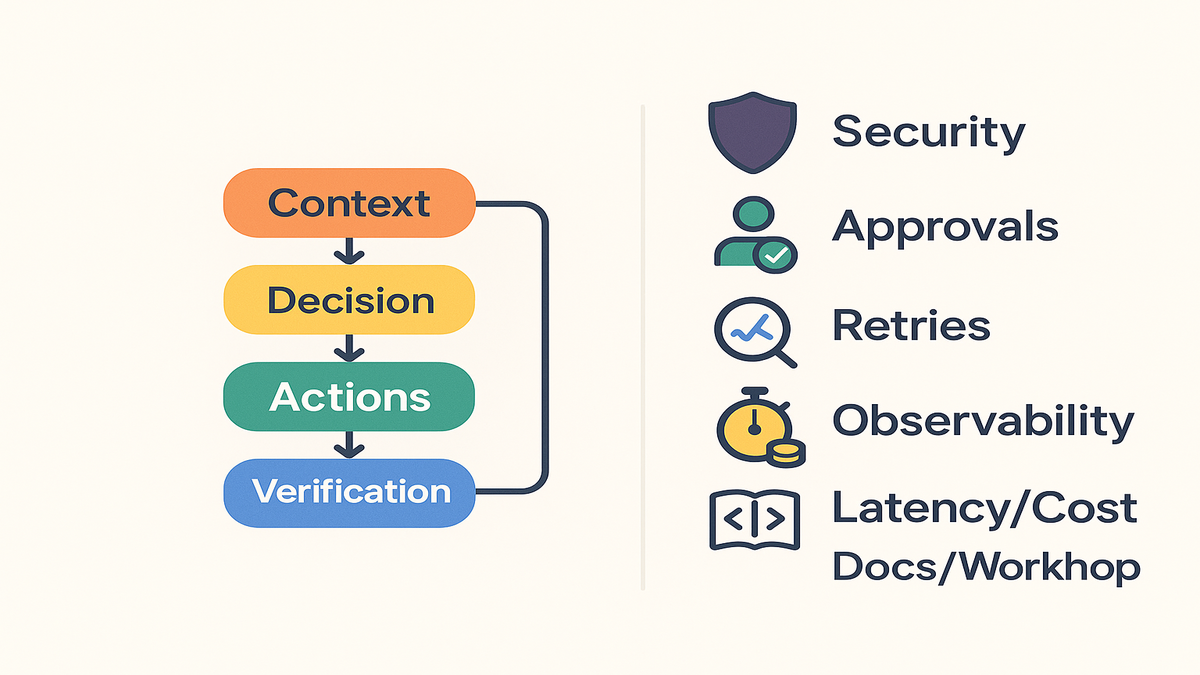
Sketch your agent as a tool graph. Context assembly → decision → action(s) → verification → user response. Each action is a plugin call with explicit contracts. Keep actions small and composable. Think single-responsibility functions. Then you can retry safely and observe performance per step.
First-hand example: a collections agent runs four steps. One, fetchaccount from Salesforce. Two, computerisk with a code tool. Three, create_case in ServiceNow. Four, notify in Teams. Each returns structured JSON the LLM can reason over.
Turn that sketch into something you can ship:
- Write the happy path, then immediately list three failure modes per action.
- Assign SLAs per step, like fetch_account p95 under one second. Track them in metrics.
- Decide which fields must be verified before moving on. Entitlement_tier present and not null.
- Add a final verification tool that sanity-checks answers before the agent responds.
Handle failures and retries upfront
Production reality: APIs throttle, tokens expire, and schemas drift. Treat plugin errors as first-class citizens. Add retry policies with jitter and idempotency keys for writes. Use circuit breakers to avoid cascading meltdowns. Keep human-in-the-loop paths for sensitive actions.
How to make retries boring, in a good way:
- Use exponential backoff with jitter. Base 200–500 ms, and cap after a few attempts.
- Add idempotency keys. A stable hash of inputs so create_case doesn’t double-create.
- Build a dead-letter path. When retries fail, persist the payload for manual review.
- Emit typed errors. Throttle, timeout, authfailure, badrequest. Don’t just 500 everything.
For human approvals, keep the loop fast. Show a compact summary, the action, and the diff. One click to approve or reject, with a reason. Log it all.
Bake in observability and evals
Log plugin inputs and outputs, minus secrets, and latencies too. Track per-action success rates. That’s how you find the flaky edge. Run regression evals when you change prompts or roll new plugin versions. Your north star is measurable task success, not token-by-token eloquence.
What “good” looks like:
- Metrics: p50 and p95 latency, error rates, retries, and time-to-first-byte.
- Traces: a correlation_id across the user request, model calls, and plugin actions.
- Logs: single-line JSON with action, status, durationms, and requestsize fields.
- Evals: a small gold set, twenty to one hundred tasks. Re-run on every change.
Bonus: add synthetic tests that ping critical actions hourly with safe data. If Salesforce auth dies at 3 a.m., you’ll know before users do.
From hello world to prod
Start with docs and workshop
Don’t freestyle. The amazon bedrock agents documentation walks through key concepts. Agents, permissions, and runtime behaviors. Pair that with the hands-on amazon bedrock agents workshop. You’ll learn action design, prompting patterns, and safe rollouts. Together, it’s your aws bedrock agents tutorial without guesswork.
- Docs: amazon bedrock agents documentation → see agents, routing, and deployment fundamentals.
- Workshop: amazon bedrock agents workshop → build an end-to-end agent with evaluation checkpoints.
Treat the workshop like flight school. Do the drills, then adapt the patterns. You’ll leave with a clear model. How the Responses API calls tools. How to scope IAM permissions. Where to add guardrails so the agent doesn’t color outside the lines.
Grab GitHub examples
Search amazon bedrock agent plugins github. Or clone the official aws-samples repo with agents examples. You’ll find reference architectures, Lambda bridges, and prompt patterns you can adapt. Fork it, tweak config, wire your own APIs, and ship a proof-of-concept this week.
- Look for aws bedrock agents example projects with Salesforce and ServiceNow scaffolding.
- Keep examples close to prod: environment variables, least-privilege IAM, and CI hooks.
If you’re on a deadline, start with multi-step tool use examples. Swap the mocked API with your dev endpoint. Add minimal validation. Then drive it through the Bedrock Agent API. Set a success metric, like create a valid P1 in under sixty seconds. Iterate from there.
Use the Bedrock Agent API
Spend time with the aws bedrock agent api and the Responses API. Treat plugin operations as typed functions with clear schemas. Return machine-readable outputs the model can ground on. Pro tip: standardize one JSON schema style across plugins. Don’t make the LLM switch payload formats.
Schema hygiene checklist:
- Use consistent keys and casing. Snake_case or camelCase—pick one and stick with it.
- Return a status field, ok or error, plus an error object with code and message.
- Prefer enums for categorical values, like severity P1, P2, or P3.
- Keep payloads small. Include only what the next action needs.
And yes, version your actions. A tiny v2 suffix beats silent field changes every time.
Security governance and cost
Stay inside AWS boundaries
Because plugins execute server-side in AWS, you cut risky round-trips. Keep data paths predictable and restrict egress where you can. Document which actions may call external services. Use AWS-native identity for invoked services and rotate credentials on a tight schedule.
First-hand example: for a plugin that writes to ServiceNow, scope it tightly. Limit to one incident table endpoint. Require explicit parameters, like severity, with validation before dispatch. No free-form execute-anything blind spots.
Practical guardrails to add day one:
- IAM least privilege for Lambda and API calls. Deny wildcard write scopes.
- Secrets in AWS Secrets Manager with automatic rotation where possible.
- VPC endpoints or PrivateLink for internal calls. Restrict outbound to known domains.
- KMS for encrypting sensitive data at rest and in transit where supported.
Guardrails policies and approvals
Pair plugins with model guardrails. Enforce content filters and safety checks, always. Your agent should never suggest actions outside policy. For sensitive actions—refunds, entitlements, account closures—use an approver workflow. Log who approved, what changed, and the execution trace. Governance is easier when actions are small and named.
Make your policies explicit in prompts and code:
- Only create P1 tickets if entitlementtier is Enterprise and errorcount is above N.
- Never expose access tokens in responses. Mask credentials by default.
- For refunds above $X, request human approval and halt until approved.
Then back those rules with runtime checks in the plugin. The model isn’t your last defense.
Latency and cost tactics
- Consolidate actions to reduce unnecessary sequential calls.
- Cache read-only calls, like account lookups, when policy allows.
- Stream responses while actions run in parallel where it’s feasible.
- Measure model token usage and pick smaller context windows when possible.
- Keep third-party API calls minimal and batched. Those costs add up quietly.
Also, track fan-out. One question that fans into five tools across two regions is pricey. It can also wreck your p95. Audit your most common paths monthly. Axe the waste.
Pit stop
- Pre-built plugins speed up Salesforce, ServiceNow, and Teams integration with server-side execution.
- Custom plugins come together fast via SDKs or Lambda-based zero-code wiring.
- Treat your agent as a tool graph: small actions, retries, and evals.
- Start with docs, the workshop, and GitHub to hit production faster.
- Keep governance tight: least-privilege, approvals for sensitive actions, and clear logs.
FAQ
Plugins tools action logic
Think of plugins as the integration layer. They’re well-defined actions that call third-party or custom APIs. Tool use in the Responses API is how the model decides to call an action. Your action logic, often in Lambda, encodes the business rules behind the API call.
Authenticate to Salesforce ServiceNow Teams
Use the standard auth flows those platforms support, usually OAuth 2.0. Configure credentials server-side and scope them to least privilege. Plugins execute inside AWS, so tokens don’t traverse client devices. Rotate keys regularly and monitor failed auth attempts.
Keep data private using tools
Yes. With server-side tool use, your agent can search, run code, and hit databases inside AWS. For private data, expose APIs through controlled endpoints. Restrict egress to approved domains. Avoid secrets in prompts. Use server-managed credentials.
Which models call tools
Model support varies by provider. Many popular Bedrock models support tool use via the Responses API. Check the model’s capabilities page in the amazon bedrock agents documentation. Verify input and output limits before building complex multi-step actions.
Monitor and debug in production
Track per-action latency, error types, and success rates. Log structured inputs and outputs for your plugins, without secrets. For Lambda-backed actions, use standard AWS logging and metrics. Add synthetic runs for critical paths. Run evals before releasing prompt or plugin changes.
What do I pay for?
You pay for model inference, plugin execution, and any third-party API usage. Watch token counts, redundant calls, and fan-out patterns. Small inefficiencies compound fast at scale.
Need an orchestrator Step Functions
Not required, but helpful for complex and long-running tasks. Also for strict approval gates. Keep the agent focused on reasoning and short actions. Use an orchestrator when you need state, timers, or retries over minutes to hours.
Prevent over calling tools
Give the model crisp tool descriptions. Include cost and latency hints in system prompts. Return informative fields from tools, like cachevaliduntil. Add rate limits per user or task at the API layer. Track a short-term memory of calls to avoid loops.
What if my schema changes?
Version your actions. Keep backward-compat prompts during a deprecation window. Add contract tests to ensure the agent still handles valid fields. Don’t ship breaking changes without a migration plan. Thats how on-call pages happen.
Launch your first Bedrock plugin
- Pick a narrow, high-impact task. Create a ServiceNow ticket from a Salesforce alert.
- Read the amazon bedrock agents documentation and note the IAM requirements.
- Complete the amazon bedrock agents workshop to learn core patterns.
- Clone aws-samples GitHub. Look for aws bedrock agents example projects.
- Define two to three plugin actions with clear request and response schemas.
- Wire actions to Lambda or SDK and test via the aws bedrock agent api.
- Add retries, guardrails, and an approval step. Ship a pilot to one team.
Next-level in week two:
- Add observability with metrics, traces, and structured logs plus a 20-case eval set.
- Optimize prompts for fewer tool calls. Cache obvious reads.
- Run a load test to check p95 latency and throttle behavior.
- Tighten IAM and egress rules before expanding access.
Wrap-up thought: Integration beats invention. If your agent already talks to Salesforce, ServiceNow, and Teams, securely, server-side, you’re not building an LLM app. You’re upgrading workflows you’ve refined for years. That’s why these plugins matter. They compound what you already do well.
Want to see how teams turn these patterns into real impact? Explore our Case Studies.
References
- Agents for Amazon Bedrock (User Guide)
- Amazon Bedrock API Reference
- Amazon Bedrock Agents Workshop
- AWS Samples – Amazon Bedrock examples (GitHub)
- AWS Lambda (Developer Guide)
- AWS News Blog – Agents for Amazon Bedrock
- Guardrails for Amazon Bedrock
- AWS Secrets Manager
- AWS Identity and Access Management (IAM) Best Practices
- Amazon CloudWatch Logs
- AWS X-Ray
- AWS PrivateLink
- AWS CloudTrail