
AWS Lambda now supports .NET 10 LTS. You get faster starts, smaller packages, and managed updates through November 2028.
If you’ve been waiting to modernize your serverless stack without boring heavy lifting, this is your green light. Lambda gives you two clear lanes: a managed runtime for max simplicity, or a container image for max control. Either way, builds get leaner, cold starts get snappier, and your deploys get cleaner.
Think of this like an upgrade that removes friction. Less boilerplate. Better defaults. New C# features that cut clutter. And Powertools for AWS Lambda (.NET) backs you up from day one with logging, tracing, metrics, and idempotency. The result: fewer footguns, faster feedback loops, and fewer production surprises.
Key Takeaways
Key highlights
- Run .NET 10 as a managed runtime for simplicity or as a container base image for full control.
- Performance gains from JIT/AOT improvements and smaller artifacts; new C# features and file-based C# functions speed up development.
- Powertools for AWS Lambda (.NET) supports .NET 10 for logging, tracing, idempotency, and more.
Why this matters right now
- You get long-term support on the runtime, which means predictable security patches and less time babysitting versions.
- You can keep your infrastructure-as-code (IaC) steady while upgrading apps incrementally using Lambda aliases. Safer rollouts, cleaner ops.
- The developer experience is just better: faster inner loops, simpler handlers, and consistent observability baked in.
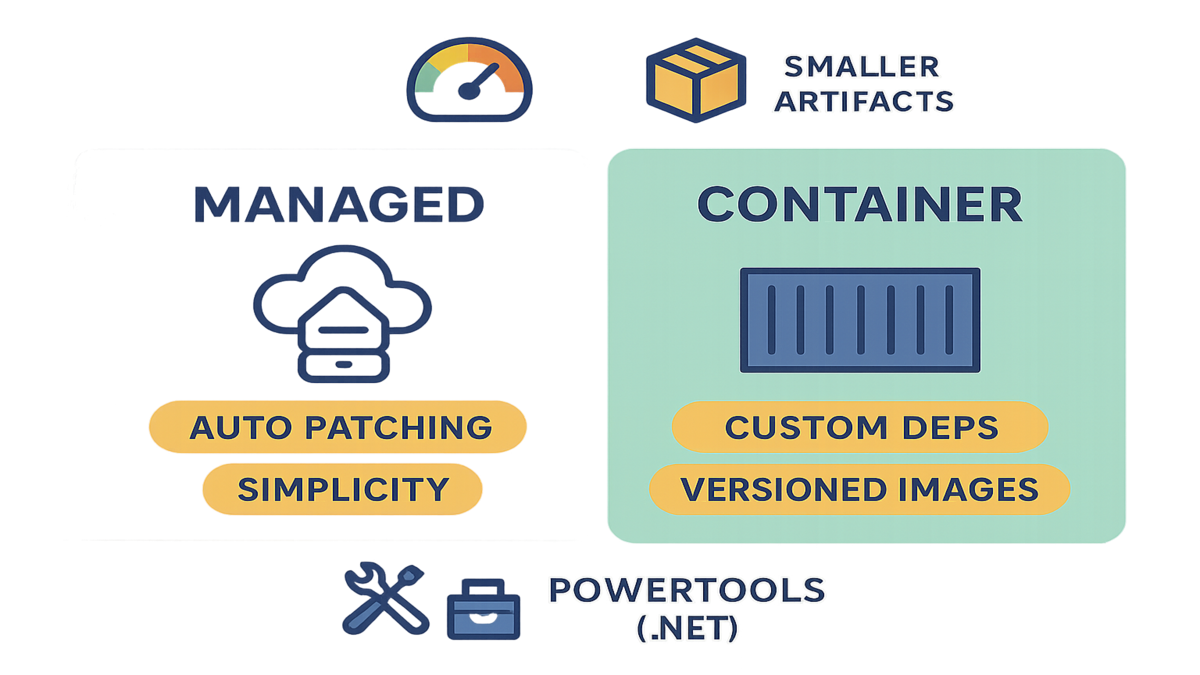
Managed runtime vs containers
Managed runtime vs containers
- Managed runtime: simplest ops, auto patching, great for event-driven services and APIs.
- Container image: custom dependencies and OS packages, image-level versioning, strong parity with container workflows.
Use the managed runtime if
- You want the lowest operational overhead. AWS handles runtime updates through the LTS window.
- Your function relies on NuGet packages and simple native libs that don’t require custom OS packages.
- You prefer fast, small deployments and quick rollbacks using Lambda versions and aliases.
Use a container image if
- You need OS packages or specific native dependencies that aren’t available in the managed runtime.
- You want the same Docker-based build and test workflow across Lambda, ECS, and Kubernetes.
- You need strict image pinning, image scanning, and a private registry flow via ECR.
Pro tips
- Start with the managed runtime unless you have a clear container requirement. You can move to images later without rewriting your app logic.
- For both paths, treat observability as table stakes. Add Powertools and structured logging on day one.
What gets faster
- Startup and cold start improvements: With better JIT and optional Native AOT, functions spin up faster and waste less memory. Your users feel the difference on spiky traffic.
- Smaller artifacts: Leaner builds and trimming reduce package size, which speeds deployments and container pulls.
- Cleaner C#: Modern C# means fewer lines of code. File-based C# functions help you skip ceremony and ship.
- Safer operations: Longer LTS support window means fewer urgent runtime upgrades. You can plan upgrades well before the end-of-support dates.
None of this replaces good hygiene: right-size memory, keep dependencies tight, and monitor p95 latency. You’ll get the best gains when you combine .NET 10 improvements with Lambda best practices.
Upgrade playbook managed runtime
Upgrade playbook managed runtime
1) Bump target framework to .NET 10 in your csproj. 2) Update AWS Extensions for .NET CLI to v6.0.0+ if you use it. 3) Rebuild, test locally and in CI. 4) Deploy to pre-prod alias and load test. 5) Shift traffic gradually with aliases and monitor.
What that looks like
- Step 1: Update your TargetFramework in your .csproj to net10.0. Keep other settings the same at first; change one variable at a time.
- Step 2: Upgrade AWS Extensions for .NET CLI (v6.0.0+) so packaging and deployment commands recognize .NET 10. This avoids weird build-time surprises.
- Step 3: Run unit tests locally, then your CI pipeline. If you use SAM local or the AWS Toolkit for Visual Studio, spin up a local test event to validate handlers and configuration.
- Step 4: Deploy to a pre-production alias or environment. Use the same infrastructure as production but with safe limits and test data. Load test with steady traffic plus spikes to mimic real usage.
- Step 5: Gradually shift traffic using Lambda aliases. Start at 1–5% canary, watch error rates, p95 latency, and memory usage. If clean, roll forward. If noisy, roll back instantly by pointing the alias back.
Checklist for success
- Monitor cold start and warm start latency separately. Provisioned Concurrency can smooth spikes for latency-sensitive APIs.
- Review IAM policies. Keep least privilege on function roles and any service integrations.
- Watch CloudWatch metrics for duration, errors, and throttles; set alarms before the rollout.
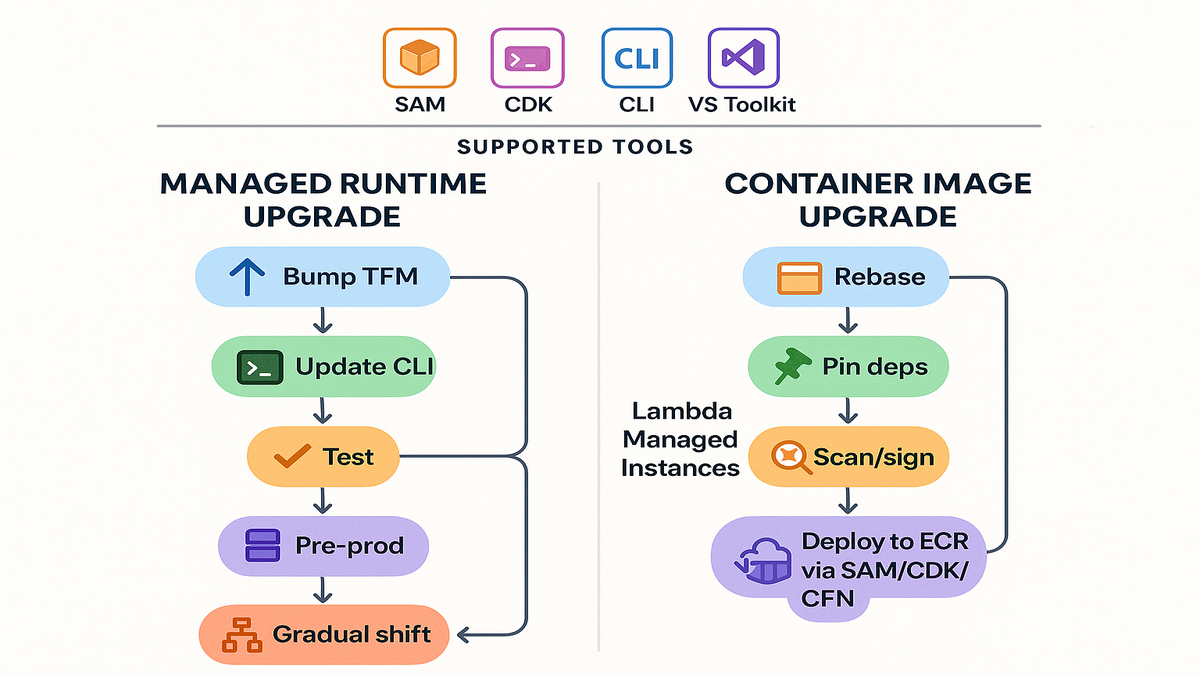
Upgrade playbook container image
Upgrade playbook container image
1) Rebase to the .NET 10 Lambda base image. 2) Bake dependencies and pin versions. 3) Scan and sign images. 4) Push to ECR and deploy via SAM, CDK, or CloudFormation.
How to make it smooth
- Step 1: Start with the official .NET 10 Lambda base image. Keep your Dockerfile simple: restore, build, publish, then copy the output to the runtime workdir. Avoid multi-purpose images.
- Step 2: Pin every OS and package version to keep builds deterministic. If you add native deps, record them in code and docs.
- Step 3: Use image scanning before promotion. ECR scanning or your preferred tool should block promotion on high-severity issues. Consider image signing for your release stage.
- Step 4: Push to ECR, reference the digest (not just a tag), and deploy via SAM/CDK/CloudFormation. Roll back by flipping to a previous image digest.
Shipping containers Dont forget
- Keep images small. Remove build tools from the final stage and clean caches.
- Log to stdout/stderr in JSON. CloudWatch will thank you.
- Tag images with git SHA and app version for easy tracing.
Tooling and dev experience
Tooling and dev experience
- SAM, CDK, AWS CLI, Lambda console, and AWS Toolkit for Visual Studio all support .NET 10.
- Use Powertools from day one for standardized observability and operational safety.
What this means
- SAM and CDK: You can define the .NET 10 runtime or point to your container image and use the same deploy commands you already know. Templates stay clean, environments stay consistent.
- AWS CLI and Lambda console: Great for quick experiments. Set environment variables, memory, and timeouts. Then script it later with IaC.
- AWS Toolkit for Visual Studio: Debug locally, run test events, and push to Lambda without leaving the IDE. Use it for quick feedback, then lock in your pipeline with CI/CD.
- Powertools for AWS Lambda (.NET): Add it when you create the project. You’ll get consistent correlation IDs, structured logs, traces, metrics, idempotency, and parameters/utilities that teams standardize on.
Real world patterns to copy
- Event-driven glue: Use managed runtime + Powertools + SAM. Keep the function small, stateless, and focused on one job.
- API endpoints: Use provisioned concurrency for the hot paths, structured logging, and strict timeouts. Monitor p95 latency closely.
- Heavy native deps: Use container images, pin OS packages, run image scans, and deploy via CDK. Version images by digest.
- Team-of-teams standard: Create a starter template with .NET 10, Powertools, logging format, alarms, and a CI pipeline. Make the right path the easy path.
Lambda Managed Instances
Lambda Managed Instances
- Use when you need specialized EC2-backed compute while keeping a serverless model.
- Keep IaC and CI/CD identical so switching is a config change, not a rewrite.
Think of Managed Instances as a pressure-release valve. If a workload needs specialized compute that doesn’t fit the standard Lambda execution environment, you can still keep serverless semantics—events, auto-scaling, and aliases—without refactoring everything. The trick is to design your templates and pipelines so the switch from standard Lambda to Managed Instances is mostly configuration. That way, you keep one playbook for deployments, rollbacks, and monitoring.
Deep dive performance
- Right-size memory and CPU: Lambda ties CPU to memory. Don’t be afraid to give functions more memory if it cuts duration. Sometimes 512 MB is slower and more expensive than 1 GB.
- Provisioned Concurrency for APIs: If p95 matters, pre-warm the most frequently hit functions. Start small, measure, then tune.
- Minimize dependencies: Trimming and mindful package selection can drop artifact size and speed up cold starts.
- Async everything you can: For I/O-bound work, async C# with proper cancellation tokens helps reduce timeouts and costs.
- Log less, log better: Use structured logs with correlation IDs. Sample traces if traffic is high.
DevX improvements
File-based C# functions help you ship small units of logic without a lot of ceremony. Combined with modern C# features, you can model handlers as simple methods that are easy to test. This reduces boilerplate and improves readability. The benefit is most obvious when you have many small functions: less overhead per function, faster code reviews, and fewer places to hide bugs.
Powertools multiplies that effect
- Logger: Consistent, structured JSON logs topped with correlation IDs.
- Tracer: Instrument external calls and see the call path per request.
- Metrics: Emit standard business and technical metrics with a single line of code.
- Idempotency: Make retries safe by default—especially for event-driven flows like SQS and EventBridge.
FAQ quick hits
FAQ quick hits
- .NET 10 is available as both managed runtime and container base image.
- File-based C# functions are supported; use AWS Extensions for .NET CLI v6.0.0+.
- For Node or Python runtime upgrades, follow a similar staged rollout with aliases and tests.
Extra answers youll probably need
1) Can I mix managed runtime and containers in one app? Yes. Choose per-function. Keep shared libs in NuGet packages and standardize logging.
2) Do I need Provisioned Concurrency? Only for latency-sensitive paths. Start with managed runtime and measure.
3) How do I roll back fast? Keep your previous Lambda version (managed runtime) or previous image digest (containers) and flip the alias.
4) What about regions? Check regional availability before rollout if you’re multi-region; most services are broadly available but verify.
Get started in under
Get started in under
- Install or update .NET SDK 10, AWS CLI, SAM CLI, and AWS Extensions for .NET CLI v6.0.0+.
- Initialize with SAM or CDK, add a minimal handler, wire Powertools, test locally, and deploy.
A quick path you can
- Install the .NET 10 SDK, the AWS CLI, and SAM CLI. Log in with an IAM user or role that can deploy to Lambda.
- Create a new serverless project with SAM or CDK. Add a simple handler and a unit test.
- Add Powertools for logging and tracing. Emit a test metric so you can see it in CloudWatch.
- Run locally with a sample event. Validate environment variables, timeouts, and memory.
- Deploy to a dev stage. Create a Lambda alias (e.g., dev) and point traffic to it.
- Add alarms for errors and duration. Trigger the function with a sample event or a test API call.
- When it looks good, promote the same artifact to staging and production by shifting alias traffic gradually.
Security and governance
- Least privilege IAM: Start with the minimal permissions your function needs. Review policies as part of code review.
- Image scanning and signing (containers): Scan every image, fail the build on critical vulnerabilities, and sign images before promotion.
- Parameter and secret management: Use AWS Systems Manager Parameter Store or AWS Secrets Manager. Don’t bake secrets into images or code.
- Versioned deployments: Use Lambda versions and aliases to ensure every release is traceable and reversible.
- Consistent templates: Standardize SAM/CDK templates with the runtime, memory defaults, alarms, and Powertools so every team ships the same way.
Put it all together
Here’s the play: pick the managed runtime if you want the fastest path to value. Choose containers if you need OS-level control and airtight image workflows. Either way, standardize on Powertools, keep your IaC clean, and roll out with aliases. Watch error rates and latency like a hawk for the first few hours, then relax as the charts stay boring—in a good way.
AWS Lambda now supports .NET 10 LTS, and that support stretches through November 2028. That’s a long runway to build, iterate, and ship without constant runtime churn. So upgrade the TFM, test the path, deploy behind an alias, and start shifting traffic. You can have your first .NET 10 Lambda in production before lunch.
References
- AWS Lambda runtimes and support policy
- Deploying Lambda functions as container images
- AWS Lambda regional services and availability
- Powertools for AWS Lambda (.NET)
- AWS SAM
- AWS CDK
- AWS Toolkit for Visual Studio
- AWS Extensions for .NET CLI
- .NET support policy
- Native AOT overview
- What is new in C#
- AWS Lambda aliases and traffic shifting
- Amazon ECR image scanning
- AWS X-Ray for tracing
- Provisioned Concurrency