

You spend hours pulling customer data into S3, cleaning it in Spark, then… exporting CSVs to upload into your tools. It’s 2026—why are you still the human API?
Here’s the unlock. AWS Glue just added write operations for SAP OData, Adobe Marketo Engage, Salesforce Marketing Cloud, and HubSpot connectors. Translation: you can push clean, modeled data back into the exact systems your marketers, lifecycle teams, and sales ops actually use.
That means fewer brittle scripts, fewer point tools, and way fewer late-night “why didn’t this segment update?” pings. You stay in Glue. You model once. You write wherever.
If you’ve been waiting to build reverse ETL without adding another SaaS to your stack—or you’re tired of duct-taping AppFlow, Lambdas, and spreadsheets—this is your green light.
One more reason this matters. Your team already trusts Glue for jobs, schemas, and monitoring. Turning it into your activation engine means less context switching and more shipping.
And yes, this is how you shrink martech latency from “whenever someone uploads a CSV” to “near-real-time enough to hit a promo window.”
TL;DR
- New AWS Glue write operations for SAP OData, Marketo Engage, Salesforce Marketing Cloud, and HubSpot shrink martech latency and tool sprawl.
- Use Glue jobs (Spark or Python shell) to power reverse ETL, audience syncs, and lifecycle automations—end-to-end in AWS.
- Mind API limits, idempotency keys, and schema drift. Test writes like you test payments.
- Check AWS Glue release notes for version support and aws glue 3.0 end of life timelines.
- Prefer newer aws glue versions (5.x/6.x) for performance, Python/Spark updates, and connector compatibility.
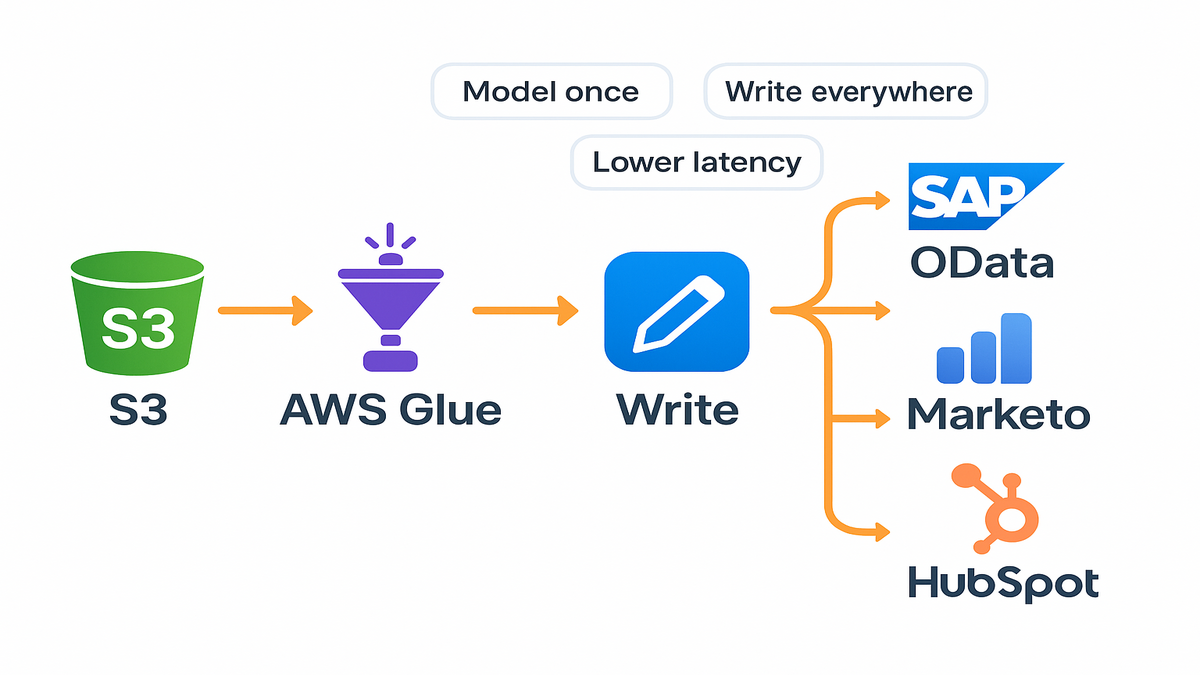
What changed and why now
The headline
AWS Glue now supports write operations for four big martech surfaces: SAP OData endpoints, Adobe Marketo Engage, Salesforce Marketing Cloud (SFMC), and HubSpot. You already could read from many of these; adding writes completes the loop so you can operationalize data—without bouncing between five tools.
- SAP OData: Post transactional updates or master data changes to SAP systems via OData services.
- Marketo Engage: Push leads, custom objects, or program memberships.
- Salesforce Marketing Cloud: Update Data Extensions and triggered send data.
- HubSpot: Sync contacts, companies, deals, and custom properties.
See AWS Glue release notes for the full aws glue enhancements list and region availability.
What this unlocks in practice. You can treat your curated zone in S3 as the source of truth and fan out to these destinations in a single pipeline. No more hand-offs to “the person with the Marketo login.” Your Spark transformations, quality checks, and observability now sit in front of the actual business action.
Who benefits
If you run marketing analytics, data engineering, or growth ops, you can now:
- Ship first-party audiences to activation tools without new vendors.
- Keep data residency in AWS and simplify security reviews.
- Collapse “read in Spark -> export -> upload via API” into one Glue job.
Bonus points if your security team prefers fewer external connections and a single audit trail. With Glue, your governance lives where your data already lives.
Why this is big
Activation speed matters. Segments get stale. Offers miss windows. When writes live inside Glue, you tap the same Spark code, catalog schemas, and monitoring you already use.
First-hand example. Say you score leads nightly and calculate LTV cohorts weekly. With Glue writes, you update Marketo lead attributes and SFMC Data Extensions in the same pipeline that computed them—no more CSV uploads from a marketing ops inbox.
Add a real-world twist. Your pipeline can enrich HubSpot contacts with product events while also posting order syncs to SAP via OData—all triggered by the same job parameters and guarded by the same IAM role.
References:
- AWS Glue release notes
- AWS Glue Studio connectors
Design patterns instant ROI
Reverse ETL without platform
Build a job that:
1) Reads modeled data from your curated zone (e.g., S3/Parquet partitioned by date). 2) Transforms to target schemas (Marketo lead fields, SFMC Data Extensions, HubSpot contact properties). 3) Writes in batches with retries and dead-letter queues (DLQs) for rejects.
This replaces manual uploads or point tools while giving you Spark-scale transforms, Glue job bookmarks, and centralized logging.
Add these practical touches:
- Mapping layer: Maintain a simple mapping file (YAML/JSON) in S3 that pairs your canonical fields to each destination’s property names. Your job reads it at runtime so field changes don’t require a code redeploy.
- Feature flags: Use job parameters to toggle destinations (e.g., writetomarketo=true). Handy for staged rollouts.
- Dry runs: Add a “validate_only” mode that fetches destination schemas and validates payloads without actually writing. Save any mismatches to S3 for review.
Upserts merges and idempotency
APIs differ:
- Marketo and HubSpot: Lean on external IDs or email as primary keys, but always prefer a stable external ID. Build upserts that do “create-or-update” behavior and supply idempotency keys where supported.
- SFMC: Write to Data Extensions. Treat writes as append plus dedup on a surrogate key inside your model if the API doesn’t fully upsert.
- SAP OData: Respect service metadata. Many endpoints enforce required fields and versioning (ETags) for concurrency control.
Pro moves:
- Batch size: Tune to stay below per-minute limits (Marketo, HubSpot, and SFMC all throttle). Add exponential backoff.
- Partial failures: Route rejects to S3 with payload + error message. Reprocess with a "corrections" job.
- Sequencing: Some endpoints require parent objects first (e.g., companies before contacts). Enforce DAG order across Glue jobs.
Example. A lifecycle team promotes “High-Intent Leads” hourly. Your Glue job merges overnight scoring with recent events, upserts 5k leads to Marketo, and flags a campaign membership in SFMC. No swivel-chairing.
Docs to keep handy:
- Marketo REST API
- HubSpot API overview
- Salesforce Marketing Cloud APIs
Observability marketers will trust
- Golden metrics: Track recordsattempted, recordssucceeded, recordsrejected, writelatencyms, and apithrottle_events. Publish them to CloudWatch and set SLOs (e.g., 99% success, <5-minute lag for priority audiences).
- Per-destination reporting: Mark payloads with a destination tag and object type so you can filter metrics fast when a provider has a blip.
- Human-readable receipts: After each run, write a summary JSON and a friendly text report to S3 (and optionally Slack) showing counts by segment and destination. Marketers love receipts.
Error handling that page
- Categorize failures: Separate 4xx (bad data/permissions) from 5xx (provider issues). Auto-retry only the safe ones.
- Retry budget: Cap retries per payload and roll excess into the DLQ to avoid burning quota.
- Replays: Build a tiny job that reads DLQs, fixes common issues (e.g., trims whitespace, normalizes emails), and retries with a special idempotency key suffix so you can trace replays.
Latency and scheduling tips
- Hourly for most audiences is plenty. Use event-driven triggers (e.g., new partition in S3) when you need faster loops.
- Chunk large audiences by account, region, or lifecycle stage to avoid timeouts and quota spikes.
- For time-sensitive promos, run an early canary (1% of payload) first. If error rates are clean, fan out.
Version reality check
Know your runtime
Write support—and its performance—depends on aws glue versions. Runtimes bundle specific Apache Spark, Python, and library versions. Newer versions typically bring:
- Better Spark performance and memory management.
- New Python versions and security patches.
- Updated connectors and bug fixes.
Before you roll out, verify the connector’s supported Glue versions in the docs. If you’re running legacy jobs on 3.0, test on a newer runtime in a dev endpoint or separate job to confirm compatibility, especially with pandas, Arrow, and auth libraries.
Pro tip. Build a small “compat test” job that imports your usual libs, hits sandbox endpoints, and exercises 5–10 representative writes. Keep it in source control and run it before every runtime upgrade.
Plan around windows
AWS periodically sunsets older runtimes. If you’re searching for aws glue 3.0 end of life details, check the official aws glue release notes. Don’t assume “it still runs” equals “it’s supported.” Lack of security updates or bug fixes can bite you during audits.
Migration tips:
- Pin a baseline version for the project, but schedule quarterly reviews against release notes.
- Maintain dual-run pipelines (old vs. new runtime) for a week to compare metrics and errors.
- Use canary datasets first; scale after API and schema validations pass.
Practical rule. If you’re building new reverse ETL today, target 5.x/6.x where available. That sets you up for modern Python/Spark, stronger connector support, and fewer surprise deprecations.
Helpful links:
- AWS Glue release notes
- AWS Glue (what it is)
Guardrails secure govern observe
Lock down access and secrets
- Authentication: Store API keys, OAuth tokens, and client secrets in AWS Secrets Manager. Rotate regularly and reference them at runtime.
- Network: Use VPC endpoints or private links where supported so writes don’t traverse the public internet.
- Least privilege: Scope IAM roles so jobs can read only the necessary S3 prefixes and call only required connector endpoints.
How to make this concrete:
- Separate roles per destination (e.g., glue-role-marketo, glue-role-sfmc). If one credential is compromised, blast radius stays tiny.
- Keep secrets out of job parameters. Reference by ARN and decrypt at runtime. Audit access in CloudTrail.
Respect API limits audit trail
- Throttling: Most martech APIs enforce per-minute or per-day caps. Implement token-bucket rate limiting, exponential backoff, and jitter. Surface retry counts and backoff metrics.
- Idempotency: Design for safe retries. Include a deterministic idempotency key (e.g., hash of externalid + updatetype + date) when you can. If the API doesn’t support it, enforce “last write wins” logic on your side.
- Observability: Emit business metrics (records attempted/succeeded/rejected), not just logs. Wire CloudWatch metrics and alarms for success rates, latency, and 4xx/5xx spikes.
Auditability checklist:
- Every run should have a run_id and a link to logs and metrics.
- Every payload should store a checksum and destination response code.
- Every reject should keep the raw input, the transformed payload, and the error reason.
Data governance and schema drift
- Catalog everything: Register target schemas in Glue Data Catalog—even if targets are SaaS objects—to track expected fields.
- PII hygiene: Tag sensitive columns and scrub before writes. Apply Lake Formation tags to gate who can launch jobs that push PII to SaaS.
- Change control: When marketing adds a new HubSpot property, prevent silent failures by validating schema diffs at job start.
First-hand example. A B2C subscriptions team used Glue to sync churn-risk flags to HubSpot. They enforced a preflight schema check, rejected 0.8% of rows to a DLQ due to invalid emails, and unblocked the lifecycle team without creating a new toolchain.
Bonus. Keep a lightweight “data contract” doc per destination (owner, object names, required fields, rate limit notes, rollback plan). Nothing fancy—one page that prevents 80% of surprises.
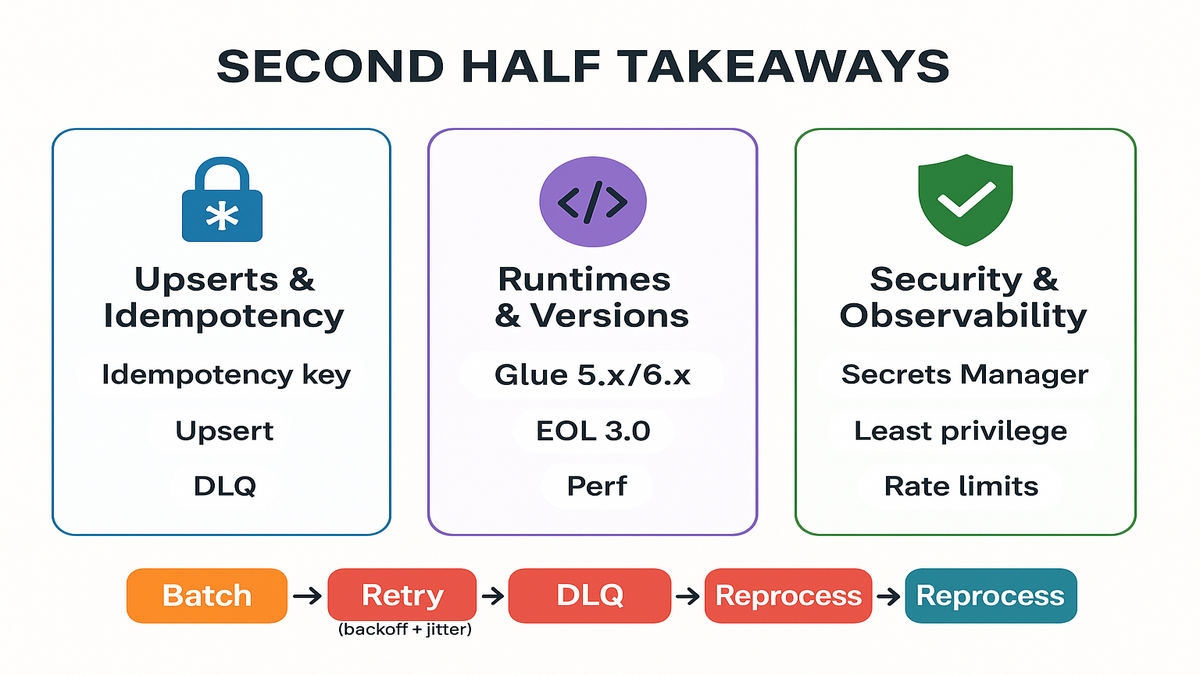
Halftime briefing working
- Glue write support for SAP OData, Marketo, SFMC, and HubSpot lets you run reverse ETL without extra platforms.
- Build idempotent upserts, batch carefully, and handle partial failures with DLQs.
- Target newer runtimes (5.x/6.x) and monitor the aws glue release notes for deprecations.
- Secure creds in Secrets Manager, restrict IAM, and add CloudWatch-based SLOs.
- Validate schemas at job start to catch drift before you burn API quota.
Zooming out. Teams that win with this pattern keep the payloads boring and the monitoring loud. They automate the unglamorous bits—mappings, retries, alerts—and free humans for the creative work (offers, journeys, experiments).
FAQ quick answers before ship
Do I need Glue Studio
Either works. Glue Studio offers a visual experience and managed connectors. Many teams prototype in Studio and codify production pipelines as Spark or Python shell jobs with the same connectors. Pick one path, add CI/CD, and standardize job parameters.
How do writes authenticate
Through each provider’s OAuth or API token mechanism configured in the connector. Store secrets in AWS Secrets Manager, inject them at runtime, and avoid hardcoding in scripts or job parameters.
API rate limits timeouts
Assume they exist and design for them. Batch requests, add exponential backoff with jitter, surface retry counts as CloudWatch metrics, and include dead-letter queues for hard rejects. For large updates, schedule during off-peak windows and chunk by account/region.
aws glue end of life
AWS deprecates older runtimes over time. The exact date can change by Region and context. Always check the official aws glue release notes for current support windows and plan upgrades to newer aws glue versions.
How different from AppFlow
AppFlow is great for no-code data movement between SaaS and AWS. Glue is built for code-first, large-scale transformations and complex orchestration. With write support in Glue, you can keep heavy transformations and activation in one place—especially when you already run Spark jobs.
Test writes safely
Yes. Most tools support sandboxes (Marketo, SFMC, HubSpot). Point your dev Glue job at sandbox endpoints, use synthetic data, and disable downstream automations until validation passes. Gate production with a manual approval in your CI/CD pipeline.
What about costs FinOps
Glue costs scale with job runtime and resources. Good hygiene helps. Prune input data, cache lookups where possible, right-size DPUs, and consolidate writes to avoid tiny, chatty requests. Add CloudWatch budgets and alerts early so there are no mysteries.
Do I need Step Functions
Glue triggers and workflows can cover many cases. If you need long-running orchestrations, branched logic, or human approvals, pair Glue with Step Functions. Keep the business logic in your Spark code; let orchestration do orchestration.
Plan productionize writes
- Confirm connector write support for your Region and runtime version.
- Create an aws glue project repo with IaC (job, role, connections, alarms).
- Store SaaS credentials in Secrets Manager; grant least-privilege IAM.
- Prototype a Glue Studio job to validate schemas and small test writes.
- Define idempotency strategy and error-handling (retries, DLQ bucket).
- Tune batch sizes to respect provider rate limits; add backoff with jitter.
- Add schema preflight checks to catch drift before execution.
- Wire CloudWatch metrics and alarms for success rate, latency, and throttles.
- Run a dual-write canary (sandbox + prod read-only) for one week.
- Promote: lock versions, document SLOs, and schedule regular upgrade tests.
To go even faster, template your job:
- Standard params: env, destination, batchsize, validateonly, segment_name.
- Shared libs: one internal package for retries, idempotency, metrics, and schema validation. Reuse across destinations.
- Reusable mappings: store mappings per destination/version so upgrades don’t break older jobs.
Wrap-up
AWS Glue’s new write operations flip your pipelines from “data at rest” to “data in motion.” You don’t just clean data—you deploy it where it matters: CRM, MAP, and the inboxes that drive revenue.
If you adopt one mindset, make it this. Treat outbound writes like payment flows. Validate inputs, enforce idempotency, and observe everything. Then use Glue’s scale to do the boring parts (batching, retries, logging) so your team can focus on the fun parts (better scoring, richer segments, faster tests).
Start small—one audience, one endpoint. Prove latency drops and error rates. Then templatize the job, snap in a second destination, and let your marketing team ship experiments at the speed of curiosity.
Working with Amazon Marketing Cloud audiences or activating into Amazon DSP as part of this workflow? Explore our AMC Cloud and get inspiration from real-world outcomes in our Case Studies.
References
- AWS Glue release notes
- AWS Glue: What is AWS Glue?
- AWS Glue Studio connectors
- AWS Secrets Manager (for credential storage)
- Rotating secrets in AWS Secrets Manager
- Monitoring AWS Glue jobs
- VPC endpoints and AWS PrivateLink
- Lake Formation tag-based access control (LF-Tags)
- Exponential backoff and jitter (AWS Architecture Blog)
- Marketo REST API reference
- HubSpot API overview
- Salesforce Marketing Cloud APIs
- OData (SAP OData protocol background)
- AWS Glue pricing