

Your biggest cloud risk isn’t attackers; it’s quiet drift you didn’t notice. One unchecked security group rule, one unencrypted dataset, one SageMaker notebook with public internet access, and you have a problem.
Good news, AWS Config expanded coverage across EC2, SageMaker, and S3 Tables this round. That means fewer blind spots, more automatic fixes, and stronger auditability across your stack.
TLDR
- Enable AWS Config for wider inventory on EC2, SageMaker, and S3 Tables to catch misconfigurations fast.
- Use managed rules or custom rules, then pair with Systems Manager Automation for auto-remediation.
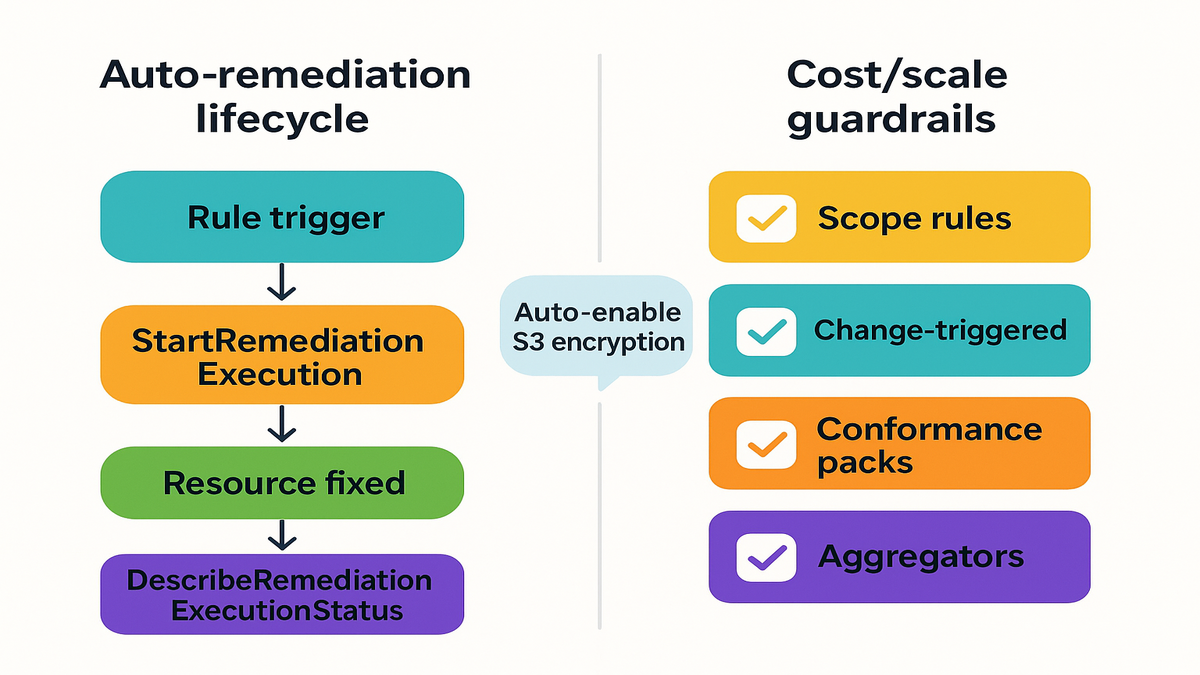
- Example pattern, auto-enable S3 bucket encryption and verify using DescribeRemediationExecutionStatus.
- Control cost by scoping rules, preferring change-triggered evaluations, and using conformance packs and aggregators.
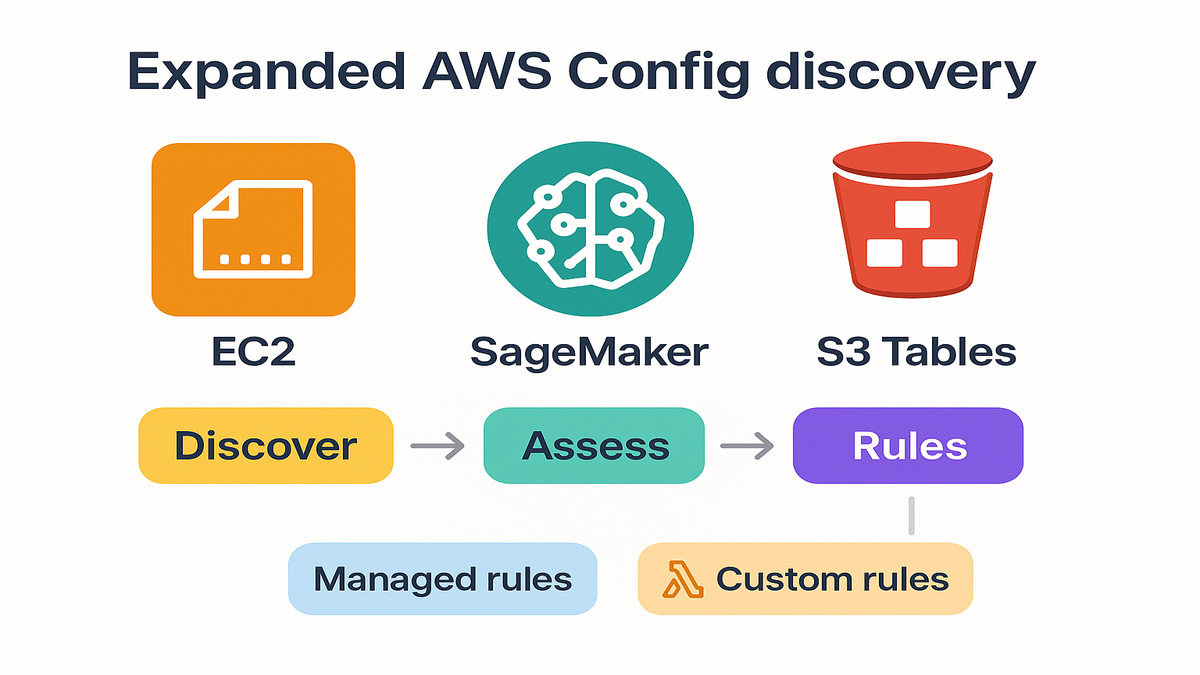
Expanded discovery
- EC2: Instances, security groups, volumes, and AMIs; catch unrestricted SSH or stray public IPs.
- SageMaker: Notebooks, endpoints, model packages; ensure restricted internet access and encryption.
- S3 Tables: Enforce encryption and access policies for tight analytics governance.
Setup tips
- Enable Config in active regions and pick an encrypted S3 bucket with lifecycle for snapshots and history.
- Use the service-linked role, or a tight least-privilege role for setup.
- Start with key resource types, like EC2, SageMaker, and S3-related, then add an aggregator for org-wide visibility.
- Designate a delegated admin account to handle central governance across the org.
From detection to fix
- Managed rules give quick coverage, while custom rules in Lambda handle unique policies.
- Attach SSM Automation runbooks to remediate issues, like removing 0.0.0.0/0 SSH, enabling S3 encryption, and disabling notebook internet.
- Key APIs here are StartRemediationExecution to initiate fixes, and DescribeRemediationExecutionStatus to track outcomes.
- Safe patterns include detect-only starts, set concurrency and error thresholds, require approvals for risky changes, and log everything.
- Make sure IAM is correct for Config, SSM Automation, and any KMS usage.
S3 encryption example
- Goal is to auto-enable default encryption on any noncompliant S3 bucket.
- Steps: enable Config, add managed rule for bucket encryption, attach remediation (AWS-EnableS3BucketEncryption), test with noncompliant bucket, verify with DescribeRemediationExecutionStatus.
- Note, default encryption affects new objects only; plan backfill for legacy data using S3 Batch Operations or rewrite.
Scale to EC2 and SageMaker
- EC2: pair restricted-ssh with remediation to remove 0.0.0.0/0 access on port 22.
- SageMaker: flag notebooks with direct internet access, then remediate by updating configuration.
- S3 Tables: enforce encryption and access policies consistently across environments.
Alerting and reporting
- Use EventBridge to route noncompliance alerts to SNS or chat tools.
- Include links to the Config rule and Automation execution for fast triage.
- Use aggregators and conformance packs for central reporting across accounts and regions.
Cost and sustainability
- Cost drivers include configuration items recorded and rule evaluations; remediation costs come from SSM Automation and related services.
- Keep costs predictable by scoping rules by resource type or tags, and prefer change-triggered over periodic.
- Standardize with conformance packs, aggregate centrally without duplicate evaluations, and pilot in non-prod first.
- Operational hygiene matters; tag out-of-scope resources, retire stale rules, consolidate overlaps, and maintain dashboards.
What you gain
- Broader discovery reduces blind spots across EC2, SageMaker, and S3 Tables.
- Automated remediation closes the loop from detection to fix, with fully auditable results.
- Cost controls and org-wide patterns make this approach sustainable at scale.
FAQs
New resources discovered include expanded coverage across EC2, SageMaker, and S3 Tables; check Supported Resource Types by region.
Tracking remediation, use DescribeRemediationExecutionStatus for step-by-step results and failure reasons.
How remediation differs, it ties compliance findings to SSM Automation documents for standardized, verifiable fixes.
Regional scope wise, Config is regional; use aggregators for org-wide visibility.
Approvals are supported; many runbooks support approvals and rate controls.
S3 encryption and existing objects, default encryption does not retroactively encrypt; plan a backfill.
Exclusions, scope rules by resource IDs or tags, like ComplianceExempt=true, and use expirations for temporary exceptions.
SageMaker gotcha, disabling internet may require stop and start, plus VPC endpoints for S3, ECR, and SageMaker APIs.
Troubleshooting failures, check SSM Automation execution logs; common blockers are IAM, bucket policies, and KMS key policies.
Quickstart
- Enable AWS Config, then set the S3 bucket and IAM role.
- Configure an aggregator for multi-account and multi-region visibility across the org.
- Add managed rules, like S3 bucket encryption and restricted SSH, to start.
- Attach SSM Automation remediation to the rules you just added.
- Test drift, verify remediation and compliance, then roll out using conformance packs.
- Add alerts and set up regular compliance reports for teams.
References
- What is AWS Config: What is AWS Config
- Supported Resource Types: Supported Resource Types
- Managed Rules: Managed Rules
- Conformance Packs: Conformance Packs
- StartRemediationExecution API: StartRemediationExecution API
- DescribeRemediationExecutionStatus API: DescribeRemediationExecutionStatus API
- AWS-EnableS3BucketEncryption: AWS-EnableS3BucketEncryption
- AWS Config pricing: AWS Config pricing
- Shared Responsibility Model: Shared Responsibility Model
- Aggregators: Aggregators
- EventBridge for Config events: EventBridge for Config events
- S3 bucket default encryption: S3 bucket default encryption
- KMS key policies: KMS key policies
- Systems Manager Automation docs: Systems Manager Automation docs
- Organizations delegated admin: Organizations delegated admin