
You wake up, open your AWS dashboard, and your cloud just grew teeth. Kubernetes nodes here. An AI app over there. A few dozen IoT devices doing who-knows-what at the edge. Fun… until an auditor asks, "Show me exactly what changed, where, and when."
Here’s the twist: AWS Config now supports 30 new resource types. It spans Amazon EKS, Amazon Q, and AWS IoT. Now you can track, audit, and fix stuff in one place. Less swivel-chair ops, fewer blind spots, and a cleaner compliance story.
If you’ve been duct-taping spreadsheets and tagging policies, this is your exit. You get drift detection on autopilot. You get policy-as-code with AWS Config Rules. And built-in fixes through AWS Systems Manager. Regulated teams get conformance packs for HIPAA, PCI DSS, and SOC 2.
You want proof, not promises. Below is the how, why, and Monday plan. Use these 30 new resource types to move faster and sleep better.
TLDR
- AWS Config adds 30 new resource types across EKS, Amazon Q, and AWS IoT.
- You get end-to-end visibility: inventory, change history, and compliance posture.
- Use AWS Config Rules and conformance packs to enforce policy-as-code.
- Wire remediation via AWS Systems Manager Automation for one-click fixes.
- Ideal for HIPAA, PCI DSS, SOC 2 teams; map controls to resources fast.
- Scale across accounts with aggregators; query posture with Advanced Queries.
What Just Landed
The headline expansion
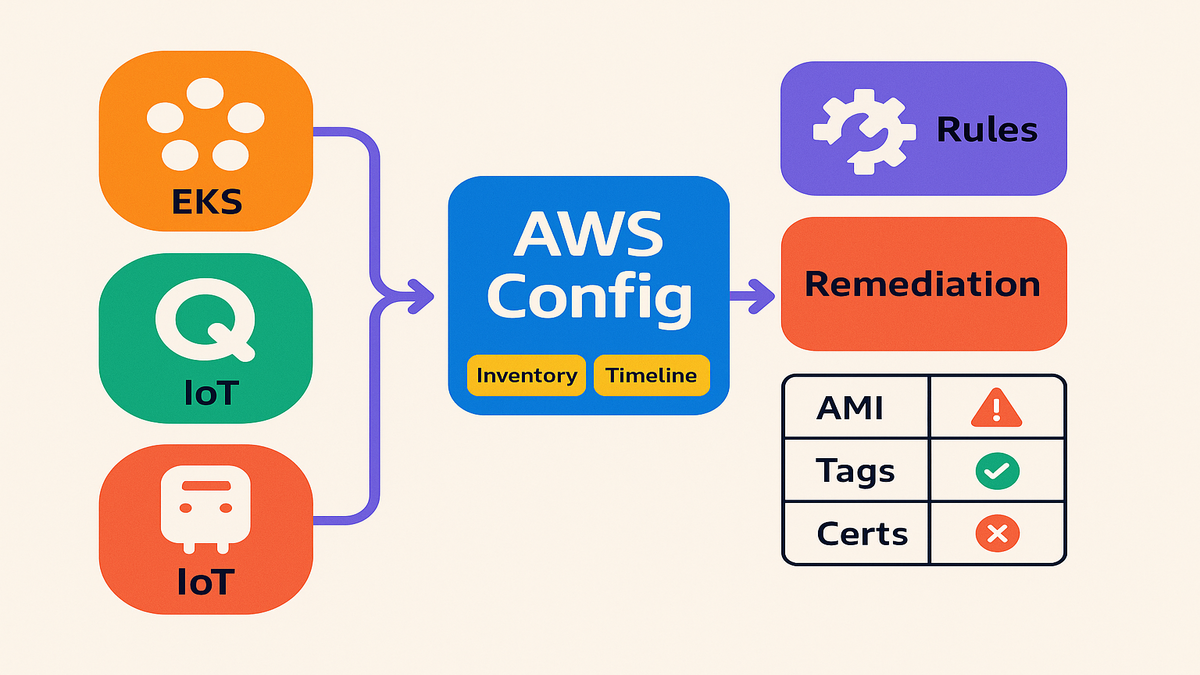
You can now bring EKS node groups, Amazon Q apps, and AWS IoT fleets together. They land in the same compliance and drift pipeline as EC2, S3, and IAM. That’s the unlock: one timeline for cloud apps, AI helpers, and edge devices.
- Amazon EKS: Track managed node groups and cluster-linked resources. Know when capacity, AMIs, or configs change.
- Amazon Q: Track Amazon Q applications and understand configuration posture for your AI footprint.
- AWS IoT: Inventory things and fleets. Watch certs and policies. Prove what changed at the edge.
If you searched "aws config now supports 10 new resource types," here’s the upgrade. You’re getting 30. Big visibility without big overhead.
Here’s why this matters today. A dev tweaks a node group or spins a new Amazon Q app. Maybe the tags are missing, or the AMI isn’t approved. You’ll see it fast. Not by rumor. Not during a quarterly audit. It’s right in Config timelines, diffs, and compliance status you can act on. Better than learning when a bill or incident blows up your day.
Why you care today
Once these resource types are recorded, they flow into your normal motion. Timelines, snapshots, rules, and remediation all kick in. Fold them into account aggregators for an org-wide view.
Example to steal: build a view that flags EKS node groups with non-approved AMIs. Add Amazon Q apps missing required tags. Add IoT devices with expired certs. Tie each finding to an automated runbook for the fix.
First-hand style scenario: a platform team sees an EKS node group changed at 2 a.m. No guessing. They open the AWS Config timeline, see the delta, and check a rule. The AMI isn’t on the approved list, so they trigger a rollback runbook. All before morning standup.
Operational tip: turn on recording where these resources live, not everywhere. If IoT is global but Amazon Q is US-only, be selective. Get full coverage without paying to record ghosts in unused regions.
Governance Without Hand Ticking
Policy as code
AWS Config Rules let you write guardrails, then skip manual checks. Maybe it’s "EKS node groups must use approved AMIs." Or "Amazon Q apps need cost-center tags." Or "IoT policies can’t allow broad actions." Turn each statement into a rule. Use managed rules where they exist. Write custom rules with Lambda when you need special logic.
Conformance packs bundle rules and remediation actions to match frameworks. Think HIPAA, PCI DSS, and SOC 2. Instead of gluing controls one by one, apply a pack. You get out-of-the-box coverage for these new resource types.
Want a quick start? The managed required-tags rule is perfect for Amazon Q app tagging. Keep your approved AMI list in Parameter Store or a small config map. Reference it from a custom rule for EKS node groups. For IoT, flag wildcard actions in policies. Then remediate by swapping in a least-privilege policy.
Pro move: match rule names to control IDs, like PCI-7.2-ApprovedAMIs. Audits will map cleanly. When asked, "Which control enforces node group hardening?" you can point to the rule and history.
One click fixes
Fixes shouldn’t need Slack pings and wishful thinking. With Systems Manager Automation, tie noncompliance to a runbook. Re-tag a resource, rotate an IoT cert, or update an EKS AMI version. Findings become actions, not tickets that rot.
Practical example: an IoT device drifts to an insecure policy. A remediation swaps it for least-privilege. For EKS, a runbook can cordon and drain nodes. Then update the AMI to a compliant build and rejoin safely.
Pro tip: version-control custom rules and runbooks. Treat governance like code. You’ll roll out safer changes and roll them back fast.
Extra guardrails you’ll thank yourself for later:
- Dry runs first: use manual approval mode. Flip to auto after a week of clean runs.
- Least privilege: scope SSM Automation roles to only what each runbook needs.
- Idempotent steps: make runbooks safe to re-run after failures or timeouts.
- Logs on: ship Automation logs and final state to a central S3 bucket.
Regulated
Compliance without the spreadsheet trauma
In healthcare, finance, or other regulated work, this coverage is huge. Your audit trail now includes Kubernetes, AI assistants, and edge fleets. It happens automatically. That helps prove HIPAA, PCI DSS, or SOC 2 controls.
AWS ships conformance packs aligned to these frameworks. Apply a pack, scope it to accounts and regions, and go. You’ll see where you’re good and where you’re not. This includes the new resource types.
To keep your compliance story crisp:
- Deploy packs in staging first. Tune rules to your needs, like IoT test fleet exceptions.
- Document exception processes. Not all noncompliance is fire. Sometimes it’s a planned change.
- Tie each pack to an evidence folder. Drop rule results, remediation logs, and final states there.
Required resources for control findings
Many security tools use AWS Config as the source of truth. If your controls depend on Config data, make sure recording is on. That means turn on the new EKS, Amazon Q, and IoT resource types. Do it in the accounts and regions where they actually run. No recorder, no findings.
Example mapping: a PCI DSS control wants tight IAM and network boundaries. For EKS, enforce approved AMIs and limited node IAM roles. For IoT, use least-privilege policies and rotate certs. For Amazon Q, require encryption and tagging. Conformance packs help stitch this story together. You get one view for evidence.
One more sanity check: match your pack scope to your aggregator scope. If you aggregate org-wide but attach packs to two accounts, dashboards go red. Make the picture match reality, please.
Make It Usable
Ask better questions
You can’t fix what you can’t find. With Advanced Queries, slice across accounts and regions. Answer questions like:
- Show EKS node groups not using the latest approved AMI baseline.
- List Amazon Q applications missing owner or environment tags.
- Find IoT things with policies that grant wildcard actions.
As new resource types are recorded, they become queryable with the rest. This moves you from "we think we’re compliant" to a ranked list you can work.
Practical workflow:
- Start with tags first: owner, environment, data sensitivity. Untagged stuff is your fastest win.
- Move to baselines: approved AMIs, encryption required, least-privilege policies.
- Save common queries. Run weekly and drop results in your evidence folder.
See it alert on it
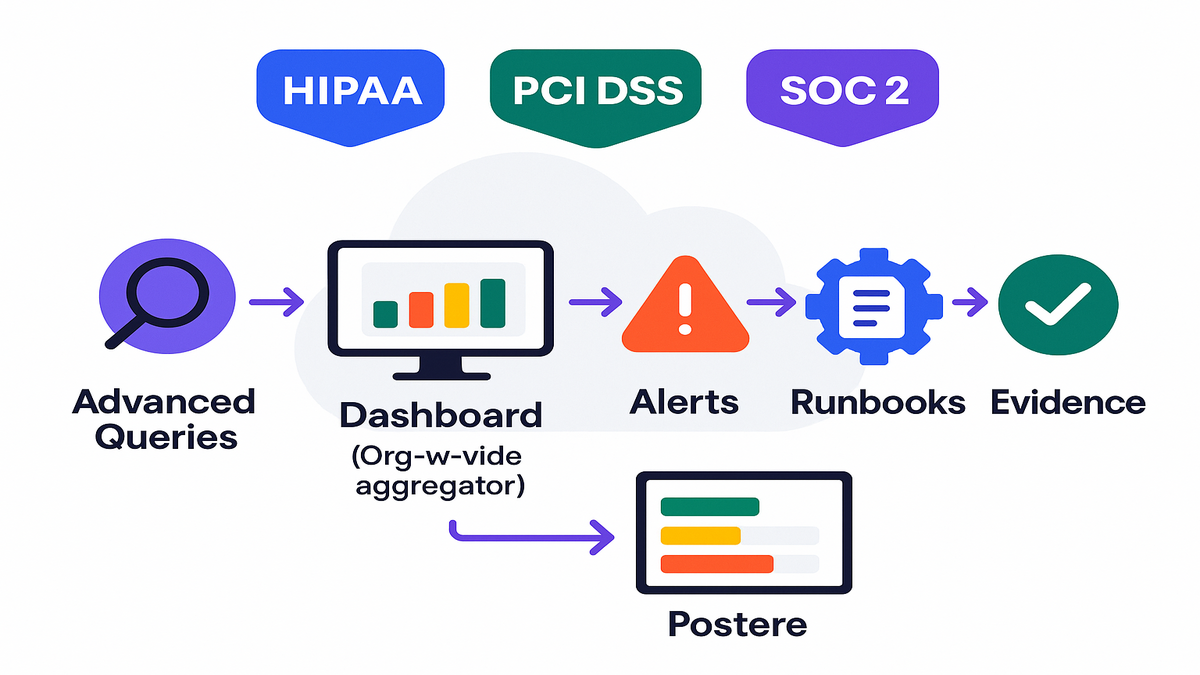
- Dashboards: use AWS Config and aggregators for an org-level view. Group by account, region, service, and control.
- Alerts: pipe noncompliant events to EventBridge, then to SNS or ChatOps. On-call sees issues fast, not months later.
- Evidence: timelines and rule evaluations are your audit trail. Snapshots beat screenshots, every time.
Example workflow: your aggregator shows five IoT fleets with certs expiring in 30 days. An Advanced Query pulls the list. EventBridge triggers a Systems Manager runbook to rotate certs. You drop success logs and final states into your evidence folder.
Bonus: color-code your dashboard by framework, like HIPAA, PCI, and SOC. Teams can triage by this quarter’s audits. Less noise, faster fixes.
Halfway Check
- Record the new EKS, Amazon Q, and IoT resource types in every active region.
- Attach conformance packs mapped to HIPAA, PCI DSS, or SOC 2 where needed.
- Pair rules with Systems Manager Automation for clean, fast remediation.
- Use Advanced Queries to find drift patterns and high-risk gaps.
- Aggregate across accounts to avoid perimeter-only compliance.
- Treat governance like code. Review, version, and roll out with CI/CD.
FAQ
Do these costs change
Costs depend on recorded configuration items and evaluations. Adding coverage can increase recorded changes. So scope carefully and use aggregators wisely. Check AWS Config pricing before rollout and pilot in nonprod.
How do I enable recording
Use the AWS Config console, API, or CLI to update the recorder. Include EKS node groups, Amazon Q apps, and IoT resources. Or opt into record all supported resources if that fits your model. Validate in each active region.
Can I use conformance packs
Yes, AWS provides conformance packs for these types. Start with packs aligned to HIPAA, PCI DSS, or SOC 2. Then customize rules or runbooks for your needs.
How does remediation work
Associate a failed AWS Config rule with an Automation document. When the rule fails, the runbook applies a fix. It might update an EKS AMI, add a tag to an Amazon Q app, or rotate an IoT cert.
What about multi account
Use AWS Config aggregators to centralize findings. You’ll get one surface for queries and dashboards. Pair with EventBridge for cross-account alerts and central remediation.
How do these updates help
Security Hub relies on AWS Config for many checks. Make sure required resource types are recorded in each account and region. No recorded config means missing evidence and empty findings.
Any tips to keep signal
Start with a small, high-impact rule set. Focus on tags, encryption, and AMI baselines. Add rules in batches and watch alerts. Use exceptions to avoid alert fatigue during changes.
How fast will changes show
Recording is near real time, with short processing delays. For critical guardrails, pair Config with preventive controls. SCPs or service policies can block risky changes upfront.
Where do I store evidence
Use Config snapshots and SSM Automation logs. Centralize them in S3 with lifecycle rules and access controls. Link each piece of evidence to a control ID for traceability.
Flip The Switch
- Identify accounts and regions running EKS, Amazon Q, and IoT.
- In each, enable recording for the new resource types in AWS Config.
- Attach conformance packs that match your target frameworks.
- Enable or write rules for AMI baselines, tags, and IoT policy scope.
- Wire Systems Manager Automation to each rule for remediation.
- Create an aggregator for org-wide visibility and queries.
- Run an Advanced Query to list top noncompliant resources.
- Trigger runbooks, verify fixes, and export evidence for audit.
A few extra steps that pay off fast:
- Tag everything you care about: owner, environment, and data classification. Your queries will thank you.
- Document rollback paths in runbooks. If a fix misfires, you wont need a war room.
- Review costs monthly. Tune recording scope and rule frequency if bills spike.
You don’t get points for spotting drift. You get points for fixing it early. With 30 new resource types in the AWS Config lens, you can extend discipline to the edge. Record broadly, control carefully, automate fixes, and put evidence on autopilot. That’s how you ship faster and still pass the audit.
References
- What is AWS Config
- AWS Config pricing
- AWS Config Rules (evaluate configuration changes)
- Managed rule for required tags
- Remediation with AWS Systems Manager Automation
- AWS Systems Manager Automation overview
- AWS Config conformance packs
- AWS Config aggregators (org-wide view)
- AWS Config Advanced Queries
- AWS Security Hub prerequisites (Config required for some standards)
- AWS IoT device certificate management
- Amazon EKS managed node groups
- Amazon Q overview
- Amazon EventBridge overview (for routing alerts)
- AWS “What’s New” for AWS Config