

Remote access doesn’t need to be a compliance headache or a latency tax. You can ship a zero-trust VPN for AWS in under an hour. No duct-taping six tools just to make it work.
Here’s the twist: most teams still backhaul all traffic through a legacy VPN. Then they wonder why Zoom lags and tickets spike. You don’t need that. With split-tunneling, federated auth, and a clean template, you get fast, least-privilege access your security team actually likes.
If you’re juggling a remote workforce, this is the move. You’ll use AWS IAM Identity Center for SAML-based authentication. You’ll keep traffic lean with split-tunnel and scale across Regions without sweating gateway capacity. Want the fast path? Skip to the checklist below once you know the why.
One more thing before we sprint: this isn’t a science project. It’s a boring, reliable building block. Managed by AWS, auditable out of the box, and friendly to your SOC 2/ISO checklists. You’ll get quick wins for the help desk (fewer tickets). Happier execs too (no more "VPN is slow"). And a security model that maps to how people actually work now.
TLDR
- Spin up a zero-trust AWS Client VPN with a simplified quickstart template.
- Use AWS IAM Identity Center for federated SAML and group-based access.
- Enable split-tunneling so only AWS/VPC traffic rides the VPN.
- Download the AWS Client VPN app and import your client config.
- Automate with Terraform for repeatable, auditable deployments.
- Costs are metered by endpoint hours and connection hours—monitor usage.
- Turn on connection logging and VPC Flow Logs for visibility and incident response.
- Separate dev/stage/prod endpoints to reduce blast radius and simplify audits.
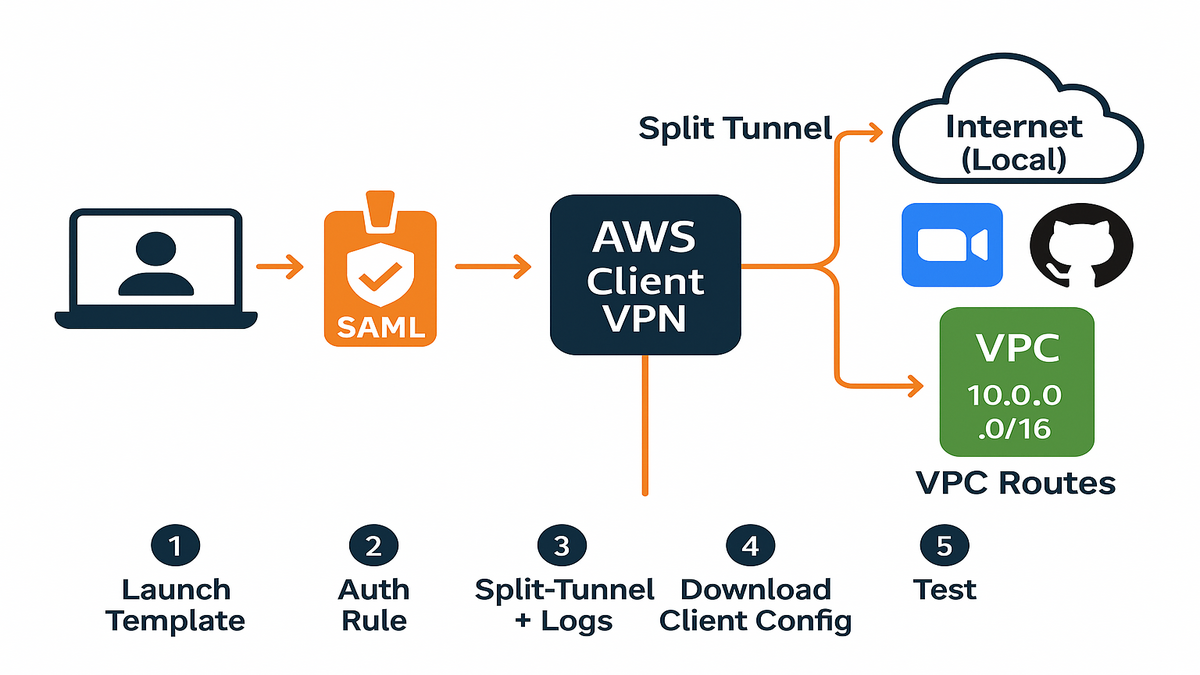
Zero Trust AWS VPN
The architecture in plain English
You’re deploying AWS Client VPN as the managed entry point for your workforce. It integrates with AWS IAM Identity Center for SAML-based sign-in. It maps user groups to authorization rules. It terminates inside your VPC subnets for private access to resources. It scales elastically—no fiddling with gateway instances or patch windows.
As AWS puts it, “AWS Client VPN is a fully managed, elastic VPN service that enables you to securely access resources in AWS and on-premises networks.” That’s your backbone: secure, managed, no server ops. Add split-tunneling so only routes to your VPCs (and optional on-prem CIDRs via AWS Direct Connect or VPN) traverse the tunnel. Everything else stays local.
Under the hood, the client uses a TLS-based tunnel (compatible with OpenVPN). The endpoint presents a server certificate from AWS Certificate Manager. With SAML auth, users are redirected to your identity provider to sign in (MFA included). The service evaluates group membership to apply authorization rules. The endpoint associates to subnets in your VPC (one per Availability Zone). You advertise specific routes so clients can reach private resources without hairpinning all their web traffic.
Why zero trust beats legacy VPN
Legacy VPNs implicitly trust you the moment you connect. Zero-trust flips that. You authenticate with SAML (and MFA). Then only the subnets and ports you’re authorized for are reachable. Security groups and authorization rules enforce least privilege. Audit trails flow to CloudWatch Logs and your SIEM.
This model maps cleanly to today’s remote reality. WFH is here to stay—nearly a third of workdays are remote in the U.S. So you need speed with guardrails, not castle-and-moat. With this template, you get click-to-connect simplicity for users and policy-as-code clarity for you.
In practice, that means you prevent “flat network” problems. Engineering doesn’t get access to finance. Contractors don’t see staging unless you say so. If a laptop is lost, you can revoke access centrally, and the next connect attempt fails. You can also rotate policies via code. So change control is as simple as a pull request.
Fast Setup
Prereqs you need
- AWS IAM Identity Center set up with your workforce identities and MFA policies.
- A VPC with private subnets, route tables, and security groups.
- DNS via Amazon Route 53 Resolver (optional but recommended for internal names).
- The AWS Client VPN desktop app installed (Windows, macOS, or Linux). Grab it from the official AWS VPN Client download page.
AWS describes IAM Identity Center as a way to “centrally manage access to multiple AWS accounts and applications.” That’s exactly what you’ll use for federated SAML sign-in to Client VPN.
Helpful prep: decide your groups (“Engineering”, “Data Science”, “Support”). Line up the CIDRs each group needs. Confirm your internal DNS zones (for example, corp.internal) resolve via Route 53 Resolver when on the tunnel. Having these answers upfront turns this from a day-long project into a coffee-break app.
Deploy the template
1) Launch the quickstart template (CloudFormation or your IaC flavor) and provide inputs: VPC ID, subnet IDs for associations, DNS servers, and SAML IdP metadata from IAM Identity Center.
2) Configure an authorization rule for the VPC CIDR (e.g., 10.0.0.0/16), scoped to an IAM Identity Center group (e.g., “Engineering”). Add tighter rules for sensitive subnets.
3) Enable split-tunnel and connection logging. Send logs to a dedicated CloudWatch log group.
4) Download the client configuration from the Client VPN endpoint and import it into your AWS Client VPN app. Users sign in via a browser pop-up (SAML), then the tunnel comes up.
5) Test: ping a private EC2, hit an internal API, and verify that public web traffic bypasses the tunnel.
Tip: Keep one subnet association per Availability Zone for resilience. The service scales capacity behind the scenes; you focus on routes and authorization.
Extra guardrails that pay off:
- Add a session timeout so idle clients disconnect automatically.
- Turn on VPC Flow Logs for the subnets hosting your services. When a user says “VPN connected but can’t reach X,” the flow logs and Client VPN connection logs will usually tell you exactly why.
- Keep your endpoint, log groups, and IAM roles tagged with environment, owner, and data classification. Your future self (and your auditor) will say thanks.
Federated Auth
Map groups to network access
Your blast radius is defined by groups, not ad hoc rules. In practice, you’ll map IAM Identity Center groups (e.g., “Data Science”, “Support”) to AWS Client VPN authorization rules (CIDRs) and security groups (ports). This gives you least-privilege access that’s easy to audit—and to change during incident response.
NIST’s definition of zero trust is the north star: it “assumes no implicit trust is granted to assets or user accounts based solely on their physical or network location.” Translate that to VPN: no blanket VPC access; only what a group needs.
Make sure your IdP passes group attributes in the SAML assertion. Client VPN uses those claims to evaluate authorization rules at connection time. Start with coarse CIDRs (like a shared services VPC). Then narrow down to sensitive subnets (like prod databases) with tighter groups. For ports, attach security groups to your workloads. So even an allowed subnet doesn’t mean “wide open.”
MFA and session controls
- MFA: Enforce MFA in IAM Identity Center. SAML handles it, so your VPN sign-in respects centralized policies.
- Device posture: If you use an external IdP with conditional access (e.g., corporate-managed devices only), enforce it upstream; Client VPN honors the SAML result.
- Session visibility: Turn on connection logging and export to your SIEM. Monitor anomalies (e.g., off-hours connections, unusual source IPs).
- Extra checks: Consider a Client Connect Handler (Lambda) to run custom logic when users connect (e.g., validate attributes or log enriched context).
Quote it simply: identity first, network second. You scale auth by groups and automate drift detection with IaC.
Reality check for rollouts:
- Pilot with one group first. Verify login flow, DNS, and routes. Then add more groups.
- Keep a break-glass path (an admin group with minimal but sufficient access) documented, with approvals logged.
- Rotate access periodically—if no one has used a route in 90 days, remove it and see if anyone notices. Least privilege is a living thing.
Performance Wins
Split tunnel speed privacy
Split-tunneling sends only AWS/VPC traffic over the tunnel. Everything else uses the user’s local internet. That cuts latency for apps like Zoom and keeps bandwidth costs down. It also avoids turning your VPN into a bottleneck.
First-hand example: You advertise three routes on the Client VPN endpoint. The primary VPC CIDR, a shared services VPC CIDR, and an on-prem CIDR via a TGW attachment. Your developer opens GitHub and Zoom locally while reaching RDS and internal APIs over the tunnel. Productivity up, tickets down.
Operational tips:
- Keep route tables lean. Only advertise subnets you actually need.
- Use DNS split-horizon so internal hostnames resolve to private IPs when connected.
- Log denied flows. If users can connect but not reach a service, it’s usually a missing authorization rule or security group ingress.
More tweaks that matter:
- Prefer a Transit Gateway hub if you have many VPCs. Host the Client VPN in a shared services account, attach app VPCs to the TGW, and advertise only the routes needed per group.
- For cross-Region workers, deploy a regional endpoint per major geography. Keep data gravity local where you can.
- Watch MTU and fragmentation if you layer other tunnels (like to on-prem). Keep paths simple to avoid packet pain.
Costs and savings
AWS Client VPN pricing is pay-as-you-go, with charges for endpoint hours and connection hours. There are no upfront fees; you pay for what you use. To control spend:
- Right-size authorization. Fewer blanket routes mean fewer unnecessary connections staying up.
- Turn on session timeouts and clean up idle endpoints when not needed.
- Use split-tunneling to minimize data path costs and reduce unnecessary traffic through AWS.
- Monitor usage by group to find heavy users and optimize routes.
Check the pricing page for your Region and updated rates, then set budget alerts.
Practical budget hygiene:
- Create a budget just for Client VPN with email/Slack alerts.
- Track connection-hour spikes after big launches—this is where split-tunnel pays off.
- Include Client VPN logs in your central logging account but use lifecycle policies to expire after your compliance window.
Terraform and GitOps
Core Terraform resources and gotchas
Codify everything so you can diff, review, and roll back changes. The Terraform AWS provider exposes:
- awsec2clientvpnendpoint (the managed endpoint)
- awsec2clientvpnnetwork_association (AZ attachments)
- awsec2clientvpnauthorization_rule (group-to-CIDR mapping)
- awsec2clientvpnroute (advertised routes)
- awscloudwatchlog_group/stream (connection logs)
- awssecuritygroup (ingress/egress)
The Terraform registry sums it up: the Client VPN endpoint resource “provides a Client VPN endpoint.” It’s straightforward, but mind these:
- SAML metadata: Store it securely (e.g., S3 with KMS) and reference via data sources.
- Ordering: Create endpoint, then associations, then routes/rules to avoid race conditions.
- Drift: Use lifecycle rules and tags to prevent manual changes from sticking.
Add structure:
- Separate workspaces or stacks per environment (dev/stage/prod). No shared endpoints across environments.
- Remote state with locking (e.g., S3 + DynamoDB) so two folks don’t stomp each other’s changes.
- Policy-as-code on PRs (e.g., validate that every authorization rule targets a known group and CIDR).
Automate certs auth routes
- Auth: If you must use mutual auth for a subset of users, manage certificates with ACM PCA and rotate on a schedule. For most, SAML via IAM Identity Center simplifies auth.
- DNS: Bake Route 53 Resolver rules into IaC so internal names resolve only when on-tunnel.
- CI/CD: Validate plans in PRs, apply on merge, and export connection logs to a dedicated account for security.
Want a quick win your auditors love? Version control the authorization rules. “Who got access to 10.0.50.0/24 and when?” becomes a 10‑second Git blame.
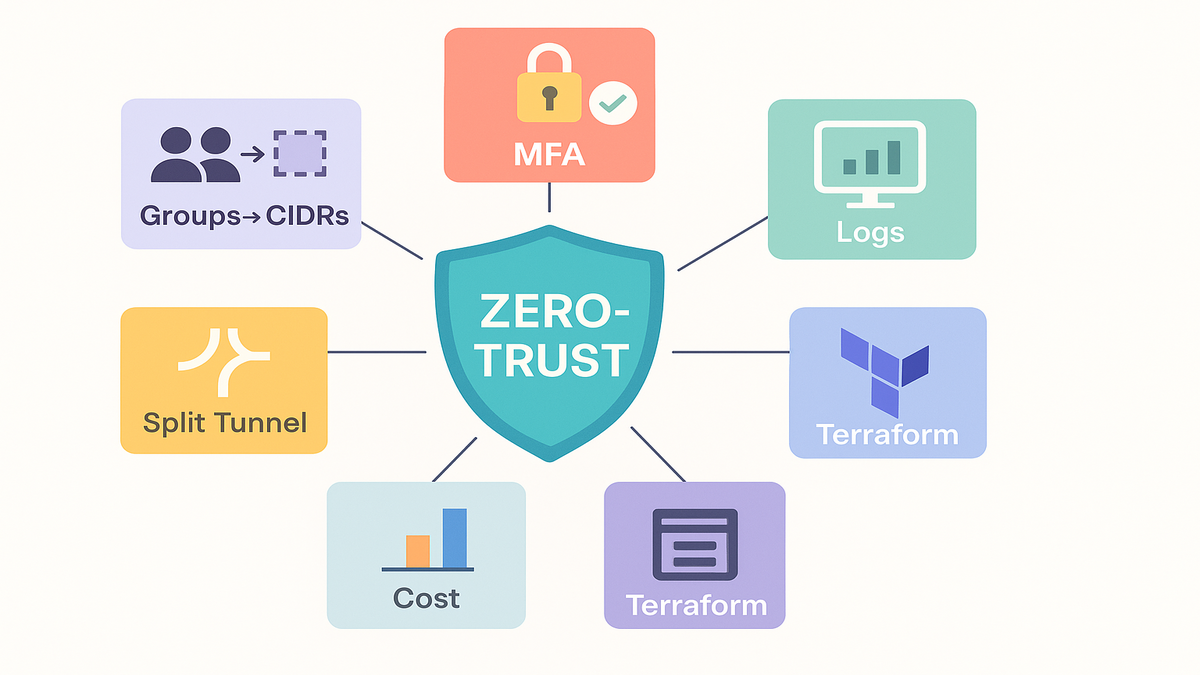
Halfway Checkpoint
- A managed AWS Client VPN endpoint with split-tunneling enabled.
- Federated SAML sign-in via AWS IAM Identity Center with MFA.
- Group-based authorization rules mapped to specific VPC CIDRs.
- Clean routing that advertises only what users need.
- Logging to CloudWatch (and your SIEM) for audit and detection.
- Terraform scaffolding to track every change and avoid drift.
Real World Patterns
- Hub-and-spoke: Put Client VPN in a shared services account and use AWS Transit Gateway to connect to application VPCs. Advertise only the app CIDRs needed per group. Keep logs, IAM roles, and budgets centralized.
- Hybrid access: If you have on-prem, propagate those CIDRs via TGW or site-to-site VPN. Keep the on-prem routes behind a tighter group (e.g., “Admins”) to limit who can reach data center resources.
- Regional duplication: Clone the endpoint in another Region for follow-the-sun teams. Keep group names and rules consistent so switching Regions is a non-event.
Troubleshooting
Symptom: “Connected, but can’t reach service X.”
- Check authorization rules: Does the user’s group map to the service CIDR?
- Check security groups: Is the port/protocol allowed from the Client VPN’s security group?
- Check routes: Is the subnet CIDR advertised on the endpoint? Is there a TGW route?
- Check DNS: Does the internal hostname resolve to a private IP while on the tunnel?
Symptom: “Zoom slows to a crawl after connecting.”
- Verify split-tunneling is enabled. If full tunnel is on, your VPN is hauling YouTube, Zoom, and Spotify. Don’t do that.
Symptom: “SAML login loop or failed sign-in.”
- Confirm the IdP SAML app is configured with the correct ACS URL and that group attributes are included in the assertion. Ensure MFA is enforced but not double-prompting.
Pro move: add runbooks with CloudWatch Logs Insights queries for common errors. Your help desk will look like wizards.
Security and Compliance
- Least privilege by design: Authorization rules plus workload security groups create two layers of control.
- Centralized identity: MFA and conditional access live in IAM Identity Center or your IdP. One place to update policies.
- Logging: Connection logs to CloudWatch Logs (ship to SIEM), and VPC Flow Logs on target subnets for packet-level visibility.
- Change control: Terraform + PR reviews = documented approvals and rollbacks.
- Data separation: Use distinct endpoints per environment and tag resources with data classification.
Map these controls to your frameworks (SOC 2 CC6/CC7, ISO 27001 Annex A controls) and link to the AWS Well-Architected Security Pillar in your policy docs.
FAQs
Official AWS VPN client
Yes. Download the desktop app for Windows, macOS, or Ubuntu from the official AWS Client VPN download page. Then import the .ovpn/.config file generated by your endpoint to connect.
IAM Identity Center integration
You configure Client VPN with SAML-based federated authentication and register the IAM Identity Center SAML metadata. Users sign in with their workforce credentials (with MFA). Client VPN maps group claims to authorization rules.
Split tunneling needed
If you care about performance and cost, yes. Split-tunneling sends only AWS/private routes through the VPN, leaving general web traffic local. It reduces latency for real-time apps and avoids turning your VPN into a bandwidth sink.
AWS Client VPN pricing
Pricing is metered by the hours your endpoint is active and by the number of client connection hours. Rates vary by Region and may change, so check the current AWS pricing page and set budget alarms.
AWS Client VPN Terraform
Absolutely. Use awsec2clientvpnendpoint, awsec2clientvpnnetworkassociation, awsec2clientvpnauthorizationrule, and awsec2clientvpnroute resources. Add logging, security groups, and Route 53 Resolver rules to complete the setup.
AWS Client VPN quickstart
This guide walks you through a practical quickstart tutorial: deploy the template, connect IAM Identity Center, enable split-tunnel, and test routes. For a hands-on repo, mirror these steps in Terraform so your example is auditable and repeatable.
Traffic encryption
Traffic between the client and the AWS Client VPN endpoint is encrypted over TLS. The endpoint presents a server certificate from ACM, and the tunnel uses strong ciphers negotiated by the client and server.
Port restrictions
Yes. Use security groups on your target resources (EC2, RDS via proxies, internal ALBs) to allow only specific ports from the Client VPN’s security group. Authorization rules handle which CIDRs users can reach; security groups handle which ports are open.
DNS and internal names
Provide DNS servers in the Client VPN endpoint (Route 53 Resolver is common). Set split-horizon rules so corp.internal resolves to private IPs on-tunnel and doesn’t resolve publicly off-tunnel.
Zero Trust VPN Checklist
- Set up IAM Identity Center and enforce MFA.
- Create a Client VPN endpoint; enable split-tunnel and logging.
- Associate two subnets (different AZs) for resilience.
- Add authorization rules tied to IAM Identity Center groups.
- Advertise only required VPC/on-prem routes.
- Create a CloudWatch log group and verify connection logs.
- Download the AWS Client VPN app and import client config.
- Connect, test DNS for internal names, and validate least privilege.
- Push everything to Terraform and protect it with PR reviews.
You now have a secure, fast, and boring (in a good way) remote access layer. Identity is the control plane, the network is dumb transport, and your policies live in code. That’s the formula that scales. From here, tighten routes, add more groups, and integrate logs with your SIEM for detections. If you’re dealing with multi-account sprawl, template the VPN per VPC and standardize tags and log destinations.
Want a sanity check? Measure time-to-first-connection for a new hire. If it takes more than 15 minutes, the process—not the tech—needs tuning. Your quickstart should be a checklist, not a scavenger hunt.
“In 2005, Netflix tried to sell to Blockbuster for $50M. Blockbuster laughed. Now Netflix is worth hundreds of billions. Don’t be the company backhauling Zoom through a 2009 VPN.”
References
- AWS Client VPN product page
- AWS Client VPN pricing
- AWS Client VPN Administrator Guide (endpoints and options)
- AWS Client VPN authentication and authorization
- AWS Client Connect Handler (Lambda) for Client VPN
- AWS IAM Identity Center (What is)
- AWS Client VPN app downloads
- Terraform awsec2clientvpnendpoint
- Terraform awsec2clientvpnnetwork_association
- Terraform awsec2clientvpnauthorization_rule
- Terraform awsec2clientvpnroute
- AWS Well-Architected Security Pillar
- NIST Special Publication 800-207 (Zero Trust Architecture)
- WFH Research (remote work trends)