
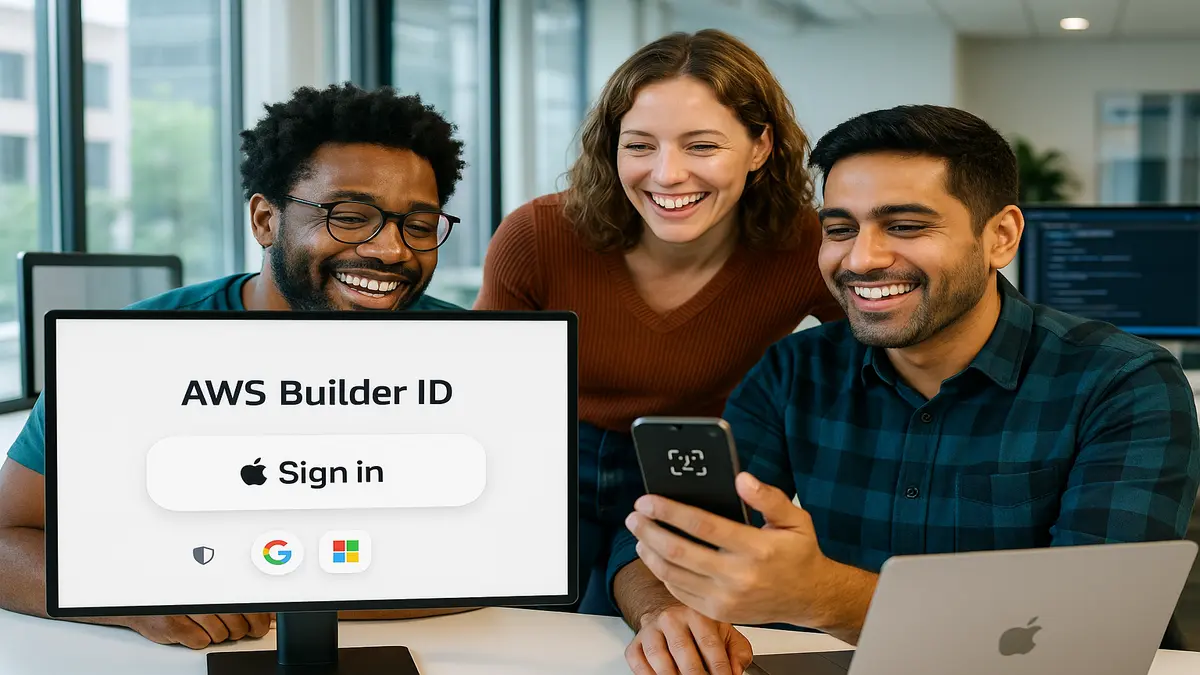
If you’ve ever wasted minutes on a password reset loop, this one stings. Verizon’s 2024 DBIR says 74% of breaches involve people today. Think stolen creds, sneaky phishing, and classic fat-finger errors during logins. Passwords aren’t just annoying; they’re risky and expensive when things go wrong.
Good news: AWS Builder ID now works with Sign in with Apple. Translation: fewer passwords, less PII exposure, and a smoother on-ramp for Apple-first users. Apple’s relay keeps your real email private, so apps see a proxy. Federation cuts friction, and still gives secure paths to console and CLI. No more duct-taping another login to your brain every week.
If you’re optimizing your aws builder id login flow, this matters a lot. Maybe you’re deciding how to create aws builder id for your team. Or settling the “aws builder id vs aws account” debate for good. You get faster sign-in, better privacy defaults, and a dev experience your team won’t hate.
And no, this won’t bulldoze your current setup, promise today. It plays nice with Google and Microsoft, and respects your identity policies. It slots into existing SSO flows without breaking your rules. It’s one more familiar door into the same secure house. Users move faster, and your security team keeps the keys. Result: fewer support tickets, fewer resets, fewer uh-ohs overall.
TLDR
- Sign in with Apple now works with AWS Builder ID for easier, privacy-first auth.
- Apple’s relay hides your email; fewer passwords and less PII to manage.
- Plays nicely with Google/Microsoft options—pick what your team already uses.
- Faster path to AWS console and CLI via federated sign-ins (where enabled).
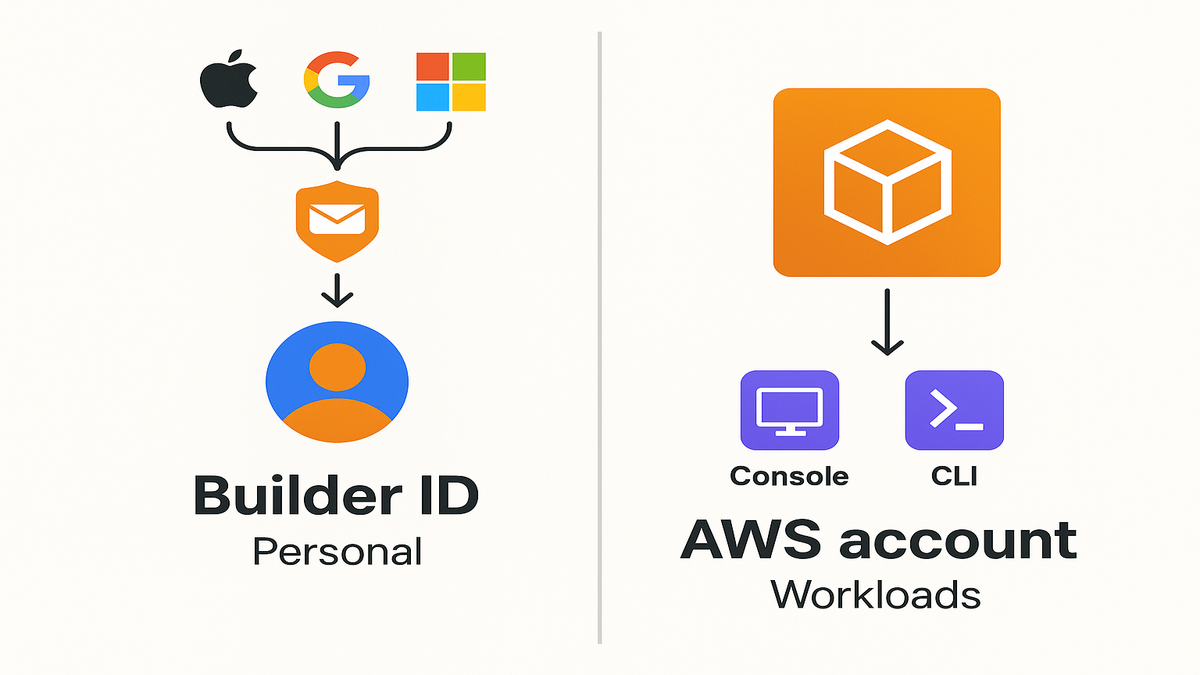
- Clear split: Builder ID is your personal profile; AWS account runs workloads.
AWS Builder ID
Builder ID vs AWS account
Let’s settle the “aws builder id vs aws account” mix-up in one line. An AWS Builder ID is your personal identity, full stop. An AWS account is where services run and bills get charged. Your Builder ID is tied to you, not one company or project. You can use it across learning tools, community sites, and allowed federated flows. Your AWS account remains the container for resources, IAM, and spend.
- Use Builder ID to manage your aws builder profile, join events, and tap learning resources.
- Use an AWS account to create resources (EC2, S3, Lambda), enforce policies, and track costs.
Where you use it
You’ll see Builder ID across AWS places like AWS re:Post and Skill Builder. With this update, you can also choose Sign in with Apple. It sits beside Google and Microsoft during aws builder id sign up or login. If your org uses federated sign-ins for console or CLI, Builder ID fits in. You get quicker access without juggling brand new credentials again.
Bottom line: Builder ID travels with you across roles and seasons. AWS accounts can change with teams and projects over time. That matters for contractors, learners, and multi-org developers bouncing between environments.
Edge cases to know
- Email relay and notifications: If you choose Apple’s “Hide My Email,” notifications still reach you. They’ll route through a private address that forwards to your inbox. If your company allowlists by domain, confirm those relayed emails won’t get filtered.
- Provider control: Your identity admin decides which providers can be used for console or CLI. Even if you add Apple to your Builder ID, access still depends on assigned roles.
- Recovery matters: Locking your Apple ID with MFA is great, but set recovery methods. Use trusted devices and recovery contacts, so you don’t lock yourself out.
- Multiple providers: Many users attach two or more providers, like Apple and Google. If one provider has issues, you’ve got a simple backup ready.
Why Sign in with Apple
Privacy by design
Sign in with Apple uses a private relay to mask your actual email. Apple creates a unique, random address that forwards to your inbox. So your real email stays hidden from apps and services you use. Less exposed PII means fewer headaches if a vendor list leaks. Also, you’ll see less spam piling up over time too. It balances convenience with privacy in a way devs actually respect. “Privacy is a fundamental human right.” That’s Tim Cook, and it shows in defaults.
Faster for Apple first teams
If you live in Apple land, you already know the drill here. One tap with Face ID or Touch ID beats typing passwords, every time. Especially on a tiny laptop keyboard while screensharing with your boss. There are more than two billion active Apple devices out there. Optimizing for Apple isn’t niche anymore; it’s table stakes today. Adding Apple beside Google and Microsoft keeps control while staying familiar.
Performance win: You shorten time-to-first-action for new and returning users. Conversion win: Fewer bounces at the login wall, plain and simple. Security win: Fewer credentials exist to phish, steal, or spray.
Security mechanics in plain English
- OpenID Connect under the hood: Apple issues a signed ID token proving who you are, without passwords.
- Device-native auth: Face ID or Touch ID plus Apple ID MFA gives strong assurance it’s you.
- Data minimization: You share your name and real email or a private relay, nothing else.
- Fewer standing secrets: Short-lived AWS credentials shrink blast radius when something leaks, especially with federation.
Accessibility and UX perks
- Less context switching: Tap, approve, and you’re in within seconds, no fiddly steps.
- Lower cognitive load: No more “which password did I use here?” debates with yourself.
- Cross-device friendly: Works on Macs, iPhones, iPads, and the web without weird workarounds.
Set it up
Create your AWS Builder ID
If you’re new, choose aws builder id sign up and pick “Sign in with Apple.” You’ll approve the request with Face ID/Touch ID and choose whether to hide your email via Apple’s relay. That’s it—you’ve effectively created your aws builder profile without another password. If you already have a Builder ID, you can often add providers. Or switch providers from account settings and consolidate your login flow.
Tip: Keep your Apple ID protected with strong MFA, always. You just reduced your password surface area, now maximize the win. Use hardware-backed or device MFA for extra safety right.
Use it in Console CLI
Console: If your org enables federated access, Builder ID joins the chain to console. You still need the right role assignments and permissions to do anything. Builder ID handles who you are; the AWS account decides what you can do.
CLI: Modern flows use short-lived credentials instead of static keys for terminals. Configure the AWS CLI once, authenticate, and let it fetch temporary tokens. With federation enabled, you go from auth to action fast, no long-lived secrets.
Pro move: Replace static access keys with SSO wherever possible. It shrinks blast radius and boosts your security posture a lot.
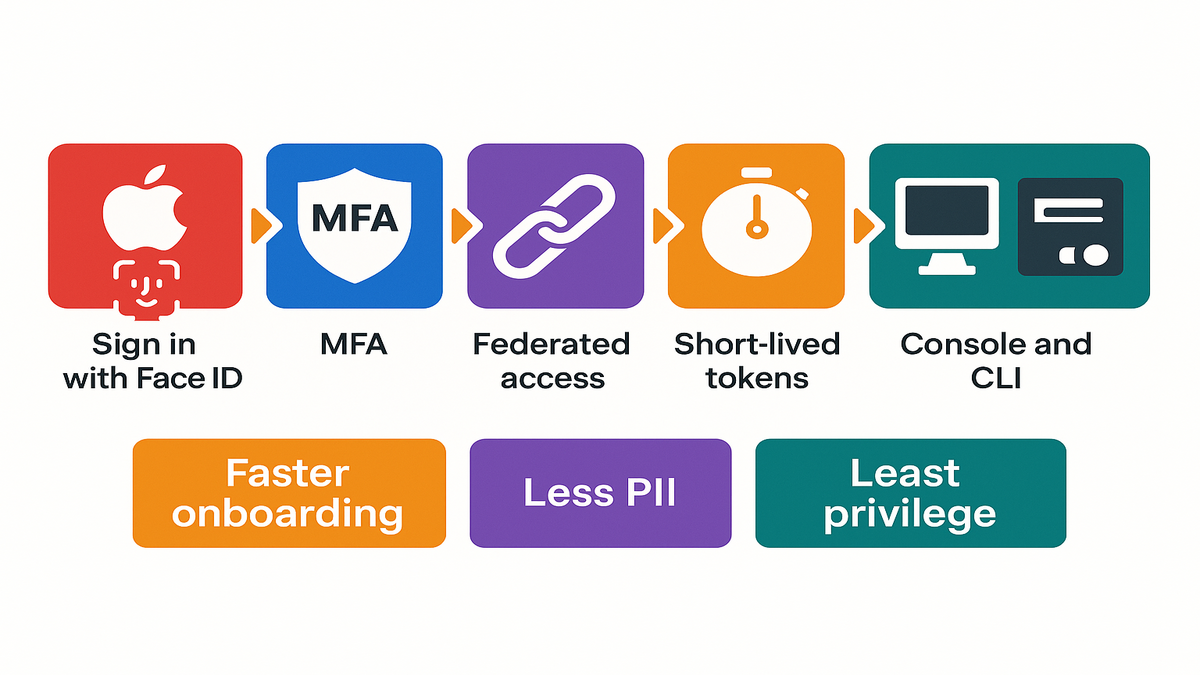
Mental model of the flow
1) You click “Sign in with Apple” for your AWS Builder ID. 2) Apple uses Face ID, Touch ID, and MFA to verify you, then returns a signed ID token. 3) Your org’s identity system maps you to assigned roles there. 4) For console: you assume a role and land in the AWS Management Console. 5) For CLI: the AWS CLI exchanges authorization for short-lived credentials stored locally until they expire.
Common CLI gotchas
- Multiple profiles: Use named profiles like dev, staging, and prod to avoid mix-ups. Run commands with --profile to be explicit and safe each.
- Default browser troubles: If the SSO window won’t open, set your preferred browser. Or use the device code flow when prompted by the CLI.
- Time drift: If your machine’s clock is off, token validation can fail. Sync your system time and try again right away.
- Expired sessions: If you see “the SSO session has expired,” re-authenticate with aws sso login --profile your-profile.
- Least privilege tests: If a command gets AccessDenied, check the role and policy first. It’s usually that, not the sign-in method at all.
Security compliance control
Less data lower risk
Storing fewer credentials and less PII makes your security team smile. Apple’s relay hides the real email tied to your identity online. Centralized auth reduces the number of passwords you must maintain. Short-lived session tokens limit reuse if anything leaks or gets stolen. That hits a big chunk of risk from human error and credential theft.
From a compliance lens, you’re leaning into data minimization principles. Collect only what you need to authenticate and authorize users. You get tighter scoping in reviews and fewer noisy tracking sheets. No more guessing where personal emails might live across systems.
If you’re also building privacy-safe measurement on Amazon, explore our AMC Cloud. It’s a managed path into Amazon Marketing Cloud that avoids raw PII handling.
Audit and revoke fast
Identity events tied to console access are logged across your AWS stack. Federated sign-ins can be monitored with your existing logging tools too. If a contractor leaves, disable their identity once, and access evaporates. If a device is lost, lean on Apple and org policies to block access.
You still need strong role design, least-privilege policies, and solid alerting. This update won’t fix bad IAM, but it reduces credential sprawl a lot. It also makes “who did what, when” much easier to answer.
Frameworks and policies
- Least privilege: Assign only the roles and permissions a user needs for the task at hand.
- Data minimization: Share the smallest personal data needed, like relay emails, to meet GDPR’s “adequate, relevant, and limited” standard.
- Short-lived credentials: Prefer temporary tokens over long-term access keys; rotate and scope access tightly.
- Monitoring and response: Use CloudTrail to answer “who did what, when,” and alert on unusual sign-in or role-assumption patterns.
What to measure
- Track login success rate and time-to-first-action after sign-up closely too.
- Measure password reset volume; it should drop as federation adoption rises.
- Count standing access keys; trend should drop toward zero for humans.
- Watch support tickets tied to auth and access for faster resolutions.
- Track mean time to revoke access for departures and contractors.
Real world plays
External collaborators made easy
You invite a contractor for a six-week migration project. They don’t need another username or password to get started. They enroll with Sign in with Apple under their AWS Builder ID. Your Identity Center assigns a scoped role, and they’re productive in minutes. When the engagement ends, you remove the assignment, and access is gone. You didn’t add another long-lived identity to your password vault.
Developer experience that sticks
For leaders, this is measurable in numbers you can defend. Faster onboarding, fewer tickets about lost passwords, and fewer policy exceptions. For developers, it’s a vibe that really sticks day to day. One-tap login, a CLI that just works, and one personal identity. It follows you across Skill Builder, re:Post, and allowed access flows.
If you’ve standardized on Google or Microsoft, adding Apple won’t fragment things. Honestly, it completes your options and rounds out the lineup. Your Apple-first teammates can use the device-native flow they already trust. Meanwhile your governance model stays intact and consistent throughout.
Hands on labs and hackathons
Spin up a temporary sandbox account for your event or workshop. Map a “LabUser” role with read-only and a few scoped write perms. Let participants sign in with Apple using their Builder ID accounts. You get:
- Fast onboarding at the door (no forms, no manual passwords).
- Contained permissions that expire when the event ends automatically too.
- Clean audit trails per participant, even across shared projects today.
Side projects and learning sandboxes
Tinkering with a new AWS service after dinner this week? Keep your personal Builder ID and use federated access to a “Playground” account. Avoid sprinkling static keys across your laptop or random scripts. If the project grows up, promote it to a new account. Then reassign roles, no identity redo required at all later.
Quick pulse check
- Builder ID is personal; AWS accounts run workloads and hold permissions.
- Sign in with Apple adds privacy via email relay and device-native MFA.
- Federated sign-in enables console and CLI access with short-lived tokens.
- Less PII plus fewer passwords equals smaller attack surface and fewer resets.
- Add Apple alongside Google and Microsoft to meet users where they are.
If you hit those five notes, you’ll feel it fast. Smoother onboarding, happier devs, and fewer late-night password resets tonight.
You asked we shipped FAQs
What is AWS Builder ID
It’s your personal identity for AWS builder services like learning and community. Where organizations enable it, it’s also a path into federated console and CLI access. Think of it as a persistent profile not tied to one company account.
builder id vs aws account
Your AWS account is the container for resources, permissions, and billing. Your AWS Builder ID is about who you are across AWS properties. You still need proper roles in an AWS account to manage resources.
Sign in with Apple
Yes, you can use it during aws builder id sign up. Choose Apple as your provider when the option appears there. You can hide your email using Apple’s relay for extra privacy. Your real address stays private while messages still reach you.
Work with AWS CLI
Yes, when your organization enables federated sign-in and assigns you roles. Configure the CLI once, then authenticate with your chosen provider. It will fetch short-lived credentials automatically after you sign in.
Change identity providers
You can often add or switch providers in your Builder ID settings. If your org manages access, they control which providers are accepted for console or CLI. Your access depends on the roles they assign, not which button you click.
Alongside Google and Microsoft
Yes, Sign in with Apple is available alongside Google and Microsoft. Teams can pick the provider that fits their ecosystem without losing control.
Sign in with Apple data
By default, it shares your name and your real email or a relay. No password is shared with apps, and you control email exposure.
Work on non Apple devices
Yes, it works on the web across non-Apple devices. Use supported browsers on Windows or Linux without any hacks. You’ll still approve with Apple ID credentials and MFA as usual.
Can I unlink Apple later
Generally, yes, you can manage sign-in methods in Builder ID settings. For console and CLI, your identity admin decides which providers are allowed.
Cost for federated sign in
There’s no extra charge for AWS IAM Identity Center in this use. You pay for the AWS resources you use, not for sign-in. Role assignments and access management are available at no extra cost.
Apple relay email allowlists
It can, if your process relies on exact personal email matching. Two fixes help right away. Allowlist the relay domain pattern your org receives from Apple. Or key internal records off a unique ID instead of an email. For example, try a user ID linked to that identity.
Rollout game plan
- Create aws builder id or log in; add Apple as your provider during sign up.
- Choose “Hide My Email” for extra privacy via Apple’s relay.
- Enable MFA on your Apple ID and your Builder ID for layered security.
- Ask your org admin to confirm federated console/CLI access is enabled and roles assigned.
- Configure AWS CLI for SSO-based login; test a role with least privilege.
- Document the flow for your team (screenshots + steps) to cut support tickets.
If login is where your dev experience starts, make it invisible here. Less friction, more shipping, and fewer blocked mornings for teams. You get privacy by default and keep governance fully intact. That’s the rare win-win in identity: better UX with stronger security. Your next move: consolidate providers and enable short-lived credentials now. Then standardize on one press-the-button flow your team can’t mess up. Want to see real teams doing privacy-safe identity and measurement? Browse our Case Studies to see how they ship this in production.
References
- Verizon 2024 Data Breach Investigations Report
- Apple Developer: Sign in with Apple overview
- Apple Support: Use Sign in with Apple (email relay explained)
- AWS CLI: Configure SSO for the AWS CLI
- AWS IAM Identity Center (Overview)
- AWS CloudTrail: Logging and monitoring user activity
- AWS Skill Builder (sign-in surface for Builder ID)
- AWS re:Post (community surface for Builder ID)
- Reuters: Apple says installed base surpasses 2.2 billion active devices (Feb 2024)
- GDPR Article 5(1)(c) – Data minimization principle (EUR-Lex)
- AWS IAM best practices (use temporary credentials)
- AWS IAM Identity Center pricing (no additional charge)