

You’re still SSH-ing into containers? In 2025? That’s like mailing yourself DVDs to watch Netflix.
The new Amazon ECS upgrades cut mean-time-to-fix from hours to minutes. You do it without opening a single port, which feels so good.
Here’s the big unlock: ECS Exec runs commands inside live containers from console or CLI. No sidecars. No jump boxes. No SSH keys floating around Slack like a compliance time bomb.
Pair it with ECS Capacity Provider Auto Scaling and your cluster flexes on demand. Teams see up to 40% faster scaling during spikes while paying less, thanks to EC2 Auto Scaling and Spot. It’s in all commercial AWS Regions, and included beyond standard ECS pricing.
If you want a practical container orchestration example, this is the one. Stop firefighting, start shipping. Below is the why, the how, and a checklist to turn it on fast.
And because it’s AWS-native, security won’t chase you with a broom. IAM handles access, Systems Manager runs the tunnel, CloudWatch keeps the receipts. You lower mental load, speed up incidents, and keep audits clean, all without changing daily dev flow.
TLDR
- ECS Exec = secure, zero-SSH live troubleshooting via IAM + Systems Manager.
- Capacity Provider Auto Scaling = 40% faster scale-ups and better cost control.
- Works across Fargate, EC2, and external (hybrid) launch types.
- EKS network observability adds pod-to-pod visibility for hybrid ECS–EKS shops.
- No extra charge beyond standard ECS pricing; available in all commercial Regions.
- See the quick-start steps in the checklist.
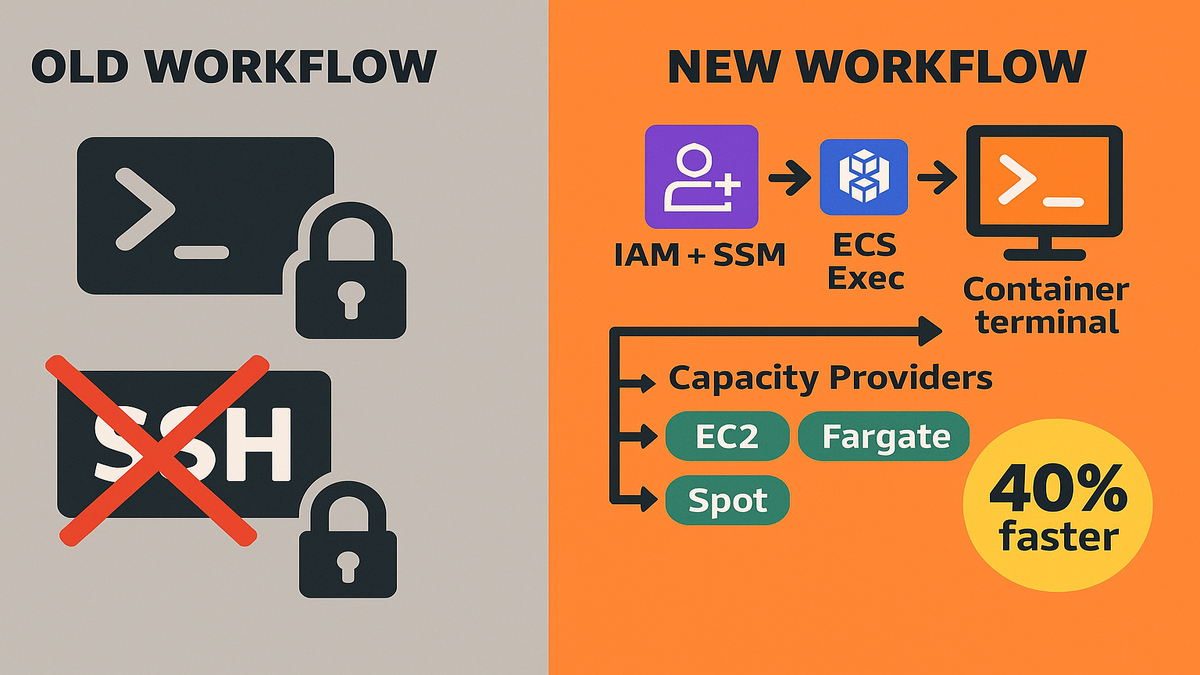
Skip SSH ECS Exec Superpower
What it does
ECS Exec lets you run commands inside a running container from the AWS Console or CLI. Think: inspect env vars, tail logs live, run one-off diagnostics, or check a grumpy process. It works on Fargate, EC2, and external launch types, so your workflow stays steady everywhere.
Here’s the kicker: no SSH tunnels, bastions, or opened ports, ever. You ride AWS Systems Manager (SSM) channels with IAM-backed auth. That shrinks your blast radius and gets security off your case.
Add this to your mental model: keep services in private subnets, leave security groups closed, still get interactive access to the exact task. The SSM tunnel is short-lived, logged, and permission-scoped. That’s the opposite of spraying SSH keys and hoping.
Security setup in plain English
Access is gated by IAM permissions and task roles. You enable exec when creating or updating the task definition or service. Once enabled, only IAM principals with ecs:ExecuteCommand and the right SSM permissions can hop in. That’s zero-trust 101: authenticate each command and log everything.
“As a rule, remove SSH keys from your threat model,” security really wants you to say it. ECS Exec gives you that path.
Here’s how to set it up safely without a PhD in IAM:
- Grant developers a role with ecs:ExecuteCommand for only the clusters, services, and task definitions they own. Scope by resource ARN—skip wildcards unless you must.
- Add required SSM session permissions. At minimum, allow starting and ending a session. Session Manager runs the encrypted channels behind the scenes.
- Turn on exec command logging. Send session logs to CloudWatch Logs or S3, and encrypt with your KMS key. Now you have a tamper-evident record of who did what, when.
- If you run in private subnets, add VPC interface endpoints for Systems Manager so sessions skip NAT. This keeps traffic inside your VPC and cuts cost.
Small but important: make “break glass” roles time-bound. Use short-lived creds or require approval via your identity provider before anyone can execute in prod.
Real world fix
You ship a new build. CPU spikes. Latency creeps upward. Instead of redeploying blind, you use ECS Exec to shell into the task taking traffic, dump thread stacks, confirm a bad connection pool. One env var tweak, redeploy, done. Minutes not hours, because you skipped SSH dances and guesswork.
Pro move: add ECS Exec to runbooks and incident templates. Your on-call will thank you later.
Zooming in on the mechanics:
- Identify the hot task in the service. CloudWatch or your APM points to a task ID.
- Run a targeted command: list open connections, check thread counts, curl the internal health endpoint from inside the namespace.
- Capture output to your exec logs automatically. Paste snippets back into the incident channel for context.
- Apply a config fix, redeploy with your pipeline, then confirm via another quick exec.
No bastions. No hunting for the right port. No “who still has the SSH key?” Just direct action with a clean audit trail.
Common gotchas and wins
- Ensure the container image has the tools you want for triage. A tiny shell plus curl, ps, and netstat equivalents go far.
- Exec is enabled at the service or task level. If you flip the switch, new tasks get it; existing ones need a redeploy.
- Keep the ECS agent and Fargate platform current so exec features are there. AWS updates improve reliability and logs.
- Lock down who can exec into prod to the bare minimum. Split roles for dev, staging, and prod to avoid footguns.
- For private subnets, configure VPC endpoints for Systems Manager to avoid routing issues and public internet.
Scale Like a Slinky
How it works
Capacity Providers let services declare how to get compute: EC2, Fargate, or Spot. With Cluster Auto Scaling, ECS watches pending tasks and adjusts the EC2 Auto Scaling group automatically. Services pick a provider strategy, like 70% Spot and 30% On-Demand, and ECS syncs capacity with deploys.
In plain terms: you scale tasks, and the cluster scales instances to match. No more hand-tuning instance counts before a release, no more guessing games. Teams reported up to 40% faster scale-ups during spikes. That protects real revenue on promo days.
Under the hood, ECS watches placement. If tasks wait because instance slots are short, ECS nudges the Auto Scaling group to add capacity. When demand drops and tasks drain, capacity scales back. You set the strategy, ECS does the choreography on time.
Why it beats manual scaling
Manual alarms fire late, and warm pools only hide the lag. Misfit instance sizes waste cash. Capacity Providers react to real task placement needs in the moment. You keep unit costs tight while giving the scheduler room to breathe. Rolling deploys behave better when capacity shows up on time.
“Let your scheduler talk directly to your capacity,” it’s unsexy, but it’s worth billions.
Think of it as cutting the middleman. Instead of guessing instance counts, you ask the service how many tasks, and let the platform fetch the right compute.
Cost tips
- Mix Spot with On-Demand for resilience and savings you can feel.
- Align task CPU and memory with instance types to reduce bin-packing waste.
- Use Service Auto Scaling for task counts; let Capacity Providers run the fleet.
- Pre-scale briefly before known spikes; let auto scaling ride the tail.
Want the quick path? Jump to the checklist.
Extra pointers when you’re tuning:
- Use provider strategies with base and weight. Example: set a small On-Demand base for a floor, then weight Spot and On-Demand evenly beyond it.
- Turn on managed termination protection so EC2 won’t kill an instance until tasks drain. Deployments stay smooth during scale-in.
- Watch placement constraints. If you pin too hard to an instance type or AZ, scaling can stall even when ASG adds nodes. Keep constraints lean and intentional.
- If you use GPU or high-memory instances, make a dedicated Capacity Provider per group. Scaling signals stay relevant for each workload type.
Resilience with Spot
Spot is fantastic when used sanely:
- Run stateless services on Spot; keep stateful or latency-sensitive parts on On-Demand.
- Spread across multiple instance families and Availability Zones to absorb interruptions.
- Ensure instance draining is enabled so tasks stop gracefully when interruptions happen.
- Keep a modest On-Demand base to shield p99 latency during churn.
Bottom line: you get cloud elasticity with a safety net that matches your SLOs.
One Platform Many Lanes
When to pick each lane
- Fargate: best when you want zero VM management, fast iteration, and per-task pricing. Great for spiky or small-to-medium services.
- EC2: choose when you need GPUs, custom AMIs, daemon sidecars, or extreme tuning. Also great when SPs or RIs matter.
- External (ECS Anywhere): for hybrid or on-prem edge nodes with ECS scheduling and one control plane.
Good news: ECS Exec works across all three. Your debugging muscle memory just transfers.
Security and ops consistency
IAM plus SSM-based exec standardizes access. Centralized logging keeps your audit trail clean. Capacity Providers unify scale logic whether you pack onto EC2 or spin up Fargate.
Here’s a simple aws ecs architecture mental model: services describe desired tasks. The scheduler picks a capacity provider using your strategy. Tasks land on Fargate or EC2. ECS Exec gives secure touch-through for diagnostics. Observability tools catch weirdness. One pipeline, many lanes.
Example pattern
A media company runs encoding on EC2 with GPUs, metadata APIs on Fargate, and an on-prem cache with ECS Anywhere. Same deploy model, same incident playbooks, one SSO path to touch containers. That’s real operational leverage.
To keep everything boring, in the best way:
- Standardize logging to CloudWatch across all lanes. One place to search, one set of alarms.
- Use the same CI/CD flow and IaC for task definitions and services. Less drift, fewer surprises.
- Apply consistent network policies with awsvpc mode and per-service security groups. You get crisp boundaries, easier audits, and clearer blast radius control.
And when you need to go deep—like kernel tweaks on EC2 or pinning ENIs for throughput—you can, without losing the simplicity Fargate gives everywhere else.
See the Network
Why it matters in 2025
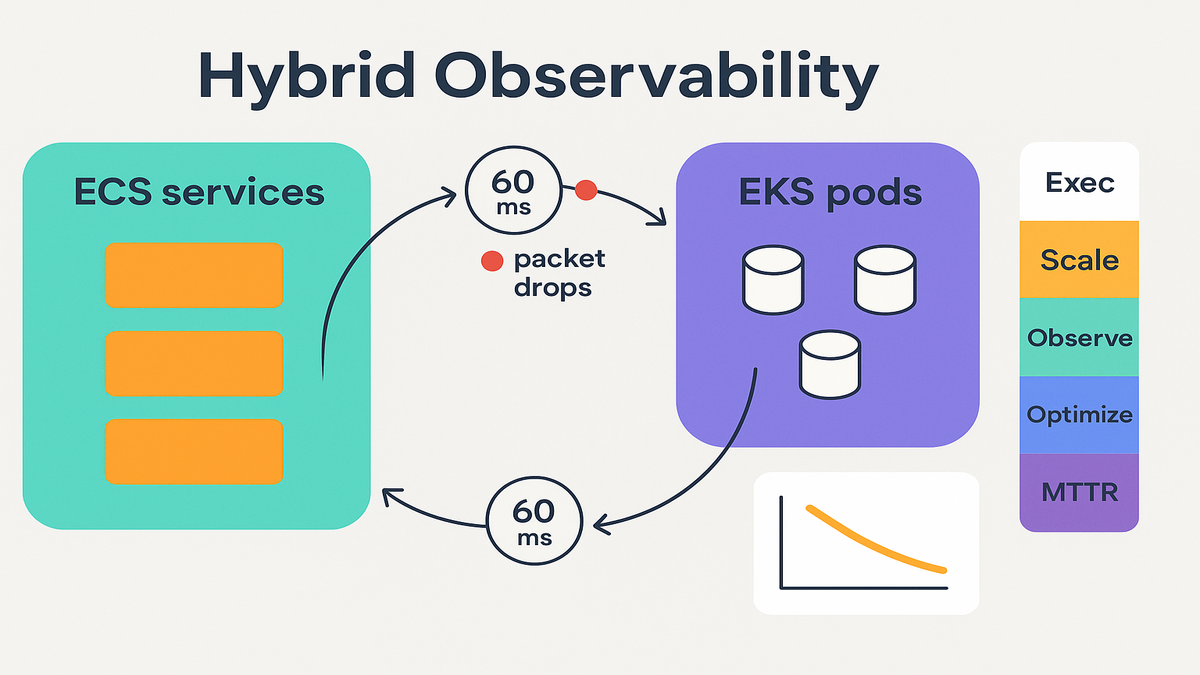
Modern outages rarely start with “server down.” They start with “p95 latency jumped 60ms between two pods,” or “packet drops spiked on a node.” If ECS runs services and EKS runs data or ML, you need cross-service traffic and latency, fast.
Amazon EKS’s container network observability shows pod-to-pod flows, latency, and packet drops. Combine that with ECS metrics and you can map requests across both platforms. It’s the difference between guessing and actually knowing.
What to look for
- Sudden packet drops between specific pods or nodes
- Latency hotspots in a single AZ or node group
- Over-subscribed ENIs that cause throttling
- Weird east-west traffic paths during deploys
Use CloudWatch metrics and logs plus open-source exporters to build golden signals. Latency, traffic, errors, and saturation, keep it simple. The goal isn’t more dashboards, it’s faster root cause and fewer 3 a.m. pages.
ECS EKS one map
If your frontend runs on ECS and your feature store or inference runs on EKS, a single network view is priceless. You’ll tie a slow checkout to a noisy EKS node, not the ECS service. Fix the right layer on the first try.
If you’re hybrid, bake this into your FAQ runbooks.
Making this real, fast:
- Turn on Container Insights for ECS and EKS to collect service metrics without sidecars.
- Track VPC CNI metrics for node ENI usage so you avoid IP exhaustion. When ENIs saturate, networking gets spiky.
- Add dependency maps to incident templates: ECS service → EKS namespace → data store. When it breaks, you already have the map.
- Treat packet drops and flow latency as first-class alarms next to CPU and memory. Most mystery incidents show up there first.
Fast Recap
- Enable ECS Exec to replace SSH with IAM + SSM-backed access.
- Turn on Capacity Providers and Cluster Auto Scaling to match capacity to tasks.
- Use Fargate for speed, EC2 for control, and External for hybrid—one playbook.
- Add EKS network observability for pod-to-pod flows, latency, and packet drops.
- Standardize incident workflows: exec, capture, rollback, and learn.
- Revisit cost levers: Spot, right-sizing, and scale policies by service.
FAQ Answers You Actually Need
What is Amazon ECS
Amazon Elastic Container Service (ECS) is AWS’s fully managed container orchestrator. It schedules, runs, and scales containers on Fargate or EC2, with deep integrations for IAM, networking, logs, and autoscaling.
Is ECS a replacement
ECS is managed and opinionated for AWS. Kubernetes, and Amazon EKS, is more portable and extensible. Many teams run both: ECS for streamlined app services, EKS for workloads that need the Kubernetes ecosystem. Pick the right tool for the job.
How does ECS Exec work
ECS Exec uses AWS Systems Manager Session Manager tunnels authorized by IAM to execute commands in containers. You don’t open inbound ports or manage SSH keys. Access is audited, least-privileged, and can be limited per task or user.
Capacity Provider Auto Scaling
Yes. Capacity Providers target Fargate or EC2, including Spot, and use Cluster Auto Scaling for EC2 fleets. Services define strategies, like prefer Spot, and ECS orchestrates capacity as tasks scale.
Any extra cost
No extra charge beyond standard ECS pricing. You pay for compute you use, Fargate vCPU and GB-hours or EC2 instances, and supporting services like CloudWatch. The features are included in all commercial AWS Regions.
How does ECS compare
ECS optimizes for simplicity and AWS-native workflows. Kubernetes or EKS gives more extensibility and vendor-neutral APIs. Tools like Nomad are lighter for some cases. For many AWS-first teams, ECS speeds time-to-value with fewer moving parts.
ECS Exec prerequisites
You need the AWS CLI and Session Manager plugin locally, proper IAM permissions, and exec enabled on the cluster or service. For private networks, configure VPC endpoints for Systems Manager so sessions stay inside your VPC. Keep images stocked with basic troubleshooting tools.
Restrict exec
You can’t make a shell read-only, but you can control who can exec, where, and what they access. Combine scoped IAM, SSM session logging, and separate prod roles to reduce risk. Pair with change management in your pipeline for writes.
Launch ECS Like a Pro
- Enable ECS Exec on your task definition and service; grant ecs:ExecuteCommand and SSM permissions to the right IAM roles.
- Install the AWS CLI and Session Manager plugin locally; test a dry run in non-prod.
- Turn on Cluster Auto Scaling; attach Capacity Providers and set service strategies, mix Spot and On-Demand where safe.
- Add Service Auto Scaling policies per service; pre-scale for planned events.
- Standardize runbooks: exec into task, capture diagnostics, patch config, redeploy.
- Wire EKS network observability for hybrid shops; alert on latency, drops, and ENI saturation.
Wrap this into your next sprint. The ROI hits on day one of your next incident.
Here’s the punchline: these updates aren’t just “nice.” They compress feedback loops. Less yak-shaving, more shipping. Replace SSH with IAM, let capacity follow demand, and get one view of your network. That’s how you make ‘five-nines’ a habit, not a hope.
“Debugging used to mean opening ports and praying. Now it’s IAM, a click, and a fix.”
References
- Using Amazon ECS Exec (docs): https://docs.aws.amazon.com/AmazonECS/latest/developerguide/ecs-exec.html
- New – ECS Exec announcement: https://aws.amazon.com/blogs/containers/new-ecs-exec-now-run-commands-in-a-running-container-on-aws-fargate-and-amazon-ec2/
- Amazon ECS Cluster Auto Scaling & Capacity Providers: https://docs.aws.amazon.com/AmazonECS/latest/developerguide/cluster-auto-scaling.html
- Capacity providers concepts: https://docs.aws.amazon.com/AmazonECS/latest/developerguide/cluster-capacity-providers.html
- Amazon EC2 Auto Scaling: https://docs.aws.amazon.com/autoscaling/ec2/userguide/what-is-amazon-ec2-auto-scaling.html
- Amazon ECS container instance draining: https://docs.aws.amazon.com/AmazonECS/latest/developerguide/container-instance-draining.html
- Amazon ECS pricing: https://aws.amazon.com/ecs/pricing/
- AWS Systems Manager Session Manager: https://docs.aws.amazon.com/systems-manager/latest/userguide/session-manager.html
- Systems Manager VPC endpoints setup: https://docs.aws.amazon.com/systems-manager/latest/userguide/setup-create-vpc.html
- Amazon EKS observability overview: https://docs.aws.amazon.com/eks/latest/userguide/observability.html
- Amazon VPC CNI metrics for EKS: https://github.com/aws/amazon-vpc-cni-k8s#metrics
- CloudWatch Container Insights: https://docs.aws.amazon.com/AmazonCloudWatch/latest/monitoring/Container-Insights.html
- Amazon ECS Anywhere: https://docs.aws.amazon.com/AmazonECS/latest/developerguide/ecs-anywhere.html
- EC2 Spot best practices: https://docs.aws.amazon.com/AWSEC2/latest/UserGuide/spot-best-practices.html