

You're trying to ship AI faster, cheaper, and without your GPUs melting. Meanwhile, models blow past 100B parameters, video gen eats your VRAM, and your inference bill feels like rent.
Here’s the twist: Amazon EC2 G7e instances with NVIDIA RTX PRO 6000 Blackwell Server Edition GPUs—up to 2.3x inference over G6e. AWS launched G7e to give you single-node muscle that used to need a cluster and a prayer.
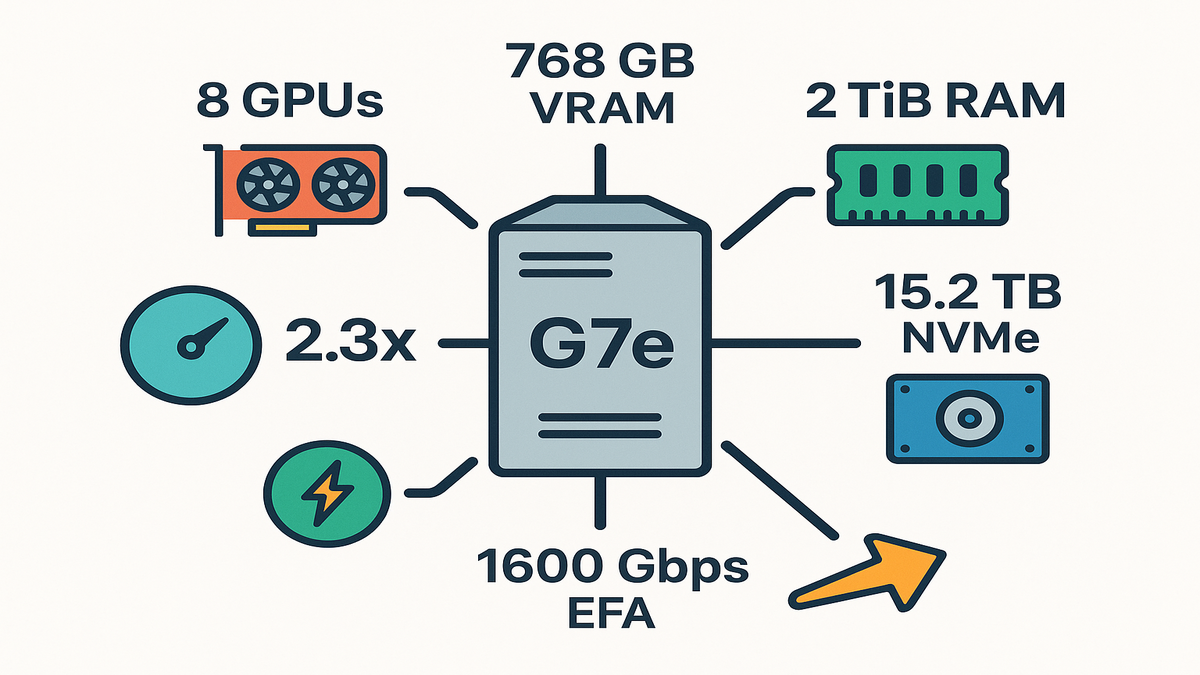
Amazon EC2 G7e instances are now generally available, and they’re stacked. Up to 8 RTX PRO 6000 Blackwell Server Edition GPUs with 768 GB GPU memory, 5th Gen Intel Xeon (Emerald Rapids) up to 192 vCPUs, 2 TiB system memory, 15.2 TB NVMe, and up to 1600 Gbps networking with EFA. Translation: bigger models, lower latency, fewer bottlenecks.
If generative AI inference, spatial computing, or high-performance rendering is your lane, this is your new daily driver.
What does that mean day to day? You keep large LLMs, multimodal encoders, and high-res assets near the compute that needs them. Less sharding. Fewer cross-node hops. More time serving tokens and frames instead of waiting on I/O. The user just feels it: stable low-latency replies, fewer timeouts, and room to scale without duct tape.
If you’ve been juggling configs to squeeze models into memory, G7e brings the hot path back to one box—weights on GPUs, vector indexes in RAM, and assets on NVMe. You get speed, predictability, and a cleaner mental model for ops.
TLDR
- Up to 2.3x faster inference vs G6e, built for large LLMs and multimodal models.
- 8x RTX PRO 6000 Blackwell Server Edition GPUs, 768 GB total GPU memory per node.
- 1600 Gbps EFA networking, 4x inter-GPU bandwidth vs L40S-era setups.
- 15.2 TB local NVMe and GPUDirect Storage for blazing model loads.
- Single-node efficiency: fewer shards, lower latency, simpler ops, better $/token.
Under the Hood
GPU muscle
You get up to 8 NVIDIA RTX PRO 6000 Blackwell Server Edition GPUs per instance, each with 96 GB. That’s 768 GB of on-node GPU memory—enough headroom for large language models, agentic AI, and high-res multimodal pipelines without frantic sharding. Compared to L40S-era G6e, G7e brings up to 4x inter-GPU bandwidth and lower peer-to-peer latency on the same PCIe switch. The net effect: multi-GPU inference feels closer to one big GPU than a herd of cats.
That extra VRAM makes architectures simpler. Larger context windows without wild KV-cache gymnastics, bigger vision encoders beside your LLM, and room for adapters or LoRAs without pushing stuff to the edge. It also gives you room to try quantization strategies, like 4-bit or 8-bit paths, as optional boosts, not emergency fixes.
Operationally, the topology helps a lot. When inter-GPU bandwidth is high and steady, tensor and pipeline parallelism feel less like a tax and more like a boost. You can co-locate parts (tokenizer, LLM, VLM, TTS) and rely on predictable peer-to-peer movement. That’s what cuts p99 spikes, fewer surprise detours.
CPU memory and storage
At the core: 5th Gen Intel Xeon Scalable (Emerald Rapids) with up to 192 vCPUs and 2 TiB system memory. You can pin giant tokenizers, embeddings, or retrieval corpora in memory and stop thrashing disks. The local NVMe story is strong too. Up to 15.2 TB per instance with 4x bandwidth over G6e—great for hot-swapping models, fast finetunes, or on-the-fly LoRA merges.
In practice, that means keep your vector index, or RAG corpus, in RAM to avoid cache misses. Stage the top-k models on NVMe so cold starts feel warm. Use memory-mapped weights so startup is streaming, not blocking. The mix of CPU headroom and local storage bandwidth keeps GPUs busy, which is the whole game.
If you manage many artifacts, a two-tier model lake works well. Store canonical weights on Amazon FSx for Lustre, backed by S3, and sync the active set to local NVMe. When traffic shifts, you can promote a model to NVMe in minutes and demote less popular ones without restarting the world.
Quote that matters
Intel sums up its platform succinctly: “5th Gen Intel Xeon Scalable processors deliver leadership performance, built-in accelerators, and advanced security.”
- Reference: Intel 5th Gen Xeon Scalable overview.
The Economics
Bigger models without
When more of the model fits on one node, you avoid cross-node latency, sync overhead, and network jitter. With G7e’s 768 GB GPU memory and 2 TiB system memory, you can run chunky LLMs, memory-hungry multimodal encoders, and high-res diffusion pipelines locally. Result: fewer tokens in limbo, faster time-to-first-token, and smoother throughput.
Single-node wins also boost reliability. Fewer moving parts mean fewer tail events. Your p50 and p99 move closer, and you stop getting paged because some shard decided to garbage-collect mid-request.
Speedup where it counts
Compared to G6e, G7e delivers up to 2.3x inference performance. That compounds at scale. If your pipeline needs 10 nodes for peak traffic, a 2.3x boost can drop that to 4–6 nodes. Plus you cut cluster complexity and make your SRE team smile.
Two compounding effects show up fast:
- Hardware utilization jumps because the model and KV cache actually fit.
- Control-plane overhead drops because you’re managing fewer instances and fewer shards.
Networking for inference bursts
“Elastic Fabric Adapter (EFA) is a network device you can attach to your Amazon EC2 instance to accelerate High Performance Computing (HPC) and machine learning applications.” On G7e, you get up to 1600 Gbps with EFA and EC2 UltraClusters, enabling small-scale multi-node finetuning and fast distributed sampling without turning your network into the bottleneck.
Use it when it really helps: cross-node all-reduce, quick dataset staging, or bursty overflow capacity. The rest of the time, keep your inference hot path on a single node so microbursts don’t pay round-trip tax.
A quick example
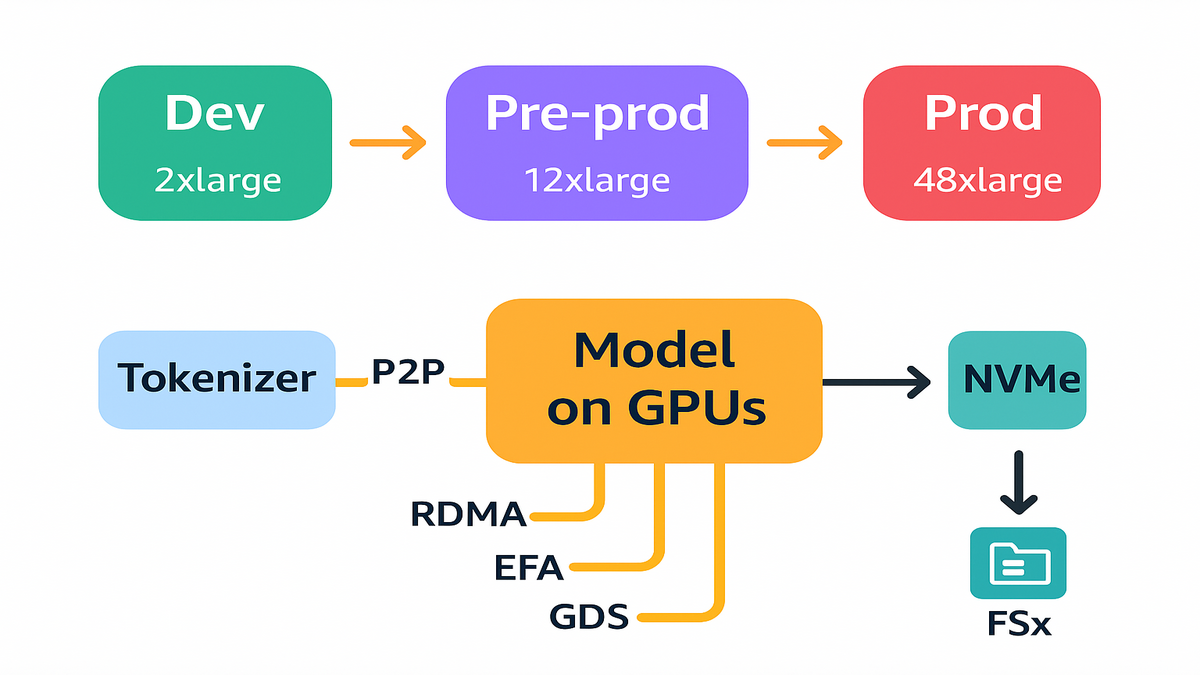
Say you’re serving a 70B+ instruction-tuned LLM with RAG and vision. On G7e.48xlarge, you place the full model split across 8 GPUs with GPUDirect P2P, keep the vector index in RAM, and stream video frames directly from NVMe. Your latencies stabilize because the slowest hop is now inside the box.
- Reference: AWS EFA documentation; EC2 UltraCluster overview.
Practical knobs to turn in that setup:
- Enable continuous batching in your inference server to keep SMs busy.
- Use paged KV cache to stretch context windows without fragmentation.
- Profile end-to-end (tokenizer, sampler, network, logging) so you don’t fix the wrong thing.
3D Digital Twins Spatial Computing
RTX rendering meets simulation
The RTX PRO 6000 Blackwell Server Edition isn’t just an AI chip—it’s a graphics powerhouse. Ray tracing, denoising, and rasterization accelerate everything from real-time digital twins to VR previews and high-fidelity engineering visualization. Spatial computing stacks—think robotics simulators, factory twins, and cinematic-quality previsualization—finally get compute and memory that match the ambition.
If you’ve ever had to decimate meshes or bake lighting just to get a scene to run at all, G7e’s compute plus memory balance feels like removing ankle weights. You can keep higher resolution textures, run physics and inference together, and still deliver responsive frame rates to remote clients.
Omniverse and OpenUSD workflows
If you live in USD pipelines, this matters. “NVIDIA Omniverse is a platform for connecting and building 3D tools and applications based on Universal Scene Description (OpenUSD).” G7e’s 4x inter-GPU bandwidth plus massive VRAM lets you shuffle heavy USD scenes, simulate physics, and render in real time. Combine with EFA for collaborative multi-user sessions or cloud-streamed reviews.
Where this shines:
- Multi-user design reviews with complex USD scenes and live edits.
- Robot simulation where perception models and physics sim share GPUs.
- Cloud rendering pipelines that mix ray tracing with on-the-fly AI denoise.
Style scenario
You’re building an industrial digital twin that ingests sensor streams, runs physics sim, and renders a real-time 3D control room. On G7e.24xlarge (4 GPUs), you pin the renderer and sim across GPUs via GPUDirect P2P, cache assets on NVMe, and push frames to clients. Your preview pipeline becomes interactive—no more “start render and get coffee” workflow.
- Reference: NVIDIA Omniverse overview; NVIDIA RTX and ray tracing resources.
Data Movement New Compute
Direct communication
Within the node, NVIDIA GPUDirect Peer-to-Peer lets GPUs exchange data directly over the same PCIe switch—no CPU bouncing. With G7e’s up to 4x inter-GPU bandwidth over G6e, tensor parallelism and pipeline parallelism get meaningfully faster. Your attention maps and key-value caches stop queueing like it’s Black Friday.
This shows up as smoother utilization in your profiler. Fewer sawtooth patterns where one stage waits on another, and more consistent kernel occupancy across GPUs. It’s not just fast, it’s predictable, which is what keeps SLOs green.
Across nodes without detours
For multi-node jobs, GPUDirect RDMA enables NIC-to-GPU data paths. As NVIDIA puts it, “GPUDirect RDMA enables a direct path for data exchange between GPUs and third-party devices.” Pair this with EFAv4 in EC2 UltraClusters and you slash latency for parameter syncs, all-reduce ops, or sharded inference.
When you do span nodes, prefer topology-aware placements and pinning. Keep chatty ranks close, spread less chatty ones, and keep your collective sizes sane. The goal: a network that helps when needed and disappears when it should.
Storage that keeps GPUs fed
GPUDirect Storage “enables a direct data path between storage and GPU memory.” On G7e, local NVMe hits 4x the bandwidth of prior gen, and when you back models with Amazon FSx for Lustre you can push up to 1.2 Tbps. That’s model swapping and dataset streaming at human-speed, not job-queue speed.
Treat storage like a cache hierarchy:
- L1: GPU memory (weights, KV cache, activations).
- L2: Local NVMe (active models, hot assets).
- L3: FSx for Lustre (broader model pool, shared datasets).
- L4: S3 (durable origin, version control).
Practical example
Cold-starting a 40–80 GB model? Pre-stage your weights on NVMe, map them with GPUDirect Storage, and warm the graph while your autoscaler spins up. For multi-model serving, batch load secondary models from FSx for Lustre and stream directly to GPU memory to avoid starving the SMs.
- References: NVIDIA GPUDirect RDMA; NVIDIA GPUDirect Storage; Amazon FSx for Lustre.
Your Fleet
Pick your lane
- g7e.2xlarge to g7e.8xlarge: single-GPU dev, unit tests, light diffusion, smaller LLMs, and Triton prototyping.
- g7e.12xlarge and g7e.24xlarge: 2–4 GPUs for mid-size LLMs, high-fidelity rendering, and single-node finetuning.
- g7e.48xlarge: 8 GPUs, 768 GB VRAM, 2 TiB RAM—production-scale inference for large LLMs, multimodal agents, and heavy spatial computing.
A good rollout pattern: keep a small warm pool of dev-sized instances for CI/CD and canary tests, and a larger pool of g7e.24xlarge or g7e.48xlarge for steady-state production. Scale out short-term peaks to a small EFA-connected group and drain them fast after the surge.
Build for latency first
Keep the hottest path on-node: tokenizer and model weights on GPUs, vector DB in RAM, assets on NVMe, and GPUDirect P2P for inter-GPU chatter. Use EFA only when you truly need to cross nodes, like bursty peaks, distributed sampling, or finetune phases.
Design decisions that usually pay off:
- Consolidate microservices that talk every token into one process space.
- Cap cold-path features (e.g., long-tail tool calls) to protect hot-path latency.
- Use load shedding and adaptive batching when queues back up.
Quote to anchor your plan
“Amazon FSx for Lustre provides fully managed, high-performance file systems optimized for compute-intensive workloads.” Use it as your model lake for quick swaps; pin active weights on local NVMe.
Example rollout
Dev: g7e.2xlarge, iterate on kernels and prompt templates.
Pre-prod: g7e.12xlarge, dial in batching and KV cache strategies.
Prod: g7e.48xlarge for primary endpoints; overflow to a small EFA-connected pool for peaks.
References: AWS FSx for Lustre; AWS EFA docs; EC2 UltraCluster overview.
Your Progress Report
- G7e boosts inference up to 2.3x versus G6e and packs 768 GB GPU memory per node.
- 5th Gen Intel Xeon, 2 TiB system memory, and 15.2 TB NVMe eliminate CPU, memory, and storage bottlenecks.
- Up to 1600 Gbps EFA and GPUDirect RDMA/P2P keep data movement lean.
- RTX graphics plus Blackwell AI mean real-time rendering, digital twins, and spatial computing are first-class on the same box.
- Right-size from g7e.2xlarge to g7e.48xlarge and keep the hot path on-node for latency wins and better $/token.
G7e Your Questions Answered
- Q: How do G7e instances differ from G6e?
A: G7e brings up to 2.3x faster inference, 4x higher networking, up to 1600 Gbps with EFA, up to 4x inter-GPU bandwidth, doubled top-end system memory to 2 TiB, and up to 15.2 TB NVMe. It’s a generational jump in single-node efficiency.
- Q: When should I choose G7e over P-series training instances?
A: Use G7e for cost-effective inference, graphics-heavy workloads, digital twins, and single-node finetunes. Use P-series for large-scale multi-node training or when you need NVLink or NVSwitch fabrics for massive model parallelism.
- Q: Can I run multimodal or agentic AI on a single G7e node?
A: Yes. With up to 768 GB GPU memory and 2 TiB RAM, you can co-locate LLMs, vision encoders, audio pipelines, and tool-use planners. GPUDirect P2P keeps inter-stage hops fast inside the node.
- Q: How does EFA help inference latency?
A: EFA provides high-bandwidth, low-latency networking for inter-node communication. Use it sparingly for cross-node requests, distributed sampling, or finetune bursts. Keep your primary serving path inside a single G7e when possible.
- Q: What storage setup should I use for fast model loads?
A: Keep active models on local NVMe for the lowest latency. Back them with Amazon FSx for Lustre and enable GPUDirect Storage for direct storage-to-GPU transfers. This cuts CPU overhead and speeds cold starts.
- Q: Which frameworks are supported?
A: If it runs on CUDA, it runs here: PyTorch, TensorRT, ONNX Runtime, JAX, DeepSpeed, vLLM, and Triton Inference Server. Pair with EFA-enabled comms stacks, like NCCL plus EFA, when you go multi-node.
- Q: How do I migrate from G6e to G7e without surprises?
A: Keep your container images the same, then validate NCCL and EFA versions. Re-profile your inference server to tune new batch sizes. Move your largest models to NVMe and verify GPUDirect P2P topology. Watch p99 latency and GPU memory headroom for a day before consolidating nodes.
- Q: Any gotchas with quantization on bigger memory footprints?
A: With more VRAM, quantization is optional, not mandatory. Use it to hit latency goals or reduce memory bandwidth pressure, but validate quality on your real prompts. Keep a precise model hot for evals, and fall back when responses look off.
- Q: How should I monitor these boxes?
A: Track GPU and CPU utilization, memory pressure, NVMe throughput, and network metrics. Export Triton or vLLM metrics, scrape with Prometheus, and visualize p50, p95, and p99 latencies. NVIDIA DCGM can surface GPU health, clocks, and thermals so you catch issues before users do.
- Q: What’s the best way to keep $/token in check?
A: Focus on utilization. Continuous batching, paged KV cache, light quantization, and caching frequent prompts all help. Keep weights and indexes local, minimize cross-node calls, and autoscale on queue depth and tail latency, not just CPU or GPU percent.
Launch G7e Quick Steps
- Choose your size: start g7e.2xlarge for dev, scale to g7e.48xlarge for prod.
- Enable EFA on multi-GPU sizes and in UltraClusters if you’ll go multi-node.
- Format and mount local NVMe; stage primary models there.
- Use Amazon FSx for Lustre as your model lake; enable GPUDirect Storage.
- Configure GPUDirect P2P and NCCL; set CUDAVISIBLEDEVICES for clean topology.
- Optimize inference: quantization, paged KV cache, batch scheduling, Triton or vLLM.
- Monitor end to end: GPU, CPU, IO utilization; p50–p99 latencies; and $/token.
- Run a load test that mimics real traffic: mixed prompt sizes, concurrent sessions, and bursty arrivals.
- Keep a warm pool during business hours; drain it at night while preserving NVMe caches for fast morning starts.
- Document your placement rules, which services must co-reside, so autoscaling doesn’t split your hot path.
In the end, this isn’t just another GPU instance drop—it’s a reset on how you architect single-node inference and spatial computing. G7e compresses what used to be a whole rack into one box you can reason about. That means simpler systems, fewer failure modes, and more velocity. If you’ve been juggling model shards across nodes, now’s your chance to pull them back together, cut tail latency, and turn “we need more GPUs” into “we need smarter placement.” Your users won’t notice the architecture—just the speed.
2019: everyone optimized training. 2026: the money’s in inference. The winners ship the fastest token, not the biggest cluster.
References
- NVIDIA Blackwell Platform overview
- AWS Elastic Fabric Adapter (EFA) docs
- Amazon EC2 UltraCluster overview
- NVIDIA GPUDirect RDMA
- NVIDIA GPUDirect Storage
- Amazon FSx for Lustre
- Intel 5th Gen Xeon Scalable processors
- NVIDIA Omniverse platform
- NVIDIA Triton Inference Server
- vLLM project
- NVIDIA DCGM (Data Center GPU Manager)