


Your ad stack is about to feel ancient. Amazon Ads just opened the MCP Server to anyone with API creds. And overnight, agentic workflows went from weeks of integration hell to minutes of simple prompts.
Wait, what? Yep. You tell an AI agent what you want—“Clone my winners to the UK, cap daily budget at $500, and blacklist low-ROAS terms”—and the Model Context Protocol (MCP) turns that into clean, current Amazon Ads API calls. No brittle glue code. No version roulette. Just results.
And it’s not some toy beta. The server ships standard tools for campaign management, reporting with parity to Amazon’s November 2025 reporting APIs, and account and permissions control with enterprise-grade authorization. It also includes three pre-built “one-shot” workflows that squash multi-step tasks into one call.
If you’ve ever read AdExchanger and thought, “When does ads exchange automation finally get simple?”, this is that moment. The infra is here. The on-ramp is fast. The edge goes to whoever moves first.
TLDR
- Amazon Ads’ MCP Server is in open beta, built on Anthropic’s open Model Context Protocol.
- One integration gives AI agents secure access to campaign CRUD, reporting, and account controls.
- Pre-built workflows compress multi-step tasks into single prompts.
- Reporting tools match Amazon’s November 2025 API parity.
- Fine-grained authorization keeps access tight and auditable.
- Early adopters cut dev time from weeks to minutes—and ship more.
Why MCP Changes Amazon Ads
From endpoints to intents
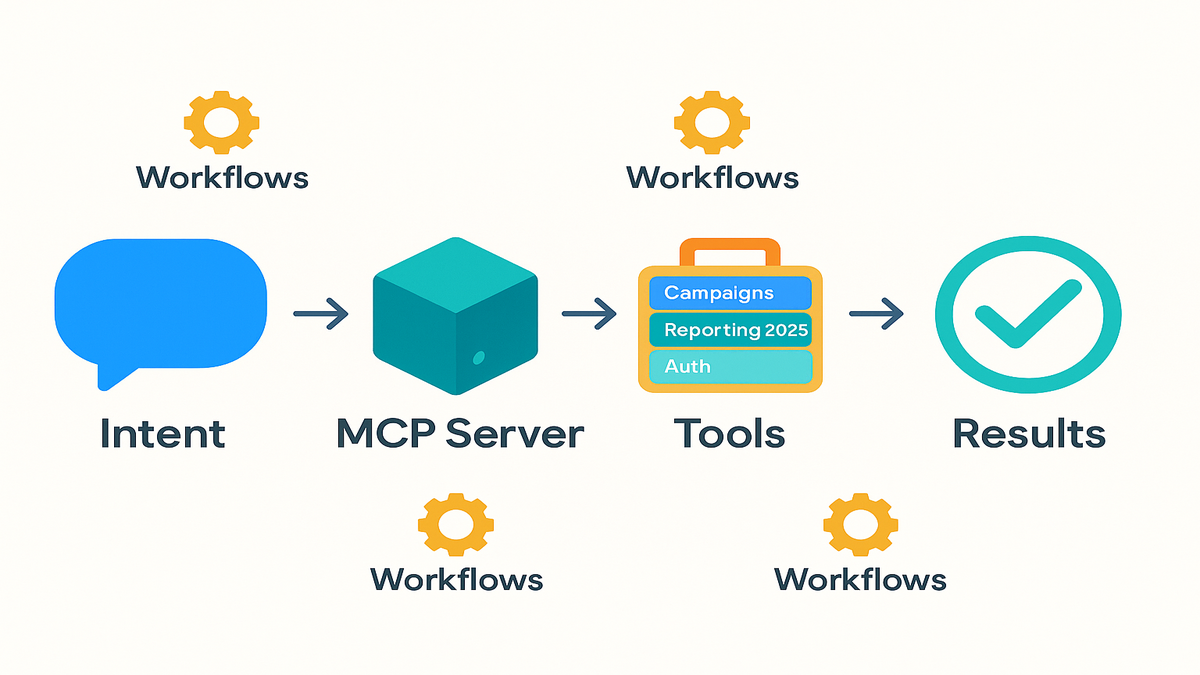
Classic API work is brittle. Different endpoints, custom schemas, endless maintenance. MCP flips that. You pass intent in plain language. The protocol standardizes tool discovery, input checks, and execution with Amazon Ads. So fewer one-off integrations and less time chasing changelogs.
First-hand example: You prompt, “Boost bids on top 10% converting keywords from the last 14 days.” The MCP Server chains what used to be manual steps—query performance, rank conversions, update bids, confirm changes—without you writing glue code. The dev lift drops from weeks to minutes.
Think of MCP like a universal remote for your ads stack. Instead of memorizing every button combo, you say the move you want. The remote presses the right buttons, checks the batteries, sets the input, and confirms you meant volume 50, not 500. That intent-to-action bridge is the real unlock.
Try these intents to get a feel for it:
- “Scale budgets by +15% on campaigns hitting 20% above target ROAS for 7 days.”
- “Find search terms bleeding >$200 without sales and add as negatives across all SP campaigns.”
- “Create a launch plan for ASIN XYZ: 3 ad groups, exact + phrase, $250/day to start, and a bid ceiling of $2.20.”
The agent handles discovery (what tools exist), validation (what’s required), and execution (which calls to make), returning a clean diff of what changed. No spelunking through endpoints. No homegrown wrappers to maintain.
Security and governance baked in
This isn’t cowboy automation. The server enforces enterprise-grade, fine-grained authorization. You can scope tools and actions by role, account, or marketplace. Huge for agencies juggling many brands, and in-house teams that like sleeping at night.
As Paula Despins, VP of Ads Measurement at Amazon Ads, put it during IAB ALM: “The server uses only the most current APIs aligned with our domain model standard.” Translation: agents aren’t calling deprecated endpoints. Your actions map to living, supported interfaces.
If you build for Amazon Ads, the MCP Server becomes your universal adapter. One integration. Many possibilities. And when new features land, your agents inherit the upgrade path.
Pro move: start at the official overview and connect your agent to the standardized endpoint
Practical governance patterns you can apply on day one:
- Principle of least privilege: give reporting-only access to analysts, edit rights to specialists, and admin rights to a very small core.
- Marketplace segmentation: allow EU edits only for EU team members; block NA budget changes for EMEA operators.
- Change approvals: require a second party to confirm major shifts (e.g., +50% budget, pausing top-3 spenders) via an approval workflow your agent can handle.
- Audit everything: enable logs on each action with user, scope, timestamp, and payload summary for clean traceability.
Add a safety net: spin up “dry run” prompts where the agent proposes a change set first, then waits for a “confirm” keyword before executing. It’s training wheels that pays for itself.
Tools That Matter
Campaign management conversational
Campaign CRUD is table stakes, but the MCP Server levels it up. You can create, update, pause, and delete campaigns from a single intent. You can also tweak bids, budgets, and targeting off real-time performance. The server includes three sophisticated, pre-built workflows that turn complex sequences into one call. You say the goal; the tools handle the orchestration.
First-hand example: “Clone this Sponsored Products winner to DE and FR, translate keywords, cap daily budgets at €400, and mirror negatives.” Previously, a spreadsheet plus three dashboards and a prayer. Now, one prompt and a confirmation payload.
More high-ROI moves to try:
- Bid scaffolding: “Set min, target, and max bids by ad group based on past 28-day conversion rates.”
- Query mining: “Harvest converting search terms into exact match with 20% higher bids; add non-converters as negatives.”
- Budget triage: “If a campaign hits 80% of daily budget by noon for 3 days straight, increase by 10% and alert ops.”
- Creative hygiene: “Rotate out ad groups with CTR in the bottom quartile; flag ASINs needing new images.”
Edge cases the workflows handle without babysitting:
- Currency normalization when cloning into new marketplaces.
- Preserving ad group structures and negatives.
- Respecting campaign status, start and end dates, and placement adjustments.
- Guardrails like not exceeding per-campaign budget caps.
Reporting with 2025 parity
The reporting tools match the new reporting APIs Amazon launched in November 2025. So you can pull clean performance data—impressions, clicks, conversions, ROAS—without wrestling SQL or stitching endpoints. Ask, “Run a Q1 performance report, surface underperforming ASINs, and recommend budget reallocations.” You’ll get data plus next steps your agent can execute.
Insight: you’re giving agents the same telemetry you use—only faster. Less swivel-chair, more strategy.
Want deeper, privacy-safe cohort analysis and incrementality across Amazon surfaces? Pair MCP-driven reporting with AMC Cloud.
Prompts that make reporting sing:
- “Build a 7/14/30-day view for SP, SB, and SD with ROAS trendlines and conversion lag notes.”
- “Identify keywords with high CPC, low CVR; propose 3 actions each: bid down, move to phrase, or pause.”
- “Report top 10% ASINs by contribution margin; suggest cross-campaign budget shifts to hit a blended ROAS target.”
Pro tips for accurate reads:
- Time windows matter: align attribution windows and report cutoffs across campaigns.
- Normalize currencies if you’re multi-market.
- Compare like-for-like (placement, match type, ad format) so you don’t mix signals.
- Bake in seasonality notes so you don’t overreact to a one-week dip.
Account and billing control
Manage users, roles, and permissions across accounts with tight guardrails. Pull invoices, forecast spend, and monitor financial health—programmatically. If you’ve ever triaged access for a new analyst at 4:58 p.m. on Friday, you’ll want this in your agent’s toolkit.
If you’re an ads exchange power user or an AdExchanger reader, this is where automation meets governance. It’s not just fast—it’s controlled.
Real-world jobs to be done your agent can own:
- Provisioning: “Add user Jane to Client A with report-only access; expire in 30 days.”
- Invoice ops: “Pull last month’s invoices, reconcile against budget, and flag variances >8%.”
- Pacing guardrails: “Alert if week-to-date spend drifts ±15% from plan; propose corrections.”
How It Works
Setup in one endpoint
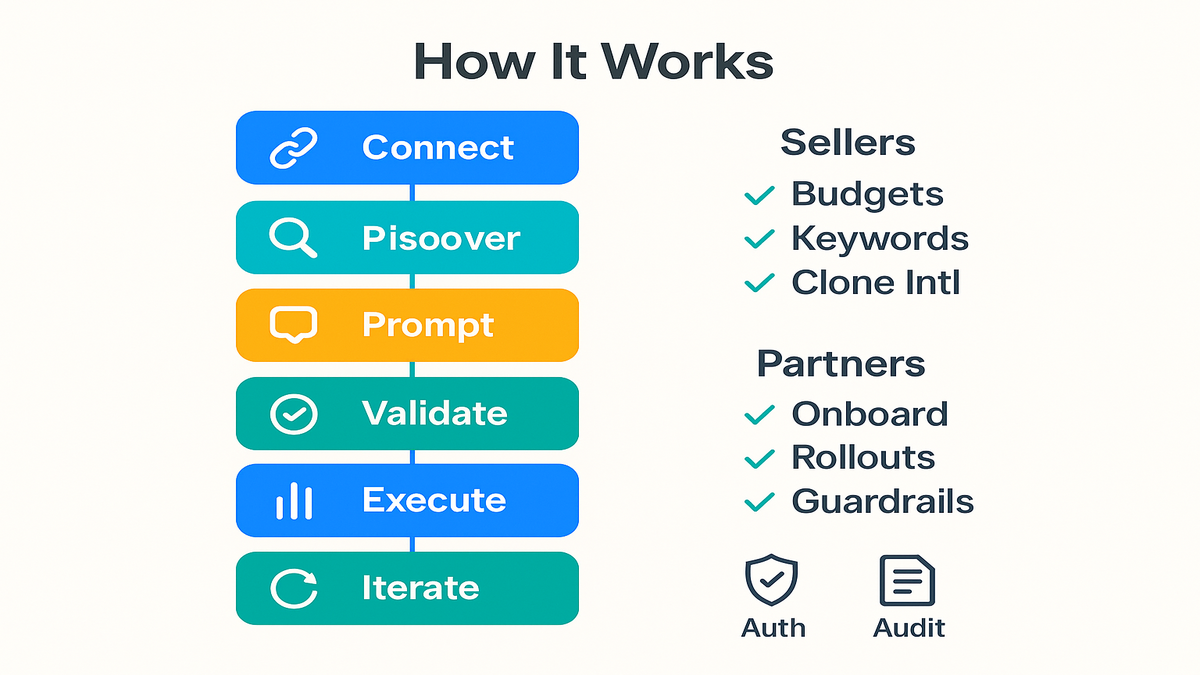
You connect any MCP-compatible agent (e.g., Claude-enabled systems) to the Amazon Ads MCP Server via a standardized endpoint. No bespoke SDKs for every service. The agent discovers tools, schemas, and permissions dynamically. That’s the universal adapter effect.
What discovery looks like in practice:
- The agent requests the tool catalog and sees what it’s allowed to use (e.g., reporting.read, campaigns.update, accounts.manage).
- Each tool advertises a schema (inputs, required fields, enums), so the agent knows exactly what to send.
- The server communicates capability versions, helping the agent pick the safest, most current path.
Prompt translate execute
You issue a plain-English prompt. The MCP Server validates intent, maps it to current Amazon Ads APIs, and executes. The server returns structured results (think JSON), summaries, and follow-up handles for iterative changes. Your agent can ask clarifying questions or proceed with safe defaults.
First-hand example: “Audit last 30 days, pause non-converting search terms with >1k impressions, reallocate 20% budget to top converters.” The agent:
- Pulls performance
- Finds waste
- Updates entities
- Confirms with a diff
All with alignment to Amazon’s active domain model and versioning.
A few reliability patterns worth adopting:
- Idempotency: send a unique token per change set so retries don’t double-apply.
- Bounded changes: cap batch sizes (e.g., 200 updates/run) to avoid rate-limit collisions.
- Explicit confirmations: request a “preview diff” before committing large updates.
- Human-in-the-loop: route big swings (>25% budget delta) for manual signoff.
Feedback loops and reliability
Here’s the big unlock: agents don’t guess. They inspect schemas, validate inputs, and request missing parameters before execution. And because the MCP Server front-loads standardization, workflows keep working when APIs evolve. It extends the spirit of Amazon’s Ads Agent to your external stacks—your tools, your data, same conversational superpowers.
Result: fewer 2 a.m. hotfixes, more measurable outcomes.
Error handling you actually want:
- Graceful fallbacks: if a field is missing (say, currency), the agent asks first.
- Clear exceptions: the server returns actionable errors (“invalid campaign status for update”) not mystery codes.
- Rate-limit hints: responses guide backoff and batching so you scale safely.
Playbook Early Wins
For sellers unlock hours
You don’t need a dev team to benefit. Connect an MCP-compatible agent and start with high-ROI routines:
- Daily budget sweep: reallocate from underperformers to proven winners.
- Keyword hygiene: pause non-converters, expand exact matches on positives.
- International cloning: copy high-ROAS campaigns across marketplaces with localized bids and negatives.
Each is now a single prompt. Over a quarter, the compounding looks like a second operator—without the headcount.
Add three more beats to your weekly rhythm:
- Launch checklist: “Create a launch campaign for ASIN X with 25 keywords, 2 ad groups, and a 10-day ramp plan; report back daily learnings.”
- Placement tuning: “Increase top-of-search multipliers for ad groups with CTR > 2x baseline; cap at +60%.”
- Recovery mode: “If CVR drops >20% week-over-week, propose 3 fixes: bid cuts, query pruning, or creative refresh.”
For partners scale
Agencies and toolmakers live on the knife’s edge of maintenance. One integration to the MCP Server means every client benefits. No per-client endpoint band-aids. Onboarding speeds up. Feature rollouts land once, everywhere. As the server updates, your agents inherit capabilities in stride.
First-hand example: A partner sets up a “Rescue Budget” workflow. When daily pacing lags, the agent pulls cross-account performance, reallocates 10% from low-velocity campaigns, and confirms via audit log. Previously, ops tickets. Now, automation.
High-leverage partner plays:
- Multitenant templates: package your best practices into standard prompts clients can toggle on.
- SLA-ready automation: codify response playbooks (budget spikes, inventory shortages) with auditable confirmations.
- Time-to-value: show clients day-one wins (reporting dashboards, clutter cleanups) to lock in adoption.
Compliance and change management
Fine-grained authorization lets you guardrail who can do what, where. Want an analyst to pull reports in NA but block edits in EU? Easy. Need read-only access for finance to reconcile invoices? Done. The auditability is built in. When procurement asks, you have receipts.
Strategic takeaway: this is how you industrialize agentic AI—fast and safe.
Practical change control tips:
- Version your prompts: keep a library with notes on impact and rollback steps.
- Pilot in low-risk accounts or ASINs before scaling.
- Record baselines: snapshot KPIs (CPC, CVR, ROAS) pre-change to measure lift cleanly.
Quick Pulse Check
- The Amazon Ads MCP Server is in open beta for partners with active API credentials.
- It standardizes campaign, reporting, and account operations behind one MCP-compatible endpoint.
- Pre-built workflows compress multi-step tasks into a single invocation.
- Reporting tools align with Amazon’s November 2025 APIs for cleaner, faster analysis.
- Fine-grained authorization enables real governance across teams and markets.
- If you’re chasing ads exchange-level efficiency, this is a real unlock.
FAQ Before Enabling MCP
1 For developers or marketers
Both. Developers will wire the connection once; then marketers use an MCP-compatible agent UI. You’ll phrase goals like “Shift budget to high-ROAS campaigns,” and the agent handles execution.
2 Security and access control
Access is gated by your Amazon Ads API credentials and enforced with fine-grained authorization. You can scope tools and actions by user, role, account, and marketplace. That means audit trails, least-privilege, and safer automation.
3 Ads Agent MCP Server
Ads Agent brought conversational AI into the Amazon Ads console. The MCP Server externalizes that superpower, letting your agents and platforms tap Amazon Ads via a standardized protocol. You get unified insights plus actionability across your custom stack.
4 MCP Server API changes
Yes. It uses current APIs aligned to Amazon’s domain model. That reduces breakage from deprecations. As capabilities expand, your agents gain tools without you rewriting integrations.
5 Reporting available today
The reporting tools offer parity with Amazon’s reporting APIs launched in November 2025. It covers metrics like impressions, clicks, conversions, and ROAS. Ask for summaries or raw data; agents can do both.
6 Support multiple regions
Not for the agent connection. Once configured, workflows can target different marketplaces based on permissions and prompts. You still apply local best practices on bids, language, and compliance, but the orchestration is unified.
7 Dry runs or previews
Yes. Prompt the agent to generate a change summary and diff first. Approve to execute, or tweak thresholds and rerun. It’s the safest way to operationalize automation.
8 Monitoring and alerting
Have the agent push daily or weekly summaries to Slack or email. Include spend vs. plan, top movers, anomalies, and recommended actions. Keep a central audit log to trace who changed what, when, and why.
9 Rate limits and throughput
Your agent should respect rate-limit guidance, batch updates, and implement backoff. Start with smaller batches, then scale as you learn safe throughput. The server’s standard responses make tuning easier.
10 Which ad types
The workflows operate across common Amazon Ads surfaces like Sponsored Products, Sponsored Brands, and Sponsored Display. Your exact access depends on your account permissions and enabled tools.
Spin Up First Workflow
- Get Amazon Ads API credentials with the right permissions.
- Connect an MCP-compatible agent to the Amazon Ads MCP endpoint.
- Discover available tools and pre-built workflows via the server’s schema.
- Start small: pull a 14-day performance report and summarize low-ROAS segments.
- Iterate: prompt the agent to pause waste, boost winners, and confirm a change log.
- Scale: template your workflow for more accounts and markets.
- Bookmark the docs for ongoing upgrades:
Want a concrete first week?
- Day 1–2: Wire the connection, confirm permissions, and run two read-only reports.
- Day 3: Build a “pause waste” routine with preview-only diffs. Validate with a teammate.
- Day 4: Enable controlled execution on 10% of campaigns.
- Day 5: Review results, tighten thresholds, and roll to the next account.
Measurement plan to prove lift:
- Define win metrics (e.g., ROAS, CVR, wasted spend share).
- Baseline them one week pre-automation.
- Compare week-over-week after enabling workflows, controlling for seasonality.
- Keep a changelog linking outcomes to actions for clean attribution.
You win when complexity falls. The Amazon Ads MCP Server makes ads ops feel like texting a power user who knows every button—and never gets tired. If you move now, you bank compounding gains: faster iteration, cleaner governance, and an automation moat rivals will hate to copy. Agentic AI isn’t a demo anymore; it’s your new operating system for Amazon Ads.
Want to see how teams are operationalizing agentic Amazon Ads today? Explore our Case Studies.
References
- Amazon Ads MCP overview
- Amazon Advertising API portal
- Amazon Advertising API release notes
- Amazon Marketing Cloud (official overview)
- Anthropic: Model Context Protocol (overview)
- Anthropic announcement on MCP
Protocols become platforms. Platforms create moats. The teams that learn MCP fastest won’t just save time—they’ll change their unit economics.